Sorry. I was expecting more than that. I can't suggest anything more right now.
Thank you just the same. I'll keep looking to find a solution.
I have just typed in to the terminal
sudo alsa force-reload
and the sound output is now coming from the internal speakers as intended. Not sure if this is a temporary fix but I found the instruction on this page if anyone else is interested:
https://softwarecosmos.com/fixing-dummy-output-sound-issue-in-zorin-os/
I am going to confirm in the coming days if the issue has finally cleared.
That was short lived. The moment I rebooted the laptop the sound issue was back.
I ended up typing sudo alsa force-reload again into the terminal and the sound came back through the speakers, however every time the laptop is rebooted it defaults to the wrong settings. I also noticed that once the sound is configured correctly through the command and a video is playing, the moment I stop the video the sound output defaults back to that faint, tinny output that seems to come out from the headphone jack. I'll keep looking for a more permanent solution.
After a month of trying to figure out what caused the problem finally found the solution. My laptop uses a Nvidia card so what I did was to choose the right version of Nvidia in the drop down menu in Software Updates / Settings / Additional Drivers / Nvidia 580 proprietary
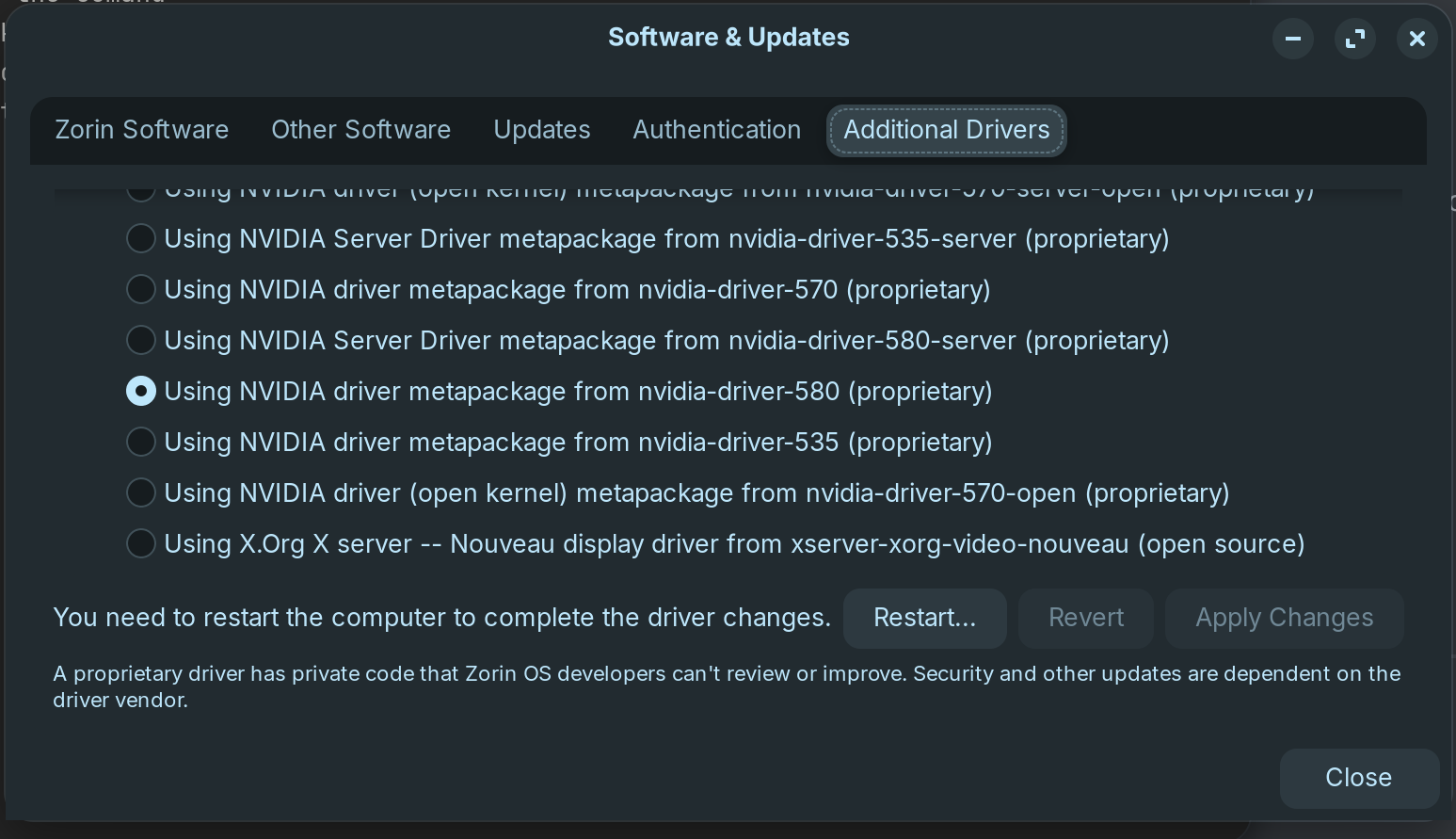
Next I entered sudo alsa force-reload in the terminal which gave me the following output
d textTerminating processes: 2055 2055 2055 2055 2055 2055 (failed: processes still using sound devices: 39278(pipewire )). Unloading ALSA sound driver modules: snd-seq-dummy snd-ctl-led snd-sof-probes snd-soc-avs snd-soc-hda-codec snd-hda-scodec-tas2781-i2c snd-soc-tas2781-fmwlib snd-soc-tas2781-comlib snd-seq-midi snd-seq-midi-event snd-rawmidi snd-sof-pci-intel-tgl snd-sof-pci-intel-cnl snd-sof-intel-hda-generic snd-sof-intel-hda-common snd-soc-hdac-hda snd-sof-intel-hda-mlink snd-sof-intel-hda snd-sof-pci snd-sof-xtensa-dsp snd-hda-ext-core snd-sof snd-sof-utils snd-hrtimer snd-soc-skl-hda-dsp snd-soc-intel-sof-board-helpers snd-soc-intel-hda-dsp-common snd-hda-codec-realtek snd-hda-codec-generic snd-hda-scodec-component snd-soc-dmic snd-soc-acpi-intel-match snd-soc-acpi-intel-sdca-quirks snd-soc-acpi snd-soc-sdca snd-hda-codec-hdmi snd-hda-intel snd-intel-dspcfg snd-intel-sdw-acpi snd-soc-core snd-hda-codec snd-compress snd-hda-core snd-hwdep snd-pcm-dmaengine snd-pcm snd-seq snd-seq-device snd-timer (failed: modules still loaded: snd-sof-pci-intel-tgl snd-sof-pci-intel-cnl snd-sof-intel-hda-generic snd-sof-intel-hda-common snd-soc-hdac-hda snd-sof-intel-hda-mlink snd-sof-intel-hda snd-sof-pci snd-sof-xtensa-dsp snd-hda-ext-core snd-sof snd-sof-utils snd-hrtimer snd-soc-skl-hda-dsp snd-soc-intel-sof-board-helpers snd-soc-intel-hda-dsp-common snd-hda-codec-realtek snd-hda-codec-generic snd-hda-scodec-component snd-soc-dmic snd-soc-acpi-intel-match snd-soc-acpi-intel-sdca-quirks snd-soc-acpi snd-soc-sdca snd-hda-codec-hdmi snd-hda-intel snd-intel-dspcfg snd-intel-sdw-acpi snd-soc-core snd-hda-codec snd-compress snd-hda-core snd-hwdep snd-pcm-dmaengine snd-pcm snd-seq snd-seq-device snd-timer). Loading ALSA sound driver modules: snd-seq-dummy snd-ctl-led snd-sof-probes snd-soc-avs snd-soc-hda-codec snd-hda-scodec-tas2781-i2c snd-soc-tas2781-fmwlib snd-soc-tas2781-comlib snd-seq-midi snd-seq-midi-event snd-rawmidi snd-sof-pci-intel-tgl snd-sof-pci-intel-cnl snd-sof-intel-hda-generic snd-sof-intel-hda-common snd-soc-hdac-hda snd-sof-intel-hda-mlink snd-sof-intel-hda snd-sof-pci snd-sof-xtensa-dsp snd-hda-ext-core snd-sof snd-sof-utils snd-hrtimer snd-soc-skl-hda-dsp snd-soc-intel-sof-board-helpers snd-soc-intel-hda-dsp-common snd-hda-codec-realtek snd-hda-codec-generic snd-hda-scodec-component snd-soc-dmic snd-soc-acpi-intel-match snd-soc-acpi-intel-sdca-quirks snd-soc-acpi snd-soc-sdca snd-hda-codec-hdmi snd-hda-intel snd-intel-dspcfg snd-intel-sdw-acpi snd-soc-core snd-hda-codec snd-compress snd-hda-core snd-hwdep snd-pcm-dmaengine snd-pcm snd-seq snd-seq-device snd-timer.
Then I ticked the far right box in the sof-hda-dsp Speaker + Headphones.
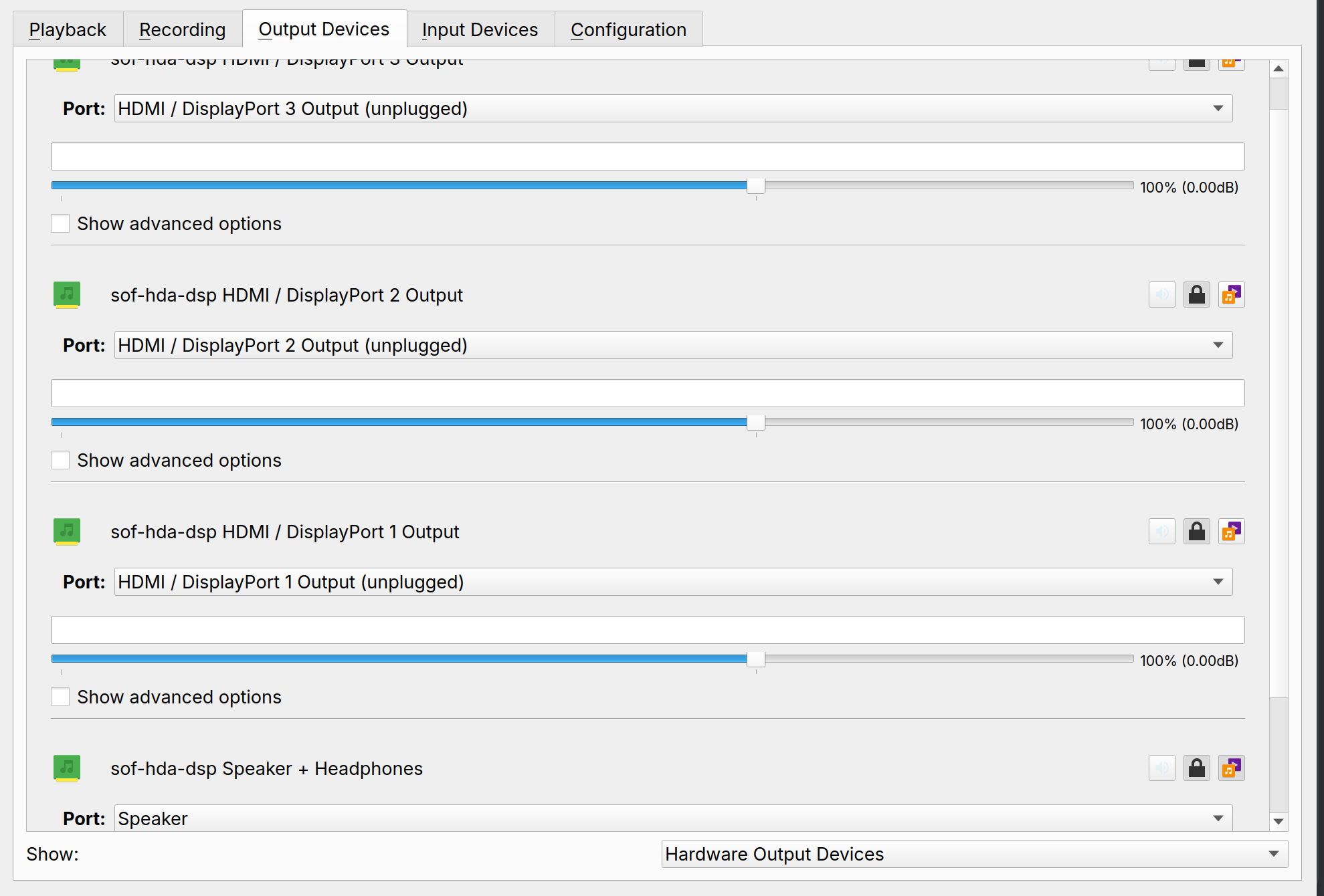
And this solved the failing audio issue once for all. Thank you to everyone for the help.
1 Like
Excellent. Well done!
I have marked your last post as solution.
Maybe it will help others, as my websearches earlier failed to reveal anything useful in your case.
PS: You may wish to have a look at your alsamixer again now that you have sof-hda-dsp working. Just to see the difference now.
1 Like
Hi. I tried all your steps but it keeps failing... I am using an Asus ROG GL703VD which also has an Nvidia card. Changed to version 580, used sudo alsa force-reload which gave a similar output to yours and the problem persists.
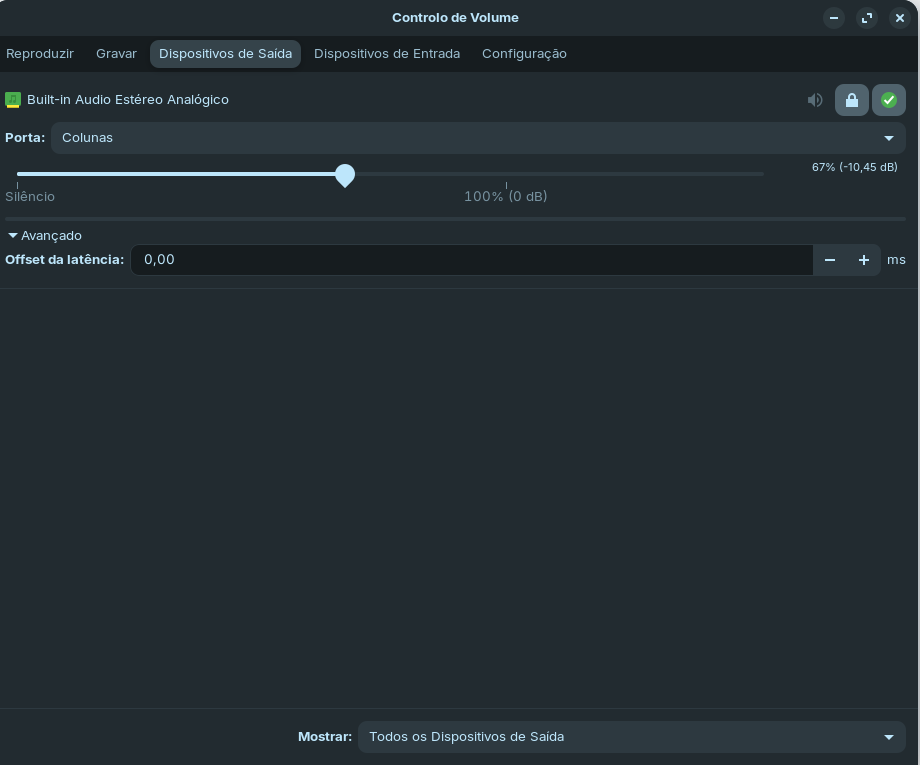
Assuming your Asus PC has a NVIDIA GeForce GTX 1050?
Which Nvidia drivers, other than 580, have you tried? e.g. 470, 535.
Which particular listed 580 driver did you choose. Post a screenshot.
Have you ticked the box sof-hda-dsp Speaker + Headphones.?
This is totally not intuitive and barely visible but it's the box further on the right. When you click on it the shade of grey changes to a barely visible darker shade of grey and locks the selection (who ever designed it needs an eye test).
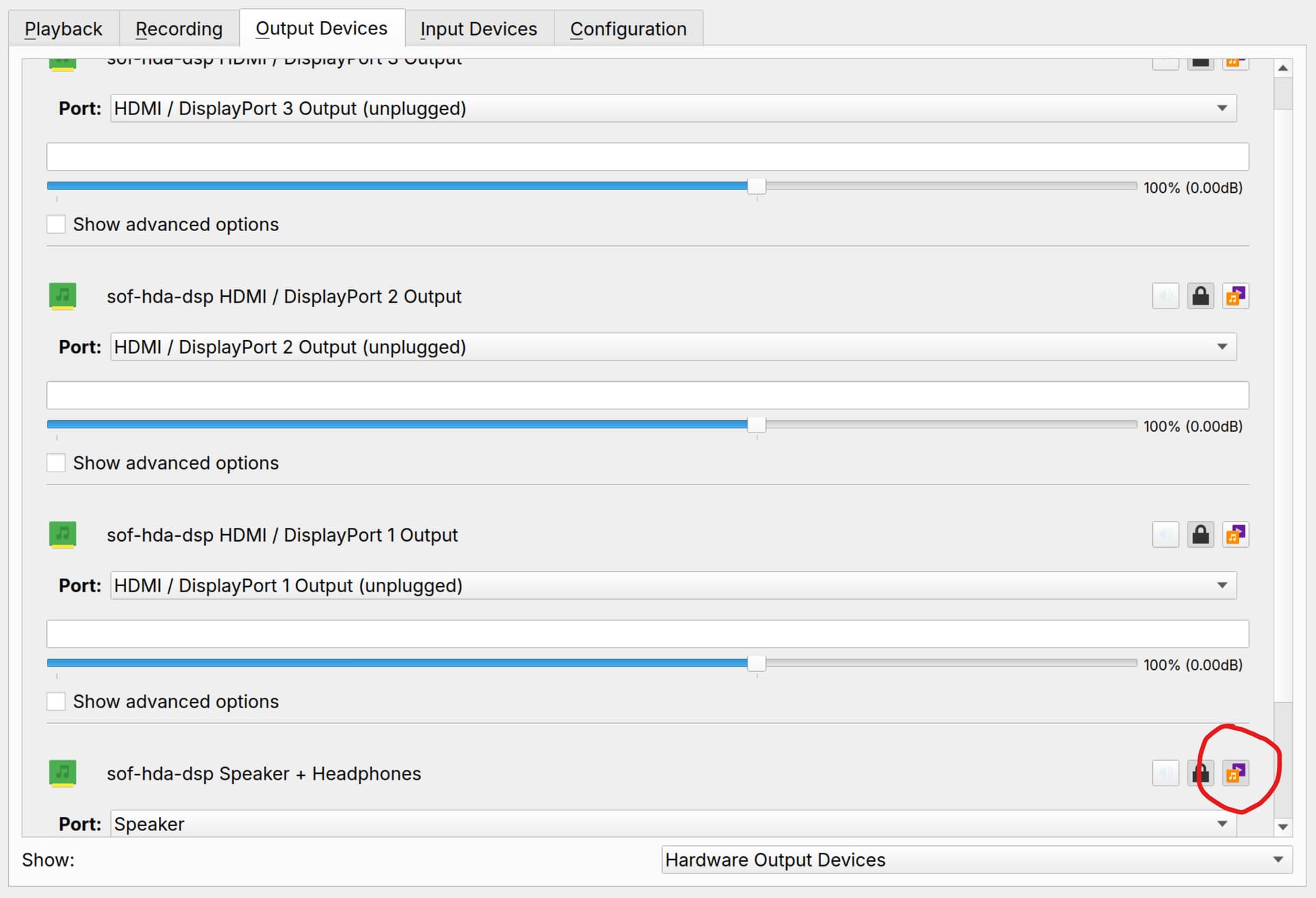
You need to find the exact version of you Nvidia card for this to work.
Also, here is a useful link if you want to try some different method https://softwarecosmos.com/fixing-dummy-output-sound-issue-in-zorin-os/
In any case it would be great if the detection could happen automatically as I have spend an insane amount of time trying to figure this out. 
Good luck!
it started working after messing up with the audio configuration in terminal. I have Removed boot override i have also edited sudo nano /etc/modprobe.d/alsa-base.conf and added "options snd-hda-intel model=alc295-asus-spk" at the end of the file. After reboot, the sound did not stop playing anymore. sorry for the late reply and thanks
1 Like
If you are happy with what you did can be considered to be the solution, can you click on the ... under your post and mark your last post as  Solution