Cant mount LDM data

hello

i'm trying to mount my HDD, disk program said it's a LDM partition, so i installed ldmtool, run the create command, but i got an error that said "Unable to create volume Volume1 in disk group 54e36f15-8d06-11e9-8229-9822ef5d3aee: ldm_vol_DESKTOP-UO0R25J-Dg0_Volume1: Stacking NODE_DEL [verify_udev]"

is there any workaround for this?

thank you

1 Like

Welcome to the Forum!

Are there any Data on the Drive?

3 Likes

yes

i was able to mount it before (different OS, kubuntu)

Hello,

Created with the help of ArchWiki

Try that
Remove any leftover mapping. Check for it with sudo dmsetup ls , then remove it:

sudo dmsetup remove ldm_vol_DESKTOP-UO0R25J-Dg0_Volume1

Mount and check. Once the volume exists, mount it read-only first to confirm the data is there before you write anything:

sudo mount -o ro /dev/mapper/ldm_vol_DESKTOP-UO0R25J-Dg0_Volume1 /mnt
1 Like

hello, thanks for the reply

i tried the command above, but it give me this as return

sudo dmsetup ls give "No devices found"

sudo dmsetup remove ldm_vol_DESKTOP-UO0R25J-Dg0_Volume1 give "device-mapper: remove ioctl on ldm_vol_DESKTOP-UO0R25J-Dg0_Volume1 failed: No such device or address
Command failed."

is there any workaround i can try?

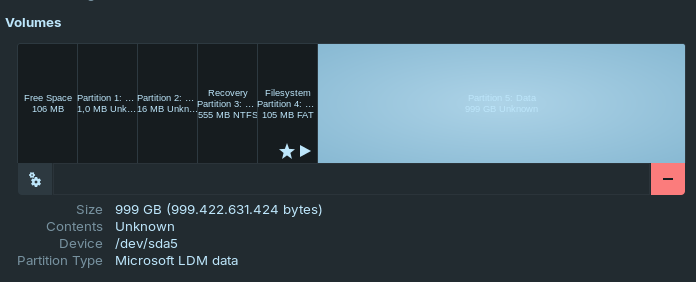
Can You plug in the Drive, open ''Disks'' and post here the Details what it shows please?

3 Likes

sda5 is where my data located

1 Like

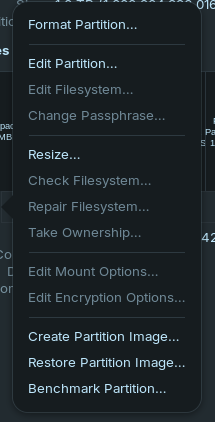
the gears to left ....if you click that is there a mount partition there?
If there is mount it then run the program you use to fetch that data and see if it sees it now
3 Likes

And the second command or what suggested @Ponce-De-Leon and @wesoliv429 ?

2 Likes

Hmm ... There isn't Windows installed on or is it? Please use the followin Command to check if the Packages are installed:

apt list libldm-1.0-0t64 libldm-common-dev libldm-common0t64 libldm-dev

You get a List with these Packages. Check if there is on each [installed] behind.

3 Likes

After you click on the cog wheel icon that @wesoliv429 mentioned, there should be an edit mount options menu choice.

You may be able to uncheck the default options and set up somethingthat works telling it where you want it to mount


there isn't

the command give me this

libldm-1.0-0t64/noble,now 0.2.5-1.1build2 amd64 [installed,automatic]
libldm-common-dev/noble 0.1.3-4build3 amd64
libldm-common0t64/noble 0.1.3-4build3 amd64
libldm-dev/noble 0.2.5-1.1build2 amd64