Display going into "Power Save Mode" on AMD A10-7800/Radeon R7 tower PC running ZorinOS 18.1 core but desktop remains accessible remotely

TL;DR: An ASUS desktop with an AMD A10-7800 (Kaveri/Radeon R7) running Zorin OS 18.1 (X11) intermittently loses local display output while the operating system continues running normally. The machine remains fully accessible through RustDesk, and the local user's mouse movements are visible remotely. Running xrandr --output VGA-0 --off followed by --auto restores the display every single time. Windows 10 on the same hardware does not exhibit this issue.


Hello!

I'm new here. I'm somewhere in that stage where I'm not an expert but no longer a complete Linux noob either and capable of borking my system gloriously. I've become comfortable enough to poke around, experiment with kernel parameters (on my machines!), occasionally break things, and hopefully learn something in the process.

I'm hoping someone can either point me in the right troubleshooting direction or recognize what's going on, because I've reached the point where I'm no longer sure what subsystem I'm actually chasing.

The computer belongs to a family member. She wanted to move away from Windows, so I installed Zorin on a second hard drive as a dual boot. Windows 10 is still there as a safety net while she gets comfortable with Linux, and the long term plan is (hopefully!) to retire Windows altogether. GRUB is the primary bootloader, with Windows currently set as the default.

Caveats

  • I do not have physical access to the machine anymore, so all troubleshooting is remote only through RustDesk.

Hardware

  • ASUS desktop motherboard
  • AMD A10-7800 APU
  • Integrated Radeon R7 Graphics (Kaveri, PCI ID 1002:130f)
  • LG Flatron L1751S-BN monitor (VGA)

Also worth mentioning:

This also happened on a newer Dell monitor using HDMI while I still had physical access to the machine. At the time I didn't realize it was an actual issue—I assumed it was just a random hiccup.

Software

  • Zorin OS 18.1 Core
  • X11 (originally Wayland, but I switched to X11 hoping it was simply a Wayland bug)
  • Kernel 6.17.0-35-generic
  • X.Org 21.1.11
  • Mesa 25.2.8
  • Kernel graphics driver: radeon

Graphics summary:

Graphics:
  Driver: radeon
  Renderer: KAVERI (radeonsi)
  X11
  GNOME Shell 46
  Kernel 6.17.0-35

System Setup

The machine dual-boots in UEFI mode:

  • Windows 10 on one HDD
  • Zorin OS 18.1 Core on a separate HDD

Each operating system lives on its own physical spinning hard drive.

A little extra background (this may be completely irrelevant, but I'll mention it just in case): Windows originally used an MBR partition scheme, so I converted it to GPT using Microsoft's MBR2GPT utility in order to boot both operating systems in UEFI mode without reinstalling Windows. I also used Ventoy to install Zorin.

I have no idea whether either of those details matters, but I've learned that sometimes the weirdest detail ends up being relevant.

The Problem

The monitor itself displays its own "Power Save Mode" message (not simply a blank Linux screen) which tells me it appears to be losing video signal.

The important part is:

The computer itself does not freeze.

I can connect remotely using RustDesk and:

  • View the desktop normally
  • Open applications
  • Launch programs
  • Move windows
  • Open terminals
  • Continue using the computer as though nothing happened

Meanwhile, the local user can still move the mouse.

What really convinced me the operating system isn't crashing is that I can literally watch the user's mouse moving around the desktop through RustDesk while they're telling me over the phone,

"The monitor just says Power Save Mode."

So, as far as I can tell:

  • Linux is still running
  • GNOME is still running
  • X11 is still running
  • Graphics are still being rendered
  • Only the physical display output disappears

Current Symptoms

The issue has happened in several different situations.

1. Returning to the computer after inactivity

The user leaves the computer for a while.

When they return:

  • Monitor is in Power Save Mode.
  • Mouse movement does not restore video.
  • Keyboard input does not restore video.

2. Booting from a powered-down state

User selects Zorin from GRUB.

Sometimes:

  • Login screen appears.
  • Within a few seconds the monitor immediately enters Power Save Mode.

Oddly, this is intermittent.

Sometimes it boots all the way to the desktop without any problem.

3. After rebooting

Most recently:

  • User returned to the computer.
  • Monitor was in Power Save Mode.
  • Mouse and keyboard would not wake it.
  • User held the power button to reboot.

After reboot:

  • BIOS/POST appears normally.
  • Linux starts loading.
  • Monitor immediately returns to Power Save Mode.

The machine still appears to finish booting and remains fully accessible through RustDesk.

4. Maximizing windows/applications

This is the part that really throws me.

While connected through RustDesk I noticed that simply maximizing certain applications could trigger the problem.

One example:

  • A slideshow/presentation was running (I unfortunately don't remember which application).
  • The window was maximized.
  • Every few seconds the monitor would enter Power Save Mode.

Meanwhile:

  • RustDesk continued displaying the desktop normally.
  • The slideshow continued.
  • The system remained fully responsive.
  • Only the local user lost video output.

Diagnostic Information

This command restores the display every single time:

xrandr --output VGA-0 --off
sleep 2
xrandr --output VGA-0 --auto

After discovering it worked every single time, I eventually turned it into a little recovery script because I was using it so often.

When I run it remotely:

  1. RustDesk briefly loses the display while --off executes.
  2. The local monitor comes back.
  3. RustDesk regains the display.
  4. Both local and remote displays recover simultaneously.

This recovery has been 100% reliable.

That makes me think the machine doesn't need a reboot. It simply needs the display output to be reinitialized.

xrandr

When functioning normally:

Screen 0: minimum 320 x 200, current 1280x1024
HDMI-0 disconnected
VGA-0 connected primary 1280x1024

The monitor is detected correctly.

What I've Tried

Disabled DPMS

xset -dpms

Verified:

DPMS is Disabled

Unfortunately the problem still returned later.

Checked GNOME power settings

idle-delay = 900
sleep-inactive-ac-type = 'suspend'
sleep-inactive-ac-timeout = 1800

Verified session type

echo $XDG_SESSION_TYPE

Returns:

x11

Verified graphics driver

lspci -k

Shows:

Kernel driver in use: radeon

What's Confusing

Windows 10 on the exact same hardware does not appear to have this issue.

Windows:

  • Boots normally
  • Sleeps normally
  • Wakes normally
  • Maintains video output

The Linux issue has occurred on:

  • The LG VGA monitor
  • A newer Dell monitor using HDMI

which makes me think the monitor itself probably isn't the culprit.

Current Theories

At this point these aren't conclusions, just the squirrels my brain keeps chasing after reading forums and experimenting.

  • Radeon/Kaveri display engine or display-output bug
  • Kernel DRM/KMS regression affecting older AMD hardware
  • X11 modesetting issue
  • GNOME compositor interaction with the Radeon driver
  • Display power management triggering a Radeon bug

The fact that

xrandr --output VGA-0 --off

followed by

xrandr --output VGA-0 --auto

always, faithfully, like the lunar cycle, restores both the local monitor and the RustDesk session simultaneously makes me wonder whether the Radeon driver continues rendering the desktop correctly, but the display output itself gets into a bad state until the connector is reinitialized.

Does that theory fit the symptoms, or am I overlooking another subsystem entirely?

Questions

Has anyone seen this behaviour before on Kaveri era AMD hardware?

Has anyone actually found a solution to something like this?

Is there a known GNOME/X11 + Radeon issue where the desktop continues rendering but the physical display output disappears?

Are there any known DRM/KMS regressions in recent kernels that might explain this?

Would it be worth testing an older LTS kernel or Mesa version before I start experimenting with kernel parameters?

The next time I get remote access to the machine, are there specific journalctl, DRM, X.Org, or other logs that would be especially useful to collect immediately after the monitor loses signal?


If you've made it this far, thank you.

I know this turned into a novel, but I figured I'd rather include too much information than too little; especially when consulting the oracle. The I've spent quite a while searching reddit, the zorin forums and elsewhere but I haven't found a solid solution to my similar-but-not-quite-the-same issue. If I've overlooked something obvious or if there are commands or logs that would be more useful than what I've collected so far, I'm more than happy to run them the next time I have remote access.

Thanks in advance for any ideas, points, comments or suggestions!

1 Like

Welcome to the Forum!

  • Are Secure Boot and Fast Boot in BIOS disabled?
  • Is Fast Start-Up in Windows disabled?
  • Does it behave the same with Wayland?
  • When You go to Settings>Power what Settings are set up there?
  • Did You checked the Settings of the Monitor, too?
1 Like

Welcome to the Forum!

Thank you, my friend, much appreciated!

Are Secure Boot and Fast Boot in BIOS disabled?

  • Fast boot is disable.

  • Secure boot, if the motherboard supports it, I would've disabled it when setting it up. I honestly don't remember whether that particular ASUS board even has Secure Boot, as it was built around the time UEFI and Secure Boot were becoming cool.

Is Fast Start-Up in Windows disabled?

I don't think so but I can check the next time I have access.

That's an interesting suggestion. As far I know, my symptoms don't quite line up with a fast startup issue because I can also trigger the problem while linux is already running. I don't remember even touching it when on the windows drive.

But maybe fast boot is leaving the graphics hardware in a weird state that linux inherits on next boot?

Does it behave the same with Wayland?

Yes, I noticed the same behaviour on wayland.

When You go to Settings>Power what Settings are set up there?

I don't remember the GUI settings offhand, my friend but I do know this:

  • idle-delay = 900
  • suspend after 1800 seconds
  • And DPMS disabled via xset

Disabling DPMS didn't permanently solve the issue, unfortunately.

Did You checked the Settings of the Monitor, too?

Not the user's VGA monitor, specifically, as I son't have access to it, but I did notice the same issue while setting the machine up using my own newer, Dell monitor over HDMI.

I don't think it's specific to the monitor because the same thing happens on two different monitors and two different connection types (VGA and HDMI).

one more observation, that may be significant, is that I can restore the user's monitor, instantly, every time it loses signal by running:

xrandr --output VGA-0 --off
sleep 2
xrandr --output VGA-0 --auto

This works 100% of the time.


Otherwise, when the issue occurs, the desktop never freezes and only the local display output appears to stop. RustDesk continues to show the dsktop and remains fully usable as if nothing has happened.


On my monitor using HDMI, the display itself would show something like "entering low power save mode" and then after playing with the monitor ie. disconnecting and reconnecting cable, selecting HDMI instead of 'auto detect' on the monitor, it would not detect and remain in low power mode until I powered the machine down by pressing the button. I imagine the user sees a similar message when this happens on her VGA monitor but I can ask her.

I hope this helps, thank you.

Hi and welcome to the forum.

I am no expert but I would agree that just the video signal stopped working.

Maybe you can open the protocol viewer on Zorin (somewhere in the startmenu) and search for radeon or vga to get some hint on what's going on?

(I got Intel and my monitor is connected through USB-C so I searched as an example for intel. :slight_smile: )

1 Like

It would be good to double-check it but I understand the Situation and that it isn't so easy. When you have Remote Access, You could use the Command mokutil --sb-state to check if Secure Boot is enabled or not.

I only asked because in this Setting, You have Power Profiles. And when there maybe is the Power Saving Profile chosen, You could change it to see if it helps.

Because of the older APU, maybe switching to an older Kernel could be worth a Try, too.

1 Like

Hello, my friend! Sorry for such a late response. Thank you for that. I feel like I've been looking at logs that my eyes are permanently cross-eyed but I will take a look at that. Although I don't think it's a graphics crash because I can still "awaken" the display from power save mode...

Thank you!

1 Like

Thank you, my friend and sorry for such a late response.

It would be good to double-check it but I understand the Situation and that it isn't so easy. When you have Remote Access, You could use the Command mokutil --sb-state to check if Secure Boot is enabled or not.

I looked around on the interwebs for info on the A68BM-A/M32BF/DP_MB motherboard but found no mention of secure boot so I don't think that it actually does support secure boot. It makes sense I guess as it's pretty old. Nevertheless, I'll stick check mokutil --sb-state

I only asked because in this Setting, You have Power Profiles. And when there maybe is the Power Saving Profile chosen, You could change it to see if it helps.

Because of the older APU, maybe switching to an older Kernel could be worth a Try, too.

Ah, I see, fair enough. Yes, I did change the numbers a bit on the Power Profile settings to try and trigger the Power Save Mode by setting sleep to the shortest time setting but I don't think it even worked so I tried to do it from the terminal with a timer but that didn't work either (the idea was to make the machine put itself to sleep automatically to see if that would trigger the display issue not showing visuals). I ended up simply putting the machine in sleep mode by going to the application launcher. It didn't trigger the issue; the monitor "woke up" as one would expect. Yes, maybe an older kernel might work. Could that possibly affect the user when doing a system upgrade? (she would be absolutely lost).

On another note, I found a .txt file I had saved from that day so I could remember what I was doing.. I might have more but may have left them saved on the local user's computer. Here is the output (I tried to label what I was doing from memory).

YourMother@asus:~$ inxi -Gxx
      Graphics:
        Device-1: AMD Kaveri [Radeon R7 Graphics] vendor: ASUSTeK driver: radeon
          v: kernel arch: GCN-2 ports: active: VGA-1 empty: HDMI-A-1 bus-ID: 00:01.0
          chip-ID: 1002:130f
        Display: x11 server: X.Org v: 21.1.11 with: Xwayland v: 23.2.6
          compositor: gnome-shell v: 46.0 driver: X: loaded: radeon
          unloaded: fbdev,modesetting,vesa dri: radeonsi gpu: radeon display-ID: :0
          screens: 1
        Screen-1: 0 s-res: 1280x1024 s-dpi: 96
        Monitor-1: VGA-1 mapped: VGA-0 model: LG (GoldStar) L1751S res: 1280x1024
          dpi: 96 diag: 433mm (17")
        API: EGL v: 1.5 platforms: device: 0 drv: radeonsi device: 1 drv: swrast
          gbm: drv: kms_swrast surfaceless: drv: radeonsi x11: drv: radeonsi
          inactive: wayland
        API: OpenGL v: 4.5 vendor: amd mesa v: 25.2.8-0ubuntu0.24.04.1 glx-v: 1.4
          direct-render: yes renderer: KAVERI (radeonsi ACO DRM 2.51
          6.17.0-35-generic) device-ID: 1002:130f

****************************************************************************

YourMother@asus:~$ xset q
      Keyboard Control:
        auto repeat:  on    key click percent:  0    LED mask:  00001002
        XKB indicators:
          00: Caps Lock:   off    01: Num Lock:    on     02: Scroll Lock: off
          03: Compose:     off    04: Kana:        off    05: Sleep:       off
          06: Suspend:     off    07: Mute:        off    08: Misc:        off
          09: Mail:        off    10: Charging:    off    11: Shift Lock:  off
          12: Group 2:     on     13: Mouse Keys:  off
        auto repeat delay:  500    repeat rate:  33
        auto repeating keys:  00ffffffdffffbbf
                              fadfffefffedffff
                              9fffffffffffffff
                              fff7ffffffffffff
        bell percent:  50    bell pitch:  400    bell duration:  100
      Pointer Control:
        acceleration:  2/1    threshold:  4
      Screen Saver:
        prefer blanking:  yes    allow exposures:  yes
        timeout:  0    cycle:  0
      Colors:
        default colormap:  0x20    BlackPixel:  0x0    WhitePixel:  0xffffff
      Font Path:
        /usr/share/fonts/X11/misc,/usr/share/fonts/X11/Type1,built-ins
      DPMS (Display Power Management Signaling):
        Standby: 0    Suspend: 0    Off: 0
        DPMS is Enabled
        Monitor is On

****************************************************************************
[ MONITOR ENTERS POWER SAVE MODE WHILE WATCHING VIDEO ON ZORIN'S DEFAULT MEDIA PLAYER ]
****************************************************************************
YourMother@asus:~$ ~/bin/reset-display.sh [ REINITIALIZE MONITOR WITH CUSTOM SCRIPT ]

              [ MONITOR GOES INTO POWER SAVE MODE WATCHING VIDEO ON DEFAULT MEDIA PLAYER MAXIMIZED ]

YourMother@asus:~$ ~/bin/reset-display.sh [ REINITIALIZE MONITOR ]

YourMother@asus:~$ xset -dpms [ DISABLE DPMS ]
YourMother@asus:~$ xset q
      Keyboard Control:
        auto repeat:  on    key click percent:  0    LED mask:  00001002
        XKB indicators:
          00: Caps Lock:   off    01: Num Lock:    on     02: Scroll Lock: off
          03: Compose:     off    04: Kana:        off    05: Sleep:       off
          06: Suspend:     off    07: Mute:        off    08: Misc:        off
          09: Mail:        off    10: Charging:    off    11: Shift Lock:  off
          12: Group 2:     on     13: Mouse Keys:  off
        auto repeat delay:  500    repeat rate:  33
        auto repeating keys:  00ffffffdffffbbf
                              fadfffefffedffff
                              9fffffffffffffff
                              fff7ffffffffffff
        bell percent:  50    bell pitch:  400    bell duration:  100
      Pointer Control:
        acceleration:  2/1    threshold:  4
      Screen Saver:
        prefer blanking:  yes    allow exposures:  yes
        timeout:  0    cycle:  0
      Colors:
        default colormap:  0x20    BlackPixel:  0x0    WhitePixel:  0xffffff
      Font Path:
        /usr/share/fonts/X11/misc,/usr/share/fonts/X11/Type1,built-ins
      DPMS (Display Power Management Signaling):
        Standby: 0    Suspend: 0    Off: 0
        DPMS is Disabled

****************************************************************************

YourMother@asus:~$ gsettings set org.gnome.desktop.interface enable-animations false [ DISABLE ANIMATIONS ]
YourMother@asus:~$ ~/bin/reset-display.sh
          [ ENTER POWER SAVE MODE ]
YourMother@asus:~$ ~/bin/reset-display.sh [ REINITIALIZE DISPLAY ]
          [ ENTER POWER SAVE MODE ]
YourMother@asus:~$ sudo journalctl -kf [ CHECK JOURNAL FOR WEIRD ■■■■ ]
      [sudo] password for YourMother:
      Jun 16 23:17:46 asus kernel: Lockdown: systemd-logind: hibernation is restricted; see man kernel_lockdown.7
      Jun 16 23:22:49 asus kernel: Lockdown: systemd-logind: hibernation is restricted; see man kernel_lockdown.7
      Jun 16 23:22:49 asus kernel: Lockdown: systemd-logind: hibernation is restricted; see man kernel_lockdown.7
      Jun 16 23:25:53 asus kernel: usb 6-1: USB disconnect, device number 2
      Jun 16 23:25:53 asus kernel: sd 7:0:0:0: [sdd] Synchronizing SCSI cache
      Jun 16 23:25:53 asus kernel: sd 7:0:0:0: [sdd] Synchronize Cache(10) failed: Result: hostbyte=DID_ERROR driverbyte=DRIVER_OK
      Jun 16 23:30:02 asus kernel: Lockdown: systemd-logind: hibernation is restricted; see man kernel_lockdown.7
      Jun 16 23:30:02 asus kernel: Lockdown: systemd-logind: hibernation is restricted; see man kernel_lockdown.7
      Jun 16 23:31:05 asus kernel: Lockdown: systemd-logind: hibernation is restricted; see man kernel_lockdown.7
      Jun 16 23:31:05 asus kernel: Lockdown: systemd-logind: hibernation is restricted; see man kernel_lockdown.7
^c
****************************************************************************

YourMother@asus:~$ ~/bin/reset-display.sh
YourMother@asus:~$ sudo journalctl -kf
      Jun 16 23:22:49 asus kernel: Lockdown: systemd-logind: hibernation is restricted; see man kernel_lockdown.7
      Jun 16 23:25:53 asus kernel: usb 6-1: USB disconnect, device number 2
      Jun 16 23:25:53 asus kernel: sd 7:0:0:0: [sdd] Synchronizing SCSI cache
      Jun 16 23:25:53 asus kernel: sd 7:0:0:0: [sdd] Synchronize Cache(10) failed: Result: hostbyte=DID_ERROR driverbyte=DRIVER_OK
      Jun 16 23:30:02 asus kernel: Lockdown: systemd-logind: hibernation is restricted; see man kernel_lockdown.7
      Jun 16 23:30:02 asus kernel: Lockdown: systemd-logind: hibernation is restricted; see man kernel_lockdown.7
      Jun 16 23:31:05 asus kernel: Lockdown: systemd-logind: hibernation is restricted; see man kernel_lockdown.7
      Jun 16 23:31:05 asus kernel: Lockdown: systemd-logind: hibernation is restricted; see man kernel_lockdown.7
      Jun 16 23:35:29 asus kernel: Lockdown: systemd-logind: hibernation is restricted; see man kernel_lockdown.7
      Jun 16 23:35:29 asus kernel: Lockdown: systemd-logind: hibernation is restricted; see man kernel_lockdown.7
^c
****************************************************************************

YourMother@asus:~$ ~/bin/reset-display.sh
YourMother@asus:~$

I hope I can find some solution. There seems to be a quite a few weird display glitch issues with Zorin especially on older systems. It's such a shame because I really want to make Zorin work for the user because it's otherwise very friendly to new comers, it looks nice (which is important to the user) and it works great... well, when you have visuals, at least! haha

Hopefully I can get some more ideas I can try next time I have access to the machine.

Thanks again for your help, my friend. In the short time that I've been on these forums, I've noticed your name on many threads here helping people... You're a beast and it's much appreciated.

Did you try to disable suspend mode ? if not:
edit this file

sudo mano /etc/systemd/sleep.conf

Remove “#” at the beginning of the lines above and make this changes

AllowSuspend=no
AllowHibernation=no
AllowSuspendThenHibernate=no
AllowHybridSleep=no

Save the changes and exit the editor (in nano, press CTRL + X, then Y, and Enter)

And in terminal run that

sudo systemctl mask sleep.target suspend.target hibernate.target hybrid-sleep.target
1 Like

Thank you, my friend!

I imagine this would definitely keep the monitor from going into Power Save Mode but the only issue with this is that the User wants the machine to sleep normally, which it does, and then it even wakes up normally except for the monitor.

Does the monitor have a power save mode? you can try to disable it if yes.
If you can't solve it disabling suspend mode and set blank screen after x minutes in settings will be your solution, but did you try to see if in your BIOS if you have something like this

  • "ACPI S3 Sleep" or "Suspend to RAM"
  • "Onboard Video" or "Integrated Graphics"
  • "Power Management" → disable any aggressive settings
    see if you can change something in here

You can also try to disable DPMS (Display Power Management Signaling):

  • As you're using X11, edit or create ~/.config/X11/xorg.conf.d/10-monitor.conf :
Section "ServerFlags"
    Option "BlankTime" "0"
    Option "StandbyTime" "0"
    Option "SuspendTime" "0"
    Option "OffTime" "0"
EndSection

Reboot

1 Like

When You mean with ''System Upgrade'' the normal Updates that come ... When a Kernel from the Repo would work, no. Then this would be updated with the normal System Updates.

1 Like

Thank you for the suggestion, my friend. Just so I'm following you, you're not suggesting dealing with the display Power Save Mode issue by completely disabling sleep/suspend states?

I don't mind testing without suspend as I have never actually disable it throughout my troubleshooting escapades. If it helps isolate the problem, I can do that temporarily, but I'm hesitant to make that the permanent solution because the user wants suspend and sleep to work. (Also Windows 10 on the same hardware suspends and resumes correctly.)

BUT... say that disabling suspend keeps the monitor from going into power save mode, what would you suggest to fix that?

I believe it does have some kind of power save mode. I can only assume, however, because I don't have physical access to the monitor. According to the local User, the monitor itself displays a "Power Save Mode" message before the screen goes off. (It did this on my own monitor over HDMI as well.)

Here's what makes me think this isn't purely a suspend issue.

That makes me wonder whether suspend is simply one trigger that causes the Radeon display output to enter a bad state, rather than the underlying cause itself.

I'm sorry, my friend. I'm not sure what you meant here, could you clarify?

To solve the issue would mean that the display does not unexpectedly go into power save mode while still preserving suspend and sleep modes so that when the user walks away from the computer, she can "wake it" normally -- monitor and computer -- by moving the mouse or pressing a button on the keyboard.

You know what, I don't remember seeing anything like that in that particular bios. I may be able to get the user to check that (although, she isn't a "techie" and has never seen or heard of a bios).

Or, come to think of it:

I may have another machine that is the exact model she has.. hmm maybe I can check that bios as it would be the same. I'll have to check!

I already did this.

Sorry, my friend, I was referring to a point upgrade as opposed to System Updates (ie. repo refresh, packages, software, etc..) I guess the answer would be "yes" if The Bug -- or whatever it is -- persists.

Thank you

If the monitor say "Power Save Mode" it mean there is an option to disable it in the monitor options.
Disabling suspend mode on a desktop is not really a problem, it doesn't need to save power like a latptop.
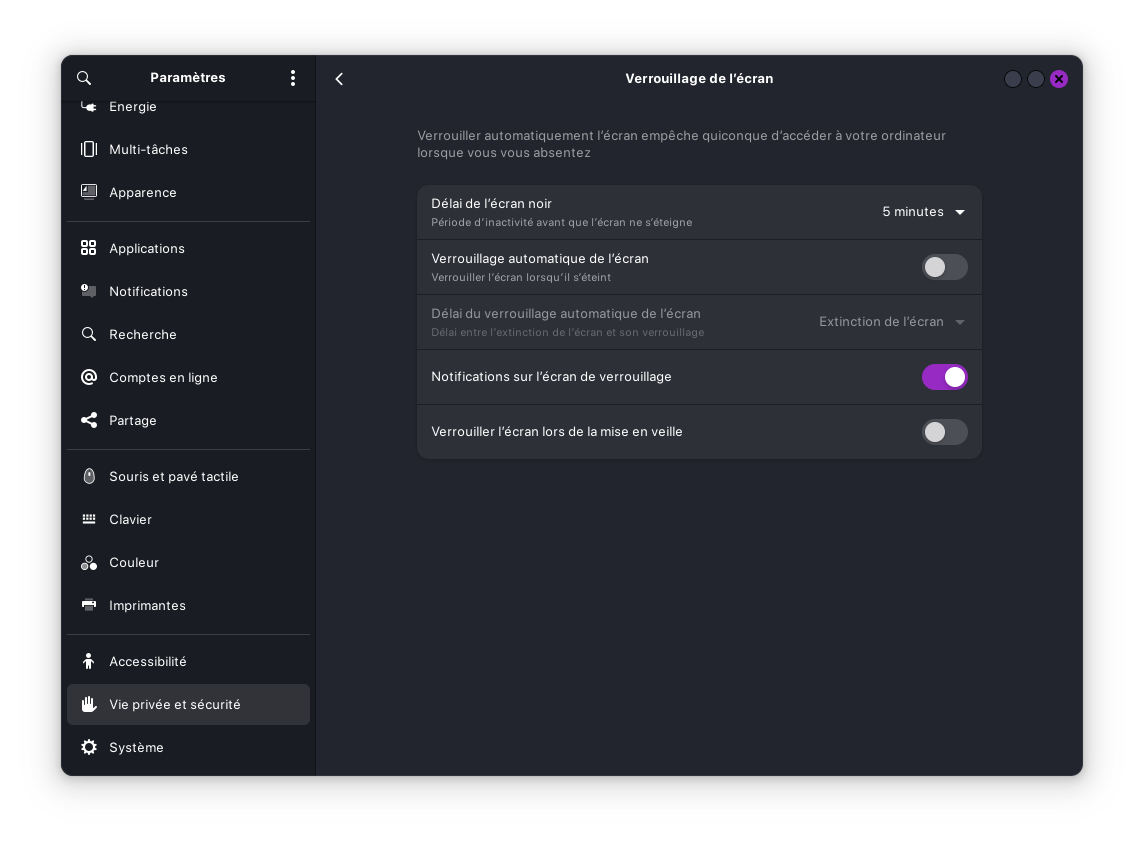
For "blank screen" option just set it privacy and security > Lockscreen settings (sorry the screenshot is in french)

1 Like

Point Releases shouldn't be a Problem, too. The only Thing would be: When You stay on the older Kernel, You wouldn't get the Advantages of a newer one if it should come with a Point Release. But in Your Case with the Hardware, this wouldn't be a Problem.

1 Like

Ah, I see.. No problem and thank you mon ami. I'll definitely check the lockscreen settings and I can ask the user to check the monitor settings to see if there's any hope there.

I understand that on a desktop, suspend mode would not be a big problem because it's always plugged in; however, the reason the user wants to keep suspend modes is because without them, the fans will still spin and she can hear it.

Actually, suspend and sleep works good on the computer. For example, if she walks away from the computer, after some time it will go to 'sleep'. After some more time, then it will go 'suspend' itself (I believe this is how it's set up). The monitor will dim and enter power save mode and when she comes back to it and moves the mouse or presses a key on the keyboard, she can hear the computer 'wake' up (except the monitor remains in power save mode.)

It's been frustrating. It also happens if the computer is powered down then she powers it on, she'll get to the grub menu then select ZorinOS, she'll see the 'Z' and 'Zorin' logos, then when she gets to the login screen, the monitor immediately goes into 'Power Save Mode'. So it can happen even before she reaches the desktop. This is a reason why I tend not to think it has to do with the power settings. I could be very wrong of course! So I'll try your suggestions and hopefully get to the issue. But will definitely check of the monitor has any kind of settings.

I'm wondering if it could be any software that I installed when I had the machine like gnome extensions/extension manager, Variety (automatic wallpaper changer)

An Option could be to check the BIOS if there are any Power Saving Features for the Ports are active.

1 Like

Sure thing. I might be able to get the user to check BIOS. I'll try anything at this point. I'll have access to the machine this week so I'll report back with any news.

1 Like