Hello, guys, what are the minimum requirements for Zorin OS 18 Pro? Is it enough?
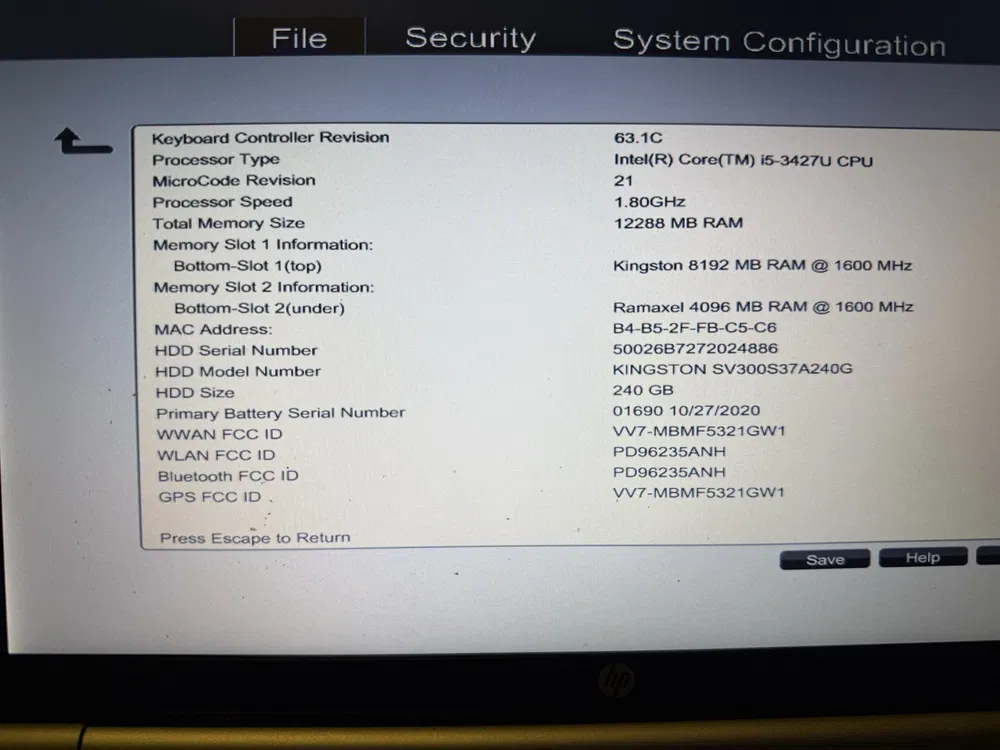
I understand, my friend, and what if there were no major problems with the fluidity of the system?
It looks not bad. I find it interesting that you have 2 different RAM Bars - with different Capacities, too. But the common Amount of RAM is fine.
The Processor doesn't have much clockspeed but here would be good to know how much Cores it has. And the Graphics would be good to know, too. I mean, is there a dedicated Graphics Unit or is there a integrated Unit in the CPU?
But You could download the Core Version, put it on a USB Stick and run it in Live Mode to see how it performs. You don't have to buy the Pro Version directly.
The card is integrated Intel HD Graphics 4000, as for the version, I received the PRO version as a gift and this laptop is sitting in the closet gathering dust and I would like to use it mainly for social media and the Internet, some movies, music and the WPS Office package, I hope it will last 
Your RAM amount is plenty decent. I too find the miss-matched RAM interesting too, typically that is a no no, especially gaming machines, where dual channel mode requires exact match stick pairs.
The integrated GPU will issue no favors in Gnome.
The CPU is below SPEC IMO for Gnome as well, it will be like trying to push your fist in molasses.
Do not fret however, there is a perfect option, for your system specs!
While Zorin OS 18 Lite has not been released yet, Zorin OS 17 Lite does exist, and still has 2-years of support left on it. If you can't wait for Zorin OS 18 Lite to be released, cause you need going now, here's the link to Zorin OS 17 Lite.
With your system specs, Lite should fly. Do not install Core however, Core will put the breaks on, it requires higher specs. Just install Lite.

I think you can try it; your computer's specifications look sufficient to me. Core/Pro and Lite are pretty different, and many users prefer Core/Pro in terms of appearance. Therefore, I would recommend you to try Core/Pro, and if it doesn't work well on your system, switch to Lite.
Well, for this, it should be enough. When it is an integrated Graphics, You should take a Look in the BIOS how much RAM is set up for it and maybe adjust it.
This topic was automatically closed 90 days after the last reply. New replies are no longer allowed.