I need Help with EXE installations, please

Good evening, I was searching the forum but did not come across any topic the describes one of my many issues.
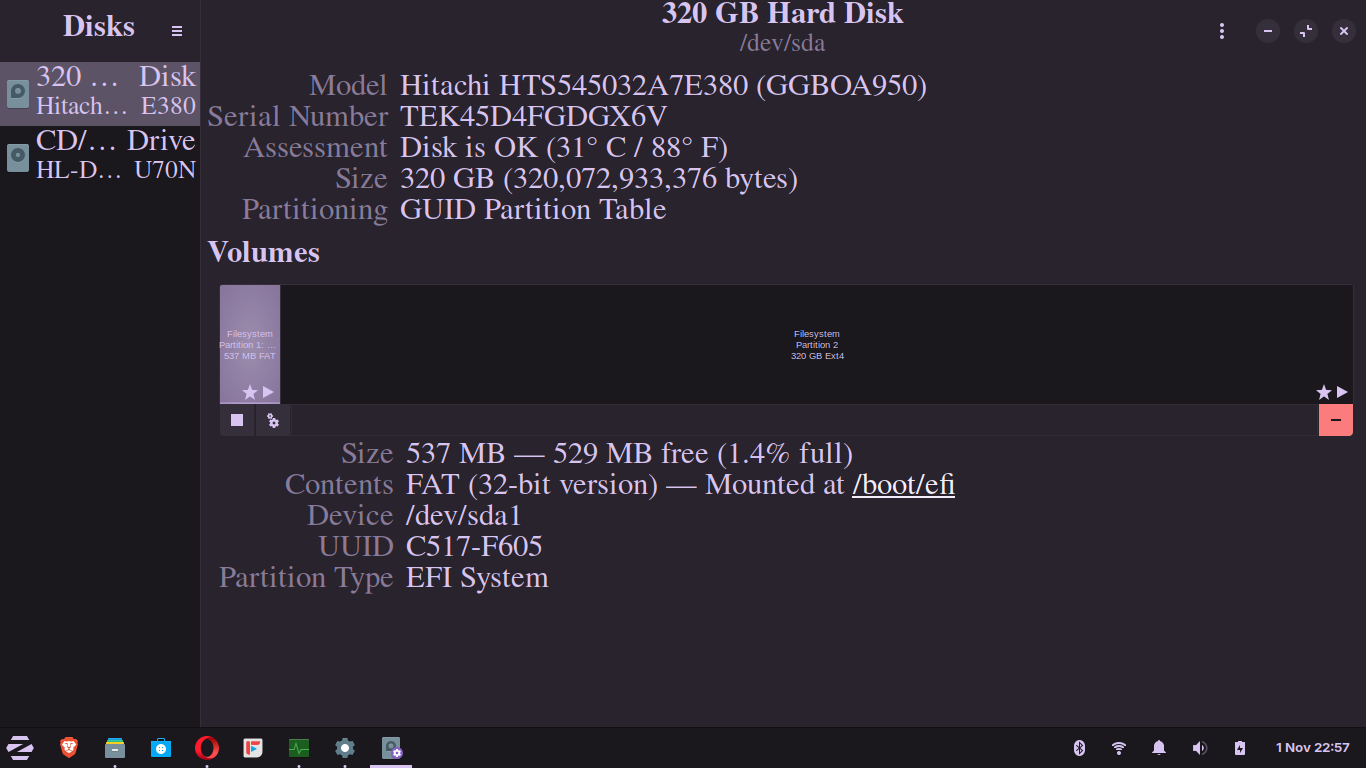
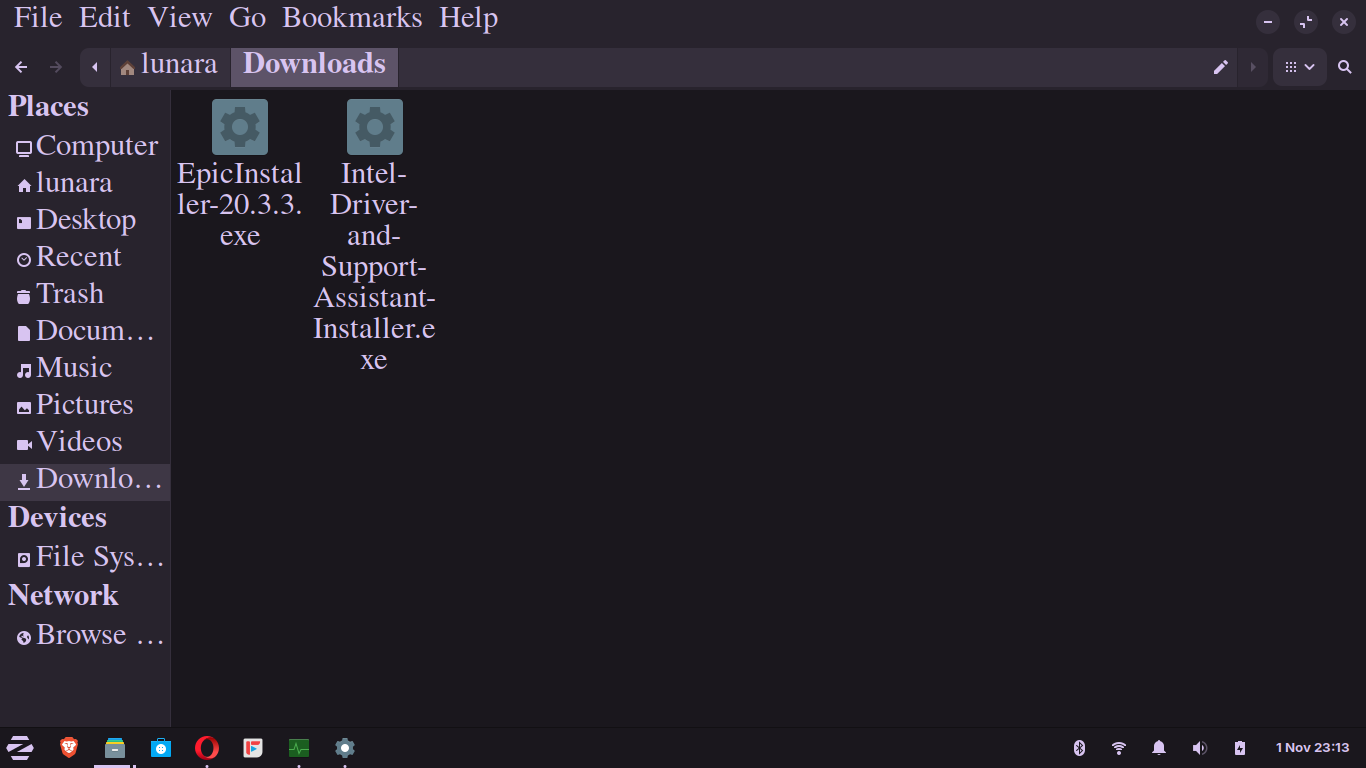
I'm a newbie, I don't know much of anything about Linux and I installed Zorin Lite because it was "sold" as one of the easiest distros good for Gaming. That said, I have tried unsucessfully to update my intel driver and install the Epic Launcher so I can run STO, so mu question is: what am I doing wrong? and (pardon my french) "how the Flipflop do I install this EXE programs? I'm furriouss fustrated and without any idea on how to resolve this, here are some useful screenshots.

I'm not sure if my screen shots work, but I can use al the help I could get, thank you.

Hello and welcome,
You won't be able to install this drivers under Zorin they are not shipped for Linux.

The question is why you want to install drivers for you computer that apparently boot into Zorin lite without any errors ?

1 Like

Thank you for your quick answer,I appreciate your help, I had to change my OS because windows would not update from 8.1 to the 10 version because my laptop was too old and I'm not buying a new one, I can't afford it. So I switched; did a clean install and ever since I've been trying to get this laptop to run the game, it won't launch it on steam but even though I installed wine and steam from the software app, I was told by "windows" that my laptop was outdated, but, it worked well. But I was denied access to many things including that game I'm trying to run, I wanted to try my luck with Linux, I looked into the software app store for a substitute or a crossover but I really have not idea what I'm looking for. I'm sorry for ranting like this, my apologies.

The reason was that I saw several people's videos that clearly show that Zorin can run STO, all I can think was, "Yes it works" so I got my hopes up, they didn't explain how they did it though, so I guess I have to learn the system, the codes and commands, I'm not young either, I remember playing Castle on our home computer when all the systems were still D.O.S., way before all this modern systems, but I'm willing to learn if you can teach me, thank you.

I wouldn't be the best teacher and I remember too this old DOS time :wink:

What I suggest you is to read all tutorial you can find all over the net, to understand how linux work, make a plan, ask you what you want to learn today, what you want to do today, if you want to play a game, so search how people make it work, not only from videos, but from tutorial that will explain you what command, why and where.

Of course here you will find help, but one step at time, and if you encounter any problem we will try to help you in the process.

1 Like

Thank you. :heart:

heart GIF

3 Likes

Hi and Welcome.

Could you post the make and model of your machine and its specifications? CPU, RAM, GPU?

To get the specs you could install a terminal program, neofetch.

Open your menu and in the search bar start typing the word terminal and it should pop-up in the menu. Press enter then use the copy-to-clipboard icon at the end of the following command and right-click and paste into the terminal:

sudo apt install neofetch

When you use the sudo command you will be asked for your login password to elevate you to 'root' (similar to "Run as Administrator" in that other OS).

After install, leave the terminal open and type "neofetch" without the speech marks and press enter, then take a screenshot and post back here please.

3 Likes

Using Epic launcher

Here's what you do. Open the terminal and copy/paste;

cd Downloads
wget https://launcher-public-service-prod06.ol.epicgames.com/launcher/api/installer/download/EpicGamesLauncher-x86_64.AppImage
chmod +x EpicGamesLauncher-x86_64.AppImage
./EpicGamesLauncher-x86_64.AppImage

This will download and execute the Epic Launcher. If you get stuck, let us know.

Explaination

  1. line. Changes the directory to Downloads
  2. line. Downloads the Epic Launcher
  3. line. Makes the file executable.
  4. line. Execute the file.

Note

You could also use the app called GearLever, it's in the software center. It's an easy poin't and click and setup of AppImages.

4 Likes

Welcome to the Forum!

First: The Intel Driver shouldn't be neccessary. The Kernel should include what is needed.

For Epic Launcher: You can do what @Storm has exlained. But when You prefer a graphical Way to do it, here You can download the Launcher:

What You donwload there is a so called AppImage. that is similar to the portable Programs that You might know from Windows already. There doesn't get installed and run by itself. but what You have to do is make them running. @Storm gave You for this a Command, too.

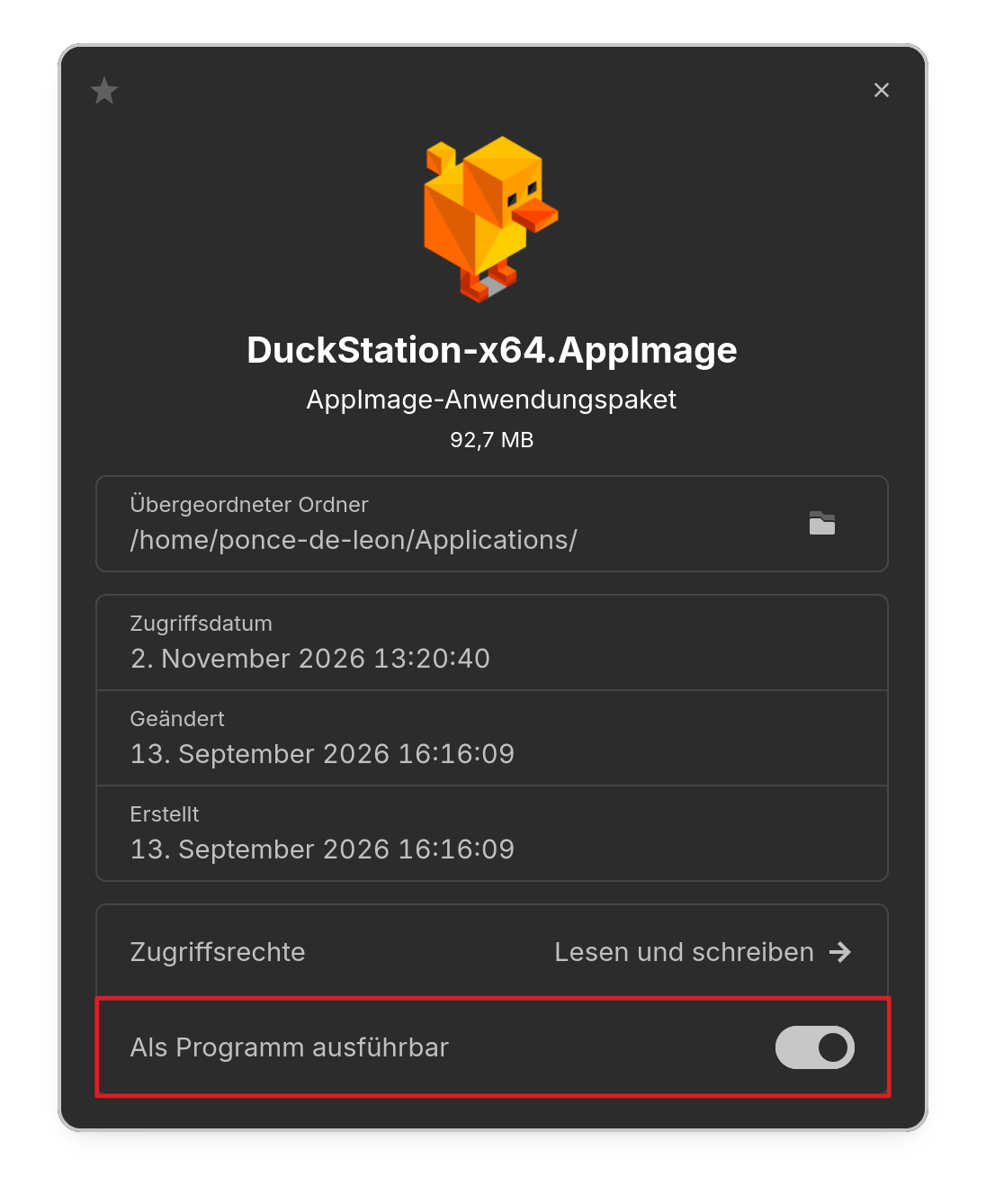
When You want make it graphically, make a Right-Click on the downloaded AppImage, choose ''Properties'' and in the Window activate the Toggle to make the Program executable:

That would be the Way to make it running. But there is a Thing: the Epic Games Launcher is relatively new and and a Preview, not a directly final Version. So, it can have it's Issues. An Alternative would be the Heroic Games Launcher; that supports Epic Games, too.

You mentioned, You have installed Steam from the Software Store. Is it installed as Flatpak, Snap or APT Package. When You go to the Side of the installed Program, You have under the Uninstall Button a Dropdown Menu. Check hat Package is installed please.

4 Likes

Hi, good evening, I was able to install the new Epic Games Launcher tailored for Linux, it's not working at all but it's still on the development phase, I gather the info about this machine, model etc, I've had this laptop since 2013 and it's a very good machine that used to be able to run STWO, DnDO and STO from the hard drive without breaking a sweat, it was very efficient until microsoft decided otherwise. the information is.:

steam was instaled on APT Package

Hard disk 320 GB

CPU Intel Celeron CPU 1007U @ 1.5GHz

RAM 4GB

GPU Hitachi HTS545032A73E80

Make Dell

Model Inspiron 15

Partitioning GUID Partion Table

Partition Type EFI System

Please let me know if I missed any information, thanks again for giving me a hand, I hope to learn as much as I can and maybe one day teach my child too :slight_smile:

1 Like

Hi, I looked at your spec for rhe same unavailable model on Amazon and it states the GPU is an integrated Intel device. I think your Hitachi details relate to the Hard Drive. Hitachi gave up making GPU chipsets in the 1980's.
:wink:

3 Likes

I found the Heroic Launcher in the software store :grinning_face_with_smiling_eyes:

and it was able to check my laptop

CPU: 2x Intel(R) Celeron(R) CPU 1007U @ 1.50GHz
Memory: 3.96 GB (used: 2.45 GB)
GPUs:
GPU 0:
Name: Intel Corporation Ivy Bridge mobile GT1 [HD Graphics]
IDs: D=0156 V=8086 SD=0597 SV=1028
Driver: i915
OS: Zorin OS 18.1 (linux)

The current system is not a Steam Deck
We are running inside a Flatpak container
We are not running from an AppImage

Software Versions:
Heroic: 2.22.4 Hajrudin
Legendary: 0.21.1 Lowlife
gogdl: 1.3.0
comet: comet 0.2.0
Nile: 1.2.0 Robert Speedwagon

I'm hoping this Launcher can run the game :slight_smile:

2 Likes

Oh Oh, I'm stuck :sweat_smile:

What does this mean?

:sweat_smile:

"Failed to retrieve wine (Proton 11.0) information

Traceback (most recent call last):

File "/app/lib/python3.14/site-packages/lutris/installer/interpreter.py", line 286, in install_runner
runner.install(
~~~~~~~~~~~~~~^
ui_delegate,
^^^^^^^^^^^^
version=runner.get_installer_runner_version(self.installer),
^^^^^^^^^^^^^^^^^^^^^^^^^^^^^^^^^^^^^^^^^^^^^^^^^^^^^^^^^^^^
callback=install_more_runners,
^^^^^^^^^^^^^^^^^^^^^^^^^^^^^^
)
^

File "/app/lib/python3.14/site-packages/lutris/runners/wine.py", line 917, in install
super().install(install_ui_delegate, version=version, callback=callback)
~~~~~~~~~~~~~~~^^^^^^^^^^^^^^^^^^^^^^^^^^^^^^^^^^^^^^^^^^^^^^^^^^^^^^^^^

File "/app/lib/python3.14/site-packages/lutris/runners/runner.py", line 630, in install
raise RunnerInstallationError(_("Failed to retrieve {} ({}) information").format(self.name, version))

lutris.runners.RunnerInstallationError: Failed to retrieve wine (Proton 11.0) information

The above exception was the direct cause of the following exception:

Traceback (most recent call last):

File "/app/lib/python3.14/site-packages/lutris/exception_backstops.py", line 85, in error_wrapper
return handler(*args, **kwargs)

File "/app/lib/python3.14/site-packages/lutris/gui/installerwindow.py", line 519, in launch_install
if not self.interpreter.launch_install(self):
~~~~~~~~~~~~~~~~~~~~~~~~~~~~~~~^^^^^^

File "/app/lib/python3.14/site-packages/lutris/installer/interpreter.py", line 219, in launch_install
self.install_runners(ui_delegate)
~~~~~~~~~~~~~~~~~~~~^^^^^^^^^^^^^

File "/app/lib/python3.14/site-packages/lutris/installer/interpreter.py", line 273, in install_runners
self.install_runner(self.runners_to_install.pop(0), ui_delegate)
~~~~~~~~~~~~~~~~~~~^^^^^^^^^^^^^^^^^^^^^^^^^^^^^^^^^^^^^^^^^^^^^

File "/app/lib/python3.14/site-packages/lutris/installer/interpreter.py", line 293, in install_runner
raise ScriptingError.wrap(ex) from ex

lutris.installer.errors.ScriptingError: Failed to retrieve wine (Proton 11.0) information

Lutris log:
[INFO:2026-11-06 22:13:43,466:application]: Starting Lutris 0.5.23
[INFO:2026-11-06 22:13:48,428:gpu]: "card1" is Intel HD Graphics 2500 (8086:0156 1028:0597 i915) Driver 26.2.5
[WARNING:2026-11-06 22:13:48,637:startup]: Vulkan reports that the 'Intel(R) HD Graphics 2500 (IVB GT1)' device has API version of 1.2.354. 1.3.0 is required for the latest DXVK.
[INFO:2026-11-06 22:18:15,926:interpreter]: Runner wine needs to be installed
[ERROR:2026-11-06 22:18:16,361:interpreter]: Failed to retrieve wine (Proton 11.0) information
[ERROR:2026-11-06 22:18:16,362:errors]: Failed to retrieve wine (Proton 11.0) information
[ERROR:2026-11-06 22:18:16,362:exception_backstops]: Error handling idle function: Failed to retrieve wine (Proton 11.0) information
Traceback (most recent call last):
File "/app/lib/python3.14/site-packages/lutris/installer/interpreter.py", line 286, in install_runner
runner.install(
~~~~~~~~~~~~~~^
ui_delegate,
^^^^^^^^^^^^
version=runner.get_installer_runner_version(self.installer),
^^^^^^^^^^^^^^^^^^^^^^^^^^^^^^^^^^^^^^^^^^^^^^^^^^^^^^^^^^^^
callback=install_more_runners,
^^^^^^^^^^^^^^^^^^^^^^^^^^^^^^
)
^
File "/app/lib/python3.14/site-packages/lutris/runners/wine.py", line 917, in install
super().install(install_ui_delegate, version=version, callback=callback)
~~~~~~~~~~~~~~~^^^^^^^^^^^^^^^^^^^^^^^^^^^^^^^^^^^^^^^^^^^^^^^^^^^^^^^^^
File "/app/lib/python3.14/site-packages/lutris/runners/runner.py", line 630, in install
raise RunnerInstallationError(_("Failed to retrieve {} ({}) information").format(self.name, version))
lutris.runners.RunnerInstallationError: Failed to retrieve wine (Proton 11.0) information

The above exception was the direct cause of the following exception:

Traceback (most recent call last):
File "/app/lib/python3.14/site-packages/lutris/exception_backstops.py", line 85, in error_wrapper
return handler(*args, **kwargs)
File "/app/lib/python3.14/site-packages/lutris/gui/installerwindow.py", line 519, in launch_install
if not self.interpreter.launch_install(self):
~~~~~~~~~~~~~~~~~~~~~~~~~~~~~~~^^^^^^
File "/app/lib/python3.14/site-packages/lutris/installer/interpreter.py", line 219, in launch_install
self.install_runners(ui_delegate)
~~~~~~~~~~~~~~~~~~~~^^^^^^^^^^^^^
File "/app/lib/python3.14/site-packages/lutris/installer/interpreter.py", line 273, in install_runners
self.install_runner(self.runners_to_install.pop(0), ui_delegate)
~~~~~~~~~~~~~~~~~~~^^^^^^^^^^^^^^^^^^^^^^^^^^^^^^^^^^^^^^^^^^^^^
File "/app/lib/python3.14/site-packages/lutris/installer/interpreter.py", line 293, in install_runner
raise ScriptingError.wrap(ex) from ex
lutris.installer.errors.ScriptingError: Failed to retrieve wine (Proton 11.0) information
[INFO:2026-11-06 22:53:48,429:interpreter]: Runner wine needs to be installed
[ERROR:2026-11-06 22:53:49,560:interpreter]: Failed to retrieve wine (Proton 11.0) information
[ERROR:2026-11-06 22:53:49,561:errors]: Failed to retrieve wine (Proton 11.0) information
[ERROR:2026-11-06 22:53:49,562:exception_backstops]: Error handling idle function: Failed to retrieve wine (Proton 11.0) information
Traceback (most recent call last):
File "/app/lib/python3.14/site-packages/lutris/installer/interpreter.py", line 286, in install_runner
runner.install(
~~~~~~~~~~~~~~^
ui_delegate,
^^^^^^^^^^^^
version=runner.get_installer_runner_version(self.installer),
^^^^^^^^^^^^^^^^^^^^^^^^^^^^^^^^^^^^^^^^^^^^^^^^^^^^^^^^^^^^
callback=install_more_runners,
^^^^^^^^^^^^^^^^^^^^^^^^^^^^^^
)
^
File "/app/lib/python3.14/site-packages/lutris/runners/wine.py", line 917, in install
super().install(install_ui_delegate, version=version, callback=callback)
~~~~~~~~~~~~~~~^^^^^^^^^^^^^^^^^^^^^^^^^^^^^^^^^^^^^^^^^^^^^^^^^^^^^^^^^
File "/app/lib/python3.14/site-packages/lutris/runners/runner.py", line 630, in install
raise RunnerInstallationError(_("Failed to retrieve {} ({}) information").format(self.name, version))
lutris.runners.RunnerInstallationError: Failed to retrieve wine (Proton 11.0) information

The above exception was the direct cause of the following exception:

Traceback (most recent call last):
File "/app/lib/python3.14/site-packages/lutris/exception_backstops.py", line 85, in error_wrapper
return handler(*args, **kwargs)
File "/app/lib/python3.14/site-packages/lutris/gui/installerwindow.py", line 519, in launch_install
if not self.interpreter.launch_install(self):
~~~~~~~~~~~~~~~~~~~~~~~~~~~~~~~^^^^^^
File "/app/lib/python3.14/site-packages/lutris/installer/interpreter.py", line 219, in launch_install
self.install_runners(ui_delegate)
~~~~~~~~~~~~~~~~~~~~^^^^^^^^^^^^^
File "/app/lib/python3.14/site-packages/lutris/installer/interpreter.py", line 273, in install_runners
self.install_runner(self.runners_to_install.pop(0), ui_delegate)
~~~~~~~~~~~~~~~~~~~^^^^^^^^^^^^^^^^^^^^^^^^^^^^^^^^^^^^^^^^^^^^^
File "/app/lib/python3.14/site-packages/lutris/installer/interpreter.py", line 293, in install_runner
raise ScriptingError.wrap(ex) from ex
lutris.installer.errors.ScriptingError: Failed to retrieve wine (Proton 11.0) information "
Try that

  1. Pick a different version. Open Lutris, go to Preferences > Runners > Wine, and choose a Wine-GE or GE-Proton build from the version list. Then restart the installer.

  2. Update Lutris. You're on 0.5.23, which is not the newest release. A newer version may ship a refreshed runner list.