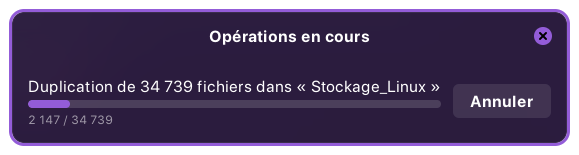
I made a new nautilus extension: nautilus-progress-mirror — a small window appears over Nautilus during long copies/moves, mirroring the native progress (bar, details, cancel button); short operations stay silent and the native progress circle is left untouched
You can take it from my github
No. I mean these Extensions are nice little Additions. And this Copy/Move Progress Bar counts to it.
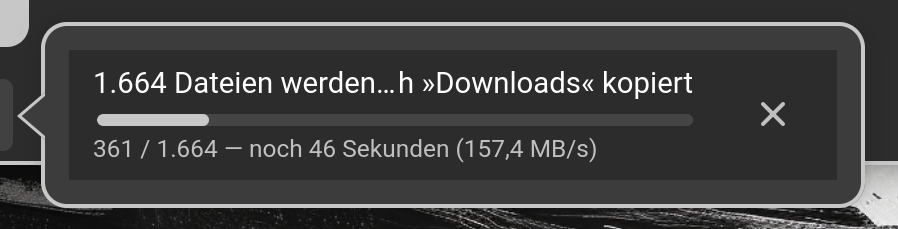
This little default Bar in Nautilus ... well, it does what it should. But it is a bit small. Yes, You can click on it and then get a bigger Screen. But all in all the Placement at this Place is in my Opinion not the best.
I think the Window Size is fine. The Fontsize under the Progress Bar could be maybe one Size bigger for my Taste. Is not a Must but You could think about it.
Another Thing is the Cancel Button. You have made that with a simple X which isn't per se wrong. But I saw myself at the Beginning that I pressed it at the End to close the Window - which of Course did not work. Maybe You could change the Button to a long Shape and write ''Cancel'' in it for more simple minded People like me.
Of Course, You would have to rearange the whole Window - which might be more Work than it's worth. You could wait for other Opinions on that.
I will see what I can do, but for the cross to cancel it's because it's a "mirror" of the original, so yeah maybe I was lazy
For the size I will stay like this and don't make it adaptative with resolution...
One little Thing what You could think about: When the Copy/Move-Process has ended, it might be as an additional visual Effect nice when the Font of the Button gets greyed out. I don't know if this is possible to do.
Your request is legitimate but it adds a time constraint between the end and the display, it would make the process more difficult.
And for me the box close automatically after the copy, I think there is another mechanism in nautilus 48 and I can't make it work without breaking the version for 46.
Is totally fine. Would only be a Detail and isn't something fundamental.
I'm not on Debian right now. I'm on Zorin. I played a bit with Debian which results in a ... well ... not so nice running Experience anymore. So, I removed it. So, I use Nautilus 46, too now. But the Box doesn't close automatically. Maybe because I'm on Wayland? I mean, it doesn't bother me that it doesn't close automatically.
For users who will ask, I will not change any feature or add any feature, It was done to be the more lighter possible and just increase the nautilus usability, I will not ad a pause button because this just a mirror of the original copy function of nautilus, and adding this kind of function may crash nautilus because of the restricted API.
Of course any bug will be eared seriously.
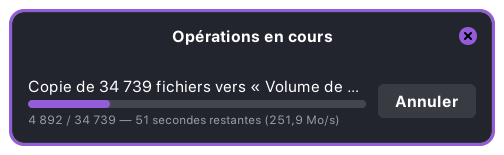
But another Thing came to my Mind: Could You add the Transfer Speed? I think, this is only when You copy/move something from/to an external Device but would be nice to have. When something does only copy/move slow, You could directly see the Speed and if it's fine or very slow.
As I explained above I will not add feature that doesn’t exist in the original, the cancel button was just a graphical change
Calling a function out of nautilus may cause unexpected behavior.
Thanks a lot for testing and for the feedback!
But it exists. As I wrote: It isn't a permanent Thing. It seem only to appear when using an external Drive and then copy from/to it. I will make some Screenshots and post them later. Showing it, might clearer.