Opera Stand Alone Mail Client

Hi,
a long time ago I enjoyed Zorin Core on Windows 8.1.
First Opera Mail was integrated in the browser, but later the browser was changed and Opera Mail was no longer in the browser. But a Stand Alone version was made available to be installed on one's PC or -in my case- laptop with Windows 8.1.

I have Windows 11 now, and do not like it. One issue is that I can still receive emails in the Opera Stand Alone on my laptop, although Windows 11 always interferes and I must always first give permission to ignore the erroneous "not valid certificate of the source" issue. Using the "enter" key makes the email readable.

All that and other things have brought Zorin to my memory.
The question before switching from Windows 11 to Zorin:

Does the Stand Alone Opera Mail Client work well on Zorin Core. (Or any other version.) Anyone know?

Kind regards,
Lode

PS:
The one I refer to:
Opera Mail 1.0 Build 1044

1 Like

I wouldn't count on the old standalone Opera Mail being a straightforward move to Zorin. The official standalone download archive I checked lists Windows and Mac versions, with the newest Windows build dated February 2016; I couldn't verify a native Linux version there or a tested Wine setup for your case. That doesn't establish the cause of your certificate errors, and I wouldn't bypass those warnings. Thunderbird has an official Linux version if you're open to an alternative.

1 Like

Thank you for responding.
Not sure what to do yet.
Maybe try Zorin Core again and see if that email program works on it.
Or begin to utilize Thunderbird.
Or try to get Windows 8.1 again with StartIsBack, making it look like a modernized Windows 7, looking very nice.

Because by default I surf in Sandboxie's virtual space, which at closing the browser empties the sandbox, unless there is something in it I know as trusted want to save and do so, if any virus or malware was downloaded it is gone at closing the browser. So I don't feel I need Windows security updates or a later version of Windows.

this one is made by the creators of opera look it over see what ya think

P.S. the downloader is for linux...... :grin:

image

just open the software store and its in there too as a snap

2 Likes

Hi and welcome.

I would follow @wesoliv429 's recommendation:

But make sure you know how to import the profile. Vivaldi has its own forum so you could seek an answer first there to ensure everything stays intact.

1 Like

Thank you for the tips.
My question was not about the Opera or any other browser, but about the stand alone Opera Mail client.
This one:
Opera Mail 1.0 Build 1044

I'm not sure a software never updated since 2016 is really secure, we talk about an email application, an open door....

1 Like

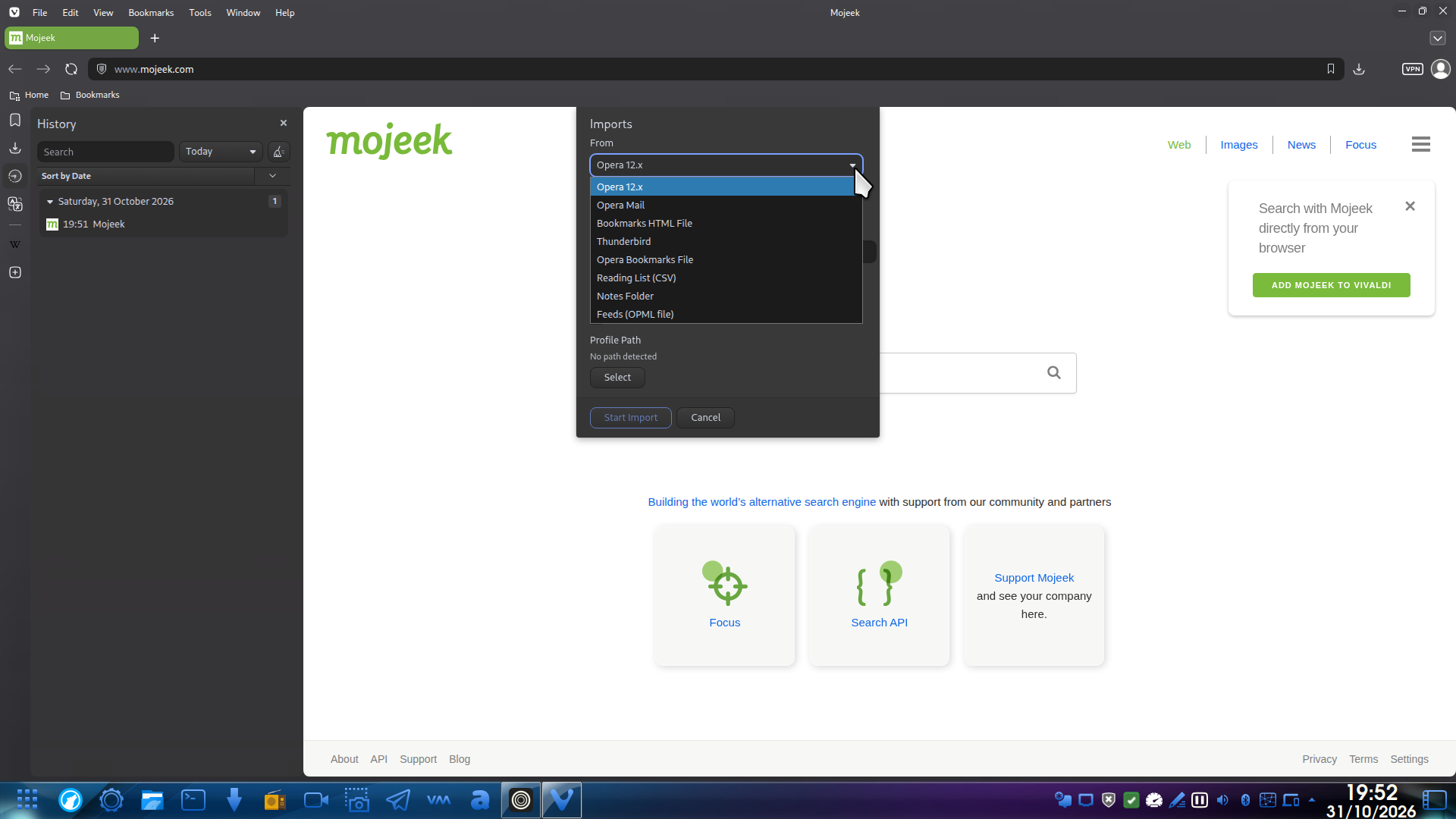
My advice to you is to try Vivaldi Browser as @wesoliv429 has suggested, and the screenshot I posted shows that Vivaldi can import Opera Mail. Vivaldi gets regular updates and as @Nourpon has pointed out, a mail client from 2016 no longer maintained is a vector for malware attacks.

I am aware of mail issues being in its own widow or panel which has now been fixed:

2 Likes

Thank you for your kind concern.
I've never encountered an unwelcome issue with that stand alone Opera Mail Client on my laptops over the years.
I could even have ran it sandboxed by Sandboxie, but only utilized the latter for surfing the web in it's virtual space.

Of course I never opened emails that were clearly phising like supposedly from my bank for example. Those I reported to my bank as well as to SpamCop, using the full header. Spamcop analyses it and sends the ISP from the sender a message that their service is being misused for sending phishing emails or viruses.

I would still by far prefer Zorin if that Opera stand alone Mail Client would work on it to the current Windows 11 I have (on which it doesn't work well as said).
My Windows 11 was installed by the repair shop I had asked to restore Windows 8.1 on it. They were adamant I must have Windows 11. Not knowing about Windows 11 I consented. Big mistake.

Windows 11 even blocks installing Zorin Core which I downloaded and saved in Downloads.

you do have to convert the iso to a usb drive 8GB or bigger to install zorin using either rufus set to your computer type MBR or UEFI also ventoy or etcher may work as well

Your repair shop might be MS certified and may face issues if they installed Windows 8.1 which no longer receives security updates.

When trying to install GNU/Linux of any flavour there are a few steps you have to undertake.

The first is to boot into Windows and check to see if BitLocker is enabled, this will need to be disabled.

Next you have to go into Power Management and disable the setting which puts your hard drive to sleep which prevents booting any other medium.

If considering dual-booting with Windows 11 you need to use Disk Management to shrink C:\ to make room for Zorin.

Then booting into BIOS you need to turn off Secure Boot and Fast Boot. Additionally Windows has the hard drive setting set to RAID, this has to be changed to AHCI for GNU/Linux to boot.

But with regard to Opera Mail, the safest way forward is to use Vivaldi and import your Opera Mail that way. Vivaldi has its own forum, I am sure they could help you.

We all hate it when things change, but with the ever growing security issues facing users one way or another, we have to accept, grudgingly or otherwise, your personal security is a much higher priority than using insecure software.

I understand your disappointment with Windows 11 as it is a data scraper, it is not there for the user.

If you are desparate for Windows 8.1 there are plenty of different versions here:

But you would need your C.o.A. key to install it, which I would run as a VM inside of GNU/Linux:

Thank you very much for all that information and logical explanation for the repair shop installing Windows 11.
I bought a DVD for Windows 8.1 but have not been able to install it. It cannot find during the install the update from Windows 8 to 8.1, and offers then the option to fill in the long licence code by hand. But that also fails. It says the code must look like 5 times 5 numbers, but on the DVD box only the first one consists of 5 numbers, the following ones of 3 only. And they don't appear when typing.

The vendor offers help by phone, but maybe because of the weekend has not called yet. I send him an email, so maybe I'll hear from him.
He sells original Windows DVDs from XP to Windows 11.

Not being much of a nerd I do not understand everything you shared about how to install Zorin on a separate partition. But if I remember well there is a step by step video on how to do it.

Secretly I was hoping someone with Zorin would download and install that Opera stand alone Mail client to see if that is compatible and let me know. But until now did not dare to confess that.

The URL I posted from Major Geeks for downloading that stand alone Opera Mail client appears in the middle of the explanatory sentence.

1 Like

Thank you too for the tip.
Maybe that is the solution, getting Vivaldi -which I used for some time in the past- while I still also had the Opera stand alone Mail client.
I don't remember about the Vivaldi build in mail program as Opera once had. If it was already there I must have overlooked it.

But as said there are things about Windows 11 I dislike, and those things won't improve with Vivaldi.

1 Like

I meant for you to use Vivaldi in Zorin. I don't use Zorin any more, but Vivaldi does a version for Mac, Windows and (GNU/)Linux. That screenshot I posted earlier is on my daily driver, PCLOS Debian.

1 Like

I just woke up at 6:30 am (Amsterdam time) with the memory that it's not just downloading and installing Opera's stand alone Mail client which only takes a minute or so. After that one must do a bunch of things before one can use it.
I realize that is too much to ask someone here to do that just to tell me if it works well with Zorin.
I watched some videos before going to sleep last night on how to install Zorin Core.

The issue is that Windows 11 blocks installing Zorin Core from my Download folder.

1 Like

Hi, you cannot install Zorin from your Download folder.

Did you read my earlier post on what you have to do first before anything else?

1 Like

Yes, I read it all. Thank you very much for those explanations.
As I know hardly anything about these technical things I wonder if the help offered with the paid Pro version could install Zorin on my current Windows 11.
I suppose also in that version of Windows it is possible to give someone else full access from a distance to one's laptop. I sure would give permission for that to the Zorin Pro helper.

1 Like

I think before going down the Pro route you need to try Core in Live Mode to make sure everything works.

As for remote help I don't think that is possible as you can't renotely login to make changes to the BIOS.

The help you would get with Pro is step-by-step instructions similar to what I have already posted.

1 Like

To my surprise I got a call from the father of the online shop that send me the Windows 8.1 DVD.
I had received an email from that shop for giving a TrustPilot rating. I tried again to call the number that had always given the message that the person was not available, but I left a message that as for service I did not know what to do. Give it 1 star and a bad review?

The Father of the son owner called and said his son was on vacation, but he would help me.

The production code was inside the Windows 8.1 box he told me.

But after everything seemed to have worked fine a message appeared that something went wrong, to restart my laptop and try again.
But the same failed result.

He agreed that Windows 11 was terrible and told me he is still using an old laptop with Windows 8 on it.

I followed your instructions -making sure the laptop never went into sleep or hibernation mode and looked for making a separate space in C:- by shrinking it or install it on an external drive- and tried to find Zorin on my laptop again it but could not find it, so I tried to download Zorin Core again.
What appears is the option to subscribe, but I only see the upper part of it and not the skip option below it. Luckily I could diminish the size on the screen and see the skip option squeezing my fingers together on the screen.

But trying to install it the message appears that there is not enough free space. I must have made a mistake. Now it says 89.4 GB used, 6.32 GB available.

Would like to restore to previous volume.
Now it's 93.0 used, 145 GB available.

I have a Zorin partition 3,63 GB.

But Windows 11 is preventing opening the download. Also, what appears is DVD-Rom.

Tapping on Zorin OS 18.1 disk copy what appears is:

.disk
boot
casper
efi
isolinux
pool
HOW TO INSTALL
md5sum
README.diskdefines

I have not checked this yet:
Windows has the hard drive setting set to RAID, this has to be changed to AHCI for GNU/Linux to boot.

Besides that I have no idea how to proceed.
I'm beginning to feel bad about posting that much here, still not understanding much after so much detailed support.

Yet there must be something better than being stuck with Windows 11.

I have an empty external drive 20 GB and a USB stick with 125 MB and I would like to put Zorin on one of those, and for that balenaEtcher is recommended. But first error messages appeared saying the install of it had failed. Later it appeared and on the black panel I see a blue button with "Flash from file". Tapping on it the Zorin OS 18.1 file appears choosing it that blue button turns black and nothing happens it looks like.

I've been looking at some laptops made in my country the Netherlands on which Zorin is pre-installed.
My current laptops are 15.6". No numerical keys on the right of the keyboard. I don't need them.

It looks like the only laptop without are these ones, but they have 14" screens, so I would have to get used to a smaller screen.