As far as I can see Yes is the only way out (it blocks out the terminal).
I think I have been here before and the files in /boot/efi are only a couple of days old.
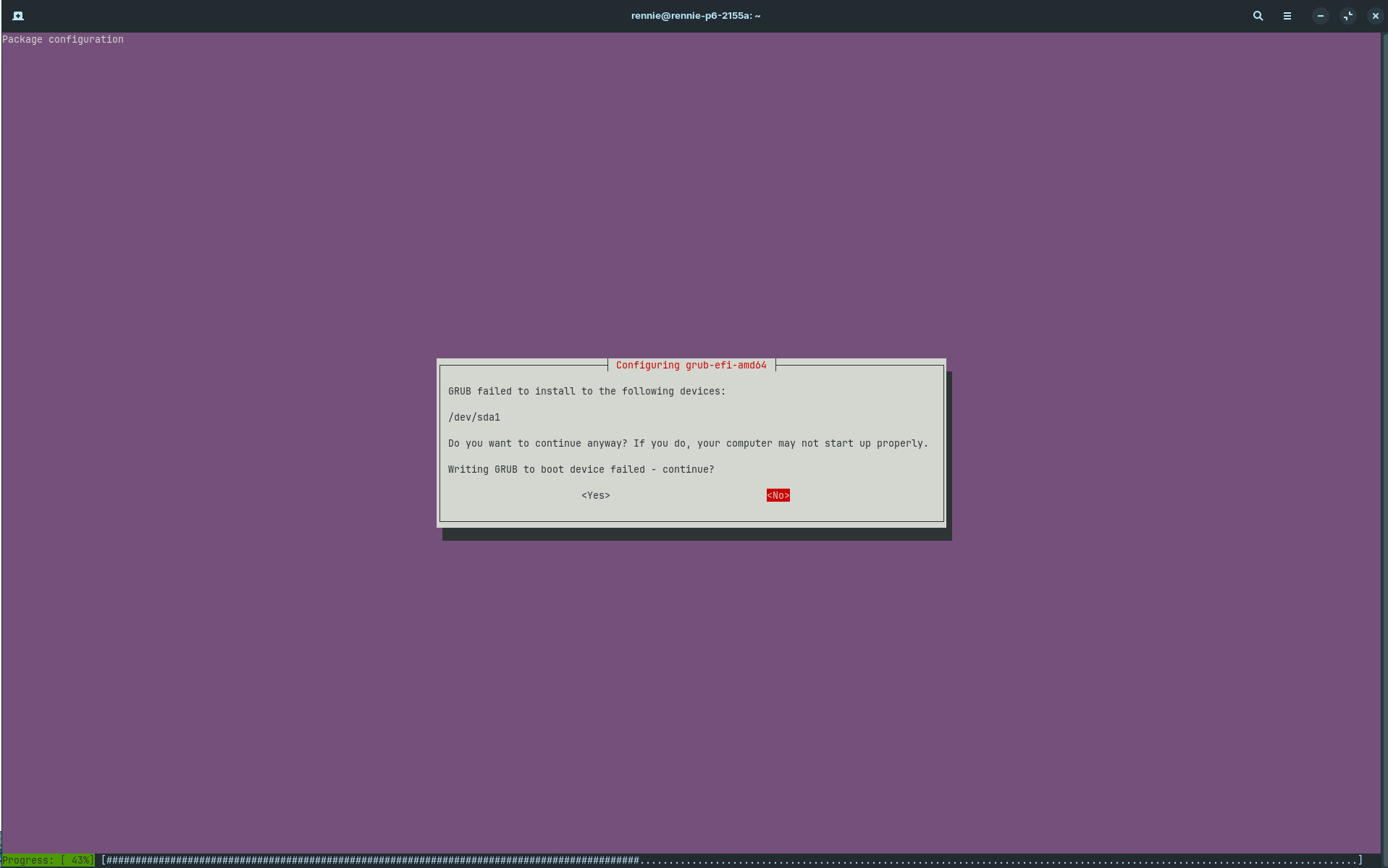
It shows No as highlighted.
If you are cautious though, you can abandon that and close that terminal window out and open a new one to run the commands.
Killed the process. A little cautious but mainly to keep the process clean for you without any unexpected sidetracks.... 
$ sudo grub-install --target=x86_64-efi --efi-directory=/boot/efi --bootloader-id=grub
Installing for x86_64-efi platform.
grub-install: warning: Cannot read EFI Boot* variables.
grub-install: warning: efivarfs_get_variable: read failed: Input/output error.
grub-install: warning: efi_get_variable: ops->get_variable failed: Input/output error.
grub-install: error: failed to register the EFI boot entry: Input/output error.

$ sudo update-grub
Sourcing file `/etc/default/grub'
Generating grub configuration file ...
Found theme: /usr/share/grub/themes/zorin/theme.txt
Found linux image: /boot/vmlinuz-6.14.0-34-generic
Found initrd image: /boot/initrd.img-6.14.0-34-generic
Warning: os-prober will not be executed to detect other bootable partitions.
Systems on them will not be added to the GRUB boot configuration.
Check GRUB_DISABLE_OS_PROBER documentation entry.
Adding boot menu entry for UEFI Firmware Settings ...
done
$ sudo ls -la /boot/efi/EFI/BOOT
total 3536
drwx------ 2 root root    4096 Jul 17  2024 .
drwx------ 5 root root    4096 Nov  1 10:10 ..
-rwx------ 1 root root 2660232 Nov  1 10:10 BOOTX64.EFI
-rwx------ 1 root root   88344 Oct 28 07:36 fbx64.efi
-rwx------ 1 root root  856280 Oct 28 07:36 mmx64.efi
During your install, did you get an nvRAM is locked error?
Your manufacturer has locked the write access (This was not done by your or by Zorin OS).
Admittedly, that can happen if the Secure Boot state was changed after Zorin OS was installed.
Your /boot/efi/EFI/BOOT looks good and stable - so you should be able to boot.
But, efivarsfs remains locked, which means you can run into this loop again and again.
You could apt mark hold the related packages, but that is not a reliable solution.
Since this install is only a couple of days old... If this was me, I would enter the BIOS Settings, reset all to Default, then disable Secure boot, then reinstall Zorin OS fully. It is the most straight forward way of fully resolving this.
I was coming to that conclusion myself.
The Bios is from 2012 and it does not support Secure Boot at all, only DEP. A colleague has a PC from 2015 and it has Secure Boot. The joys of older hardware.
Apt was updating OK with the Zorin default packages up to my global reinstall (see first post) so they must have figured it out.
Thank you very much for your assistance,
Reg.
1 Like
Would you believe that after all that mucking around, I rebooted and the boot menu came up (which I haven't seen for a while) so I jumped in and tried the solution above (post #5) AND IT WORKED!! Problem solved!!!
(I had been trying to get that boot menu up but just kept getting the grub terminal screen. What we did must have re-enabled it).
Definitely thank you very much for your assistance. 
Cheers,
Reg.
Edit: Note to self - ensure grub menu is displayed by updating /etc/default/grub file to unhide menu and set timeout greater than 0. Then sudo update-grub to apply changes.
1 Like
For your info this is how the packages ended up:
$ apt list shim*
Listing... Done
shim-dbg/noble 15.8-0ubuntu1 amd64
shim-signed/noble,now 1.58+15.8-0ubuntu1 amd64 [residual-config]
shim/noble 15.8-0ubuntu1 amd64
shimmer-themes/noble,noble 2.1.3build1 all

$ apt list grub-efi*
Listing... Done
grub-efi-amd64-bin/noble-updates,now 2.12-1ubuntu7.3 amd64 [installed]
grub-efi-amd64-dbg/noble-updates 2.12-1ubuntu7.3 amd64
grub-efi-amd64-signed-template/noble 2.12-1ubuntu7.3+zorin2 amd64
grub-efi-amd64-signed/noble-updates,now 1.202.5+2.12-1ubuntu7.3 amd64 [installed]
grub-efi-amd64/noble-updates,now 2.12-1ubuntu7.3 amd64 [installed,automatic]
grub-efi-ia32-bin/noble 2.12-1ubuntu7.3+zorin2 amd64
grub-efi-ia32-dbg/noble 2.12-1ubuntu7.3+zorin2 amd64
grub-efi-ia32/noble 2.12-1ubuntu7.3+zorin2 amd64
grub-efi/noble,now 2.12-1ubuntu7.3+zorin2 amd64 [installed]
Cheers,
Reg.
1 Like
This topic was automatically closed 90 days after the last reply. New replies are no longer allowed.