Hi y'all, so I'm trying to get playback working so I can watch my old DVD's on my computer. I'm following the instructions on this webpage. In the terminal I ran:
sudo apt install libdvd-pkg
But after hitting "Y" to install the package, halfway through I was met with a eula agreement that doesn't appear to be interactable:
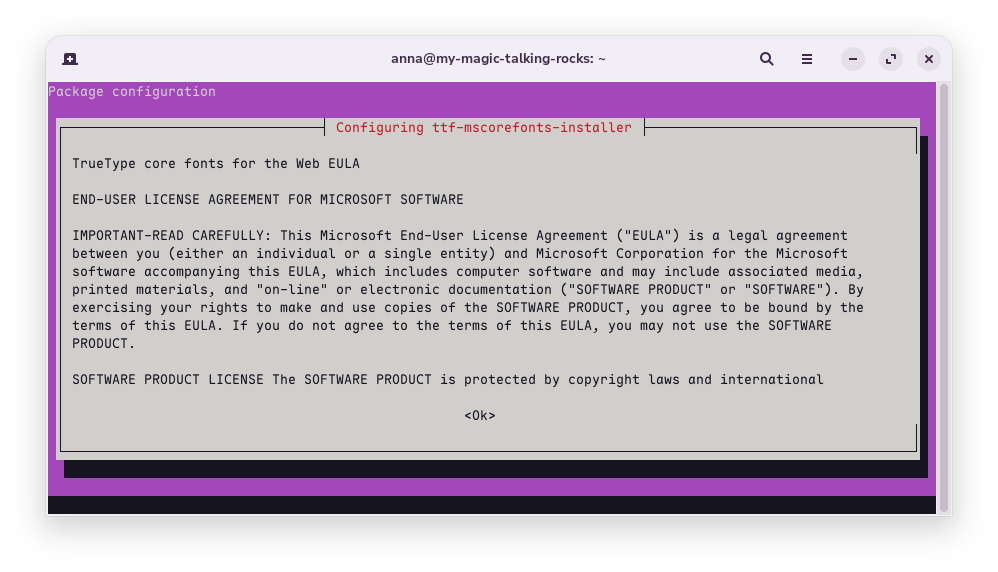
For one thing I'm confused why I'm even getting a eula screen for microsoft fonts, of all things? Are Microsoft fonts somehow a dependency for libdvd?
Hitting the enter key does nothing, neither does Y or typing "ok" Mouse clicking obviously does nothing. I can't even ^C to abort. I'm a terminal noob still and maybe this is a really dumb question, but how am I supposed to interact with this screen? It's prompting an <Ok> so presumably there's a way to agree to the eula? Is there some terminal shortcut you're supposed to use here?
Not sure what I'm missing here. pls help o_O
Running Zorin Core 18.1