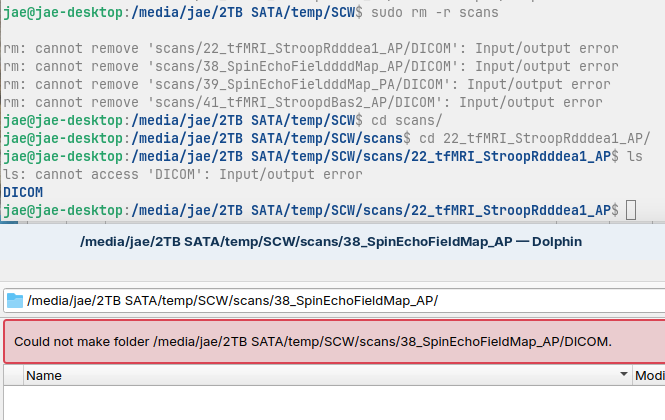
Some months ago four subdirectories became "stuck": I can't delete them, nor create new subdirectories in them. I didn't need to use that path, so just ignored the directories ... but now the same error seems to have appeared in a directory (same disk, different part of the file tree) which is part of a cloned git file structure, so it's not ignore-able.
Possibly relevant: this is a desktop computer with two hard drives, one for the file system (was windows 10, reformatted to zorin 18 pro last year, no windows partition retained), the other for work data, and the directory trouble has been only on the data disk, "2TB SATA".
The screenshot below shows the first errors. Last year there was a /media/jae/2TB SATA/temp/SCW/scans/38_SpinEchoFieldMap_AP/DICOM/ subdirectory with many files. I wanted to delete SCW and all its files and subdirectories. Most of them were deleted as expected ... but not these four. I don't remember how I removed the DICOM subdirectories; I have since experimented with renaming the numbered directories (adding/removing dds) and trying to add the missing DICOM subdirectories.
Possibly relevant: my account is the only one on this machine. This (2TB) drive was originally formatted for windows, and still is. Every few days I use FreeFileSync to mirror the drive to/from an external (USB) 2 TB disk, which I use from a laptop when I am away from the desktop machine.
The computer and both its hard drives are more than 5 years old. I read that sometimes weird file access errors can be caused by disk hardware problems, but it tests fine from what I can tell:
Is there some "extra" way to unmount the disk? I clicked the tray icon to unmount and got a message that it was, but have this:
jae@jae-desktop:~$ fsck -fy /dev/sdb
fsck from util-linux 2.39.3
e2fsck 1.47.0 (5-Feb-2023)
fsck.ext2: Permission denied while trying to open /dev/sdb
You must have r/w access to the filesystem or be root
jae@jae-desktop:~$ sudo fsck -fy /dev/sdb
[sudo] password for jae:
fsck from util-linux 2.39.3
e2fsck 1.47.0 (5-Feb-2023)
/dev/sdb is in use.
e2fsck: Cannot continue, aborting.
edited to add: evidently it's "in use", not mounted:
jae@jae-desktop:~$ sudo umount /dev/sdb
umount: /dev/sdb: not mounted.
jae@jae-desktop:~$ sudo fsck -fy /dev/sdb
fsck from util-linux 2.39.3
e2fsck 1.47.0 (5-Feb-2023)
/dev/sdb is in use.
e2fsck: Cannot continue, aborting.
You could try it with starting Zorin from the Bootstick in Live Mode and there use GParted to wipe the Disk and then format it to ext4. Of Course save needed Data before do that.
After turning on the computer I unmounted the (using the GUI), brought up a terminal, and tried fsck again (nothing about the disk being in use this time):
jae@jae-desktop:~$ sudo fsck -fy /dev/sdb
[sudo] password for jae:
fsck from util-linux 2.39.3
e2fsck 1.47.0 (5-Feb-2023)
ext2fs_open2: Bad magic number in super-block
fsck.ext2: Superblock invalid, trying backup blocks...
fsck.ext2: Bad magic number in super-block while trying to open /dev/sdb

The superblock could not be read or does not describe a valid ext2/ext3/ext4
filesystem.  If the device is valid and it really contains an ext2/ext3/ext4
filesystem (and not swap or ufs or something else), then the superblock
is corrupt, and you might try running e2fsck with an alternate superblock:
    e2fsck -b 8193 <device>
 or
    e2fsck -b 32768 <device>

Found a dos partition table in /dev/sdb
jae@jae-desktop:~$
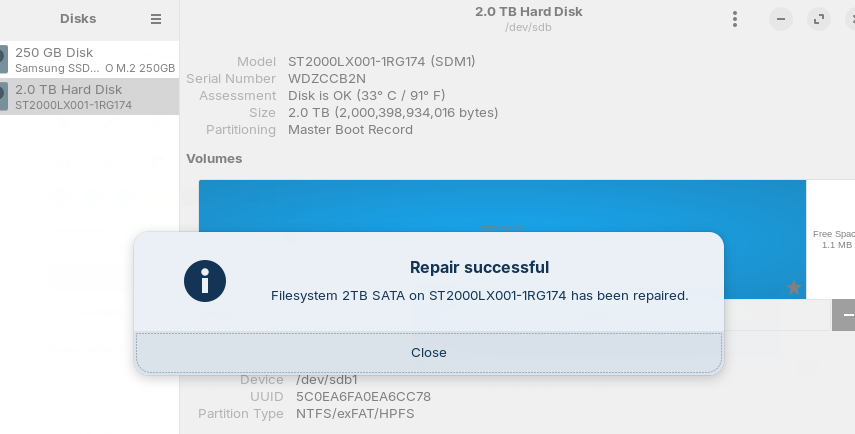
I opened Disks afterwards, and ran its "Repair Filesystem" program. It reported success, but those "stuck" files in /temp/SCW/ still can't be deleted.
T think you will find it is a permissions/ownership issue that seems to happen quite often on drives that were previously windows. You will find that you are not the owner but "root" is and, as long as it is NTFS nothing you try will allow you to change ownership. And without being the owner, nothing you will try will let you edit the permissions, which are likely read only. I think your best bet is to copy the stuff you want elsewhere then reformat the drive to EXT4 after which you should be able to claim ownership using the disks utility.
I think you are right about the ownership & permissions being the root (ha) cause of all this; I've previously tried (and failed) to change ownership of the disk and files.
I'd thought that zorin "just works" with NTFS disks, but evidently it's more accurate to say that it mostly works, but you risk sporadic unfixable file and directory errors.