I told myself that decades ago. While I do have my main ones I run, I've always got more on the go. I love the pain too much.
Just to chime in, I ran into the exact same issues as you - installed Steam from the .deb downloaded directly from steampowered.com and kept getting errors about the 555 version of that same library. I also ended up purging steam and steam-installer from my system and deleted the same .steam directory in ~/ as well as everything steam related in ~/.local and /usr/lib. Installed from the zorin repo and everything is now working as it should. I even updated to the 560 drivers and switched over to Wayland - no issues at all.
It was uncanny reading your posts because everything you did seemed to be the exact same thing I did 
1 Like
This topic was automatically closed 90 days after the last reply. New replies are no longer allowed.
This issue happened to me a second time last week, after a manual driver update. This time, I opened an issue with Valve on their Github, and to my surprise, they diagnosed it and provided information on a Sunday morning!
The short version is that it's an issue with the driver package rather than Steam: for one reason or another, there's a wait on the i386 version of libnvidia-egl-wayland1. Debian (and derivatives) require the 64 bit and 32 bit versions of libraries to have the exact same version numbers, so we're in an either/or situation: we can't have both right now.
The possible workaround on our end is to find the most recent versions where both libnvidia-egl-wayland1 and libnvidia-egl-wayland1:i386 match, and make APT install both in one shot.
apt policy libnvidia-egl-wayland1 libnvidia-egl-wayland1:i386 should provide version information.
sudo apt install libnvidia-egl-wayland1=<VersionChangeMe> libnvidia-egl-wayland1:i386=<SamePackageVersion> should install both libraries at once, using the specified version, to avoid a conflict.
I haven't tested this as I'm not running Zorin at the moment, but it seems to me that it would be wise to first remove the existing libnvidia-egl-wayland1 before attempting to install replacements, and I can't guess what side effects there might be in using an older version of these libraries with current drivers. Until/unless the wait is removed in the PPA though, it seems like our options are workarounds or full manual installation from Nvidia's runfile instead of a deb.
Github issue: libnvidia-eg-wayland1:i386 dependency problems after driver update · Issue #11720 · ValveSoftware/steam-for-linux · GitHub
Relevant PPA link: i386 build of egl-wayland 1:1.1.15-0ubuntu0~gpu22.04.1 : Proprietary GPU Drivers : “Graphics Drivers” team
There's information in the Github issue that might help the PPA maintainer fix this, but I'm not particularly comfortable poking someone I don't know to say "Hey, Valve says you're doin' it wrong," even if I knew how.
I don't know for sure whether or not I can take credit for getting this fixed, but over the weekend I contacted the package maintainer after all. I got no response, but as of now, the update process proceeds normally, without errors, and libnvidia-egl-wayland1:i386 is installed.
On a probably related note, my Valve Hardware Survey info now shows my video card correctly, whereas last week it had been showing LLVM or some such.
I have the same issue, but reinstalling drivers & any version of Steam (be it deb or from the repository) didn't help at all.
apt policy command shows this:
$ apt policy libnvidia-egl-wayland1 libnvidia-egl-wayland1:i386
libnvidia-egl-wayland1:
  Installed: 1:1.1.3-1ubuntu1
  Candidate: 1:1.1.3-1ubuntu1
  Version table:
 *** 1:1.1.3-1ubuntu1 500
        500 http://archive.ubuntu.com/ubuntu focal/universe amd64 Packages
        100 /var/lib/dpkg/status
libnvidia-egl-wayland1:i386:
  Installed: (none)
  Candidate: (none)
  Version table:
I would welcome any help in installing this dependency.
Also, what is very strange is that I use X11, not Wayland, so not sure why a Wayland dependency would be mandatory for Steam.
Note that this has all started with the below upgrade, which was requested by Zorin:
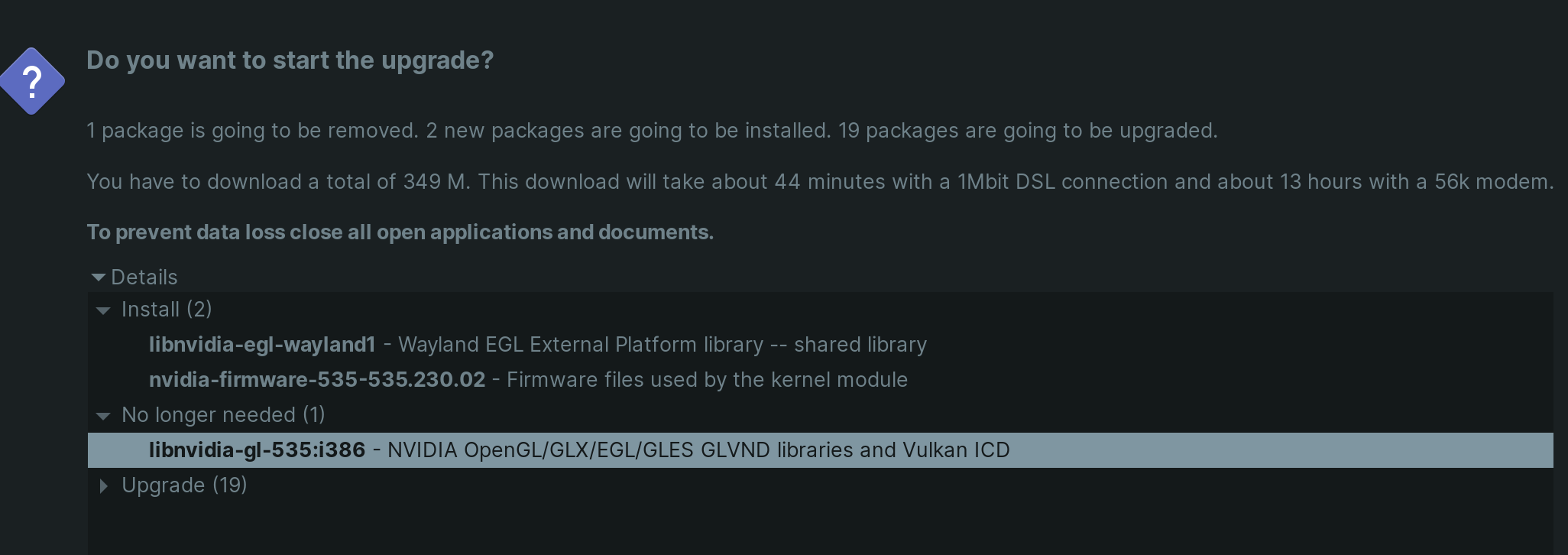
Purging Nvidia drivers allows Steam to start, but installing them again (no matter which version) brings the same issue:
Steam needs to install these additional packages:
libc6:amd64 libc6:i386 libegl1:amd64 libegl1:i386 libgbm1:amd64 libgbm1:i386 libgl1-mesa-dri:amd64 libgl1-mesa-dri:i386 libgl1:amd64 libgl1:i386 libnvidia-gl-570:i386

Press return to proceed with the installation:
........................................
Reading package lists... Done
Building dependency tree
Reading state information... Done
libc6 is already the newest version (2.31-0ubuntu9.17).
libegl1 is already the newest version (1.3.2-1~ubuntu0.20.04.2).
libgbm1 is already the newest version (21.2.6-0ubuntu0.1~20.04.2).
libgl1 is already the newest version (1.3.2-1~ubuntu0.20.04.2).
libgl1-mesa-dri is already the newest version (21.2.6-0ubuntu0.1~20.04.2).
libc6:i386 is already the newest version (2.31-0ubuntu9.17).
libegl1:i386 is already the newest version (1.3.2-1~ubuntu0.20.04.2).
libgbm1:i386 is already the newest version (21.2.6-0ubuntu0.1~20.04.2).
libgl1:i386 is already the newest version (1.3.2-1~ubuntu0.20.04.2).
libgl1-mesa-dri:i386 is already the newest version (21.2.6-0ubuntu0.1~20.04.2).
Some packages could not be installed. This may mean that you have
requested an impossible situation or if you are using the unstable
distribution that some required packages have not yet been created
or been moved out of Incoming.
The following information may help to resolve the situation:

The following packages have unmet dependencies:
 libnvidia-gl-570:i386 : Depends: libnvidia-egl-wayland1:i386 but it is not installable
E: Unable to correct problems, you have held broken packages.

Press return to continue:
Steam output:
Steam needs to install these additional packages:
libc6:amd64 libc6:i386 libegl1:amd64 libegl1:i386 libgbm1:amd64 libgbm1:i386 libgl1-mesa-dri:amd64 libgl1-mesa-dri:i386 libgl1:amd64 libgl1:i386 libnvidia-gl-570:i386

Press return to proceed with the installation:
........................................
Reading package lists... Done
Building dependency tree
Reading state information... Done
libc6 is already the newest version (2.31-0ubuntu9.17).
libegl1 is already the newest version (1.3.2-1~ubuntu0.20.04.2).
libgbm1 is already the newest version (21.2.6-0ubuntu0.1~20.04.2).
libgl1 is already the newest version (1.3.2-1~ubuntu0.20.04.2).
libgl1-mesa-dri is already the newest version (21.2.6-0ubuntu0.1~20.04.2).
libc6:i386 is already the newest version (2.31-0ubuntu9.17).
libegl1:i386 is already the newest version (1.3.2-1~ubuntu0.20.04.2).
libgbm1:i386 is already the newest version (21.2.6-0ubuntu0.1~20.04.2).
libgl1:i386 is already the newest version (1.3.2-1~ubuntu0.20.04.2).
libgl1-mesa-dri:i386 is already the newest version (21.2.6-0ubuntu0.1~20.04.2).
Some packages could not be installed. This may mean that you have
requested an impossible situation or if you are using the unstable
distribution that some required packages have not yet been created
or been moved out of Incoming.
The following information may help to resolve the situation:

The following packages have unmet dependencies:
 libnvidia-gl-570:i386 : Depends: libnvidia-egl-wayland1:i386 but it is not installable
E: Unable to correct problems, you have held broken packages.

Press return to continue:
Thank you!
To fix the error you might try updating the driver.
sudo add-apt-repository ppa:graphics-drivers/ppa
sudo apt install --install-recommends nvidia-driver-570
Non-Wayland users can run:
sudo apt update && sudo apt install nvidia-driver-570 nvidia-dkms-570
IF you want to install the latest 570 update you have to do it manually, since ubuntu repo's are 2-3 weeks behind mostly. Download the latest drivers from nvidia site and follow post 1.
I also would advice to use the kisak repo to update/upgrade the mesa drivers since that one is also outdated on Zorin. Mesa is already at 25.0.1, 25.1 will have a big inpact for nvidia users.
sudo add-apt-repository ppa:kisak/kisak-mesa
sudo apt update && sudo apt full-upgrade
Other than that, try
sudo apt --fix-broken install
sudo apt clean
1 Like
Later edit: I have used that guide and installed the latest version from Nvidia's website by side-loading. When asked to install the 32-bit libraries, I said yes. Now Steam starts and the error no longer appears, so all OK!
Yeah, the problem as explained to me by Valve is that Debian requires packages for different architectures to be the exact same version. If for some reason the i386 version and x64 versions are not the same due to some issue at the package maintainer level (which seemed to have been fixed, but maybe they re-broke it), you'll get the version for your architecture only, and Steam wants both.
This is at least the fourth time the packaged drivers have been in this state, assuming that's still the problem. I'm not familiar enough with launchpad to verify, but I'm tired of the problem occurring. If/when I return to Zorin, I'll probably use the instructions Michael provided instead of Ubuntu's package going forward.
Personally this is the reason I use the steam Flatpak. It's one of only 2 flatpaks I use, but because Steam requires so many dependencies, I prefer to keep it seperate from the system for reasons such as this. It doesn't come up too often, but it came up enough that I just stopped bothering to have it specific and it doesn't make other programs upset in the same system.
Understandable, though in my case, I actually don't mind flatpaks... except when they're not from the software developer. I won't knowingly use a third party flatpak for any reason, and the only verified Steam software on flathub is Steam Link.
1 Like