Greetings, and thanks for this forum! Installed Zorin 18 on my iMac 2017 (18,1) and the system's performance is very impressive. I cannot however figure out how to get audio. Internal Speakers and headphone out are not functional. I have checked similar posts and have tried their various suggestions without success. Thanks very much.
First thing to check is whether ALSA actually detects the audio device (aplay -l). If it does, the issue is likely PulseAudio or PipeWire configuration. I
Welcome to the Forum!
Are the Audio Output Sources are shown in Settings>Audio? Did You tried Pulse Audio Volume Control? It is a Tool to set up Audio Output and Input. You can install it with sudo apt install pavucontrol
When installed, You should check the Output and Configuration Tabs for Sources, and Audio Profiles.
Thanks! Below are the results
**** List of PLAYBACK Hardware Devices ****
card 0: PCH [HDA Intel PCH], device 0: CS8409 Analog [CS8409 Analog]
Subdevices: 1/1
Subdevice #0: subdevice #0
card 0: PCH [HDA Intel PCH], device 3: HDMI 0 [HDMI 0]
Subdevices: 1/1
Subdevice #0: subdevice #0
card 0: PCH [HDA Intel PCH], device 7: HDMI 1 [HDMI 1]
Subdevices: 1/1
Subdevice #0: subdevice #0
card 0: PCH [HDA Intel PCH], device 8: HDMI 2 [HDMI 2]
Subdevices: 1/1
Subdevice #0: subdevice #0
user@user-iMac:~$
" The primary Linux driver for the Cirrus Logic CS8409 audio codec found in 2017 iMacs is snd-hda-codec-cs8409 , available via the GitHub repository egorenar/snd-hda-codec-cs8409 . This out-of-tree module is required because support for this specific codec is not included in standard Linux kernels prior to 5.15, and even in later kernels, it may require manual compilation or specific configuration to function correctly with the internal speakers.
Installation Methods
1. Manual Compilation (Standard for most distributions) For distributions like Ubuntu, Debian, Fedora, or Arch Linux, the driver must typically be compiled from source.
- Prerequisites: Install kernel headers and build tools (
git,make,build-essentialorkernel-devel). - Commands:
git clone https://github.com/egorenar/snd-hda-codec-cs8409.git
cd snd-hda-codec-cs8409
make
sudo make install
sudo modprobe snd-hda-codec-cs8409
- Persistence: Add
snd-hda-codec-cs8409to/etc/modulesto load automatically on boot.
2. DKMS Approach (For Kernel 6.17+ or Rolling Releases) On newer kernels (e.g., 6.17) or when using Debian Backports, the standard snd-hda-codec-cs8409 driver may fail to compile due to GCC incompatibilities. An alternative is the snd_hda_macbookpro driver maintained by davidjo , which uses DKMS to handle kernel updates automatically.
- Setup: Clone
davidjo/snd_hda_macbookproand configuredkms.confwith specific CFLAGS to ignore pointer-type warnings. - Commands:
sudo dkms add -m snd_hda_macbookpro -v 1.0
sudo dkms install -m snd_hda_macbookpro -v 1.0 --force
Troubleshooting
If audio is detected but no sound plays:
- Ensure the
snd_hda_inteldriver is loaded. - Apply GRUB parameters:
snd_intel_dspcfg.dsp_driver=1andsnd_hda_intel.dmic_detect=0. - Use
hda-verbto manually set pin widget controls if the codec is detected but inactive.
AI-generated answer. Please verify critical facts."
Thanks!
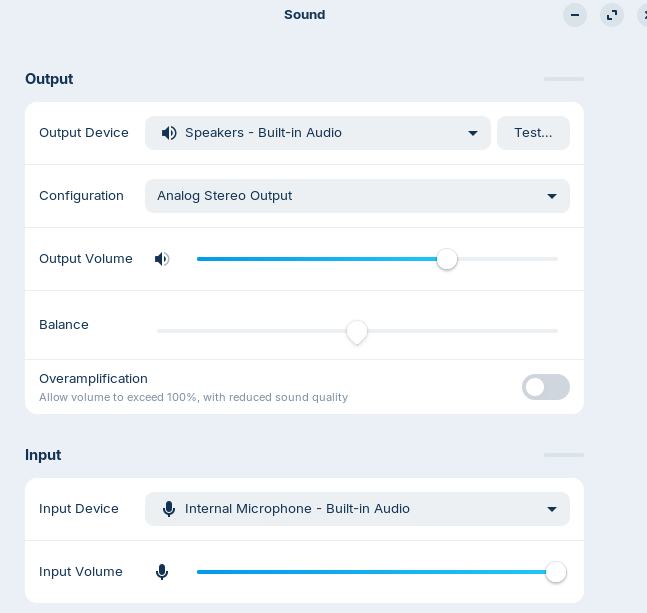
I have installed and launched Pulse Audio. I can see visually that audio is streaming from the volume meter, however I'm unable to hear audio out from the internal speakers or the headphone out. I have manipulated the configuration with the same unsuccessful results.
Thank you. I have executed those instructions however presently audio is not outputting to the internal spkrs or headphones
Hello,
In Pulse Audio, try to change the 'Configuration' to something else and see if this makes any difference.
1 Like
Yes. Is Analogue Stereo Duplex listed. Give that a try.
If still no go. Maybe a play with alsamixer in the terminal could reveal something or help fix it.
Open a terminal session (Ctrl+Alt+T)
type:
alsamixer
then hit F6 to list soundcard/s.
see if an analogue device is listed and choose it.
then hit F5 to display All sound channels. Post a screenshot.
If any show as muted [MM], select using arrow keys and unmute by typing "M". Use up arrow to increase volume level.
Also have a play with [auto-mute] and [loopback-mode] channel options.
See if any effect.
This topic was automatically closed 90 days after the last reply. New replies are no longer allowed.