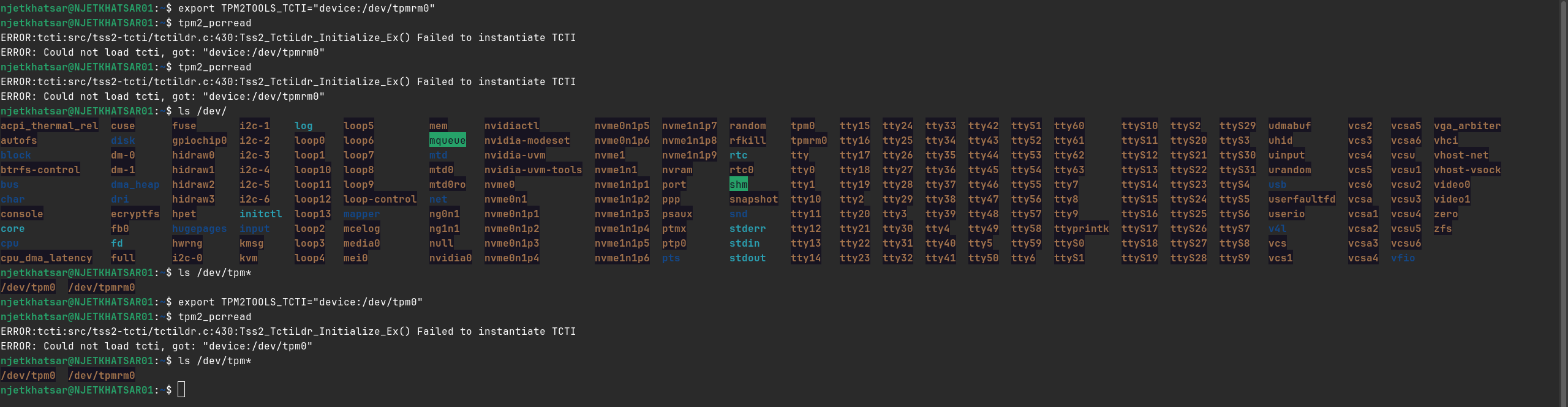
I'm trying to set up LUKS automatic unlocking via TPM2 on Zorin OS 18.1 Pro (Dual-boot with Windows 11), but I've hit a wall with hardware communication.
The Problem:
- Zorin OS:'tpm2_pcrread' and other 'tpm2-tools' fail with TCTI errors: 'Could not load tcti, got: "device:/dev/tpm0"'. However, I can manually read PCRs via 'cat /sys/class/tpm/tpm0/pcr-sha256/0'.
- Windows 11: 'Get-Tpm' previously reported 'RestartPending: True'. After some BIOS tweaks (removing Admin password), it currently intermittently reports 'TpmPresent: False'.
- Hardware Context: This is an ASUS TUF Gaming F16 (2024). The motherboard was recently replaced by official support.
Troubleshooting Done:
Confirmed Intel PTT/Security Device Support is Enabled in BIOS.
Disabled VMD Controller to ensure NVMe/TPM visibility.
Attempted 'Clear-Tpm' in Windows, but no PPI (Physical Presence Interface) confirmation prompt (F12) appears on reboot.
Attempted a "Cold Boot" (60s power button press) to reset the EC, with inconsistent results.
My Goal: I need to resolve the RestartPending state or the "missing" hardware node so I can enroll my LUKS keys. It seems the BIOS is failing to trigger the PPI prompt required to clear the TPM.
These are my system specs:
Model: ASUS TUF Gaming F16 FX607JV
CPU: Intel i7-13650HX
GPU: Nvidia GeForce RTX 4060 Laptop
Zorin OS: Zorin OS 18.1 Pro
TPM: Intel PTT (Firmware TPM 2.0)
Forgive my using AI for I am a Taiwanese with poor English skill.