A problem with dialog windows not visible and some checks before switching

CPU: AMD Ryzen 9 5950X (16 core, 32 thread)
RAM: 128 GB
NVMe: 1 TB + 1 TB
Graphics: AMD Radeon RX 6600 XT
OS: Windows 10
Needed apps: Davinci Resolve, VS Code, MS Outlook, MS Access, Vivaldi, Brave
Often used apps: Photoshop, Notepad++, Handbreak, Visual Studio, VMware Workstation, MS Word
Sometimes used: Need For Speed Unbound
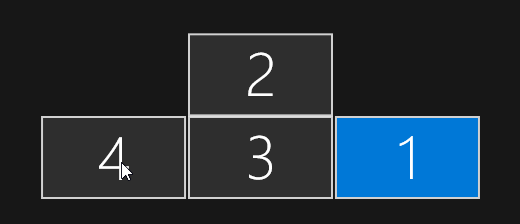
Monitor setup: 4 monitors, 3 in a row, 1 centered above them

I want to get away from Windows, actually from MS, and tested some distros from a bootable USB device. The best result, as far as I could see in a quick (1 hour) test, was with Zorin, although I couldn't install Davinci Resolve because of missing stuff.

I found one mayor problem though. A dialog telling me about something flashed up and was gone immediately. As the system wasn't very responsive then, I searched for the why. I then found out, that the dialog was still open, but I couldn't see it. It was positioned on the left top monitor, which I don't have. The only thing I could do was to right click the taskbar button for the app that had the dialog window opened and then switch it to fullscreen, which made it fullscreen on the bottom left monitor. This is not an option if I have multiple apps open while working.

Is there any setting to exclude the areas where no monitor exists from "showing" dialog windows? The system was configured correctly with the monitor positions, and the taskbars were set to behave like the Windows ones (on each monitor, app buttons only on the respective monitor and so on).

Does anything need to be changed to my system to switch to Zorin and enjoy it?

About needed apps and alternatives:
VS Code is used for my Web CMS and websites (own and customers'). As I understand it might work on Linux too? I don't like other apps, VS Code is great with its extension system.
MS Outlook is my main email app. I created VBA code to check incoming mails in a specific folder for attachments. I have a trailer rent where customers can reserve a trailer per website form, and the website sends the filled in contract to my Outlook, which per rule puts them in this specific folder. If the reservation is for the current day, the contract gets printed twice immediately, if it is for another day nothing is done. Every morning a timed VBA script runs through that folder and checks unread mails with attachments for being reservations for that day, and if so, prints the attached contracts twice. This functionality is needed and must be implementable in an alternative mail app.
MS Access is used for my billing apps for 2 companies (software development and trailer rental). Those databases have a lot of VBA programming and forms included for that purpose.

About often used apps and alternatives:
Photoshop is mainly used for YouTube thumbnails, but I think Davinci Resolve might be capable of that too. But as I create videos in 3 languages, the thumbnails are in 3 languages too, which is done easily in Photoshop with folders for layers. Is there an alternative capable of that, or can I even use Photoshop on Zorin?
Notepad++ can handle multiple documents in tabs and show colored sourcecode. I don't need it for software development anymore, but use it for simple text stuff and screenshot of sourcecode for the book I write (VS Code is set to dark mode and Notepad++ has a white background). As it is a Windows only app, what would be a good alternative?
Visual Studio is used for C# development. Can it run on Zorin, or is there a good alternative? I don't use it often as I don't have the time for it, and I might even stop my C# development.
VMware Workstation is only used for an old app I developed years ago and was duplicating in C# now. That app needs Windows XP. But, as said, I might stop that development completely.

Need For Speed Unbound might run on Zorin? At least that's what I read elsewhere.

A lot of questions—sorry about that—but they need to be clarified before I can switch over. The most important is the dialog positioning thing, I can't switch if dialogs I can't see block my work.

Thanks in advance for your time and effort.
Welcome to the Forum!

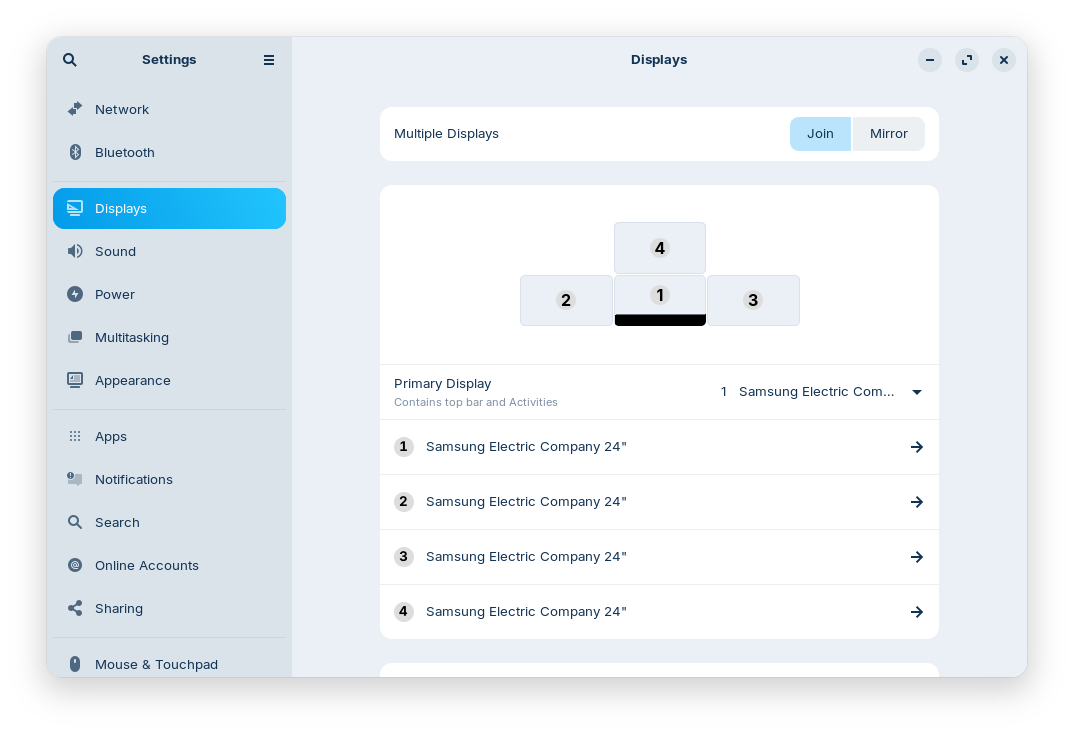
Because of the Monitor Issue: When You go to Settings>Displays, You have there the Options ''Join'' and ''Mirror''. Set it to Join and make a Screenshot of the Monitor Layout and post it here please.

Because of the Game: Do You use Steam for it? If yes, use the APT Package or download the .deb File from Steam directly:

And then simply try the Game.

For Your Software: Brave comes preinstalled on Zorin. So, this should be fine. Vivaldi offers a .deb Version for download which adds during the Installation the Vivaldi Repo. So, You will get Updates for it, too. You don't have to manually download new Versions. So, that should be fine, too. VS Code offers a .deb Version on their Website, too.

For Notepad ... You could check the preinstalled Text Editor. It is simple. Alternatives could be Kate or KWrite.

For Outlook would be Thunderbird an Alternative. But because of Your Descirption of Your Use Case, I'm not sure if this will work this Way.
Photoshop and Linux ... are not good Friends. You could try to get it to run with Winboat or Bottles but from what I've heard it doesn't seem to work. DaVinci Resolve is not easy, too. You could take a Look ath his Guide:

1 Like

You are deeply embedded in the Windows environment, with many customizations on which your workflow depends. Photoshop, Notepad++, Need for Speed Unbound, your 4 monitor setup - all those could be dealt with. But several programs which must work - Outlook, Access, Visual Studio - would give you real headaches, and many hours of trouble shooting or looking for adequate native Linux app equivalents.

If I were you, I'd stay on windows for those critical apps, and tweak it with a utility like Chris Titus' WinUtils (it's free) to eliminate cruft, speed it up and lock MS out as much as possible. Your windows 10 machine qualifies for upgrade to 11, which is advisable for security (unless you are behind a hardware firewall or the like). I prompted Google Gemini AI with your specs and data and hypothetical desire to upgrade to Windows 11. See what you think of the results:

Phase 1: Preparation (On Windows 10)

Before pulling the trigger on the upgrade, ensure your scripts are portable.

  • [ ] Export Outlook Macros: Save any .otm files or export modules from the VBA editor.
  • [ ] Trust Center Check: Note down your current "Trusted Locations" in Access (File > Options > Trust Center > Trust Center Settings > Trusted Locations). You will need to re-add these in Win 11.
  • [ ] Create a Full Backup: Use a tool or cloud drive to back up your .accdb files and Outlook signature/macro folders.

Phase 2: The Upgrade Process

When running the Windows 11 installer, use these settings to minimize "junk" from the start:

  • [ ] Region Selection: Select English (World) or English (Europe). This bypasses the automatic installation of many promotional apps (TikTok, Disney+, etc.) due to international regulations.
  • [ ] Connectivity: If possible, do not connect to Wi-Fi until you reach the desktop to force the creation of a Local Account (avoiding MSA/Cloud AI integration).
  • [ ] Privacy Toggles: Turn OFF every toggle during the "Out of Box Experience" (Diagnostic data, Tailored experiences, Advertising ID).

Phase 3: The WinUtils Clean-up

Once you are at the Windows 11 desktop, it’s time to run Chris Titus' tool.

  • [ ] Open Terminal: Right-click Start > Terminal (Admin).
  • [ ] Launch Tool: Paste iwr -useb [https://christitus.com/win](https://christitus.com/win) | iex and press Enter.
  • [ ] Set Tweaks (The Surgical Approach): Navigate to the Tweaks tab and select these specifically:
    • Check: Disable Copilot (Removes AI button/service).
    • Check: Disable Telemetry (Stop tracking).
    • Check: Remove Bloatware (Cleans up the Start menu).
    • Check: Disable Bing Search in Start (Keeps search local).
    • Check: Dark Mode / Photo Viewer (Optional UI preferences).
    • CRITICAL - Leave Unchecked: Disable Background Apps. (VBA needs these for Office triggers).
    • CRITICAL - Leave Unchecked: Remove Edge. (Office uses the Edge engine for rendering).
  • [ ] Run Tweaks: Click the "Run Tweaks" button and wait for the "Done" message in the console.

Phase 4: VBA Stabilization

Windows 11 is stricter with security. Do these three things to ensure your scripts actually run:

  • [ ] Unblock Files: For your Access databases, right-click the file > Properties > Check Unblock at the bottom > Apply.
  • [ ] Restore Trusted Locations: Open Access/Outlook and re-add your folders to the Trust Center. Windows 11 often blocks macros in folders it doesn't explicitly trust.
  • [ ] Install WebView2 (If missing): If your VBA scripts pull data from websites and fail, download the WebView2 Evergreen Runtime from Microsoft. WinUtils usually leaves this alone, but it's the "secret sauce" for modern Office scripting.

Phase 5: Final Polish

  • [ ] Reboot: Always reboot after running WinUtils.
  • [ ] Verification: Open Outlook and press Alt + F11. If the editor opens and your references are intact, you are golden.

For Linux, I'd install it on another machine and become familiar with it, try out alternative programs, see how much and how well you can replicate your current workflow in Linux. That way the pressure is off, and you aren't tearing your hair out trying to troubleshoot problems on mission critical apps.

Thanks for your answer, but:

  • Windows 11 never was and never will be an option.
  • I actually am behind a firewall (pfSense).
  • Gemini is great, but actually shouldn't know anything about my setup.
  • I have NFS Unbound from EA directly (didn't know Steam has it too, but Steam says "not compatible with steam deck", so it won't run).
    I'll have a look at the Chris Titus' WinUtils, thanks for that, but as my question clearly stated, I want to get away from Windows and if possible from MS.

Thanks for your answer!
The monitors were set to "Join" and the layout was as in the screenshot (taken from Windows):


NFS Unbound is from EA directly, I didn't know Steam has it too. But Steam says "not compatible with Steam Deck", so I think it won't run. But that's not a "no-go". And if they some day manage to get it running, I think I can join my accounts and then use the Steam version.
I will dive into the Thunderbird programming, I currently have it installed as secondary, simple mail app.
Photoshop isn't really needed if I can find an alternative. I heard Gimp could be that alternative?
BlackMagicDesign offers Davinci Resolve for Windows (x86 and ARM), Linux, and Mac OS X. It should be installable easily, but thanks for the link. This is for V.21 though, which currently is the Beta 2, which may have some difficulties.

I now hope my monitor layout can shed some light on the dialog thing.

Yes, Gimp, Inkscape or Krita would be Candidates. Maybe one of them will suit You.

Did You checked that the Monitors are exactly numbered in Zorin, too?

They're not, it depends on how they are initialized the first time the driver is activated. I had the numbers change once because of one plug disconnecting, and after that the numbers were different (happened in Windows).
Sorry, I can't take a screenshot in Zorin until tomorrow afternoon because of the "services" running needed for my work. It takes me about 10 minutes to just reboot Windows and get everything running again.


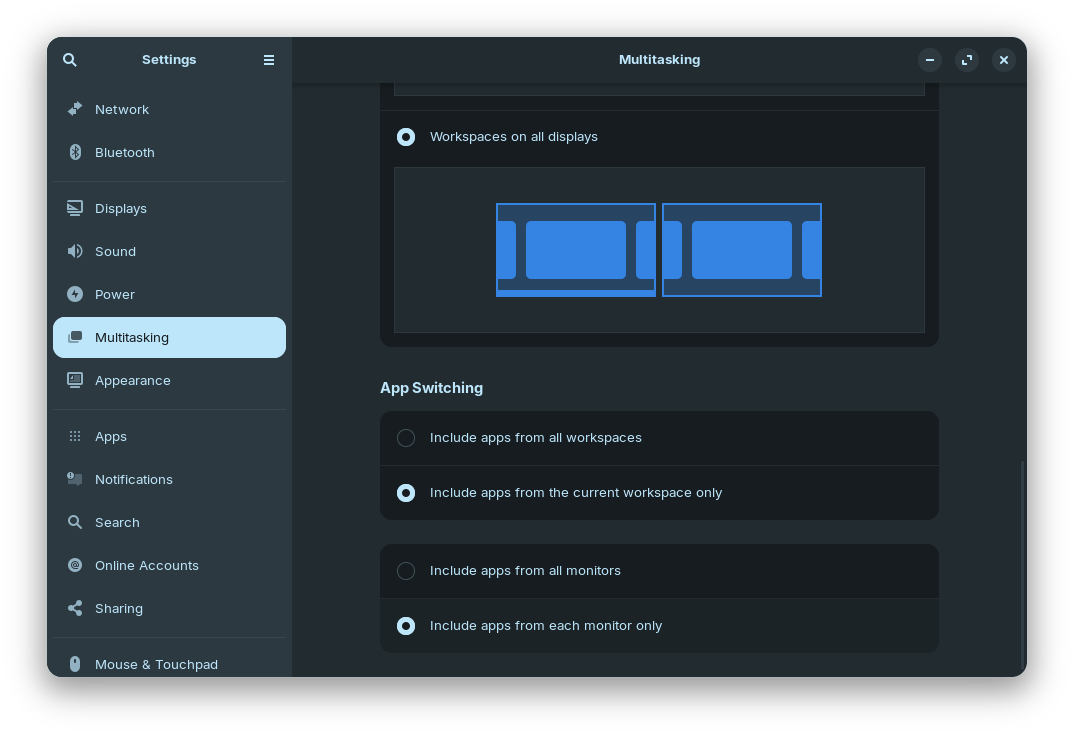
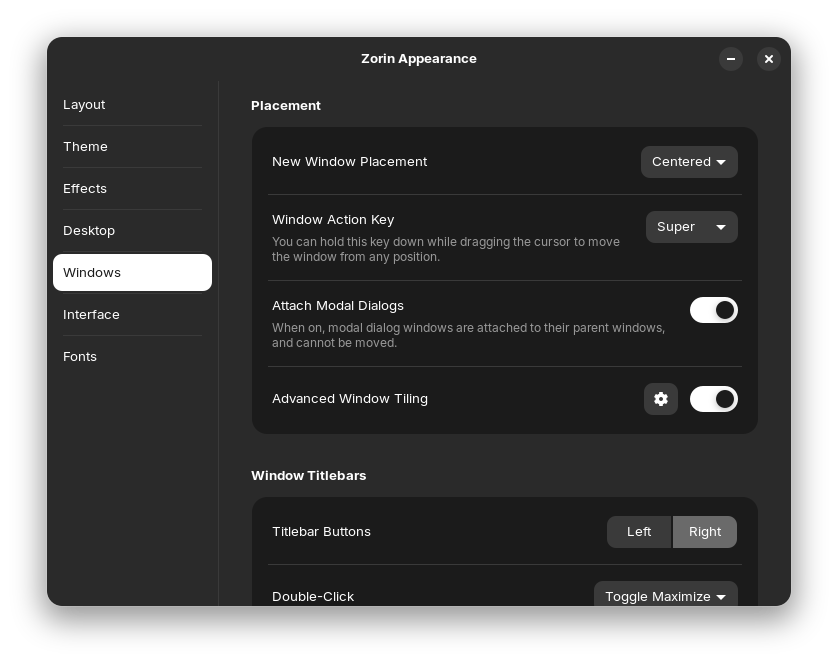
This is what it looks like in Zorin. It is a fresh download as I had tested CachyOS in between.


Multitasking settings to get as close as possible to the behavior of Windows.


I think I had the "New Window Placement" switched to "Spread" on my first test. Anyway, I tested for about 3 hours today, installed additional software (Vivaldi, QMMP, GIMP) and had no issues with dialogs disappearing again. Oh, and I had the "Attach Modal Dialogs" disabled the first time.


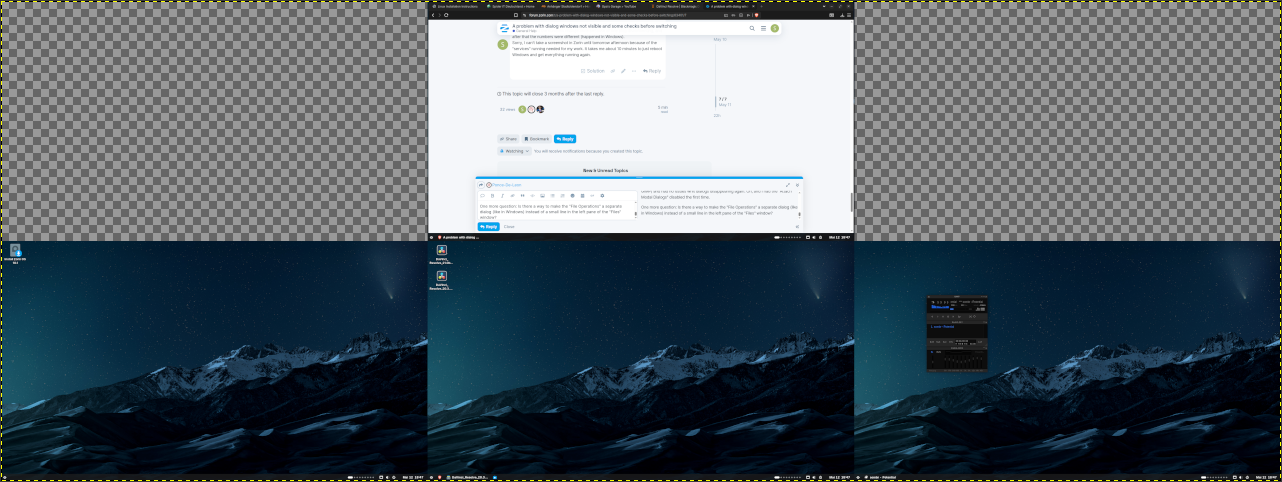
This is my monitor layout as I wanted it to be. As you can see, the upper left and right areas are not used. But the dialogs came up in the upper left area on my first test.

One more question: Is there a way to make the "File Operations" a separate dialog (like in Windows) instead of a small line in the left pane of the "Files" window?

1 Like

That could be a Point. When it is now enabled and it works so far keep an Eye on it.

Not that I would know.

1 Like

I thought so, couldn't find anything for that. On my first test I started copying a 3.9GB file to a network drive twice as no dialog came up. Now I know it and I think I can handle it.

Anyways, thanks a lot for your time and effort, it has helped me a lot and I think after some more testing and finding suitable alternatives I'm ready to switch to Zorin. As mentioned, I also tested CachyOS, but there are more difficulties to overcome with that. Zorin will be the one for me.

1 Like