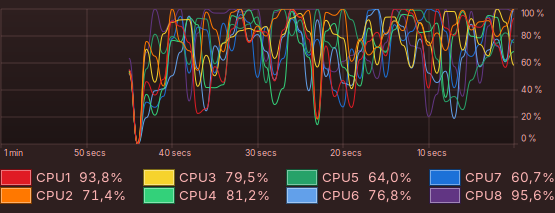
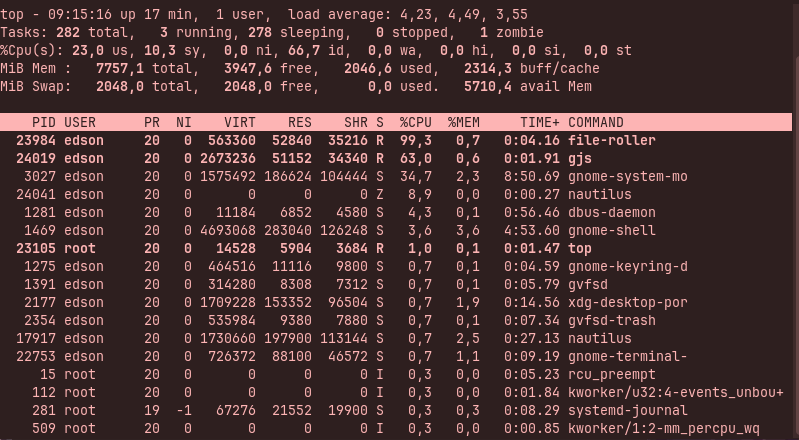
Hello guys. Since probably two weeks, threre's some times that a huge CPU usage begins after the system boot, even though there's nothing open. Using "sudo top" reveals that programs like file-roller and gjs are responsible, ocurring with some frequence. Is it usual?
Hi and welcome. Zorin 18 is based on Ubuntu 24.04 which is what I used in my search criteria. Instead of using the Brave A.I. Search results I looked at it's sources which don't bear any relation to the first finding! LOL!
" File-roller and gjs (the GNOME JavaScript engine) often cause high CPU spikes at boot on Ubuntu 24.04 because File-roller is a JavaScript-based application that relies on gjs to run, and they are frequently triggered by background file indexing or desktop portal services.
The primary culprits and solutions include:
- File Indexing Services : The GNOME file indexer tracker-miner-fs often runs aggressively at boot, causing high CPU usage that can affect gjs-dependent apps like File-roller. You can mitigate this by configuring search indexing to only run when the computer is idle or by disabling it entirely in Search and Indexing preferences.
- Desktop Portal Conflicts : Issues with xdg-desktop-portal and related packages (like xdg-desktop-portal-gtk or xdg-desktop-portal-gnome ) can cause File-roller to hang or spike CPU while waiting for services. Removing or reinstalling these packages often resolves the slowness and spikes.
- Faulty GNOME Extensions : Extensions like Vitals or DING have been known to cause gjs memory leaks and CPU spikes. Disabling all extensions via
gnome-extensions disable --alland re-enabling them one by one can identify the problematic extension. - Graphics Driver Issues : On systems with hybrid graphics (e.g., Intel + NVIDIA), mismatched drivers can cause XWayland or gnome-shell to spike CPU, which indirectly affects gjs processes. Ensuring proprietary NVIDIA drivers are correctly installed can resolve these synchronization overheads.
AI-generated answer. Please verify critical facts."
1 Like
I'm not sure if that helps, but you could try to disable the Zorin desktop icons gnome extension (at Zorin appearance > desktop > disable icons on desktop) for a test.
Do you have installed other third party gnome extensions? If yes, disable them, too and test.
1 Like
I don't know if Zorin has Nautilus with integrated file management and don't know if attempting to remove it would create a system collapse. You could install the better Archive manager that KDE uses, Ark, but it may not look right in respect of your themes.
This from Brave A.I. search engine on how to install Ark:
" How to install Ark on Ubuntu?
Checked Ark package availability
The simplest way is via apt :
sudo apt update
sudo apt install ark
Other options if you want a newer version:
# Snap
sudo snap install ark

# Flatpak
flatpak install flathub org.kde.ark
Note that Ark pulls in some KDE/Qt dependencies even on GNOME, so it may not match your desktop theme perfectly. For full format support (RAR, 7z, etc.), you'll also want the corresponding backend tools installed:
sudo apt install unrar p7zip-full
"
However, it won't resolve your spiking issue. I would follow @Forpli 's advice.