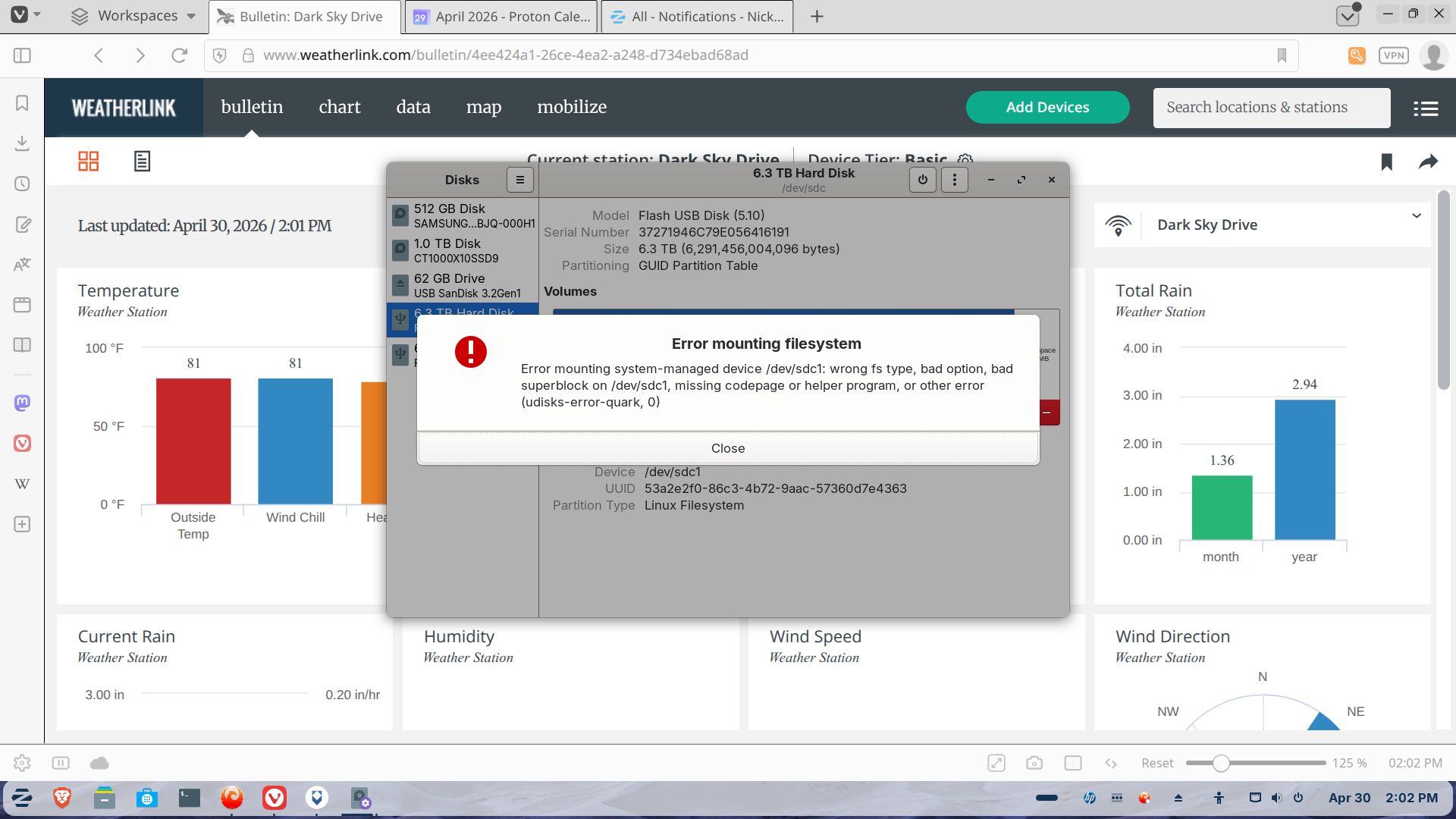
Since getting rid of windows I have been trying to set up a pair of large ssds that I previously had in a windows storage space.
I have tried formatting as ext4, deleting all partitions and then recreating a new partition, editing the mount options, and some other things in both gparted and disks
Hi. I found this (or rather Brave A.I. search engine did via Mojeek.com):
" The error (udisks-error-quark, 0) when attempting to install Linux on a 6.3 TB SSD typically indicates that the drive's partition table is corrupted, unrecognizable, or missing , or that the filesystem is in a state Linux cannot interpret (such as an NTFS volume left in a "dirty" or hibernated state from Windows).
Common Causes and Solutions
Corrupted or Missing Partition Table : The drive may have an invalid disk label. You can attempt to wipe the partition table using the terminal command:
sudo dd if=/dev/zero of=/dev/sdX bs=1M count=1
Warning : Replace /dev/sdX with your actual SSD device identifier (e.g., /dev/sdb ). Verify the device name carefully to avoid overwriting the wrong drive. After wiping, use a tool like GParted or the Disks utility to create a new partition table (GPT is recommended for large drives).
NTFS Filesystem Issues : If the drive was previously used with Windows, it may have an NTFS filesystem that is marked as "dirty" due to improper shutdowns or Windows Fast Startup. Linux often refuses to mount or format such drives.
Solution : Boot into Windows, disable Fast Startup , and perform a disk check (chkdsk /f ). Alternatively, use sudo ntfsfix /dev/sdX1 on Linux to clear the dirty flag, though this has limited repair capabilities.
Device Busy or Swap Conflicts : The partition might be mounted or used as a swap partition by the live Linux environment.
Solution : Open the Disks utility, locate the partition (often labeled as "Swap"), click the stop icon to unmount it, and then attempt the installation or formatting again.
Hardware or Connection Errors : In some cases, "udisks-error-quark, 0" combined with "Input/output error" suggests a failing drive or a faulty USB/ SATA connection.
Solution : Try a different cable, port, or computer. Check the drive's SMART status using the Disks utility to rule out hardware failure.
Recommended Steps for Installation
Backup Data : Ensure any important data on the drive is backed up, as these fixes may erase data.
Wipe the Drive : Use the dd command or the Disks utility's "Format Disk" option to create a fresh GPT partition table.
Install Linux : Proceed with the standard Linux installation, allowing the installer to manage the partitions.
Is this with both Drives or only with one? Did You formatted it from the USB Stick in Live Mode? The Error looks for me a bit like there are some Erros on the Disk itself.
Are the Disks formatted now or not? Are there any Data on them? Oh, and: Are these external or internal Drives?
Both disks are the same situation. I have tried formatting, erasing, deleting partitions, wiping file system, writing zeros at the front end, all options offered through Gparted and Disks. Everything says it is ext4 but cannot be mounted, or checked due to a list of thngs such as corrupted super block, missing helper program, wrong file system etc. The only thing I have left to try is to plug them into my wife's windows laptop and try formatting through windows.
If it doesn't make too much Circumstances, you could try it. this Way, it would also be possible to double-check if it might be an Issue with the Drives itself or not.
Otherwise ... You used Disks and GParted in Live Mode, yes?
Sorry for delay but yes and yes. And windows didn't even recognize that they existed.
I think I'll just toss the two drives - they were a special deal i got two 6TB for price of one a few years ago and I don't need that much storage. I also have a 1TB SSD on USB-c port with my main file system on it and my inbuilt 500 GB SSD has a lot more space on it since I got rid of windows. I may buy another 1TB and set them up as a RAID system when I feel rich.
This is a Commandline Tool in Windows. I had to use it in the Past to get USB Stick to wor again. But it works with Drives, too. You should find it when You search for diskpart but dont open it so. Open it with Administrator Rights. so, make a Right-Click on it and choose ''Run as Administrator''.
I used diskpart and cleanedeach disk, created partition primary which used all of the disk except a microsoft reserved partition of 4096 at beginning and a tiny amount at the end.
Then I used gparted to format the big partition as ext4. However neither partition can be mounted, with basically the same error about wrong file system, missing helper program, corrupt superblock etc.
After a lot of research it appears I should have deleted/removed the storage space in windows before removing windows from my computer and going Zorin only. Because I didn't, and obviously cannot do so now because the windows device no longer exists research says the disks are unusable. Oh well!
Tu problema tiene facil solucion creo yo mira digo entra nuevamente en windows 11 es que si lo tienes intalado y asegurate que Bitloker este desactivado si esta activo obio un sistema extraño no lo deje entrar es mejor desactivarlo y prueba nuevamente con zorin y podras acceder aveces no es culpa del Mount hard drive o ssd o lo que fuera esa unidad normalmente cuando el bitLocker esta presente antes de salirse encripta el disco par aque nadie lo accede lo hace imposible asi que mira a ver si es eso si no es otro problema .
Not to my knowledge. However apparently Windows "storage spaces" does something to them that cannot be undone once the windows machine is no longer available.
I'm trying "clean all" in diskpart on my wife's windows computer now and then going to try setting up a ntfs file system then see if I can reformat to ext4 but running out of options