Hi Everyone,
I'm new here and just installed Zorin on an older Toshiba laptop and the installation went fine but when it asked me to restart my computer it restated to the boot menu and after searching fo solutions I was unable find any. I'm on the try Zorin version right now and tried the Boot Repair option and it gave me a link to post here for help Ubuntu Pastebin
Any help would be very much appreciated, thanks.
Hi and welcome.
Could you please take a screenshot of the message? Using Ubuntu pastebin does not work as you need to login to view it!
Here's a copy of what the link says,
boot-repair-4ppa2081-zorin1 [20260503_0754]
============================== Boot Info Summary ===============================
=> Grub2 (v2.00) is installed in the MBR of /dev/sda and looks at sector 2048
of the same hard drive for core.img. core.img is at this location and
looks for (,gpt4)/boot/grub. It also embeds following components:
modules
---------------------------------------------------------------------------
fshelp ext2 part_gpt biosdisk
---------------------------------------------------------------------------
sda1: __________________________________________________________________________
File system:       BIOS Boot partition
Boot sector type:  Grub2's core.img
Boot sector info:
sda2: __________________________________________________________________________
File system:       vfat
Boot sector type:  FAT32
Boot sector info:  No errors found in the Boot Parameter Block.
Operating System:
Boot files:        /efi/BOOT/fbx64.efi /efi/BOOT/mmx64.efi
                   /efi/ubuntu/grubx64.efi /efi/ubuntu/mmx64.efi
                   /efi/ubuntu/shimx64.efi /efi/ubuntu/grub.cfg
sda3: __________________________________________________________________________
File system:       ext4
Boot sector type:  -
Boot sector info:
Operating System:  Zorin OS 18.1
Boot files:        /boot/grub/grub.cfg /etc/fstab /etc/default/grub
                   /boot/grub/i386-pc/core.img
sda4: __________________________________________________________________________
File system:       ext4
Boot sector type:  -
Boot sector info:
Operating System:  Zorin OS 18.1
Boot files:        /boot/grub/grub.cfg /etc/fstab /etc/default/grub
                   /boot/grub/i386-pc/core.img
sdb: ___________________________________________________________________________
File system:       iso9660
Boot sector type:  Unknown
Boot sector info:
Mounting failed:   mount: /mnt/BootInfo/FD/sdb: /dev/sdb already mounted or mount point busy.
   dmesg(1) may have more information after failed mount system call.
================================ 2 OS detected =================================
OS#1 (linux): Zorin OS 18.1 (18) on sda3
OS#2 (linux): Zorin OS 18.1 (18) on sda4
================================ Host/Hardware =================================
CPU architecture: 64-bit
Video: Core Processor Integrated Graphics Controller from Intel Corporation
Live-session OS is Zorin 64-bit (Zorin OS 18.1, noble, x86_64)
===================================== UEFI =====================================
BIOS/UEFI firmware: 2.10(2.10) from TOSHIBA
The firmware seems EFI-compatible, but this live-session is in Legacy/BIOS/CSM mode (not in EFI mode).
39bc76ff6662f4fbe9aa116e4c997b41 sda2/BOOT/fbx64.efi
4ba5a5aad43c197e9fb58b76b404d287 sda2/BOOT/mmx64.efi
94c7467f956700d44c5b4dcd3967535c sda2/ubuntu/grubx64.efi
4ba5a5aad43c197e9fb58b76b404d287 sda2/ubuntu/mmx64.efi
07e25dcaf57c776875f78fa36827c58e sda2/ubuntu/shimx64.efi
07e25dcaf57c776875f78fa36827c58e sda2/BOOT/BOOTX64.efi
============================= Drive/Partition Info =============================
Disks info: ____________________________________________________________________
sda : is-GPT, hasBIOSboot, has---ESP, not-usb, not-mmc, has-os, no-wind, 2048 sectors * 512 bytes
Partitions info (1/3): _________________________________________________________
sda2 : no-os, 64, nopakmgr, no-docgrub, nogrub, nogrubinstall, no-grubenv, noupdategrub, not-far
sda3 : is-os, 64, apt-get, signed grub-pc grub-efi , grub2, grub-install, grubenv-ok, update-grub, end-after-100GB
sda4 : is-os, 64, apt-get, signed grub-pc grub-efi , grub2, grub-install, grubenv-ok, update-grub, end-after-100GB
Partitions info (2/3): _________________________________________________________
sda2 : is---ESP, part-has-no-fstab, no-nt, no-winload, no-recov-nor-hid, no-bmgr, notwinboot, vfat
sda3 : isnotESP, fstab-has-goodEFI, no-nt, no-winload, no-recov-nor-hid, no-bmgr, notwinboot, ext4
sda4 : isnotESP, fstab-has-goodEFI, no-nt, no-winload, no-recov-nor-hid, no-bmgr, notwinboot, ext4
Partitions info (3/3): _________________________________________________________
sda2 : not--sepboot, no---boot, part-has-no-fstab, not-sep-usr, no---usr, part-has-no-fstab, no--grub.d, sda
sda3 : not--sepboot, with-boot, fstab-without-boot, not-sep-usr, with--usr, fstab-without-usr, std-grub.d, sda
sda4 : not--sepboot, with-boot, fstab-without-boot, not-sep-usr, with--usr, fstab-without-usr, std-grub.d, sda
fdisk -l (filtered): ___________________________________________________________
Disk sda: 465.76 GiB, 500107862016 bytes, 976773168 sectors
Disk identifier: 94B9D4C6-0A4C-42C1-A4B2-3788864003FB
Start End Sectors Size Type
sda1 2048 4095 2048 1M BIOS boot
sda2 4096 1054719 1050624 513M EFI System
sda3 1054720 506670185 505615466 241.1G Linux filesystem
sda4 506671104 976771071 470099968 224.2G Linux filesystem
Disk sdb: 7.48 GiB, 8032092160 bytes, 15687680 sectors
Disk identifier: 0x1967c9d6
Boot Start End Sectors Size Id Type
sdb1 * 0 7634943 7634944 3.6G 0 Empty
sdb2 604 10843 10240 5M ef EFI (FAT-12/16/32)
sdb3 7634944 15687679 8052736 3.8G 83 Linux
parted -lm (filtered): _________________________________________________________
sda:500GB:scsi:512:4096:gpt:ATA WDC WD5000LPVX-2:;
1:1049kB:2097kB:1049kB:::bios_grub;
2:2097kB:540MB:538MB:fat32:EFI System Partition:boot, esp;
3:540MB:259GB:259GB:ext4::;
4:259GB:500GB:241GB:ext4::;
sdb:8032MB:scsi:512:512:msdos:JetFlash Transcend 8GB:;
2:309kB:5552kB:5243kB:::esp;
3:3909MB:8032MB:4123MB:ext4::;
Free space >10MiB: ______________________________________________________________
sdb: 5.29MiB:3728MiB:3723MiB
blkid (filtered): ______________________________________________________________
NAME FSTYPE UUID PARTUUID LABEL PARTLABEL
sda
├─sda1 844a310d-3c17-41c0-a32d-e18d6af753f1
├─sda2 vfat 0A26-4593 57d1c941-743b-4b91-87f4-a6dd155e6246 EFI System Partition
├─sda3 ext4 4a1c7227-c8d7-4fec-bfa6-adc9166e21a4 9394c30d-1fe5-40ed-adfc-e54f4eb2b4bc
└─sda4 ext4 b897a23c-4327-48db-85a7-2e55dde13691 65445213-a38d-407d-8fa0-878ad000f6ec
sdb iso9660 2026-04-14-18-19-02-00 Zorin OS 18.1 Core 64bit
├─sdb1 iso9660 2026-04-14-18-19-02-00 1967c9d6-01 Zorin OS 18.1 Core 64bit
├─sdb2 vfat 50D2-EA10 1967c9d6-02
└─sdb3 ext4 f217343a-f095-44f9-a145-a7ed4cde5e4e 1967c9d6-03 writable
sdc
Mount points (filtered): _______________________________________________________
Avail Use% Mounted on
/dev/sda2 505.8M 1% /mnt/boot-sav/sda2
/dev/sda3 215G 4% /mnt/boot-sav/sda3
/dev/sda4 199.4G 4% /mnt/boot-sav/sda4
/dev/sdb1 0 100% /cdrom
Mount options (filtered): ______________________________________________________
/dev/sda2 vfat rw,relatime,fmask=0022,dmask=0022,codepage=437,iocharset=iso8859-1,shortname=mixed,errors=remount-ro
/dev/sda3 ext4 rw,relatime
/dev/sda4 ext4 rw,relatime
/dev/sdb1 iso9660 ro,noatime,nojoliet,check=s,map=n,blocksize=2048,iocharset=utf8
===================== sda2/efi/ubuntu/grub.cfg (filtered) ======================
search.fs_uuid b897a23c-4327-48db-85a7-2e55dde13691 root hd0,gpt4
set prefix=($root)'/boot/grub'
configfile $prefix/grub.cfg
====================== sda3/boot/grub/grub.cfg (filtered) ======================
Zorin OS 4a1c7227-c8d7-4fec-bfa6-adc9166e21a4
END /etc/grub.d/30_os-prober
UEFI Firmware Settings uefi-firmware
END /etc/grub.d/30_uefi-firmware
========================== sda3/etc/fstab (filtered) ===========================
/ was on /dev/sda3 during installation
UUID=4a1c7227-c8d7-4fec-bfa6-adc9166e21a4 / ext4 errors=remount-ro 0 1
/boot/efi was on /dev/sda2 during installation
UUID=0A26-4593 /boot/efi vfat umask=0077 0 1
/swapfile none swap sw 0 0
======================= sda3/etc/default/grub (filtered) =======================
GRUB_DEFAULT=0
GRUB_TIMEOUT_STYLE=hidden
GRUB_TIMEOUT=0
GRUB_DISTRIBUTOR=( . /etc/os-release; echo ${NAME:-Ubuntu} ) 2>/dev/null || echo Ubuntu
GRUB_CMDLINE_LINUX_DEFAULT="quiet splash"
GRUB_CMDLINE_LINUX=""
GRUB_THEME=/usr/share/grub/themes/zorin/theme.txt
GRUB_DISABLE_MEMTEST=true
==================== sda3: Location of files loaded by Grub ====================
GiB - GB File Fragment(s)
158.629283905 = 170.326896640 boot/grub/grub.cfg 1
172.654872894 = 185.386758144 boot/grub/i386-pc/core.img 1
6.651329041 = 7.141810176 boot/vmlinuz 1
5.159137726 = 5.539581952 boot/vmlinuz-6.17.0-20-generic 1
6.651329041 = 7.141810176 boot/vmlinuz-6.17.0-23-generic 1
5.159137726 = 5.539581952 boot/vmlinuz.old 1
6.904300690 = 7.413436416 boot/initrd.img 1
6.130878448 = 6.582980608 boot/initrd.img-6.17.0-20-generic 1
6.904300690 = 7.413436416 boot/initrd.img-6.17.0-23-generic 1
6.130878448 = 6.582980608 boot/initrd.img.old 1
===================== sda3: ls -l /etc/grub.d/ (filtered) ======================
-rwxr-xr-x 1 root root 18123 May 17 2025 10_linux
-rwxr-xr-x 1 root root 43192 May 17 2025 10_linux_zfs
-rwxr-xr-x 1 root root 14513 May 17 2025 20_linux_xen
-rwxr-xr-x 1 root root 786 May 17 2025 25_bli
-rwxr-xr-x 1 root root 13120 May 17 2025 30_os-prober
-rwxr-xr-x 1 root root 1174 May 17 2025 30_uefi-firmware
-rwxr-xr-x 1 root root 722 Mar 12 23:54 35_fwupd
-rwxr-xr-x 1 root root 214 May 17 2025 40_custom
-rwxr-xr-x 1 root root 215 May 17 2025 41_custom
====================== sda4/boot/grub/grub.cfg (filtered) ======================
Zorin OS b897a23c-4327-48db-85a7-2e55dde13691
Zorin OS 18.1 (18) (on sda3) 4a1c7227-c8d7-4fec-bfa6-adc9166e21a4
END /etc/grub.d/30_os-prober
UEFI Firmware Settings uefi-firmware
END /etc/grub.d/30_uefi-firmware
========================== sda4/etc/fstab (filtered) ===========================
/ was on /dev/sda4 during installation
UUID=b897a23c-4327-48db-85a7-2e55dde13691 / ext4 errors=remount-ro 0 1
/boot/efi was on /dev/sda2 during installation
UUID=0A26-4593 /boot/efi vfat umask=0077 0 1
/swapfile none swap sw 0 0
======================= sda4/etc/default/grub (filtered) =======================
GRUB_DEFAULT=0
GRUB_TIMEOUT_STYLE=hidden
GRUB_TIMEOUT=10
GRUB_DISTRIBUTOR=( . /etc/os-release; echo ${NAME:-Ubuntu} ) 2>/dev/null || echo Ubuntu
GRUB_CMDLINE_LINUX_DEFAULT="quiet splash"
GRUB_CMDLINE_LINUX=""
GRUB_THEME=/usr/share/grub/themes/zorin/theme.txt
GRUB_DISABLE_MEMTEST=true
==================== sda4: Location of files loaded by Grub ====================
GiB - GB File Fragment(s)
417.753784180 = 448.559710208 boot/grub/grub.cfg 1
301.728973389 = 323.979018240 boot/grub/i386-pc/core.img 1
247.427696228 = 265.673465856 boot/vmlinuz 1
246.287067413 = 264.448724992 boot/vmlinuz-6.17.0-20-generic 1
247.427696228 = 265.673465856 boot/vmlinuz-6.17.0-23-generic 1
246.287067413 = 264.448724992 boot/vmlinuz.old 1
247.563480377 = 265.819262976 boot/initrd.img 1
247.165058136 = 265.391460352 boot/initrd.img-6.17.0-20-generic 4
247.563480377 = 265.819262976 boot/initrd.img-6.17.0-23-generic 1
247.165058136 = 265.391460352 boot/initrd.img.old 4
===================== sda4: ls -l /etc/grub.d/ (filtered) ======================
-rwxr-xr-x 1 root root 18123 May 17 2025 10_linux
-rwxr-xr-x 1 root root 43192 May 17 2025 10_linux_zfs
-rwxr-xr-x 1 root root 14513 May 17 2025 20_linux_xen
-rwxr-xr-x 1 root root 786 May 17 2025 25_bli
-rwxr-xr-x 1 root root 13120 May 17 2025 30_os-prober
-rwxr-xr-x 1 root root 1174 May 17 2025 30_uefi-firmware
-rwxr-xr-x 1 root root 722 Mar 12 23:54 35_fwupd
-rwxr-xr-x 1 root root 214 May 17 2025 40_custom
-rwxr-xr-x 1 root root 215 May 17 2025 41_custom
Suggested repair: ______________________________________________________________
The default repair of the Boot-Repair utility would reinstall the grub-efi of
sda3,
using the following options: sda2/boot/efi
Additional repair would be performed: unhide-bootmenu-10s use-standard-efi-file
Blockers in case of suggested repair: __________________________________________
The current session is in BIOS-compatibility mode. Please disable BIOS-compatibility/CSM/Legacy mode in your UEFI firmware, and use this software from a live-CD (or live-USB) that is compatible with UEFI booting mode. For example, use a live-USB of Boot-Repair-Disk-64bit (www.sourceforge.net/p/boot-repair-cd), after making sure your BIOS is set up to boot USB in EFI mode. This will enable this feature.
Final advice in case of suggested repair: ______________________________________
Please do not forget to make your UEFI firmware boot on the Zorin OS 18.1 (18) entry (sda2/efi//grub.efi (**** will be updated in the final message) file) !
The boot of your PC is in BIOS-compatibility/CSM/Legacy mode. You may want to retry after changing it to UEFI mode.
sprunge.us ko ()
OK. There is a bit of a clue about the live session being in legacy mode (mbr). Did you use Rufus to create the bootable media? If so you need to select GPT settings for EFI. That could be what is causing the issue.
I'm not very tech but I put Zorin on a USB drive and installed it from there. I only see Lagacy in one place when in bios and it's enabled.
Welcome to the Forum!
Are Secure Boot and Fast Boot in BIOS disabled? Could You maybe offer some Screenshots/Pictures of Your BIOS so we can look for UEFI/Legacy Mode?
1 Like
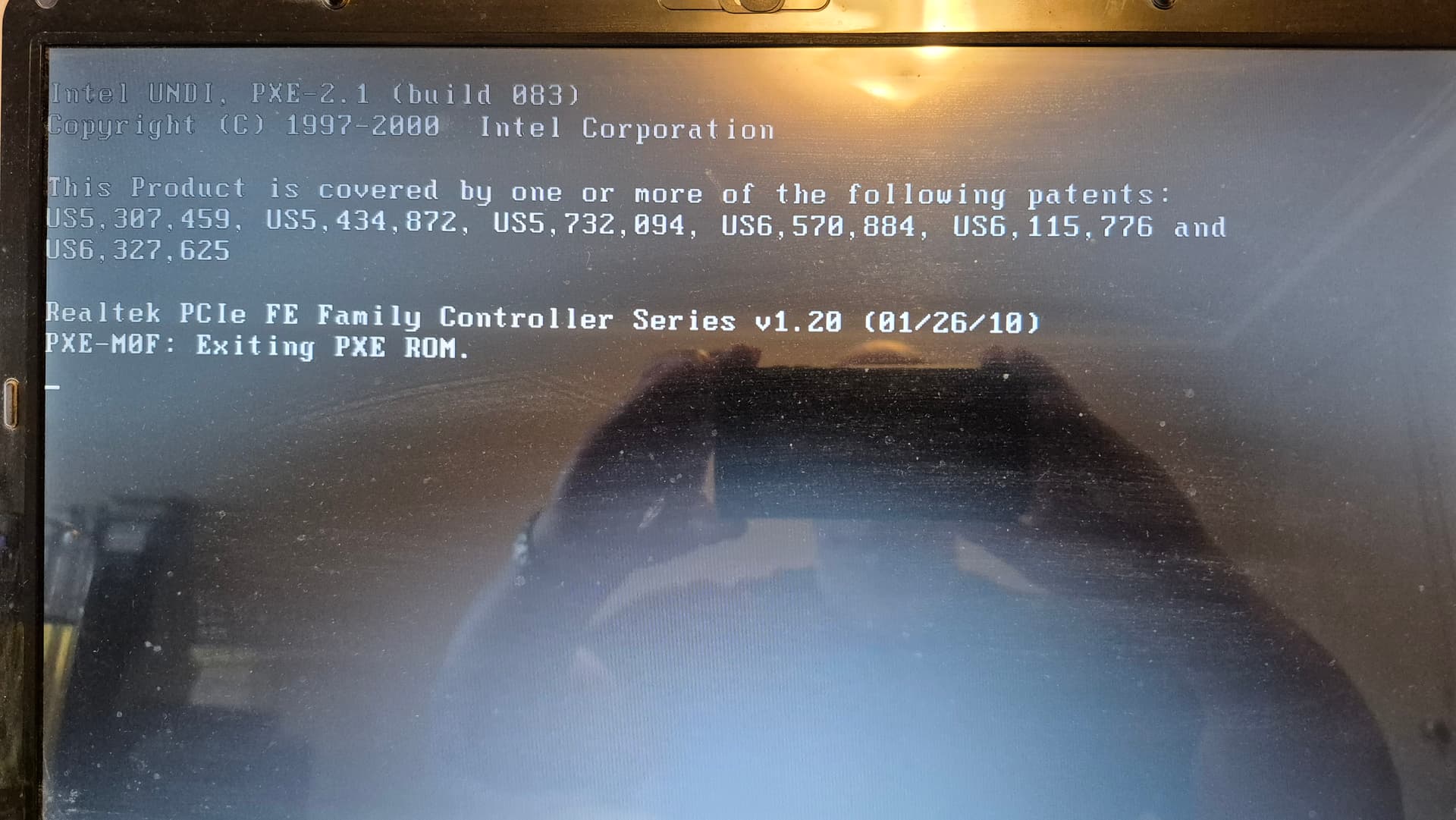
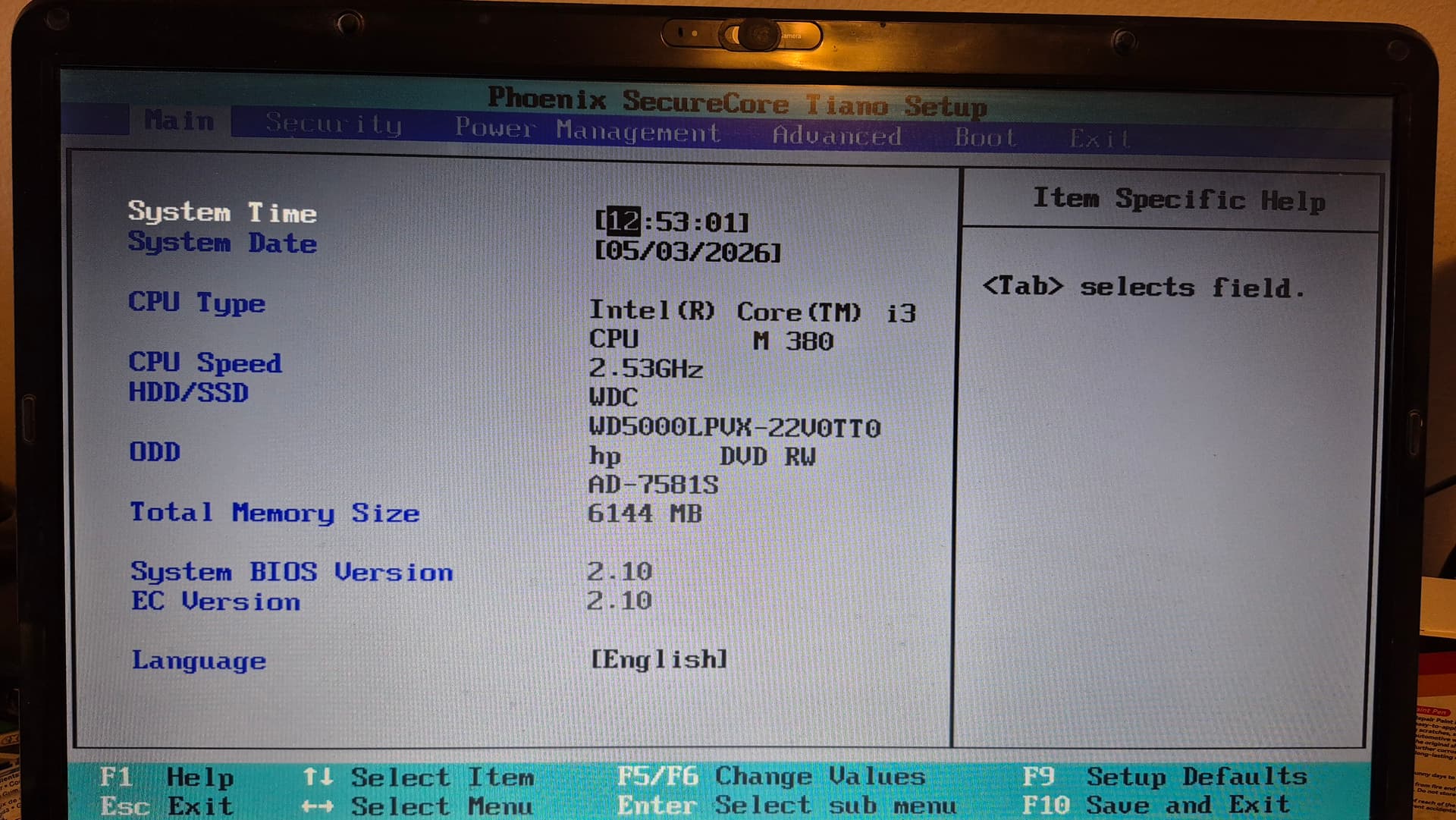
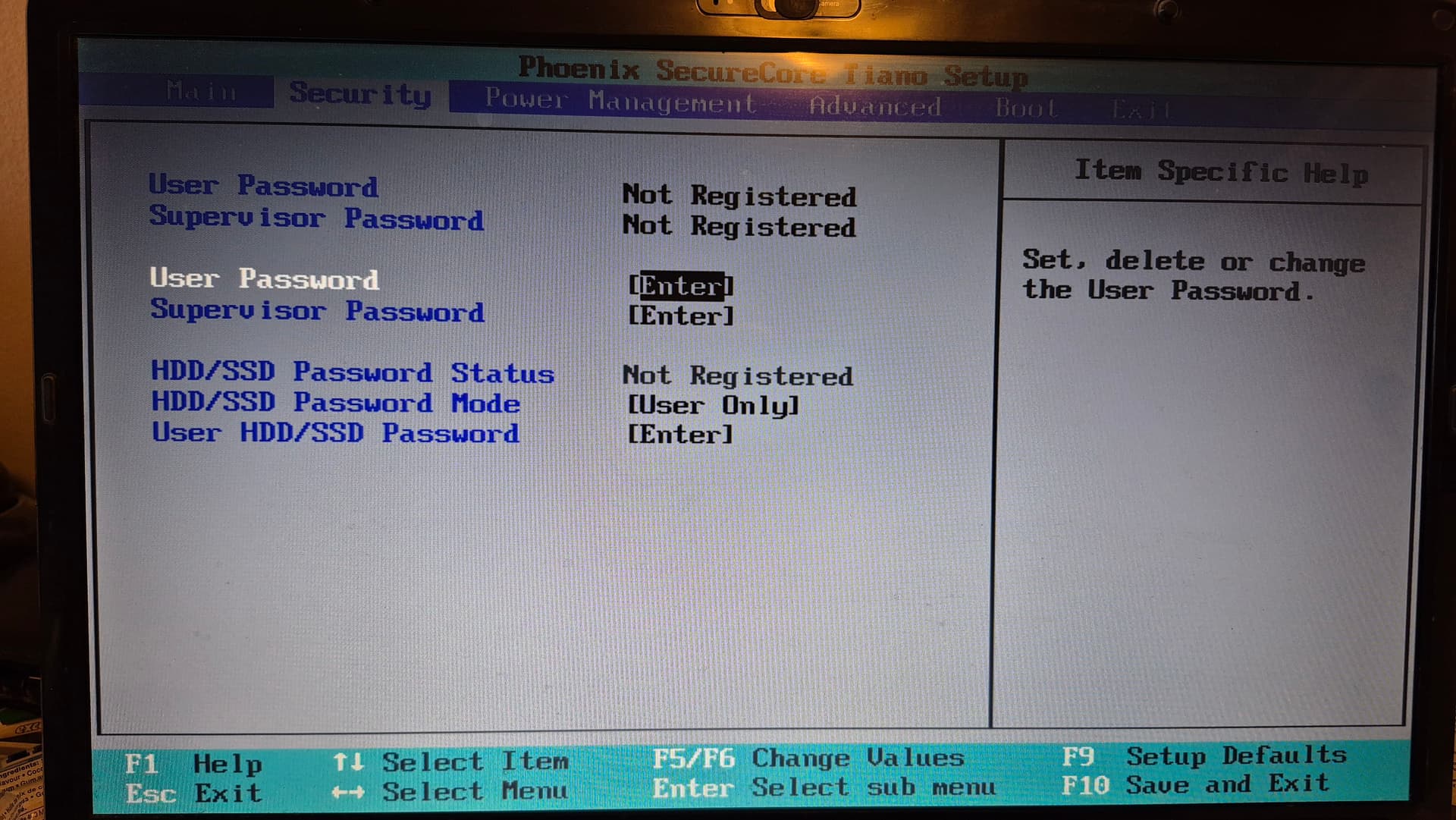
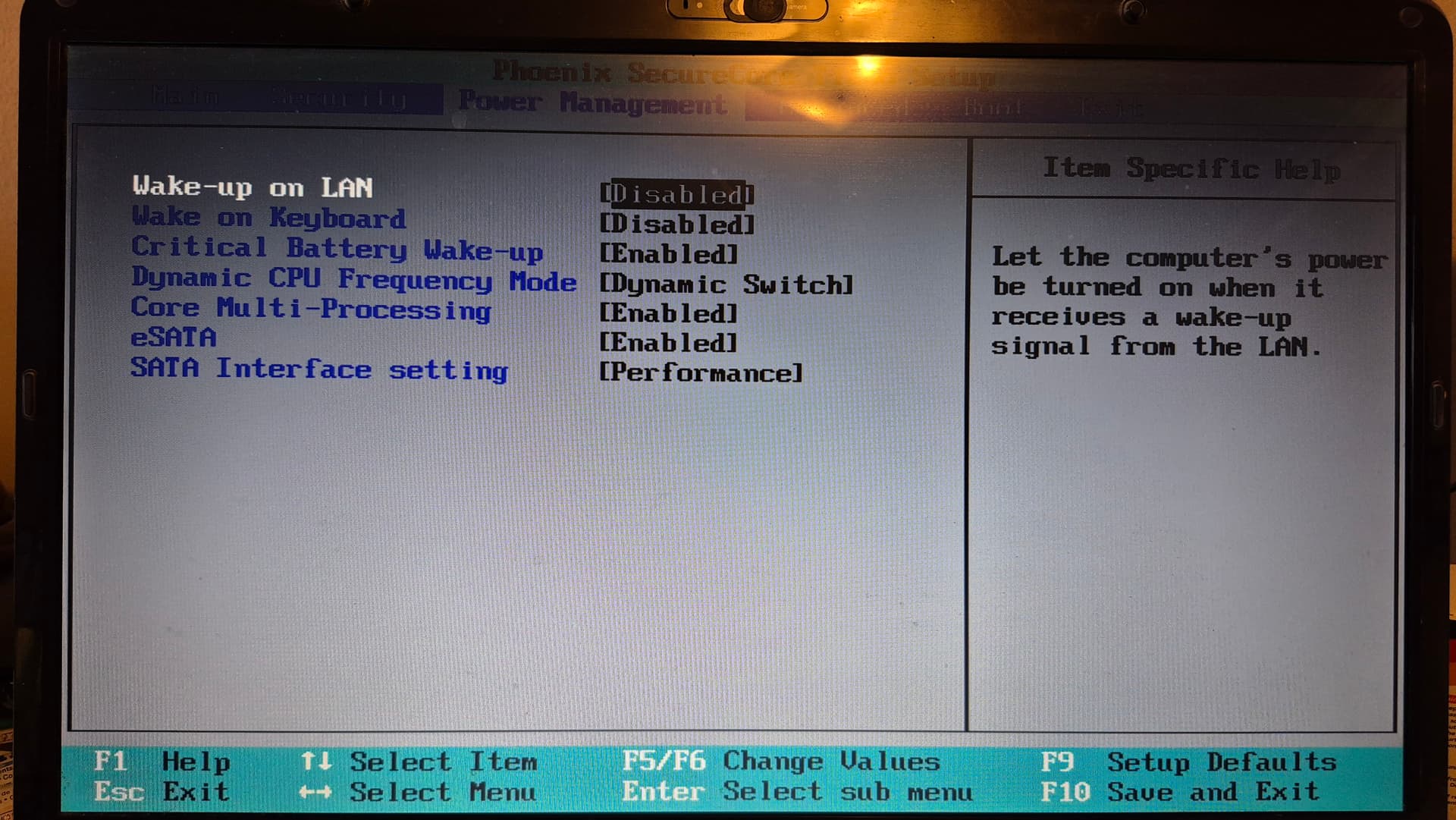
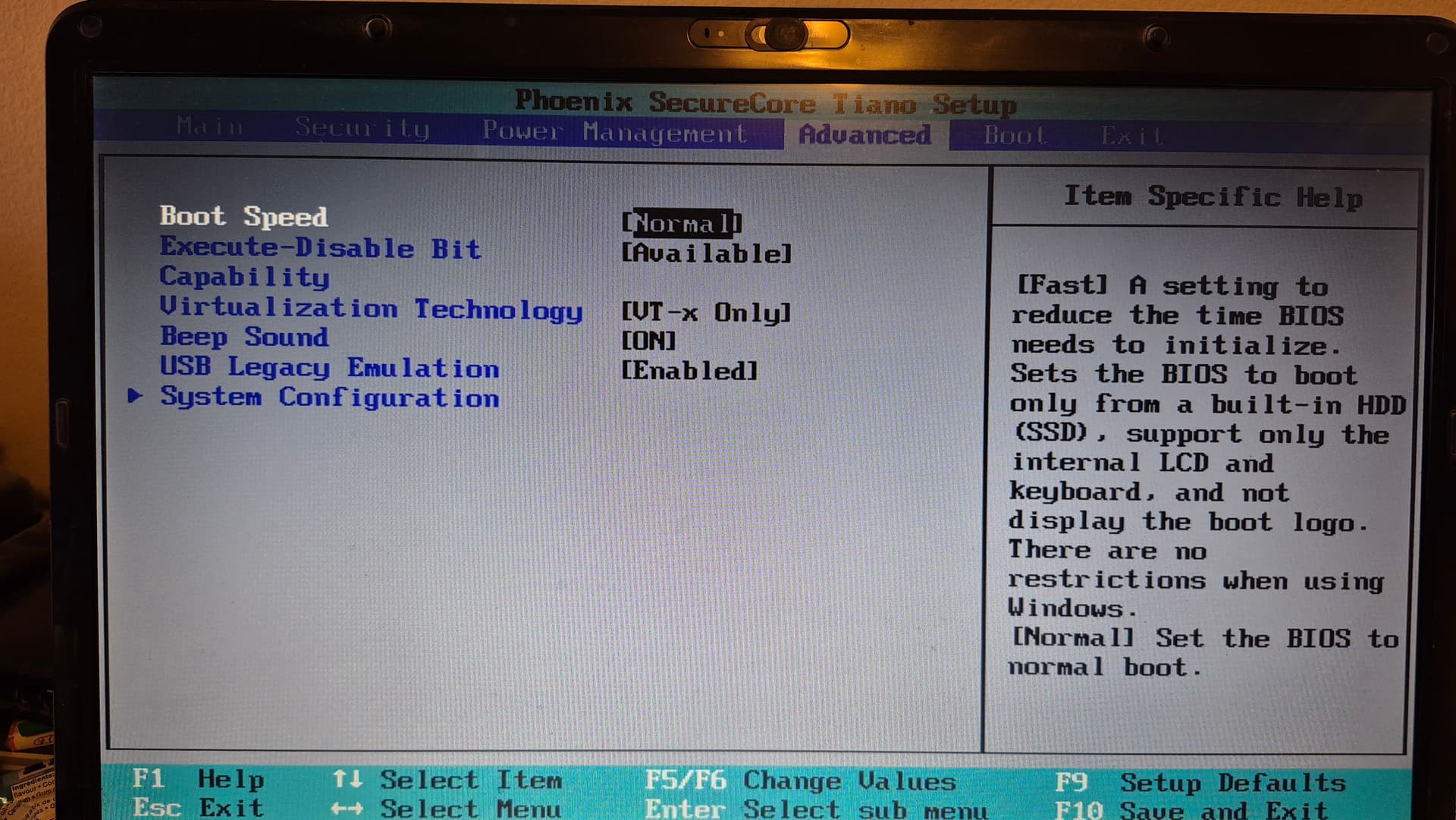
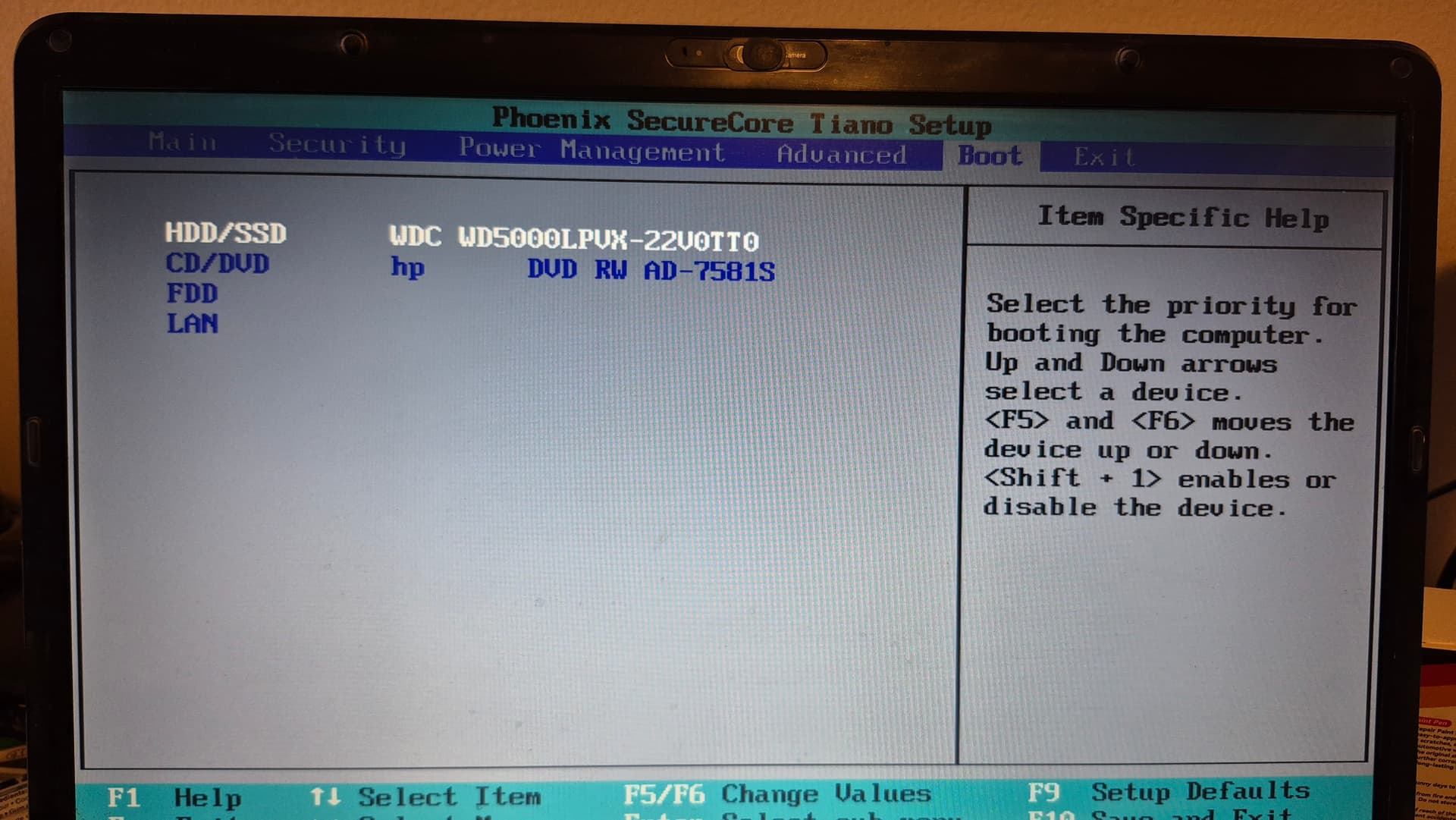
Hi, What are the options available in 'SATA Interface setting' and what happens when you expand the arrowhead next to 'System Configuration'? Do you know if there are any available updates for the BIOS?
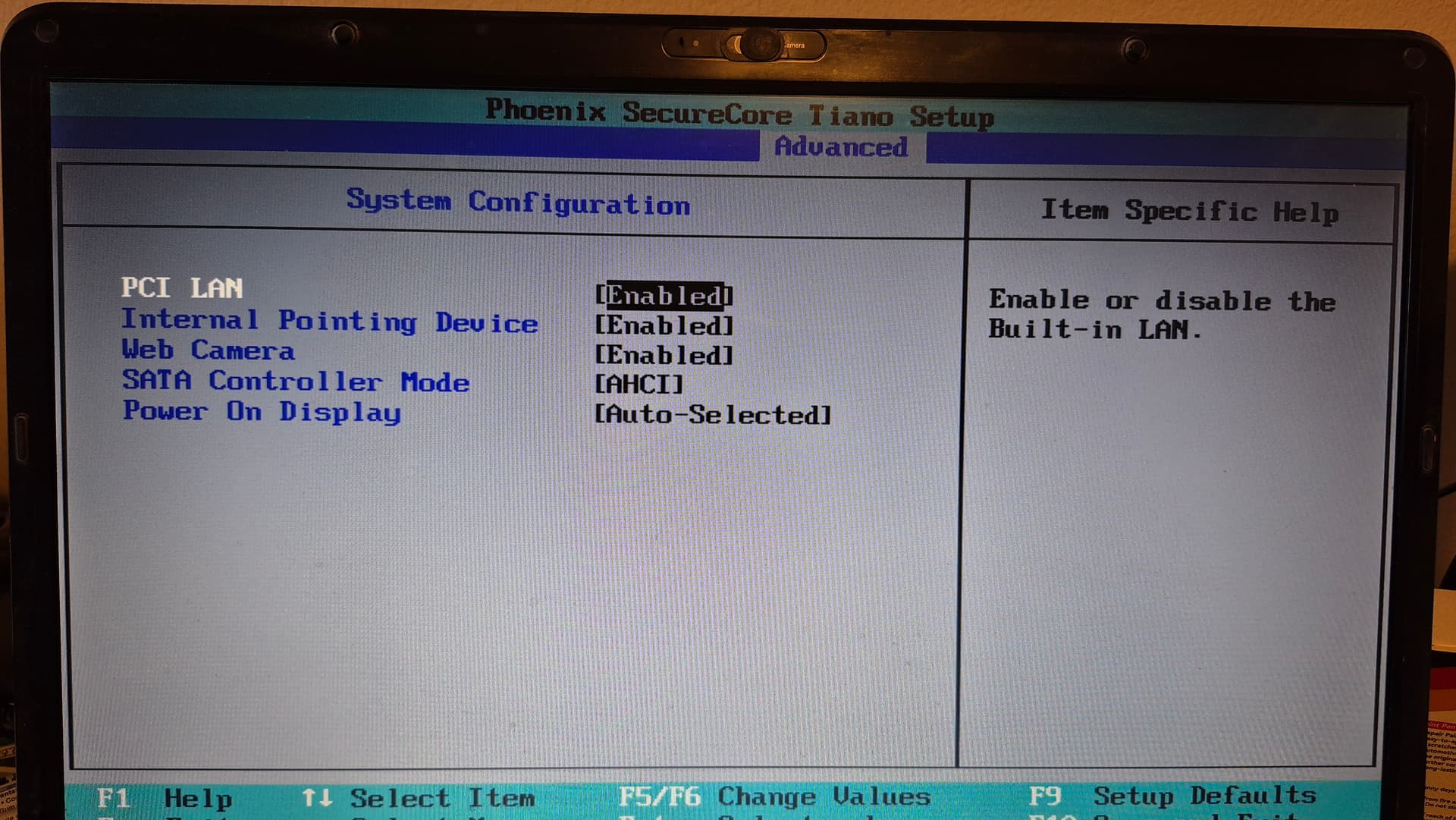
In SATA it shows AHCI and Compatibility
OK. Just noticed that you are using a notebook. Usually such notebooks have part of the RAM assigned for Graphics which might take you below a workable machine as Gnome is quite memory intensive. I would recommend that you try Zorin 18.1 Lite as an alternative. You get the same layouts, but it uses a lot less resources.
I thought Zorin Lite is what I installed, are you seeing from my other post a different version installed?
If you have a legacy BIOS (I saw no UEFI options), you need to select MBR as partition scheme when creating the boot stick (e.g. in Rufus).
Ok thanks, how do I do that?
Sorry, my bad. Should have checked your profile. 
No worries..
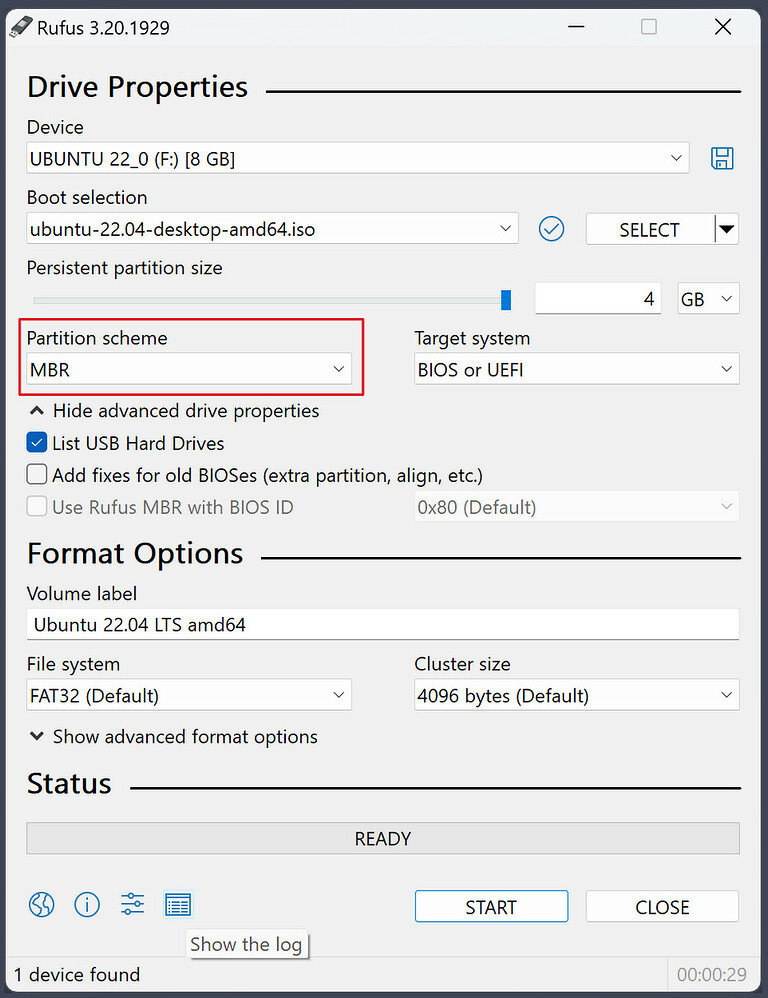
I don't have Rufus, so when I install it will I still need to keep Zorin on my flash drive or do you think it's still on my computer in the background?
Sorry, I don't understand the question.
Perhaps it is better to wait until someone with more experience who understands the output of Boot Repair can help.
I'm not entirely sure whether you have Legacy or UEFI. Which tool did you use to create the bootable USB drive? Rufus is a good tool if you have a Windows computer.