Hi there, I am trying out Zorin OS 18 before doing a full install, and none of the Alt keys are working. I use a Spanish keyboard of my laptop and I wonder if there is a way round as @ and # is something I use very often. I have tried to change the keyboard settings in Keyboard > Input Sources to Spanish (same as Windows) but this does not resolve the problem.
Additionally other keyboard settings are not working either like the backlit keyboard, and some of the commands of the upper row like screenshot. When I bring up the Keyboard Layout, it shows the correct keyboard, but unfortunately only the standard key work.
Welcome to the Forum!
There are several Keyboard Layouts for Spanish. Which one did You choose exactly?
I tried all of them, none picked up the Alt keys. I have tried this with English and went through all the settings available. There is no symbol output to control+alt. It is the only detail that is preventing me from installing Zorin. I wanted to go straight to the pro version so I am glad I have checked before installing.
Hmm ... what Keyboard do You have? Could You make a Picture of it?
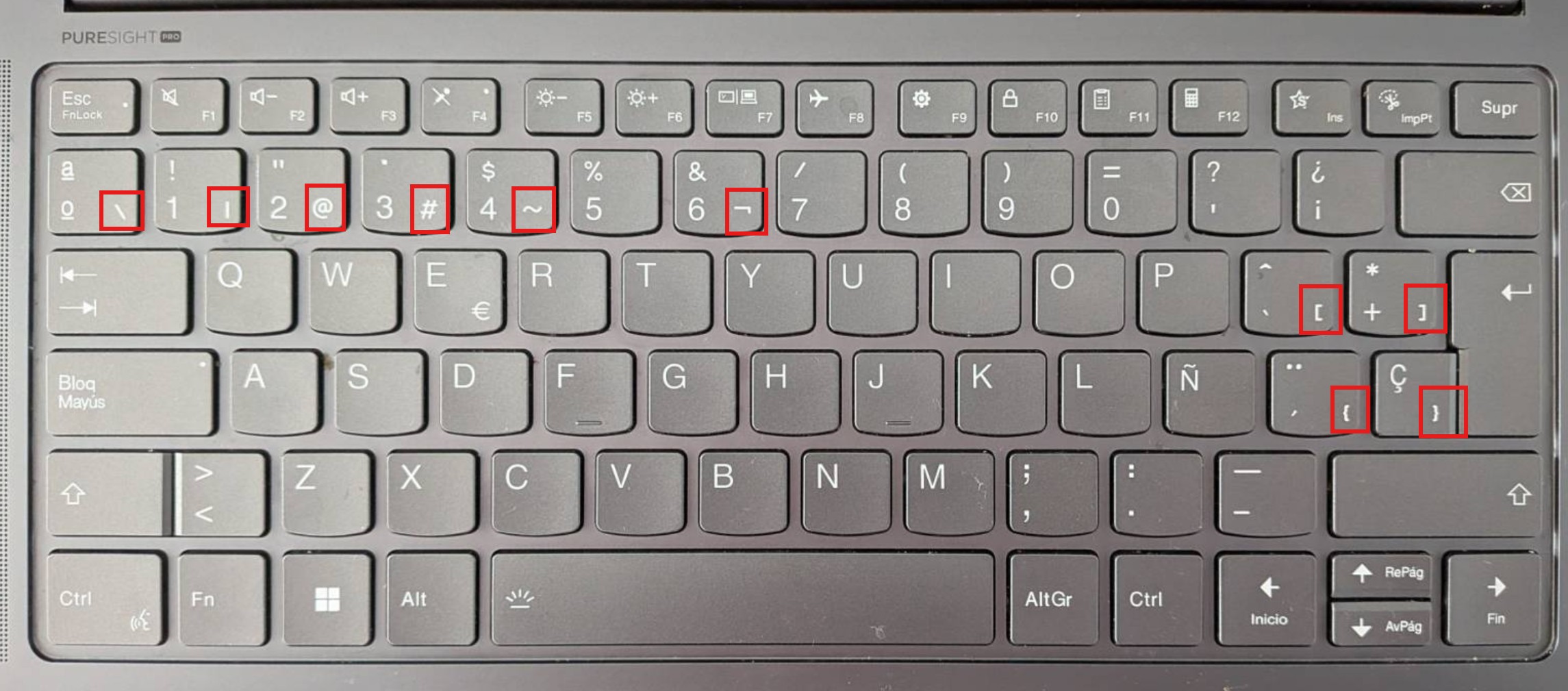
Here it is. Lenovo Yoga Pro 14" Keyboard
All the alt keys highlighted in red do not work
Hmm ... did You tried to get these with AltGr?
Than worked!!!! Thank you so much for all your help!
1 Like