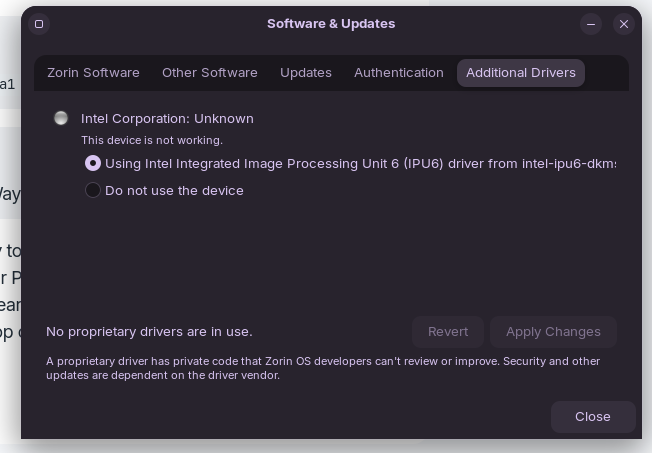
New Zorin user here and I know it's a Linux issue and not a Zorin specific one, but I am running Zorin OS on my Samsung Galaxy Book 360 Pro 3 (nice short name there) and there were a couple of things that did not work out of the box.
The first was the speakers, which I found a fix for.
The other, however, is the webcam, it's not a deal breaker, because I'd rather buy a cheap £20 external webcam than go back to Windows, just is less convenient than fixing the issue. So I am curious if anybody knows if is there was ever a fix found, because I've struggled to find fixes.
From what sleuthing I could do, it's an Intel IPU 6, which has driver support (Zorin even has them in the Software & Update tool). It sounds like doesn't work for Samsung Laptops and sounds like might be because of some sensors and it'd need Samsung specific drivers. But no workable solutions, so maybe this is a shot in the dark.
Could You post the Output of lsusb please? It shows hopefully Your Camera. Also: Did Your System run in wayland or X11? You can check that with the Command echo $XDG_SESSION_TYPE
Bus 001 Device 001: ID 1d6b:0002 Linux Foundation 2.0 root hub
Bus 002 Device 001: ID 1d6b:0003 Linux Foundation 3.0 root hub
Bus 003 Device 001: ID 1d6b:0002 Linux Foundation 2.0 root hub
Bus 003 Device 002: ID 1c7a:05a1 LighTuning Technology Inc. ETU905A80-E
Bus 003 Device 003: ID 8087:0033 Intel Corp. AX211 Bluetooth
Bus 004 Device 001: ID 1d6b:0003 Linux Foundation 3.0 root hub
The I would think it is worth a Try to switch to Xorg and see if it helps. To do that, go to the Login Screen. click on Your Profile so that the Password Field appears. When it is appeared, You should see a Gear Icon in the bottom right Corner. Click on it and choose the Option ''Zorin Desktop on Xorg'' and then log in.
That'll be the fingerprint reader. The webcam is an IPU6. Swapping to Xorg.
I think the hardware is being detected back Zorin lists me the open source drivers for it. And camera apps are able to detect I have an IPU6 but don't work. I tried with Xorg too.
And looking at the guide it looks like it's supposed to show the driver and then bind the sensor to a port, but doesn't for me. I can also see it's different sensor.
So it sounds like that it's fixed for the Pro 4 and newer. Maybe I'll drop a post to the GitHub to see if my sensor can be supported.
[edit]
Apparently it worked for this guy
I'll see what more digging I can do in the GitHub, maybe some other issue.
[edit 2] Nevermind, it looks like an update broke it for the same guy further down and looks like there are open issues for this sensor. So that probably answers my question.
Thats the kind of thing that makes me want to buy newer stuff that is better supported. Having said that, its not always the case though. Take Nvidia GPU's for example, the previous 2 generations are better supported, then the most recent generation. So I suppose, it just depends.
I hope that you can get your Samsung Probook 3 supported.
And funny you should say that, the Nvidia card in my desktop is 3 generations old and I think I read they were no longer going to support the driver for it.
I was thinking of replacing it with an AMD but am also waiting to see what the prices of the new Steam Machine/GabeCube will be, because I was also looking at replacing a couple of other parts, including the case because I want something smaller. So it might work out to my favour.
Great news about AMD systems, they are in the kernel and do not require proprietary drivers. Its important to note however, if you buy a brand new AMD machine from this year, you will likely have to install a later kernel however, as the newest machines, may not be in the current Zorin OS 18 kernel.
Why I approve of the kernel method, over that of GPU proprietary drivers is, usually kernel upgrades, go well on modern machines, as they were coded with them in mine anyways. With nvidia proprietary drivers, there are often regressions, which sometimes causes the driver updates to not work.
Also, AMD are doing pretty well these days, and unlike Jenson Wong, Lisa Sue is not overly obsessed with AI, with her hands in the pocket of government leaders.
Yeah, all reasons making me favour the idea of going AMD. I use their CPU's and found them to be great. I am legit impressed what AMD hardware is capable of in handhelds like my ROG Ally, which feels like punches above it's weight (especially with Linux).
And NVidia, especially nowadays, feels overpriced and yeah the AI obsession is something I want to stay away from - and is on of my long list of reasons for moving away from Windows too. Like, why does Notepad now have Copilot in it??? It's Notepad.