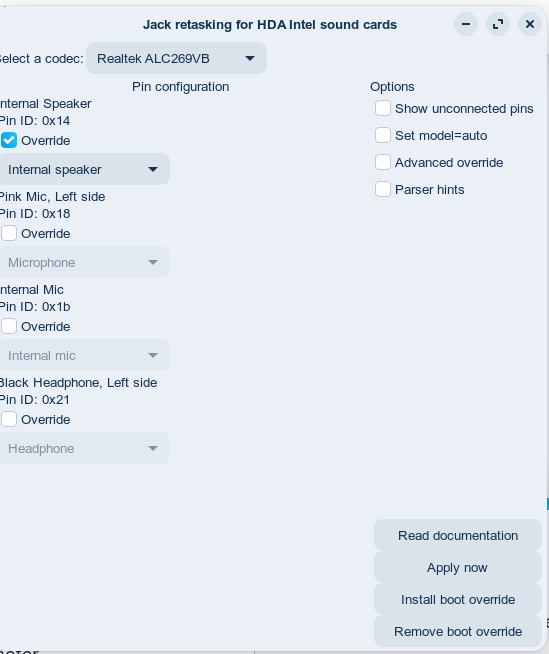
Technical infos
uname -a
6.17.0-23-generic #23~24.04.1-Ubuntu SMP PREEMPT_DYNAMIC Tue Apr 14 16:11:48 UTC 2 x86_64 x86_64 x86_64 GNU/Linux
inxi -A
Audio:
Device-1: Intel 7 Series/C216 Family High Definition Audio
driver: snd_hda_intel
API: ALSA v: k6.17.0-23-generic status: kernel-api
Server-1: PipeWire v: 1.0.5 status: active
play -l
**** Liste der Hardware-Geräte (PLAYBACK) ****
Karte 0: PCH [HDA Intel PCH], Gerät 0: ALC269VB Analog [ALC269VB Analog]
Sub-Geräte: 1/1
Sub-Gerät #0: subdevice #0
Karte 0: PCH [HDA Intel PCH], Gerät 3: HDMI 0 [HDMI 0]
Sub-Geräte: 1/1
Sub-Gerät #0: subdevice #0
pactl list sources
Quelle #51
Status: SUSPENDED
Name: alsa_output.pci-0000_00_1b.0.analog-stereo.monitor
Beschreibung: Monitor of Built-in Audio Analoges Stereo
Treiber: PipeWire
Abtastwert-Angabe: s32le 2ch 48000Hz
Kanalzuordnung: front-left,front-right
Besitzer-Modul: 4294967295
Stumm: nein
Lautstärke: front-left: 65536 / 100% / 0,00 dB, front-right: 65536 / 100% / 0,00 dB
Verteilung 0,00
Basis-Lautstärke: 65536 / 100% / 0,00 dB
Ziel-Monitor: alsa_output.pci-0000_00_1b.0.analog-stereo
Latenz: 0 usec, eingestellt 0 usec
Flags: HARDWARE DECIBEL_VOLUME LATENCY
Eigenschaften:
alsa.card = "0"
alsa.card_name = "HDA Intel PCH"
alsa.class = "generic"
alsa.components = "HDA:10ec0269,10250686,00100100 HDA:80862806,80860101,00100000"
alsa.device = "0"
alsa.driver_name = "snd_hda_intel"
alsa.id = "PCH"
alsa.long_card_name = "HDA Intel PCH at 0xd3610000 irq 32"
alsa.mixer_name = "Realtek ALC269VB"
alsa.name = "ALC269VB Analog"
alsa.resolution_bits = "16"
alsa.subclass = "generic-mix"
alsa.subdevice = "0"
alsa.subdevice_name = "subdevice #0"
api.alsa.card.longname = "HDA Intel PCH at 0xd3610000 irq 32"
api.alsa.card.name = "HDA Intel PCH"
api.alsa.path = "front:0"
api.alsa.pcm.card = "0"
api.alsa.pcm.stream = "playback"
audio.channels = "2"
audio.position = "FL,FR"
card.profile.device = "4"
device.api = "alsa"
device.class = "monitor"
device.id = "44"
device.profile.description = "Analoges Stereo"
device.profile.name = "analog-stereo"
device.routes = "2"
factory.name = "api.alsa.pcm.sink"
media.class = "Audio/Sink"
device.description = "Built-in Audio"
node.name = "alsa_output.pci-0000_00_1b.0.analog-stereo"
node.nick = "ALC269VB Analog"
node.pause-on-idle = "false"
object.path = "alsa:pcm:0:front:0:playback"
priority.driver = "1009"
priority.session = "1009"
factory.id = "18"
clock.quantum-limit = "8192"
client.id = "35"
node.driver = "true"
factory.mode = "merge"
audio.adapt.follower = ""
library.name = "audioconvert/libspa-audioconvert"
object.id = "51"
object.serial = "51"
api.acp.auto-port = "false"
api.acp.auto-profile = "false"
api.alsa.card = "0"
api.alsa.use-acp = "true"
api.dbus.ReserveDevice1 = "Audio0"
device.bus = "pci"
device.bus_path = "pci-0000:00:1b.0"
device.enum.api = "udev"
device.form_factor = "internal"
device.icon_name = "audio-card-analog-pci"
device.name = "alsa_card.pci-0000_00_1b.0"
device.nick = "HDA Intel PCH"
device.plugged.usec = "12893455"
device.product.id = "0x1e20"
device.product.name = "7 Series/C216 Chipset Family High Definition Audio Controller"
device.subsystem = "sound"
sysfs.path = "/devices/pci0000:00/0000:00:1b.0/sound/card0"
device.vendor.id = "0x8086"
device.vendor.name = "Intel Corporation"
device.string = "0"
Ports:
analog-output-speaker: Lautsprecher (Typ: Lautsprecher, Priorität: 10000, Verfügbarkeitsgruppe: Legacy 3, Verfügbarkeit unbekannt)
analog-output-headphones: Kopfhörer (Typ: Kopfhörer, Priorität: 9900, Verfügbarkeitsgruppe: Legacy 4, nicht verfügbar)
Aktiver Port: analog-output-speaker
Formate:
pcm
dmesg | grep alc269
[ 12.866723] snd_hda_codec_alc269 hdaudioC0D0: ALC269VB: picked fixup for PCI SSID 1025:0000
[ 12.868010] snd_hda_codec_alc269 hdaudioC0D0: autoconfig for ALC269VB: line_outs=1 (0x14/0x0/0x0/0x0/0x0) type:speaker
[ 12.868016] snd_hda_codec_alc269 hdaudioC0D0: speaker_outs=0 (0x0/0x0/0x0/0x0/0x0)
[ 12.868020] snd_hda_codec_alc269 hdaudioC0D0: hp_outs=1 (0x21/0x0/0x0/0x0/0x0)
[ 12.868023] snd_hda_codec_alc269 hdaudioC0D0: mono: mono_out=0x0
[ 12.868025] snd_hda_codec_alc269 hdaudioC0D0: inputs:
[ 12.868028] snd_hda_codec_alc269 hdaudioC0D0: Mic=0x18
[ 12.868031] snd_hda_codec_alc269 hdaudioC0D0: Internal Mic=0x1b
play -l
**** Liste der Hardware-Geräte (PLAYBACK) ****
Karte 0: PCH [HDA Intel PCH], Gerät 0: ALC269VB Analog [ALC269VB Analog]
Sub-Geräte: 1/1
Sub-Gerät #0: subdevice #0
Karte 0: PCH [HDA Intel PCH], Gerät 3: HDMI 0 [HDMI 0]
Sub-Geräte: 1/1
Sub-Gerät #0: subdevice #0
No audio output after reactivate
Test in VLC / Audacity and other - playing without sound
pactl list short sinks | grep SUSPENDED | awk '{print $1}' | xargs -I {} pactl suspend-sink {} false
- no change