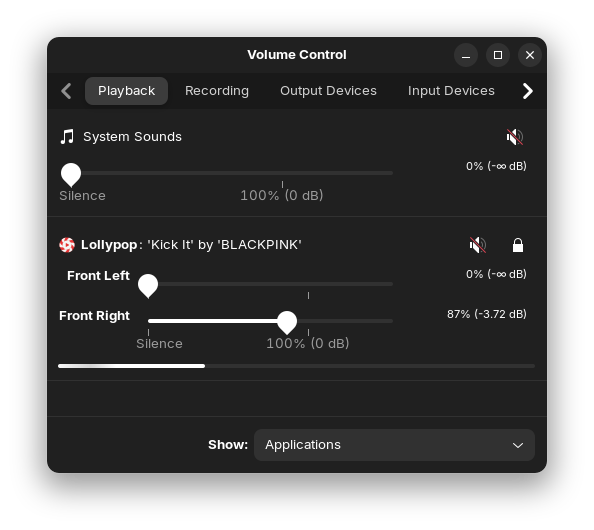
Hello guys,
How can I set the audio to play only through my right ear and make the setting permanent?
Ubuntu 22.04 Headphone Audio
To set audio in Ubuntu 22.04 to play only through the right ear of headphones and make it permanent, you can use PulseAudio to remap the audio output. Here's a step-by-step guide:
- Install PulseAudio Volume Control (pavucontrol) : Open a terminal and run the following command:
sudo apt-get install pavucontrol
- Launch pavucontrol : You can launch it from the application menu or by running the following command in the terminal:
pavucontrol
- Configure the Output Device :
- In the "Output Devices" tab, select the appropriate output device (e.g., "Analog Output" or "Headphones").
- Click on the "Configuration" tab and select "Analog Stereo Duplex" as the profile. This allows you to play audio from both the speakers and the headphones simultaneously.2
- Set the Default Output Device :
- Go to the "Playback" tab.
- Select the application you want to play audio from.
- Under "Output," select "Simultaneous Output to Built-in Audio" to direct the audio to both the speakers and the headphones.2
- Remap the Audio Output to the Right Ear :
- Use the
pacmdcommand to load a module that remaps the audio output to the right channel. Replacealsa_output.pci-0000_00_1e.2.analog-stereowith the name of your audio output device, which you can find by running:
pacmd list-sinks | grep name:
- Run the following command to remap the audio output to the right channel:
pacmd load-module module-remap-sink sink_name=right-only master=alsa_output.pci-0000_00_1e.2.analog-stereo channels=2 channel_map=right,right
- Make the Configuration Permanent :
- To make the configuration permanent, add the above command to the end of the
~/.asoundrcfile. If the file does not exist, create it. - Open the file in a text editor:
nano ~/.asoundrc
- Add the following line to the file:
load-module module-remap-sink sink_name=right-only master=alsa_output.pci-0000_00_1e.2.analog-stereo channels=2 channel_map=right,right
- Save the file and exit the text editor.
- Set the Default Sink :
- To set the remapped sink as the default, run the following command:
pacmd set-default-sink right-only
- To make this change permanent, add the command to the
~/.asoundrcfile as well.
By following these steps, you can set audio in Ubuntu 22.04 to play only through the right ear of headphones and make the configuration permanent. If you encounter any issues, you can refer to the PulseAudio documentation or seek help from the Ubuntu community forums.2
AI-generated answer. Please verify critical facts.
askubuntu.com
22.04 - Force audio through internal speaker (and headphones) - Ask Ubuntu
superuser.com
linux - Mono sound output in Ubuntu? - Super User
askubuntu.com
sound - One side of headset / headphone does not work in Ubuntu 18.04.1 - Ask Ubuntu
superuser.com
linux - Ubuntu - Sounds from both headphones and speakers - Super User
help.ubuntu.com
Use different speakers or headphones
linux.org
Ubuntu 22.04 audio issue | Linux.org
1 Like
What Options do You have in the Output Tab and the Configuration Tab?
1 Like
Following the AI's instructions, I proceeded but, as usual, messed things up. After saving the settings, my sound completely cut off. I deleted all the settings and restarted the system, but now the sound only comes from my right ear. Either my left ear is completely deaf  , or the settings finally worked correctly. Anyway, thanks to you all, friends
1 Like
This topic was automatically closed 90 days after the last reply. New replies are no longer allowed.