I did a clean install of Zorin 18 after using backup to backup my files and then went to recover files using backup again after install of Zorin 18. The screen immediately froze and had to reboot! Any help on getting my files back in Zorin 18 would be appreciated. This should have been a simple process!
1 Like
Welcome to the Forum!
Do you get any Error Messages or does it only freeze and zhen not responsible anymore?
Are Secure Boot and Fast Boot in BIOS disabled? Is Your BIOS in UEFI or Legacy Mode? What Tool did You take to create the bootable USB Stick with Zorin on it? Does Your System run in Wayland or Xorg?
No error messages. Just completely freezes and no response to any key strokes or mouse clicks. Only way to get out is to reboot. Is this normal? I am using the backup from 17.3 and thought it should restore in 18 to get my docs etc. Is there a way to do this?
Are Secure Boot and Fast Boot in BIOS disabled? Not sure --Is Your BIOS in UEFI or Legacy Mode? It is in whatever mode a normal clean install would put it?? What Tool did You take to create the bootable USB Stick with Zorin on it? I used Balena etcher to create the bootable USB as per the standard instructions. Does Your System run in Wayland or Xorg? ??????????? Don't know what they are so I would guess not.
If you have a Dualboot with Windows also disable fast startup in the energy settings of Windows.
To switch to Xorg logout and at login click on your username, then a cog wheal appears at the bottom right corner. There select "Zorin Desktop on Xorg".
What are your computer specs (brand, model, CPU, RAM, graphics...)?
Which data did you try to restore? The entire /home directory or only personal datas?
You should find these Options in Your BIOS.
That You should also find in Your BIOS.
If you have the Pssibility to use a Windows Machine, I would recommend to use Rufus. Depending if Your BIOS is in UEFI or Legacy Mode, choose in Rufus on the ''Partition Sheme'' Option GPT for UEFI or MBR for Legacy.
When You go to Settings>System>About>Systemdetails, you should get an Overview with Your System Setup. And there You can find it:
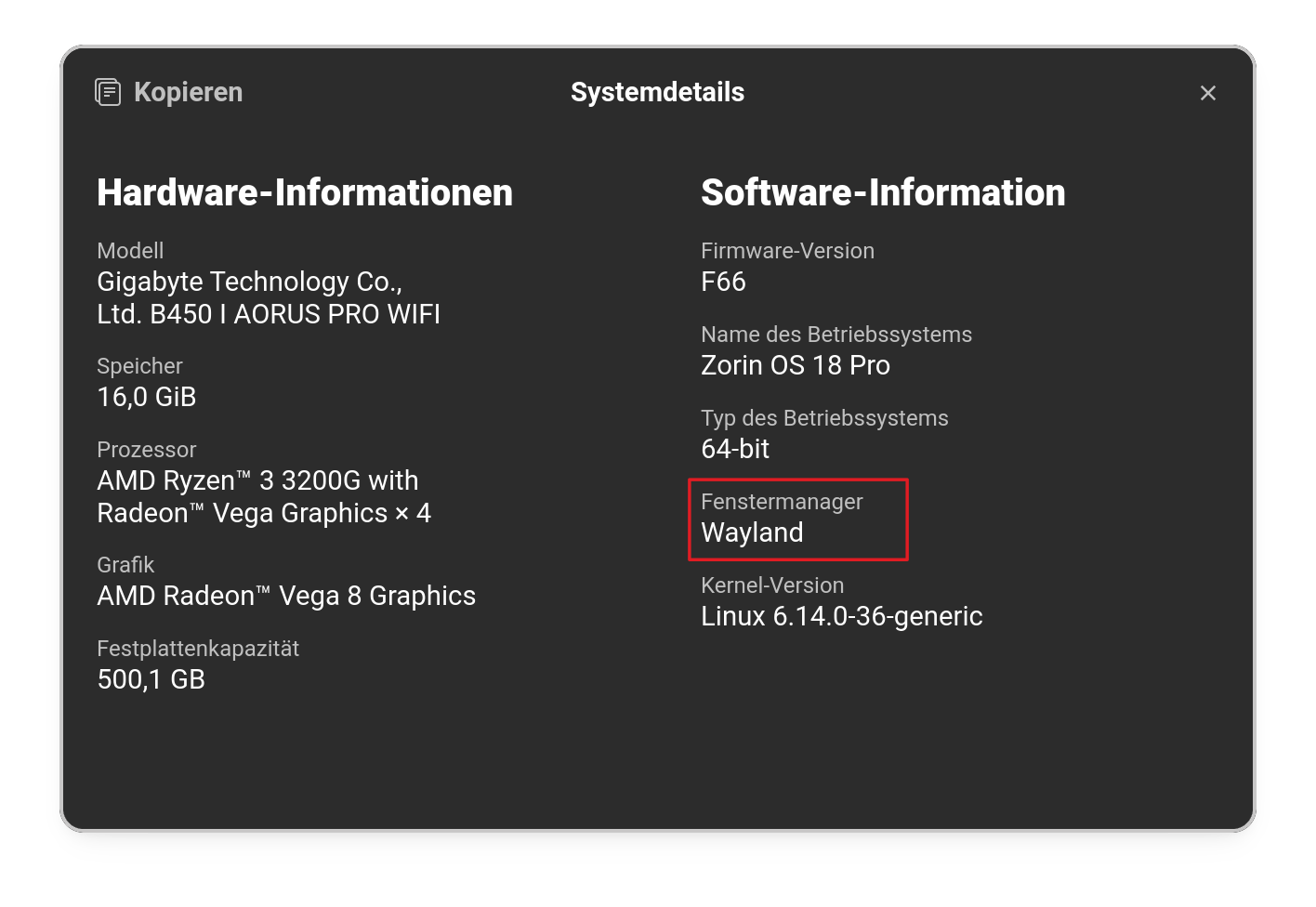
If there should stand Wayland, try it with switching to Xorg like @Forpli already explained.
System Details Report
Report details
- Date generated: 2025-11-23 09:27:53
Hardware Information:
- Hardware Model: TOSHIBA Satellite C55D-A
- Memory: 16.0 GiB
- Processor: AMD A4-5000 APU with Radeon™ HD Graphics × 4
- Graphics: KABINI
- Disk Capacity: 240.1 GB
Software Information:
- Firmware Version: 1.80
- OS Name: Zorin OS 18 Core
- OS Build: (null)
- OS Type: 64-bit
- Windowing System: X11
- Kernel Version: Linux 6.14.0-36-generic
No dual boot. I did a format and clean install of Zorin 18. Prior i did have a dual boot of Windows with Zorin 17.3 but wanted to get rid of Windows as I didn't use it at all on this machine. Thus the format/ install of Zorin 18. I had done a backup of files prior to install on a separate USB drive and merely wanted to restore my files on the new install. Should have been a simple thing!
OK so I solved the freezes. Had to completely remove Brave as that was freezing every time I tried to do backup. But now the backups I did in Zorin17.3 are not being found when searched for in the freshly installed Zorin 18. I am using the backup tool that was installed with 18 and it is the same as the one in 17. Why is this not working???
But the Device with the BackUp on it is detected, yes?
No I still cannot restore my 17.3 backups to the 18 version. It does not recognize it. So I thought that if I did a backup in 18 then maybe I could recover thew older versions from 17 but no joy. Only sees the new backup just made without ANY of my old files from 17! I am about out of ideas. Would migrating back to 17 work to get my files back??
BTW i tried the upgrade to 18 and that did not work for me. That is why I had to go with the clean install of 18.
Did you wipe out the 17.3 backup on some external device when you created the new one from version 18? Also, I assume you stored your 17.3 backup on an external device (like a USB drive or external SSD). Please tell me you did not create the backup on your harddrive/ssd that you then wiped out when you installed Zorin 18!
That is a good Question ... the Point here is: Why is the Drive not detected? If You have bad Luck, it couldn't be detected on Zorin 17, too.
Okay, let's try this: Plug in the Drive with You BackUp and open the Program called ''Disks'' and check if it is listed there. If yes, make a Screenshot please and show it here.
To brianr0922------No I did the backups to a separate USB connected drive and I can still see them in Files under Sate1 with a path of /media/terry/backup Sate1. The Full, incremental and new backups are all still there but do not show when I open Backup in Zorin 18. Only the newer backups that I made in Zorin 18 show as available. If I copy the last full backup to Documents on the current file system in 18 Backup still does not see it.
Yes it is seen as a 256 GB---195 gb free fat32 on/dev/sdb3 with UUID 5D74-4658 with partition type Basic Data and it is a SATA SSD disk. itis in partition 1 It is mounted at /media/terry/backup Sate1
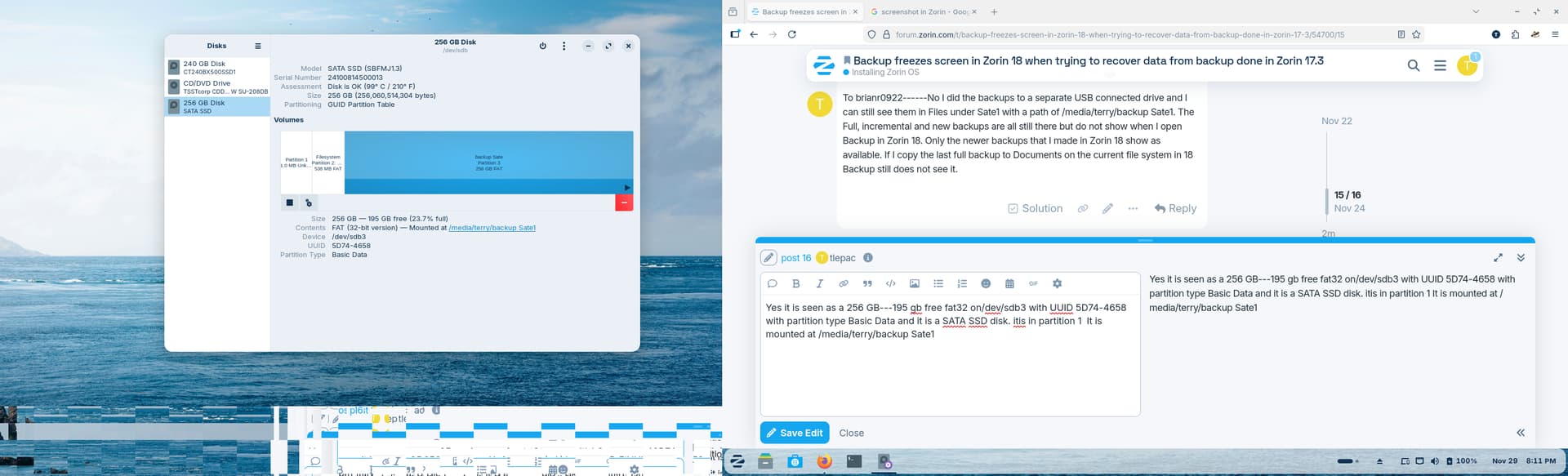
Has the mount point changed? That can cause the files to not be recognized, if the path that they were saved to is not the same as the path they are now being read from.
In Backups > Storage Location > Folder, can you point it to the backup path location?
I seem to remember having a failure to restore a deja-dup backup from one version of deja-dup to a newer one that came with newer ZorinOS. Luckily I had the data files copied elsewhere, but lost other content of /home. That was some years ago maybe during Z12 to Z15 transition from scratch. I was miffed at the time, expecting deja-dup to work backwards compatible with backups. Zab.
This topic was automatically closed 90 days after the last reply. New replies are no longer allowed.