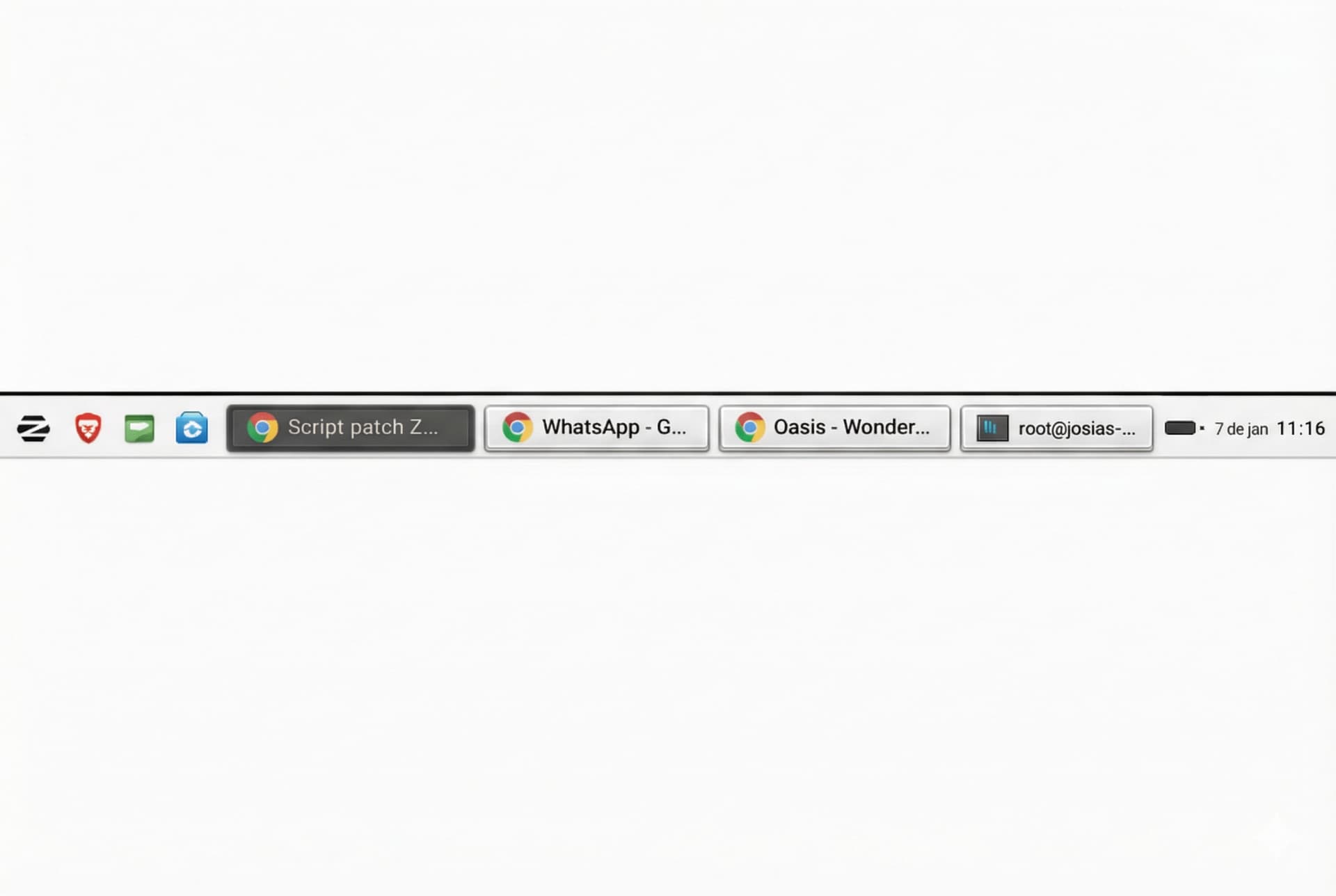
In Zorin's taskbar, on larger monitors (4k), the active window indicator is poor. It's an almost imperceptible line below the window title. My suggestion is a different approach, separating the windows and giving them a standard size (windows with small titles appear smaller and harder to locate). I've already done this configuration (standard-sized windows in the taskbar), but I haven't been able to modify the selection. I would like to suggest this modification to the project, as it requires less visual processing time to locate windows and clearly highlight the selected window. Attached is a visual prototype of how it could look.
Do You use the Standard Zorin Theme?
Yes. Zorin Core - Standard Theme.
And what Desktop Layout do You use?
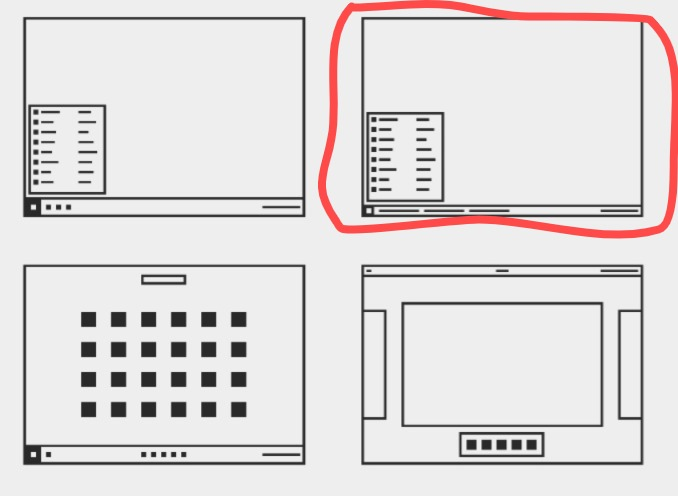
As a Workaround, You could try it with the Dash To Panel Gnome Extension. There You can set up where Indicatore Line is positioned.
I tried, but when installing the GNOME taskbar extension, the zorin-taskbar package breaks: the zorin taskbar disappears and the GNOME taskbar appears at the top. Then I need to go to extensions, disable and remove it, and restart everything. Only then does the zorin taskbar return.
How did You installed it? To make it easy, You can use the Extension Manager. You can find it in Gnome Software:

It is a Program for manage and install Gnome Extensions. When it is installed, open it and go to the ''Browse'' Tab. There search for Dashh To Panel and install it. Of Course, then You have to disable the Zorin Taskbar.
I hope that nothing has been changed in Zorin or the gnome extension dash to panel. When I tried yesterday to download and install it, it was not possible in the live session to turn it on with layout 2 in Zorin appearance and to turn the Zorin taskbar off. Before it always worked but I've never tested the extension with layout 2.
Zorin's taskbar is better than Gnome's. Disabling it doesn't make sense. That's why I suggested this improvement.
You would turn on dash-to-panel after the login, it has nearly the same look as Zorin taskbar but offers more settings, especially for the running appindicators. E.g. you can setup the active window in the taskbar custom colored.
I was not able to use the dash-to-panel extension with layout 2 (which shows the names of the apps) in the live session, so would have to test if it works for you. But with layout 1 it is no problem.
It would really be nice if Zorin taskbar would also offer the options to set a color for the running apps or to make a better visible frame as you made.
Here you can see it. That is not Zorin taskbar but Dash-to-panel and I set red as custom background color for the active window (I have set high contrast so that both windows can be read and the inactive window is not darkened.) You can also make it floating and having rounded corners like Zorin taskbar.
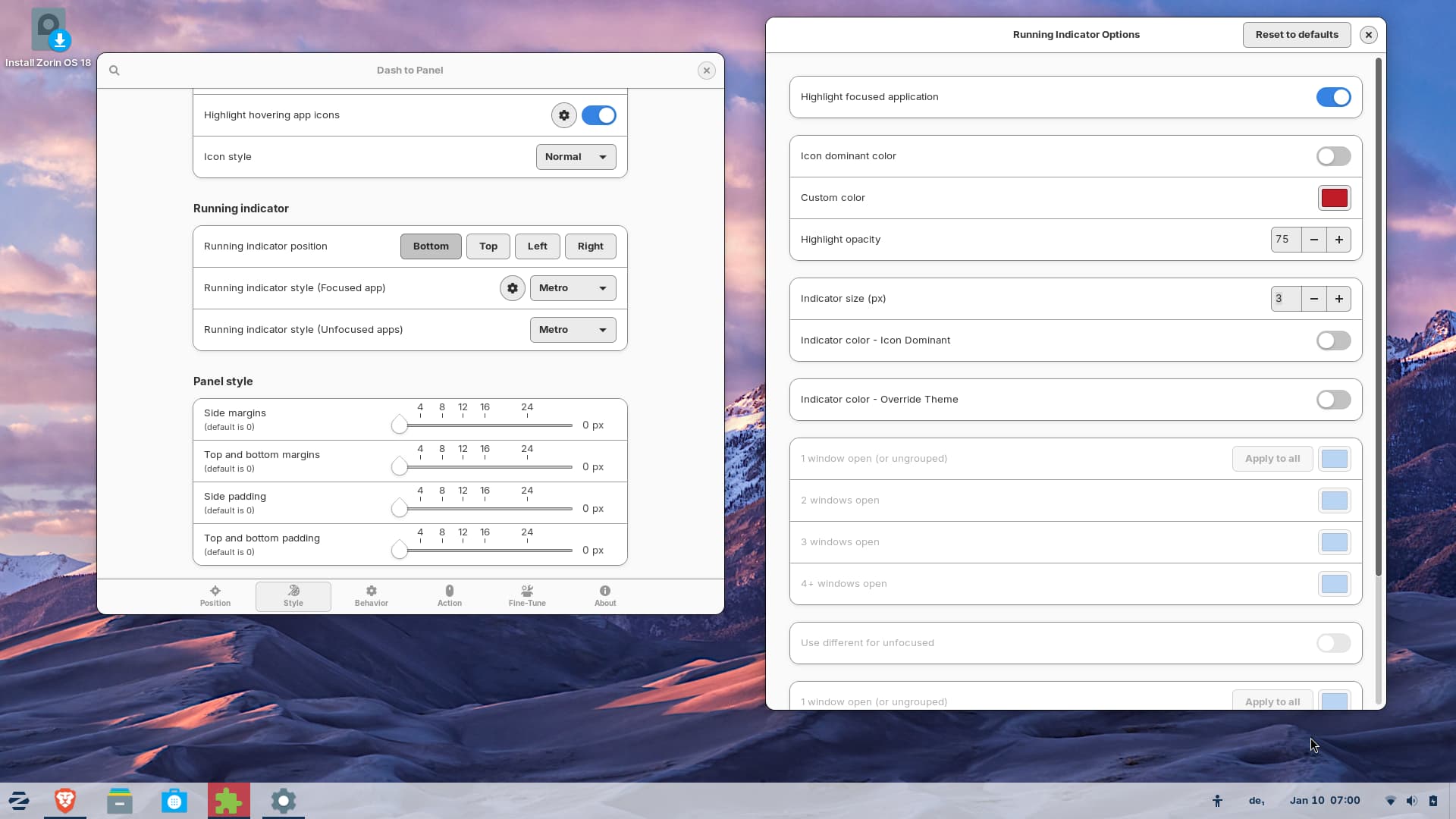
To me it seems as the gnome extension "Zorin taskbar" is needed for the layout 2 and can't be replaced with Dash-to-panel as it is possible with layout 1.
I don't quite understand. gnome doesn't have a Taskbar. It only has the Top Bar - and that is not customizable without Gnome Extensions.
And when You mean Dash To Panel: This is like the Zorin Taskbar but with more Customization Options.
So, from your perspective, the user needs to install an extension to be able to make a simple change to the selection indicator color in the taskbar, because the current one is quite bad (just one line below the name). The same average user who doesn't know how to install extensions and has no familiarity with technology needs to install an extension and make extra configurations just to make it easier to use.
That's not how users think. Understand that, from the user's perspective, simple and clear options make all the difference in usability. That's called maturity. Now, if the Zorin project believes that, to change a simple color in the taskbar, the user needs to do all that, well, it will still take a long time to reach the potential audience. Listening to the user community is good.
You have to understand here something: The default Gnome Desktop is at the End empty. You don't have a Taskbar, Startmenu, Desktop Icons and all the other Stuff. And that is because gnome thinks that this is the Way to use the Desktop - for whatever Reason.
So, on the Gnome Desktop, You have to use Extensions to get basic Stuff. That belongs together - except the Vanilla Gnome Desktop is enough for You. So, and Zorin now adds Extensions to make the User Experience better. And they have their Vision of it. And the Extensions work in a Way so that it fits to that Concept.
You can - like You here did - give Feedback for it and see if the Devs can implement that. But of Course that needs Time. And my Thing is more like a Workaround, not a Solution. It was only a Suggestion what You could do instead.
Does Dash-to-panel work on your system with Zorin appearance layout no. 2?
Edit: Finally, after many trials I found a way to get it to work with layout no.1 because with layout no.2 it didn't work for me in live session.
You can make such a look with Dash-to-panel extension (disable Zorin taskbar). Choose the normal, first layout in Zorin appearance and in the gnome extension Dash-to-panel enable "Ungroup applications" at tab "Behaviour"

Here you can see the settings I made in Dash-to-panel:
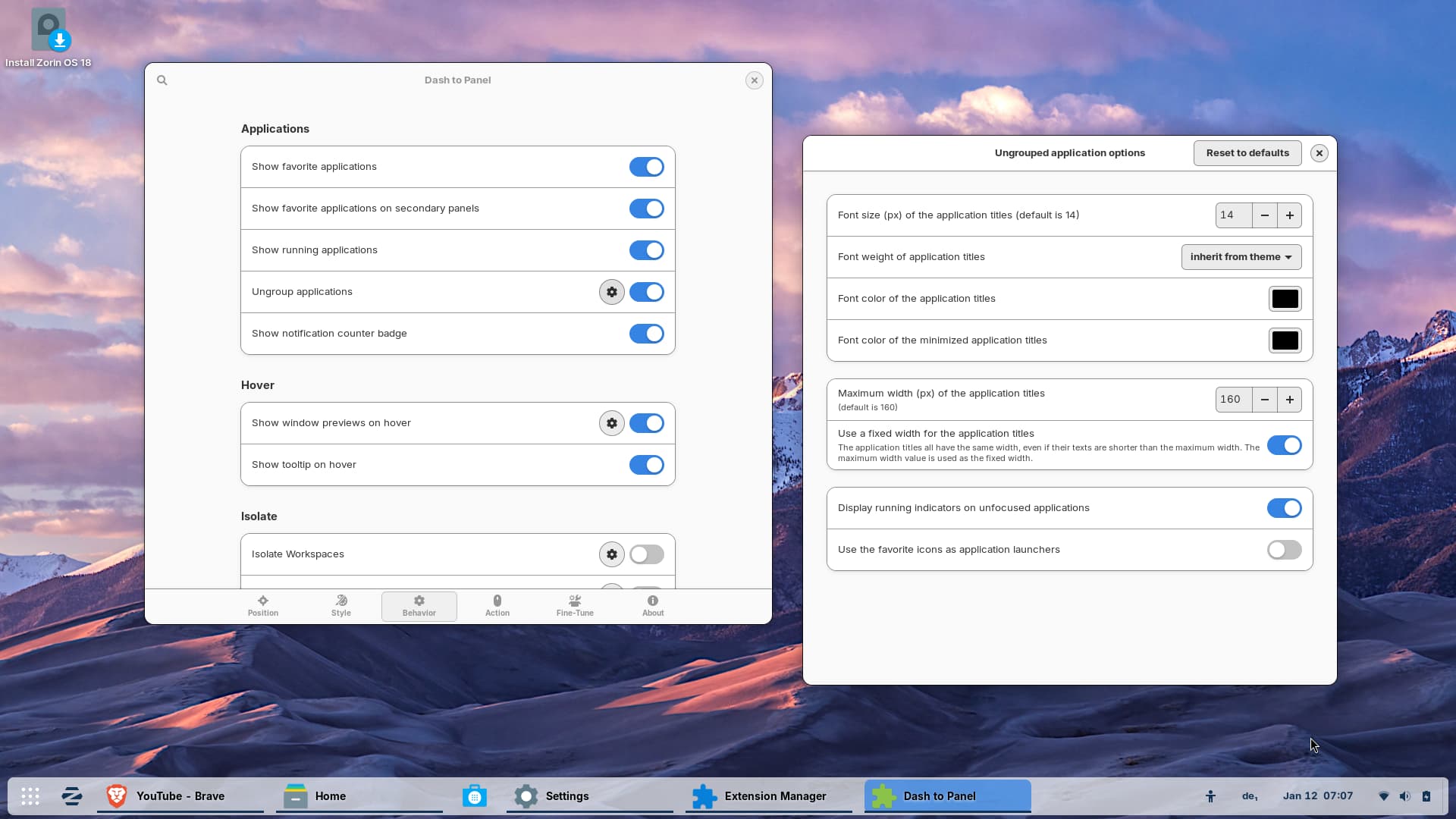
You can also set up the normal look of Zorin taskbar (at tab position click on visible to turn on/off "show applications button" and "activities button", and to change their position use the arrows:

If you like different colors for the focused applications you can enable "icon dominant color" instead of a custom color.
1 Like
This topic was automatically closed 90 days after the last reply. New replies are no longer allowed.