Hi. I'm experiencing randomly black screen issue after logging in. The problem is present on five PCs (3 Intel, 1 AMD, 1 NVIDIA, built from 2014 to 2018, freshly installed) I thought my installation key might be defective, so I bought another one. I'm still experiencing the same problem, what could I have done wrong ?
Thank you for suggestions.
Welcome to the Forum!
So, You have the Login Screen, type in Your Password, but then it goes black, yes?
- Are Secure Boot and Fast Boot in BIOS disabled?
- If Windows is still installed: Is Fast Start-Up in Windows disabled?
- Does the Systems run in Wayland or X11? You can check that on the Login Screen. click on Your Profile so that the Password Field appears. When it is appeared, You should see a Gear Icon in the bottom right Corner. Click on it. You should see 2 Option: Zorin Desktop and Zorin Desktop on Xorg. Try it with switching between both.
- Is Your BIOS in UEFI or Legacy Mode?
- What Tool did You choose the create the bootable USB Stick?
- Could You give more Details about the Hardware Specs?
Yes, sometimes the screen goes black just after typing pw on the five PCs - all on single boot, no Windows. BIOS settings are in legacy mode, fast boot & secure boot are disabled, USB created with Etcher. I tried both Wayland and Xorg. Here are the PCs specs :
· two MSI MB + I7-4770K / iGPU / ram 16Gb
· Gigabyte MB + Ryzen 7 3800X / GTX1070Ti (535 drivers) / ram 32Gb
· Asus UX410 I7-8500U / iGPU - ram 16Gb
· Lenovo 110 AMD A6-7310 / iGPU - ram 8Gb
[edit] If I unplug & replug the video cable, the image comes back (only towers, obviously not the other two which are laptops) so boring to do this 1-2 times per week, the other solution being to unplug & replug the pc mains cable...
Is video cable plugged into motherboard or dedicated graphics. I read a post yesterday where motherboard connection was problematic but OK if using dedicated graphics connector. Worth a try.
Hi and welcome.
You stated that you "bought another key" - there is no purchase with Zorin Core. Did you buy ZorinOS from a third party?
Only one PC uses a dedicated graphics card (GTX1070Ti), the other 4 have only an output because of an integrated GPU
I bought a blank USB drive, obviously
1 Like
Does this happen after suspend or after a fresh reboot? If it happens after suspend try to go manually into suspend by pressing the button in start menu.
You could also test if it helps to close all apps before going into suspend.
This happens 1 or 2 times per week when turning on the PCs (cold start)
Maybe some of this thread can help you? Do you see a cursor on your screen or nothing, only black screen?
Yes, there is the mouse cursor, I will try the proposed solution as soon as it happens again. I will come back to confirm, in the meantime thanks
[edit] Replacing gdm3 with lightdm now gives me a permanent black screen. I unplugged and replugged the power and tried again under Xorg, which works but I get power management error messages. I really need Wayland for my Wine requirements
Maybe it is this bug?
Yes, that sounds like my symptoms, except that I didn't upgrade from an old version, this is a fresh install. Moreover, this method concerns Xorg, and I need Wayland.
Did You tried it with a different Cable? And if possible: a different Port?
This could be something, too. When the BIOS is in Legacy Mode, it would be good to have the Bootstick with MBR. But Etcher creates them in GPT if I remember correctly.
I doubt that the 3 cables suddenly became defective after migrating from Windows to Zorin
My friend is testing with the dd command, and I'm going to test with Popsicle. We'll see if a new installation from these new thumbs will fix this black screen. Do you think we'll have the same problems with 5 Pro licenses?
I think you would probably have the same issue with the pro license, because the basics of the OS are the same. From what I read in the forum, Zorin Pro doesn't run better than Core, it only offers more installed Apps and more layouts.
If you like you could try Zorin 17 lite or Zorin 17 core - they make less problems, especially the lite version, but not everyone likes the lite version.
In Case that it is the Legacy BIOS Thing, it doesn't matter if it are Pro Licences. I would suggest the Following - if possible: When a Windows Machine is available, You could use Rufus for creating the Bootstick. There You have directly the Option ''Partition Sheme''. Select there MBR:
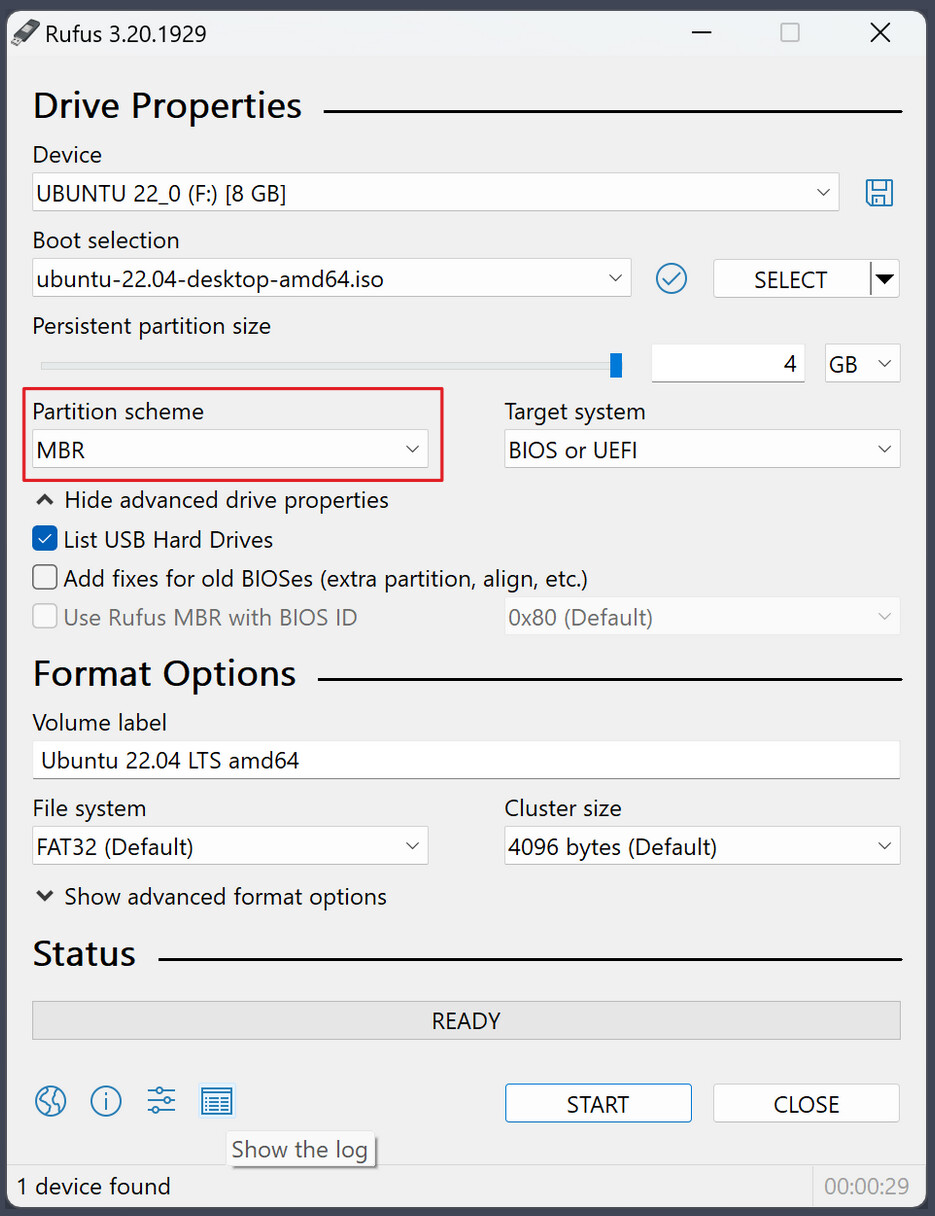
If no Windows Machine is available, there would be Ventoy. There You can set up MBR and GPT, too. I think it starts with MBR as default if I'm not wrong ... but of Course, You would have to look.
I tried with EFI / GPT, with legacy / MBR, and also Core 17.3 and Lite 17.3 versions. We always get these black screens right after entering the password. I just saw that a second release of Core 18 has been released, I will test one last time before choosing another distro.
1 Like
This topic was automatically closed 90 days after the last reply. New replies are no longer allowed.