I have been trying to get Zorin Pro set up as dual boot with Win 11 all day and I've read several posts about the black screen problem and have tried all the suggestions that my not very techie abilities allow. I have a three year old HP Envoy desktop machine. I have turned off secure boot and fast boot. I have tried two different USBs with the balenaetcher method specified in Zorin's how to article. I have also tried Ventoy using grub2 option. I have tried all three try Zorin options multiple times. I even did a bios reset to factory defaults that someone said worked. I don't know how to do the nomodeset thingy that someone suggested a few years ago but someone else said that didn't make a difference. Does anyone have a further suggestion? If not I think I'll just have to go back to using windows all the time and write off the $50 I paid for the Zorin download.
When using LiveUSB, can you run
sudo lshw -C video
and tell us what graphics card your machine has?
I'm not sure what LiveUSB is or how to use it but the windows device manager says I have Intel UHD Graphics 730.
And the driver is 31.0.101.3729
This is what you are using to test and install Zorin OS.
In TryZorin, you can peruse the Operating system in a trial mode.
When you boot Zorin after installing, you should be able to access the Recovery Menu by tapping either tab or esc. From the grub menu - select Zorin on 6.8 (Recovery)
From the next menu - enable networking.
Then back up to the menu and arrow key down to the bottom to Drop to Root Prompt
Tap ctl+d , then in this menu, run
sudo nano /etc/default/grub
Arrow key down to the line that says
"quiet splash"
and add this parameter i915.enable_psr=0 - it should look exactly like:
GRUB_CMDLINE_LINUX_DEFAULT="quiet splash i915.enable_psr=0"
Once done, tap ctl+o to overwrite, then enter key on Save As Current Configuration.
Tap ctl+x to eXit the editor.
Now, run
sudo update-grub
Once done, test boot.
I tried one more time using Benton disk and the safe graphics and left it to go start supper. I came back and have an hp icon and a z icon on screen so maybe something is happening. I’ll look again in a few more minutes
It changed to HP and Zorin on the screen but hasn’t moved in about an hour. Should I just wait or is it hung up if it’s taking so long.
The install should not take an hour.
However... recently, there has been a major outage on an Ubuntu Server that supplies the Linux Firmware package. I am not sure if this would affect you or not - nor am I certain that outage has been completely fixed.
When you set the installation in motion, did you connect to the net and check the box for installing additional drivers?
If so, try installing disconnected from the net.
No. I haven’t reached that point. When I started the computer was off. I turned on and kept pushing esc until the start menu came up then F9 for boot menu and chose the ventoy usb stick. Then I picked try or install Zorin and then the safe graphics option. Then I got a black screen for about 10 mins followed by a black screen with HP icon and a Z icon for about 15 mins. Then changed to an HP icon and the word Zorin but that hasn’t changed in about an hour and a quarter. I’m thinking it’s hung up and I shoul turn off and try starting over. Hope that doesn’t screw upthe windows option. I do have Ethernet cable connected.
Ah... I misunderstood the issue.
I thought you had installed Zorin OS, but upon first boot up after install, you got a black screen.
In your BIOS settings, are you set to RAID or to AHCI?
I think I saw raid somewhere but I don’t know what either is. I tried turning off and restarting and it’s gone black again. Perhaps I wasn’t quick enough selecting the safe graphics option. I’ll try again.
In the BIOS settings, you need to be set to AHCI, not RAID.
Ok I’ll try changing it. Like I say I’m not tech and today was the first time I’d heard of either.
It says changing the SATA mode might prevent the system from booting up and could result in data loss. Is this really something I should be doing?
Do you have Windows installed and are you removing or keeping Windows OS?
Yes win 11 and I want to keep it in dual boot
Sometimes, Windows OS can be finicky about RAID.
Zorin Pro comes with knowledgeable Installation Support directly from the ZorinGroup (The Zorin OS creators and developers.)
At this point, I would suggest using the Pro Support contact form to ensure a safe and effective installation (Or Refund, if necessary...)
Thanks for all your help. I will do as you suggest. Didn’t know that support was available. I’m probably getting too old for this (74!)
There is a @Frog on the forum that might take exception to such a claim... 
Welcome to the Forum!
When You use Windows, I would recommend to use Rufus for creating the bootable USB Stick with Zorin on it.
Does Your BIOS run in UEFI or Legacy Mode? Depending on that, You can in Rufus for the Partition Sheme choose a different Format. For UEFI, You should choose GPT and for Legacy MBR. The Option is here:
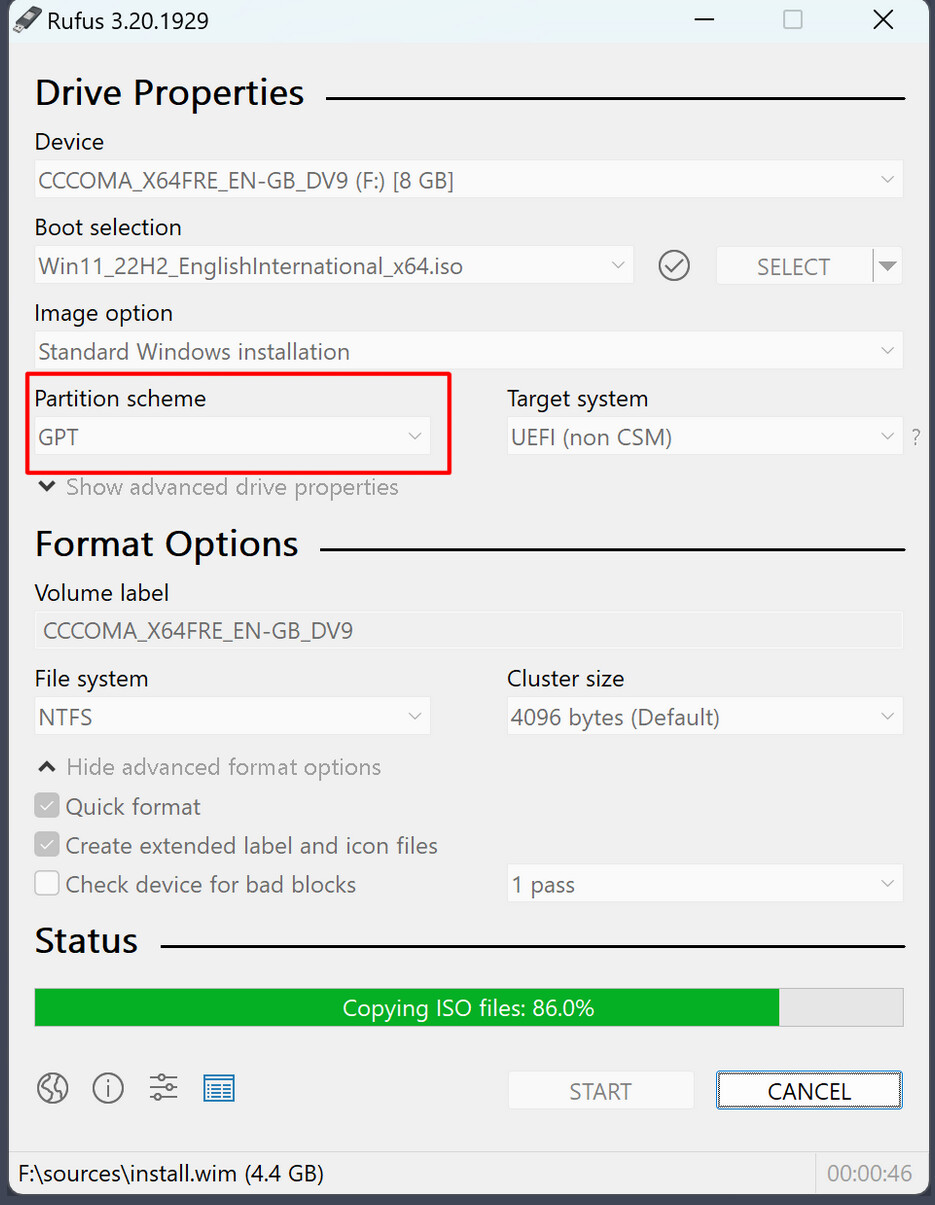
And did You checked the Checksum of the ISO?