You can. But it will be deleted with a later Kernel Update because by default only 2 Kernels of the same Kind are saved.
Your Bluetooth seems now to be detected. But it doesn't work ... We could try an even newer Kernel but if this would work, I don#t know.
1 Like
OK, just for fun I tried to pair my phone with Zorin and it worked like a charm. I even sent a picture from my phone to my computer. A complete new experience for me.
It seems my Apple Magic Keyboard and my PS4 Dualshock-Controller don't wanna play ball.
1 Like
Did You tried to connect the PS4 Controller with Cable?
2 Likes
Alright! I did a bit of tinkering and here's where I am at:
THE BLUETOOTH: 
I tested the bluetooth via this link's commands and added the adresses of pad and board to the trusted list. Then I installed bluez again via...
sudo apt update
sudo apt install --reinstall bluez bluez-cups bluez-obexd bluez-tools
...and after that the Controller paired and worked flawlessly.
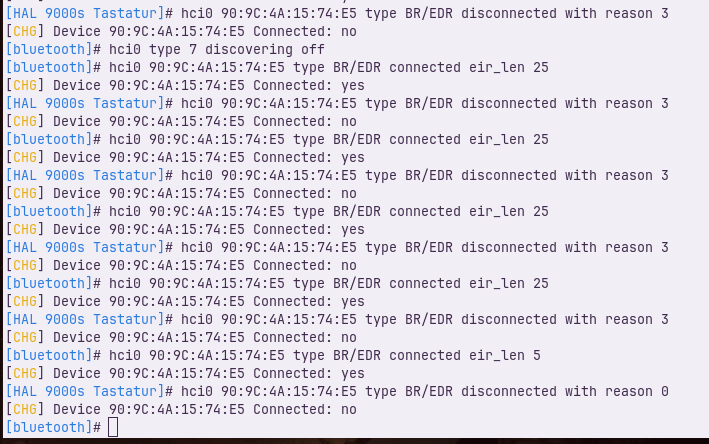
The keyboard not so much though. Here's the result from the Bluetooth testing command for the keyboard:
THE CONTROLLER:
I reinstalled Steam. Killed the Flatpak (with Flatsweep) and used the DEB-Package from Steam. Apparently the fixes issues with Controller support. Some games work, some don't! Working on it. This is a promising lead. I'll keep this thread posted.
But I consider the pairing in regards to this thread a success and done!!!
THE MAGIC KEYBOARD: 
If anyone can read the screenshot up above and make heads and tails of it, that could help. Cause I can't...  Apparently Zorin supports Apples Magic Keyboards right out of the box, so I am hoping for a simple fix on this one.
Thanks for your time guys!