Bluetooth refuses to turn ON after Sw updates

Hi all...first post here. I am still very new to linux.

I installed v18 PRO on a seperate partition on a brand new Lenovo T16. All was fine for 2 days. I was installing and testing my stuff from my old Wi... stuff.

About 10 mins ago, I checked for SW updates using the app in the desktop. I applied all that was there.

From that time, my Bluetooth module refuse to turn ON.

I booted back in Wi... partition to test and BT does work.

I looked in the logs but nothing special seems to shine.

Any ideas ??

From the Grub Menu (tap tab or esc once at the motherboard splash screen to pull the Grub Menu up if you have it set to Hidden), please select Advanced Options for Zorin and then in the next menu, arrow key down to select Zorin On the earlier kernel (pre-update) and then boot normally and test.

Welcome to the Forum!

Do You remember what Updates that were? Are secure Boot and Fast Boot in BIOS disabled? Is Fast start-Up in Windows disabled?

Thx ..I will try that

many thx. Well, I was able to find the update install history but I fail to see which might have affected BT. I will try what Aravisian suggest to see if that fixes BT. But I know I will have to update at some point.. I will provide updates on my testing soon

Ok.. so see below the update that I could find in the APT history log. Yes Secure boot is OFF. Not sure about Fast boot thought. I will check. But I confirm BT is working fine in my Win part.
So here is the APT log
Start-Date: 2025-11-07 19:52:29
Commandline: aptdaemon role='role-commit-packages' sender=':1.114'
Remove: linux-image-6.14.0-33-generic:amd64 (6.14.0-33.33~24.04.1), linux-tools-6.14.0-33-generic:amd64 (6.14.0-33.33~24.04.1), linux-headers-6.14.0-33-generic:amd64 (6.14.0-33.33~24.04.1), linux-hwe-6.14-headers-6.14.0-33:amd64 (6.14.0-33.33~24.04.1), linux-modules-6.14.0-33-generic:amd64 (6.14.0-33.33~24.04.1), linux-hwe-6.14-tools-6.14.0-33:amd64 (6.14.0-33.33~24.04.1), linux-modules-extra-6.14.0-33-generic:amd64 (6.14.0-33.33~24.04.1)
End-Date: 2025-11-07 19:52:31

1 Like

Hi there again. I boot in the earlier kernel listed but BT is not working there either ?!?! Strange

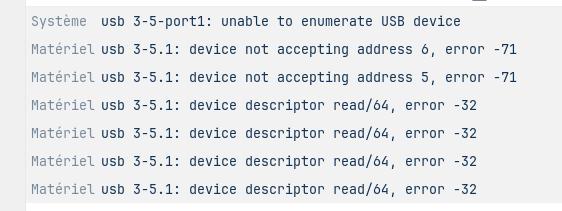
I also get these in the system's log

Whta Kernel Version were shown to You? And could You post the Output of sudo lshw -C network and rfkill list please?

I had 2 versions: 6.14.0-1015-oem and 6.14.0-35-generic

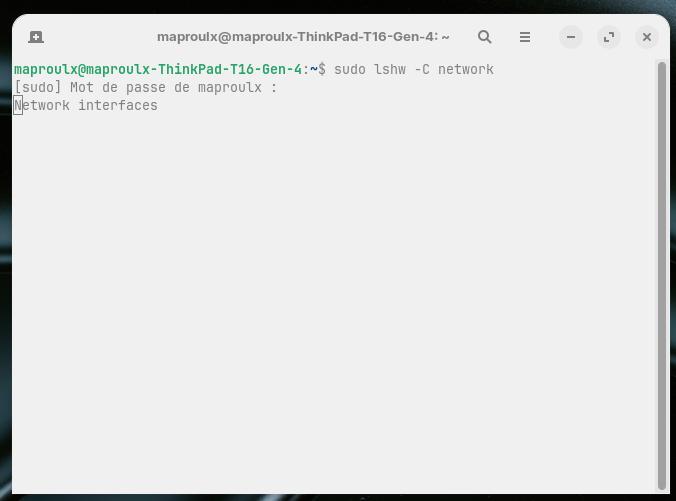
lshw just outputs "Network Interfaces" with a blinking cursor at 1st char

finally...rfkill list output:
0: tpacpi_bluetooth_sw: Bluetooth
Soft blocked: no
Hard blocked: no
1: phy0: Wireless LAN
Soft blocked: no
Hard blocked: no

Did You type sudo before lshw?

Yes :wink:
BTW...many thanks for your help. much appreciated :slight_smile:

And You didn't got an Output like this?

  *-network DEAKTIVIERT     
       Beschreibung: Kabellose Verbindung
       Produkt: Wi-Fi 5(802.11ac) Wireless-AC 9x6x [Thunder Peak]
       Hersteller: Intel Corporation
       Physische ID: 0
       Bus-Informationen: pci@0000:06:00.0
       Logischer Name: wlp6s0
       Version: 29
       Seriennummer: 40:74:e0:64:e1:82
       Breite: 64 bits
       Takt: 33MHz
       Fähigkeiten: pm msi pciexpress msix bus_master cap_list ethernet physical wireless
       Konfiguration: broadcast=yes driver=iwlwifi driverversion=6.14.0-35-generic firmware=46.7e3e4b69.0 9260-th-b0-jf-b0- latency=0 link=no multicast=yes wireless=IEEE 802.11
       Ressourcen: irq:71 memory:fcd00000-fcd03fff
  *-network
       Beschreibung: Ethernet interface
       Produkt: I211 Gigabit Network Connection
       Hersteller: Intel Corporation
       Physische ID: 0
       Bus-Informationen: pci@0000:08:00.0
       Logischer Name: enp8s0
       Version: 03
       Seriennummer: b4:2e:99:c0:3c:57
       Größe: 1Gbit/s
       Kapazität: 1Gbit/s
       Breite: 32 bits
       Takt: 33MHz
       Fähigkeiten: pm msi msix pciexpress bus_master cap_list ethernet physical tp 10bt 10bt-fd 100bt 100bt-fd 1000bt-fd autonegotiation
       Konfiguration: autonegotiation=on broadcast=yes driver=igb driverversion=6.14.0-35-generic duplex=full firmware=0. 6-1 ip=192.168.178.20 latency=0 link=yes multicast=yes port=twisted pair speed=1Gbit/s
       Ressourcen: irq:37 memory:fcc00000-fcc1ffff ioport:f000(Größe=32) memory:fcc20000-fcc23fff

When You go to /etc/bluetooth/main.conf is there AutoEnable set to true?

Yes autoenable is set to true

And no I do not get what you have. Here is th window I get

Hmm ... that is weird. It doesn't even detect Your built-in Stuff ...

You wrote, that this a a brand new Laptop? Maybe a newer Kernel is needed for the Hardware then. You could try it with installing a newer Kernel. Here are Instructions:

But what is strange is, it was working fine for about 3 days before the update. And yes this is brand new device.

Very strange indeed.

And that is bundled with me trying very hard to leave mickeysoft :wink: I am willing to live with some big adjustments but not when devices can go OFF with just a system update :frowning:

I do not know if I want to move away from the mainstream install as I am still very new in the linux world. There must be a way to figure what is wrong with my setup ...I wish :slight_smile:

Totally understandable. A System what doesn't work or not work as intended, is useless.

If You still have the USB Stick with Zorin on it, start it and choose the ''Try Zorin'' Option and check if Your Bluetooth works in Live Mode.

That means that lshw is hung on the process. The driver (or portion of the kernel that contains the driver) is corrupted.

This is a pretty rare thing to happen. First steps I would take is to run a S.M.A.R.T. test on the drive to check for bad sectors.

Second thing would be to perform a full reinstall of the O.S. after backing up important data and files.

There are fallbacks in place to prevent driver corruption. That this happened anyway suggests that other portions of the kernel may be affected, too.

oh !! that is a good idea. Yes it did work when I did my pre-validation to decide if Zorin was a good OS to work with. I will try that and let you know.
1 Like