For the last few weeks or so when using Brave, I've been receiving a red "Update" button in the upper right corner. When I click on it, I get a message that Brave can't be updated, and it asks me to reinstall it. I also noticed that Brave doesn't update along with all the other apps that update when I run Software every morning. This is strange since my understanding is that Brave comes bundled with Zorin on install. Will uninstalling the package and reinstalling the Flatpak version solve the problem?
Maybe the gpg keys are missing. Let us run the update from terminal to see if there are errors:
sudo apt update && sudo apt upgrade
Please post the terminal output of that command.
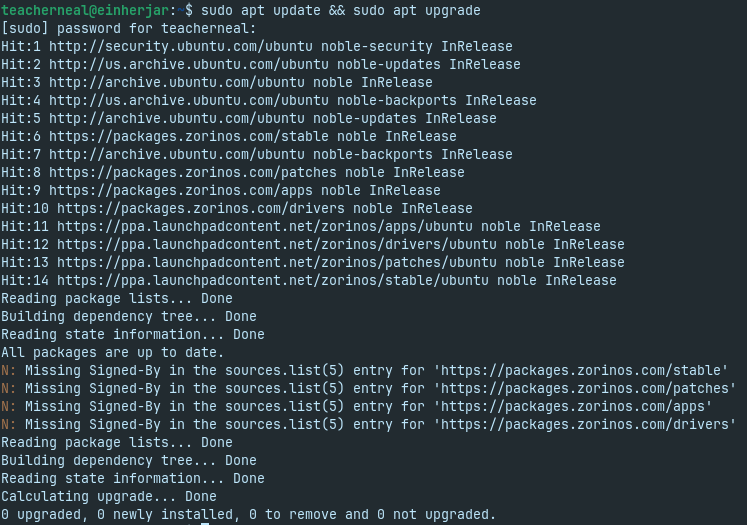
Your brave-browser repository is missing. Do you have disabled it? Can you please make a screenshot of the content of the folder of
/etc/apt/souces.list.d
and if you have the file "brave-browser-release.list" in that folder, please open it with a text editor and also take a screenshot and post it.
Is brave-browser installed as Zorin apt package on your system, or do you have removed it and do you use brave-browser as flatpak or snap? Flatpaks and snaps wouldn't be updated with a repository.
After that, we'll also need to figure out what's causing the other errors.
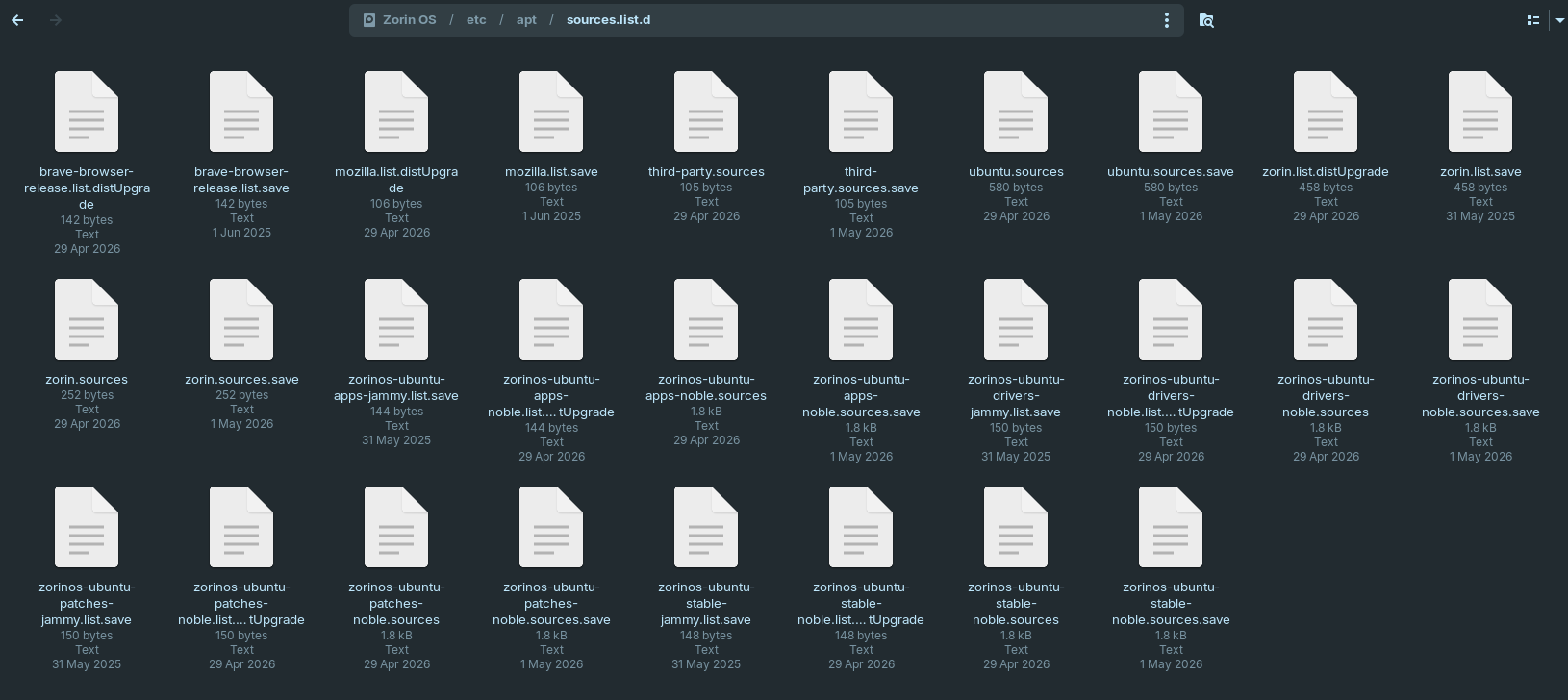
Thank you. Then please take a screenshot of the first file there.
Maybe that thread can help you with the signed by errors. It is similar to your problem:
Please leave this out; it's for the Pro version:
deb https://packages.zorinos.com/premium noble main
# deb-src https://packages.zorinos.com/premium noble main

This is getting in over my head. So, I'm considering the following: I use "browser isolation," i.e. - Brave for Facebook ONLY; Vivaldi for Gmail and anything Google ONLY; and Firefox with Containers for everything else. So, if I can't get Brave to behave, then I might dump it and go with, say, Librewolf. Or, maybe I'll uninstall the apt version of Brave and install the flatpak version.
Sorry, I'm at a loss to find out what is wrong here. The /etc/apt/sources.list.d contains the brave-browser release file and the file looks normal and there were no errors with the keyring shown, so I'm not sure if we should check the brave keyring. You could uninstall brave-browser and follow these steps to install it again, but with that you get the normal apt version of brave-browser, not the Zorin adapted one (but you can disable functions you don't like in the browser settings)
Or if you like, install the flatpak.
Actually...
Flatpak users have also reported that Brave Browser will refuse to upgrade - and Google Chrome will do it, too.
Both Google and Brave periodically rotate repo signing keys.
With Flatpak, it is a series of different issues:
The Zorin OS version is the same as the APT version, but with the added privacy configurations in ~/.config/BraveSoftware/Brave-Browser/.
So using
sudo apt install --reinstall brave-browser command should lead to the exact same configuration of the browser.
If... a user does sudo apt purge brave-browser first - that may remove the configurations.
Making a back up of ~/.config/BraveSoftware/Brave-Browser/ before installing it again could be wise.
2 Likes

This is usually more an informative note, rather than an error.
It means that repository is using a globally assigned key, rather than a repository specific key.
This is related to apt-key being deprecated. Causes can be if the Zorin Upgrader tool was used to upgrade to Zorin OS 18 or a partial upgrade. It is not harmful, at all.
2 Likes
I had a similar issue with Vivaldi on my current preferred GNU/Linux. The key OS maintainer thought I had not used the OS's Browser Installer. I explained to another user how I resolved it. The maintainer then acknowledged the issue and updated the repo bit for other users within the Browser Installer. Vivaldi made a major change with version 8.x and up.