jan_v
1
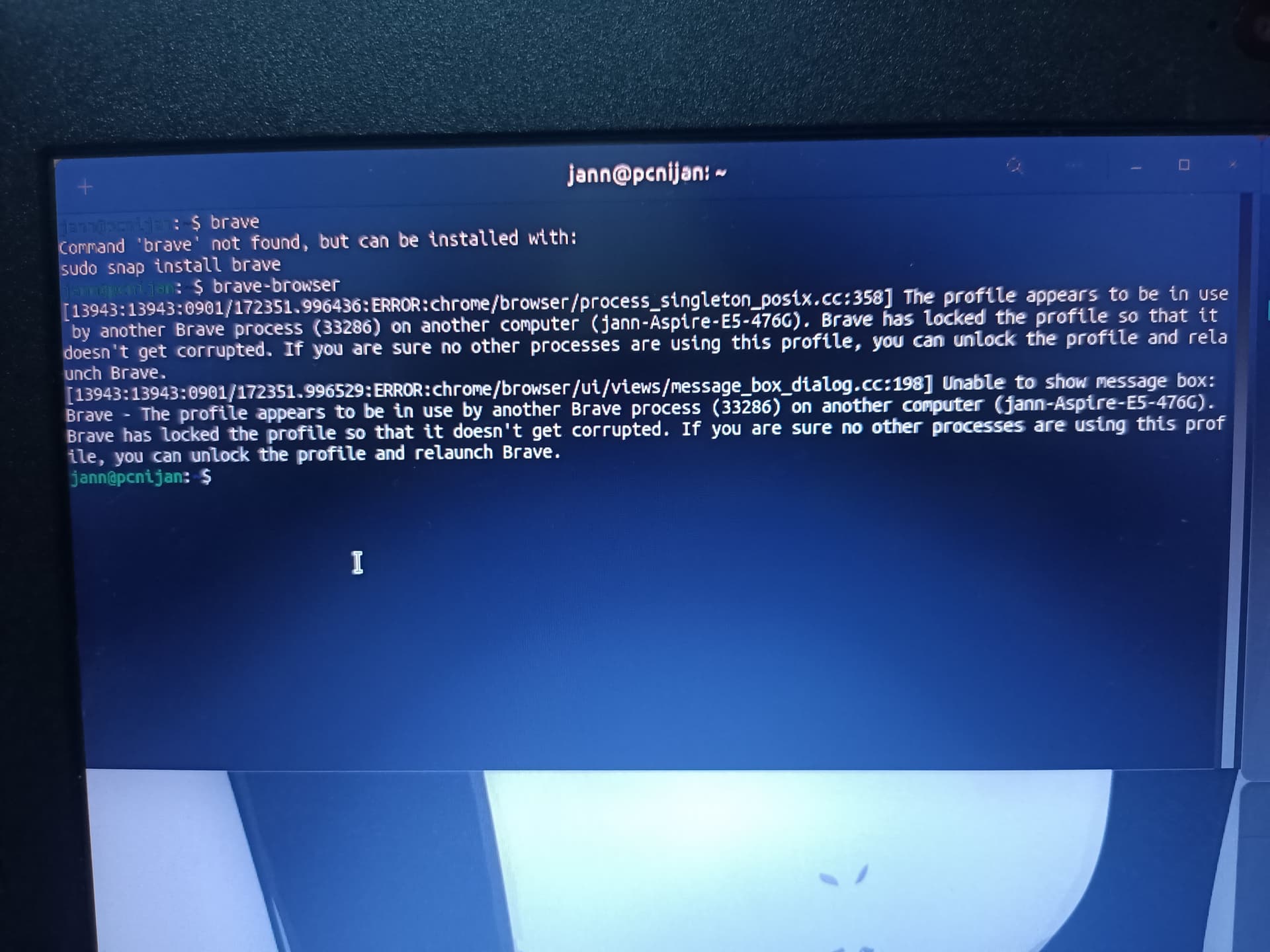
Brave wont open after clicking the icon my mouse cursor would reload but then a few seconds it went back to normal and brave didn't open
1 Like
Forpli
2
You could try to launch it via terminal with
"brave-browser" or "brave"
and look what errors there are shown.
jan_v
3
I red the error i did change my profile name, but where do i unlock the other profile? and does that mean i have two profiles now?
Forpli
4
Did you change the hostname of your pc? This can cause this error.
I'm not sure - you could try this:
Close brave and delete
SingletonSocket
SingletonLock
SingletonCookie
https://www.reddit.com/r/brave_browser/comments/1am8pod/brave_wont_open_on_ubuntu/
You could search it there (I'm not at the computer in the moment, so can not check it):
~/.config/BraveSoftware/Brave-Browser/SingletonLock
1 Like
jan_v
5
yes i did while brave was running
In the reddit post, i dont where the profile folder is
Forpli
6
I added a path above, but I'm not sure, found this in internet. When you have opened your file manager press ctrl+h to also show the hidden files.
system
Closed
8
This topic was automatically closed 90 days after the last reply. New replies are no longer allowed.