Because Zorin uses Gnome, this is in my Opinion a neccessary Tool to manage and install Gnome Extensions. Since I know from it, I use it on every Gnome Desktop Distro, I used in the Past. It is in my Experience a reliable Tool which works fine. It would be good to have it preinstalled.
There is the Gnome-own ''Extensions'' Program but this is only for managing Gnome Extensions. So, the Extension Manager has with the additional Function to install Gnome Extensions a bigger Value in my Opinion.
even that's not included. I tried zorin on distrosea.com to test an extension and it wasn't included. I use pro and it's included there. (one of these 2)
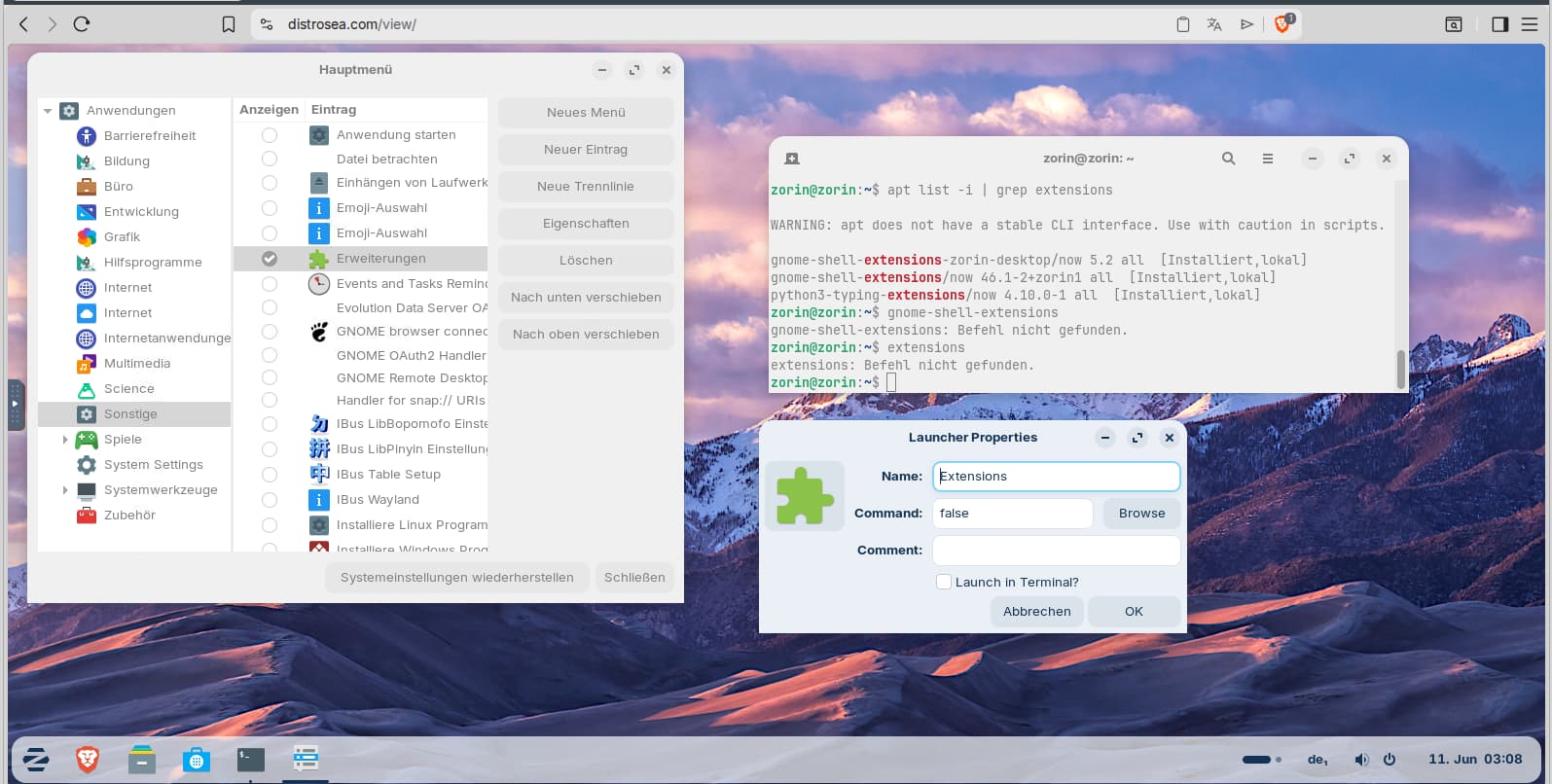
Extensions is included in Zorin 18 (tested in distrosea), but you don't find it via the start menu because it is set to be hidden in the menu. You first need to enable it by right-clicking on the menu> edit menu, and then you find extensions at category "others". Enable the checkbox there. Now extensions appears in the menu.
But the launcher of the program still doesn´t work because the command is set to "false."
I didn't found out yet what command needs to be set there to launch it.
What works, is the preinstalled cli tool of gnome-extensions.
E.g. you can list all installed extensions with
gnome-extensions list
or list only the enabled gnome extensions
gnome-extensions list --enabled
To enable an extension run
gnome-extensions enable [extension-name]
Replace [extension-name] with the name of the extension shown in the list command.
gnome-extensions is the CLI (command line) application that's included by default on ubuntu and its based ones.
But the green one with UI is called gnome-extensions-app (with its deprecated / apt install name gnome-shell-extension-prefs) is not included by default.
And the blue one that @Ponce-De-Leon wants to include is extension-manager
You're right. It is very confusing.
The app gnome-shell-extension-prefs which also has a green puzzle icon isn't installed.
I don't know what the extensions launcher is for.
Yes, it's normal. Since GNOME is not usable and the worst without extensions (not even a taskbar without extension for the sake of "minimalism"), it's really weird that it comes without extension manager.
Let us not also lose sight of Gnome devs stance on Extensions, they would rather they were not used as they hold the false belief that vanilla Gnome is the best.
This is one difference between KDE and Gnome, you can tweak KDE to your heart's content by adding new Global Themes (some can be finnicky, requiring you choose a matching 'colour' before a Global theme gets installed), new icon themes and new cursor themes. I particularly choose only cursor themes that allow size changes. This is where KDE is better than Gnome which limits size to the inbuilt black cursor theme, but I could be wrong on that. I guess what I am trying to say is, cursors with available sizes and different colours, such as the many Oxygen Cursors vary from 24 points up to 48. Other cursors even go up to 72 points.
Many Gnome devs have been openly critical of extensions and quite vocal:
Common complaints are:
Users should submit code that is integrated into Gnome instead of Extensions (Where Gnome has full control and can reject them, outright).
Extensions are fragile and hurt the ecosystem.
Extensions are a niche thing only for power users.
Extensions distract from Gnome code.
It's funny. Much of it is remarkably similar to their complaints about user theming - and... They are fighting back against that with Hard Dependencies, Hard Code blocks in LibAdwaita. Very proactive about seizing control over users desktops.
I booted up someone's Windows OS 10 computer (helping them out) and I sat back as it loaded and stared at a blue screen that had printed on it.
"Relax.
We've got everything under control."
It was. Seriously. The creepiest thing I had seen on a computer in years.
Despite this; HIG and LibAdwaita is far more controlling in the real world.
Gnome does handle cursors differently. What makes it confusing is that it is hit or miss.
Many or most Gnome Applications disregard the settings that manage cursor size.
Whereas it is universally respected on Plasma.
This fits Gnome’s broader design philosophy to reduce configuration maintenance, even if that sometimes means advanced users have less direct control over details like cursor scaling.
The Cursor Themes that I have used in the Past and the one that I use now work with different Sizes. I have to set it up in the Accessability Settings and get a bigger Size.
If every single Cursor Theme out there will work so well, I can of Course not say.