Greetings All !
Hope everyone is doing well !
Did something stupid today and broke my SMB settings somehow
I have always access my NAS server through "OtherLocations > Server > SMB://192.168.x.x
I broke that today and now when i try to connect to that same server it shows in RED
Scenario:
i installed SAMBA ( figured out i didnt need it ) so i uninstalled it
after that when attempting to connect via OtherLocations > Server > SMB://x.x.x again it now shows in RED
i tried to re-install samba, cifs-utils, gvfs-smb nothing seems to be working
i am stuck at SMB: Showing in red and not able to connect to my server
( see pic below )
When I try the following via TERMINAL > smbclient -L 192.168.1.x -U user
i connect using my password and see the drives on the server
thanks to everyone for any comments or suggestions.
stupid move i know..but not my first time,, and probably not my last LOL
Cheers !
Try: smb://host.local/share - that should prompt for a share username / password when connecting. (host.local and share will be different for your naming convention used)
Are you able to ping the address that's hosting the Samba share?
yes, always connected with IP
so i always used smb://192.168.1.x and would hit Connect - and then enter user/pass
tried all variations as well.. anything i type in the line, as soon as i type the colon after SMB it goes RED, as if it rejects all that is " smb: "
as soon as i uninstalled Samba as shown in my OP using cmnds sudo apt-remove samba --purge* sudo apt remove samba
i started encountering the RED when typing in SMB
i updated a few days back and today after i noticed the Red Smb.
OS: Zorin OS 16.3 x86_64
Kernel: 5.15.0-94-generic
i have a Zorin VM that i use, and everything works as normal from there , so server is OK
What's the status of Samba?: systemctl status smbd
Try restarting Samba with: sudo service smbd restart in a terminal then try again..
Are there any additional packages recommended when you issue sudo apt install --install-recommends samba that may have been missed?
I actually don't have Samba in my Zorin install but I can still access my share - do you remember having to change anything to WORKGROUP in /etc/samba/smb.conf?
the way you are setup is what i had before i started messing around with Samba, so to be clear , i never had to mess around with Samba before, that is why it was never installed - my shares worked from the time of install with NO ISSUES - everything was working fine all this time until i installed and uninstalled samba...
hope that makes sense.
to answer your questions,
SMB is running
smbd.service - Samba SMB Daemon
Loaded: loaded (/lib/systemd/system/smbd.service; enabled; vendor preset: enabled)
Active: active (running) since Sun 2024-02-11 19:08:29 EST; 5min ago
sudo apt install --install-recommends samba
Reading package lists... Done
Building dependency tree
Reading state information... Done
samba is already the newest version (2:4.15.13+dfsg-0ubuntu0.20.04.7).
0 upgraded, 0 newly installed, 0 to remove and 1 not upgraded.
:~$ apt list --upgradable
Listing... Done
xdg-desktop-portal/focal 1.14.3-1~flatpak1~20.04 amd64 [upgradable from: 1.8.1-1~flatpak1~20.04]
N: There are 3 additional versions. Please use the '-a' switch to see them.
So that's got nothing to do with Samba that I'm aware of - one thing you could check; are you running a firewall? Maybe poke around to see if SMB is filtered or not..
Beyond that I'm kinda lost - you can try updating that one package with sudo apt upgrade xdg-desktop-portal -y reboot, then try again.. I would think it's a residual configuration / file somewhere causing this. When you removed Samba, did you also issue sudo apt autoremove? Purge does remove, but not residual installation files and configurations.
No worries - try autoremove though, see what that shows if anything related to Samba. Might have something hanging around preventing connection..
Sounds convoluted but, you could try uninstalling with purge and autoremove, then reinstall and try once more lol but no worries I'm sure someone will chime in soon with something else to try out.
still having issues - still looking to resolve,
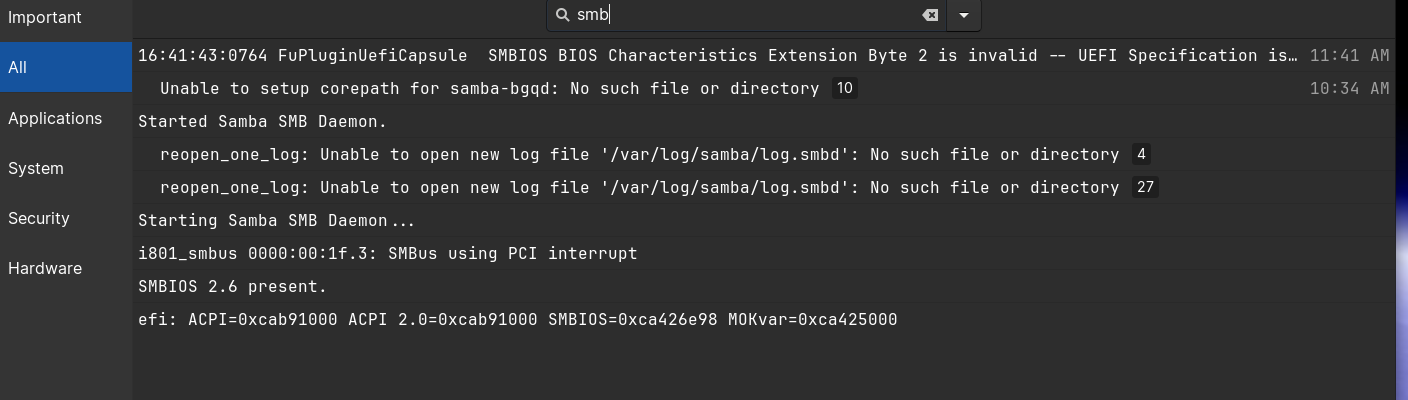
checking logs i see the following, not sure if this is helpful
TIA to all, getting pretty desperate here,
dont really want to wipe and re-install