Do you use Zorin Core or Zorin lite?
Zorin Core
And you logged out? It doesn't work with lock screen.
1 Like
So, it doesn't look like this:
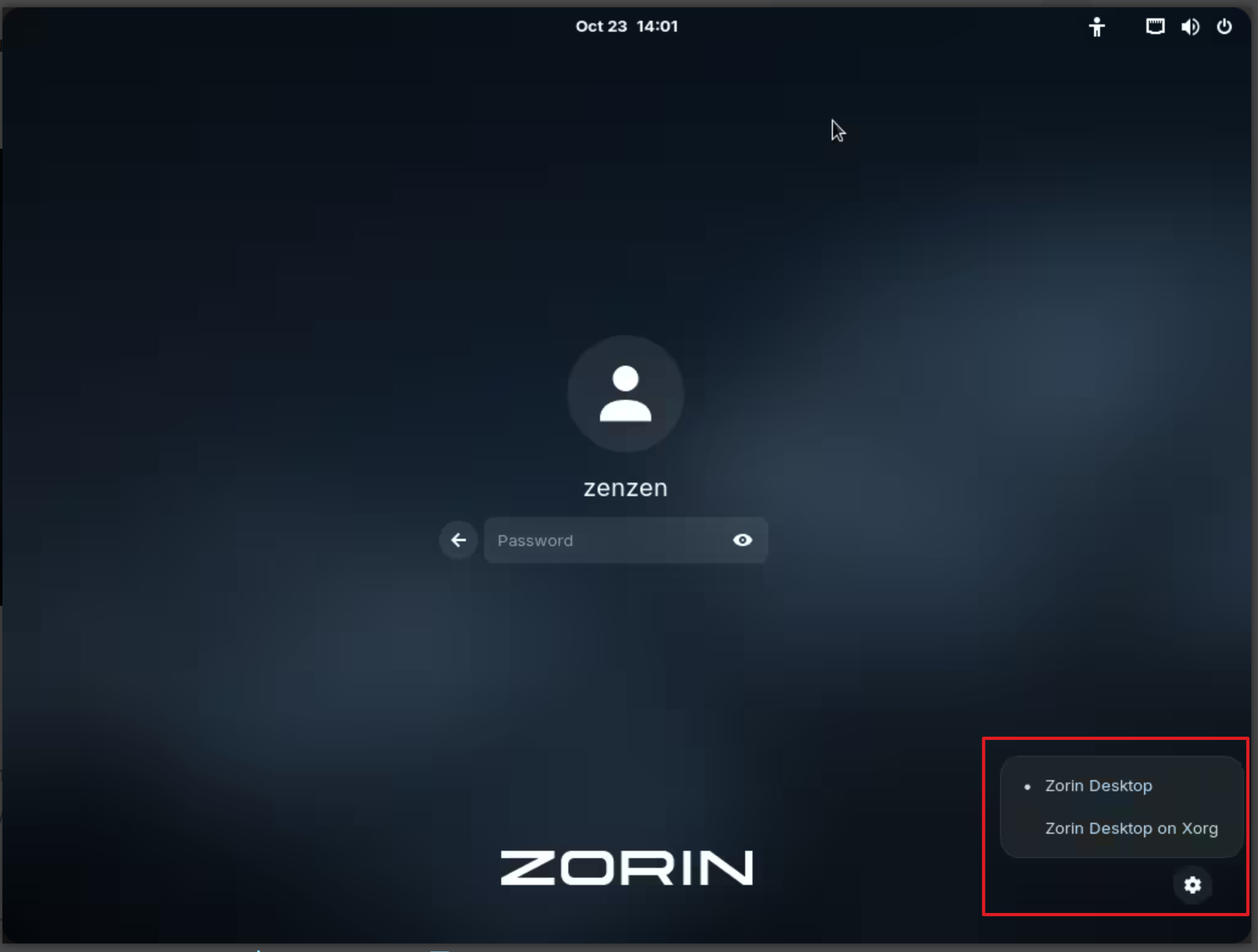
Little Gear Icon in the Corner and when You click on it, You get the choice? Like @Forpli already wrote: It has to be the Login Screen, not the Lock Screen.
But when it is not there ... Okay, go to /etc/gdm3/ and open the File called custom.conf and look for the Following in it

Does it look exactly like that?
Firstly, how did you get the screenshot when you were logged out?
Now I have opened up custom.conf, and I have
[daemon]
AutomaticLoginEnable=true
AutomaticLogin=xxxx
So this must relate to how I set up my installation. I was wondering how that could be changed down the track, if I wanted to.
So how can I edit that file to enable that Gear Icon? Thanks.
I am currently using Firefox within Zorin, and that is working.
Chromium is currently working, but there is no browsing history. When I right click on the icon in the dash and Show Details, it opens up Software and shows an error message
Sorry! There are no details for that application.
When I click on Installed, chromium is listed there, and when I click on that, it says it comes from the Snap Store, and is the Canonical version, so it's coming from Ubuntu.
I have a snap folder in Home, which contains chromium and nvim (NeoVim).
Regarding Brave, which is currently not installed, I have a choice of installing via Flathub or Zorin OS. Which is more advisable for me?
Then there is another version available as a snap from Brave Software. This snap version has a few choices.
Are snaps a good thing in Zorin?
Ubuntu uses them.
Mint does its best to avoid them.
I commented out the next 2 lines in custom.conf
AutomaticLoginEnable=true
AutomaticLogin=xxxx
and it just asked me to enter my password. I will uncomment those lines and return to my status quo in this respect. No gear icon.
I would choose ZorinOS source.
Snaps and Flatpaks are self-contained apps so are big and bulky and also may have system integration issues. I personally do not use either, but other users are willing to use them. At least there is a choice.
Well I have just installed Brave using Zorin OS, so let's see if it keeps working this time.
You mean from the Login Screen? That is not from me; that is from the User @zenzen. I would guess it is from a Virtual Machine maybe. That was that what I have already linked above to show You.
that is not what I've shown You. this means that Automatic Login is active - and then You can't choose Wayland or Xorg.
Yes, that is right. And when You have to type in Your Password and the Password Field is there, you should see the Gear Icon.
Okay, I go a bit more out. Does the whole custom.conf File include all this?
# GDM configuration storage
#
# See /usr/share/gdm/gdm.schemas for a list of available options.

[daemon]
# Uncomment the line below to force the login screen to use Xorg
#WaylandEnable=false

# Enabling automatic login
#  AutomaticLoginEnable = true
#  AutomaticLogin = user1

# Enabling timed login
#  TimedLoginEnable = true
#  TimedLogin = user1
#  TimedLoginDelay = 10

[security]

[xdmcp]

[chooser]

[debug]
# Uncomment the line below to turn on debugging
# More verbose logs
# Additionally lets the X server dump core if it crashes
#Enable=true
I will just paste in my custom.conf
# GDM configuration storage
#
# See /usr/share/gdm/gdm.schemas for a list of available options.

[daemon]
AutomaticLoginEnable=true
AutomaticLogin=john

# Uncomment the line below to force the login screen to use Xorg
# WaylandEnable=false

# Enabling automatic login

# Enabling timed login
#  TimedLoginEnable = true
#  TimedLogin = user1
#  TimedLoginDelay = 10

[security]

[xdmcp]

[chooser]

[debug]
# Uncomment the line below to turn on debugging
# More verbose logs
# Additionally lets the X server dump core if it crashes
# Enable=true
I don't know why it's all coming out in bold. I couldn't turn bold off. Anyway, it's copied and pasted. It's a bit different to yours.
I have formatted it for You. And indeed, You have automatic Login active. So, switching Wayland and Xorg can't work.
Getting back to the original post, 2 browsers are not working. And they are:
Opera - Flathub and
Brave - That was installed via terminal using nala (or apt).
Firefox is working, as is Chromium.
Firefox was installed via Flathub, and
Chromium via terminal using nala.
So what can I do to get Brave and Opera working?
I like to have 2 browsers working.
Are you on XOrg now?
You could try to create another user account with no automatic login to get the gear icon. Simply create it, you can afterwards use your normal account.
Hey,
So I was facing the same issue and got it resolved.
What seemed to be the problem was that the browsers required access to the default key ring, and since I hit escape and forgot the password just brushed it off, but this apparently is a crucial access for the browsers to work.
What I did to resolve it was:
Deleted Default Key Ring, then launched the browser. After that, it asked me to set up a new password. I did, and voila, it worked flawlessly.
Hope this helps.
This topic was automatically closed 90 days after the last reply. New replies are no longer allowed.