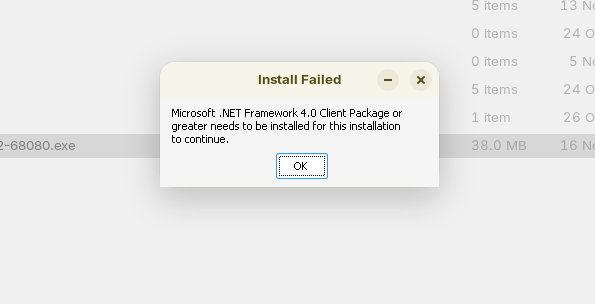
Has anyone tried to install the Sonos Controller app with Windows App Support. Did it work? I've tried a # of times and it just keeps telling me to install Windows App Support to run the Sonos .exe. As this is my first time using W.A.S. I'm assuming this a good sign that it's not going to work?
Any suggestions, comments or questions would be appreciated. Thanks.
Thanks for letting me know about Noson. I want to try it so I checked it out. There are two almost identical looking downloads available, both from the same person, both have the same write up and both have the same rev. # but they are vastly different is size! One is very small at 3.5mb and the other is huge at 117mb with no explanation as to why!
Do you have any idea why there would be so much difference in size & would it possibly matter?
After a good bit of research & numerous unsuccessful attempts to use Windows App Support I stumbled on this suggestion by Aravisian to re-installed WAS with the following:
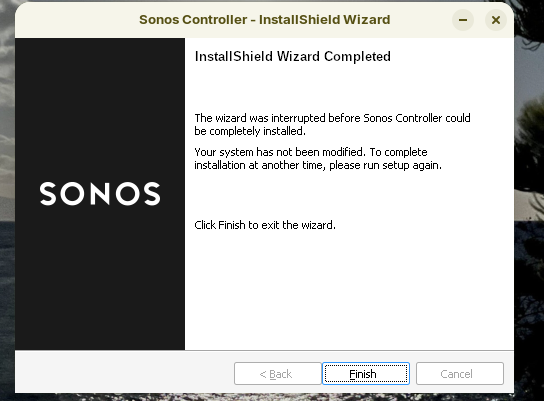
Thanks for that and a re-install seems to have fixed something. Even though the Sonos exe still didn't install, the installation process went further, until I got this:
I'm a bit new to this level of involvement so I just want to make sure I'm clear, when you say "automatically stage the prefix" you mean the above commands will download & install .net framework 4.8?
The "Prefix":
In order for elements to work together, they must be able to find each other.
The prefix includes the instruction and path - so that an application run in Wine knows where to find .NET
Installation would install .NET, but not set up a means of finding it for Wine. Wine is a compatibility layer - it is not Windows OS - so things will not be located in the same places as they would be by default on Windows.
So you must give the launch command a prefix - In this case, using Winetricks allows you to run only two commands to download, install and stage the prefix without needing to manually configure all of that.
As you can see, my answers can be long winded - So, I was more concise:
LOL
All of the above was intended to convey why to install and use Winetricks, another application, to do what you would otherwise do manually.
Thank you. I've now installed & uninstalled Noson three times and it's just never able to discover the Sonos "zone". It just keeps returning "Action can't be performed". Any thoughts or comments wold be appreciated.
I've installed Winetricks and preformed the donet48 cmd. I also tried a different version if the Sonos exe. and .net framework. The installation process appears as if it's going to make it but always ends with a warning that the Windows Module Installer Service is not installed ( isn't that Windows App Support ? ) and the installation process is interrupted:
But, the bigger news is that this effort may have all been for naught anyway as I've just learned that Sonos is abandoning the desktop controller app in favor of the Sonos Web App controller! It works, to a point!
So, with that bit of news I think I'm done with this!