Can´t update in Zorin 18 live mode

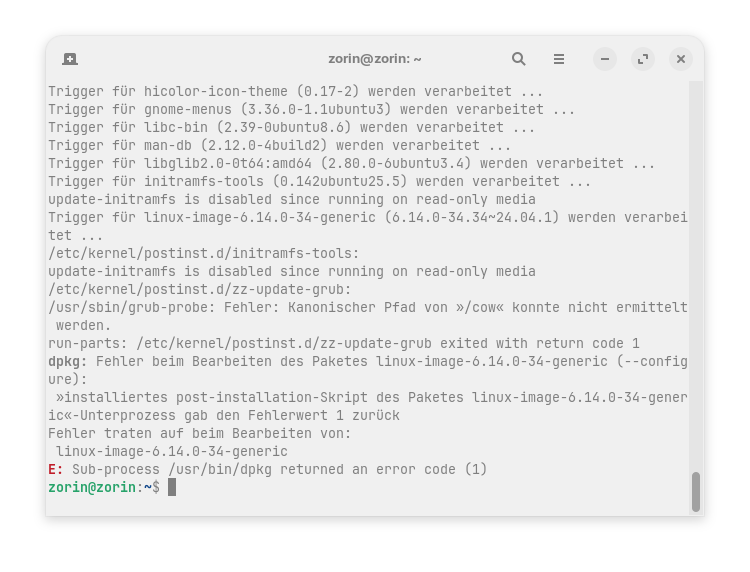
I get this error in live mode:

I already tried
rebooting the stick
sudo dpkg --configure -a
sudo apt install -f
sudo apt remove --purge linux-image-6.14.0-34-generic

and the commands didn´t help. Is the USB boot stick broken? I can´t install anyting now. I used the stick the last days and never had problems.

Is this a persistent boot?

The LiveUSB session is a loaded SquashFS. You can normally update and upgrade non-system pacakges (even Core desktop packages that are updated in the repository), but will not be able to upgrade the kernel or boot specific files; due to this.

No, it is not persistent. But it was always possible to run sudo apt update && sudo apt upgrade to be able to install an app like extension manager or today I wanted to install another browser for testing the pwa apps.
I did not change the kernel.

1 Like

Hmmm
You are right - running sudo apt update && sudo apt upgrade on the live session should still work.
But if a current package in the Zorin Repo's contain metadata in transition; if something is calling update-initramfs, maybe a firmware update or linux base package, then this can happen (It's still SquashFS).

I do not think your USB stick is broken or anything. If this is repeatable on the non-persistent session on repeat boots - definitely is a package in the repo.

1 Like

I think this doesn't work because You are in Live Mode. This is a Kernel Update and would require a Reboot after Installation.

Will the problem resolve itself at some point in the next few days?

Given that we have seen a variety of transitional package threads; I would give it some time. :wink:

1 Like

Don't know if this will help, if you are not trying to update the kernel then mark kernel related packages to hold and then use apt upgrade.

  1. Update the repositories

    sudo apt update
    
  2. Find the packages related to kernel from the upgradable list

    apt list --upgradable
    
  3. Mark packages to hold

    sudo apt-mark hold <packages-names>
    
  4. Upgrade

    sudo apt upgrade
    
1 Like

Thank you very much, that was a good idea and worked. I marked to hold all kernel updates and the linux firmware, now the upgrade was successul and I'm able to download packages.
1 Like

This topic was automatically closed 90 days after the last reply. New replies are no longer allowed.