Cannot port forward?

Hello, I'm trying to start a Minecraft server. I'm fairly familiar with the process having come from Windows. However, I seem to be getting stuck on actually forwarding the port.

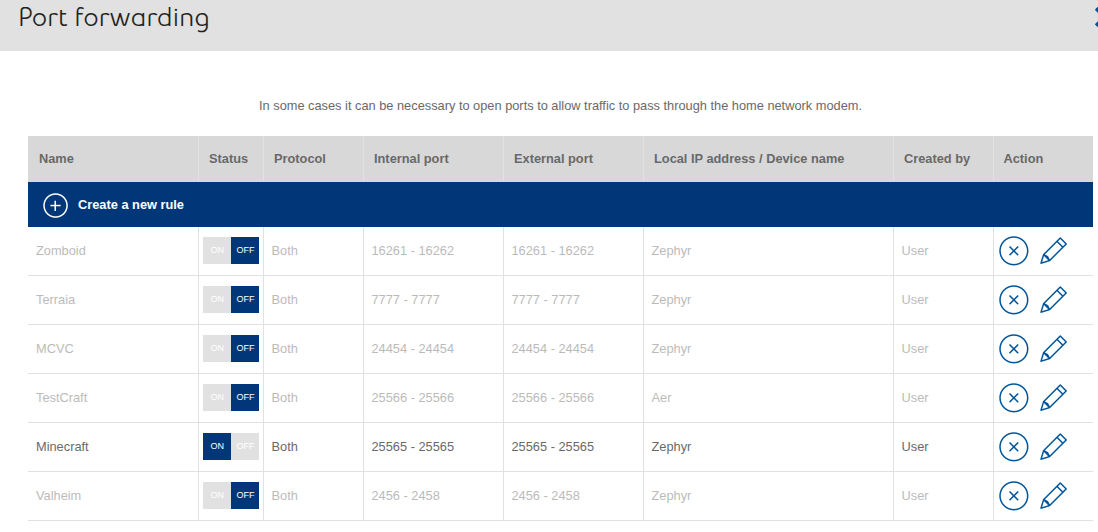
I have pre-existing port forwarding that has worked before on Windows. I just had to update the local IP address.

I used this website to check my port is actually open, but it's closed.

I checked my GUFW firewall app, and it's disabled. So I turned it on, added a simple rule, allow both direction, both protocol, and entered the port, and the website is still saying my port is closed.

I'm not really sure what I'm doing wrong, since I've port forwarded correctly, the port is listed in the configs (so it's not the wrong port), and enabled the firewall and added the rule to allow the port.

It might also be important to note that I'm hosting a modded server (ATM 10). The server files come with a startserver.sh that I cannot normally run (it says unable to locate the program). So I open a terminal in the location, run ./startserver.sh and that opens the server. I can then see the server via localhost, but not with my ip:port combo.
Hi, doing a search I found (Zorin 18 is a fork of Ubuntu 24.04):

"To set up a Minecraft server on Ubuntu 24.04 with port forwarding, begin by updating the package index with sudo apt update and installing the required OpenJDK 17 JRE with sudo apt install openjdk-17-jre-headless . Next, allow traffic on the default Minecraft server port by running sudo ufw allow 25565 . Download the latest Minecraft server .jar file from the official Minecraft website using wget if you're on a CLI-only system.

Create a directory for the server, such as /opt/minecraft , and move the downloaded .jar file into it. Accept the End User License Agreement (EULA) by running sudo bash -c "echo eula=true > /opt/minecraft/eula.txt" . Start the server using the command sudo java -Xms8G -Xmx11G -jar server.jar nogui , adjusting the RAM values (-Xms and -Xmx ) based on your system's available memory.

To enable external access, port forwarding must be configured on your router. First, determine your router’s IP address using ip r in the terminal. Access your router’s admin interface by entering the gateway IP address into a web browser. Log in using the default credentials, which are typically found on the router’s label or in its manual. Navigate to the port forwarding settings, which may be under sections like Advanced, NAT, Security, Gaming, or Virtual Servers. Create a new rule by setting the external and internal port to 25565, and enter your server’s local IP address (e.g., 192.168.1.x). Ensure both TCP and UDP protocols are selected for the port. Save and apply the changes, and reboot the router if required.

For stability, assign a static IP address to your server machine through the router’s DHCP reservation settings to prevent the local IP from changing after reboots. After completing these steps, you can connect to your server using your public IP address (which can be found by searching “what is my IP” in a browser) and the port 25565. If friends still cannot connect, verify the port is open using an online port checker tool and ensure your firewall allows traffic on port 25565. Be aware that port forwarding introduces security risks, so keep your system and firewall updated and only share your public IP with trusted individuals."

Hello, thank you for your response.

The first 2 paragraphs are effectively done. Although I did it a different way. I did also run sudo ufw allow 25565 before doing it via the way I mentioned in the firewall app. Running it again says there is already an existing rule.

For the external access part, all of that is done. My device already has a static IP, so that's not an issue.

Everything is working up to the part where I have things correctly port forwarded and set up, but something is still leading my port being closed per the website I mentioned initially. As mentioned, I have experience with this, and my port forwards are still setup correctly, since Windows had no issues. It seems like my issue might be Zorin forcing the port to stay closed.

Adding some additional firewall/port info:

Running sudo ufw status verbose, excluding everything that isn't the port I want to open.

Status: active
Logging: on (low)
Default: deny (incoming), allow (outgoing), allow (routed)
New profiles: skip

To                         Action      From
--                         ------      ----
25565                      ALLOW IN    Anywhere                  
25565 (v6)                 ALLOW IN    Anywhere (v6)             

25565                      ALLOW OUT   Anywhere                  
25565 (v6)                 ALLOW OUT   Anywhere (v6)             

Running ss -ntlp | grep 25565

LISTEN 0      4096               *:25565            *:*    users:(("java",pid=13296,fd=656)) 

Also just to mention, the '25565' above is showing as red.

I tested on another computer with windows, and it was opening the port. I then checked this site, and it was showing that my server was open, but I was still unable to see it using the IP, and the Query field returned a 'No - Failed to read from socket.', which seems to be an entirely different issue. It seems I've been able to determine that it is my Zorin PC that isn't successfully opening the port when I start my server.

I would raise the issue on Minecraft forum. I am also wondering if it is an issue with samba or cifs.

This is expected. Thegrep command highlights matches of the text that you are searching for.

If I understand correctly, you're looking running to run the Minecraft server from your own desktop computer, and not an external hosted server, correct? If so, check also that your router doesn't have another firewall that may be blocking certain known ports (popular services like Minecraft servers are prime targets for hackers looking for exploits, and they might be blocked by default).
I also ask to clarify this because it's important to make the distinction between "port forwarding" and allowing traffic through a specific port.

Note also that having a process running and listening on a port does not necessarily mean that the process is running correctly. That is, maybe the process (the Minecraft server, in this case) crashed at some point during initialization, for whatever reason, and it left a dangling socket taking over that port, giving the impression that is listening to it when that is not the case.

A few things that you can look into:

  1. Disable the Firewall entirely during troubleshooting.

  2. Disconnect from your VPN, if you are running one.

  3. Check the status of the Minecraft process by running sudo systemctl status minecraft. If this returns an error saying that the service doesn't exist, run that ss command again and make a note of the process id (PID) and use that, instead e.g.: sudo systemctl status 13296.

  4. Check the logs for that same service to see if there's something mentioning errors, lack of file permissions, etc. : journalctl -xeu minecraft (again, change the name of the service with the process id if needed).

  5. Check your router's settings for any additional firewall that may be running over there as an additional layer of defense.

  6. Check connectivity in general by pinging your computer from another one, using the ping command (also available in Windows).

I did a bit more testing (including other game servers like Terraria which uses 7777 as the port, also port forwarded), and that also didn't work. So my issue isn't exclusive to Minecraft.

I am looking to both host the server on the same computer I'm playing on. Unless my router updated and suddenly began blocking the port, its the same router, and the same ISP when I was hosting a server successfully earlier this year. I was also able to test on a Windows PC just yesterday, and the server hosted to PCs outside my network.

Just to go over the points:

  1. I've tested with Firewall/ufw entirely disabled already with no change in result.
  2. No VPN running.
  3. I might need some help with this one. The server I'm running doesn't require Minecraft to be open, since it's being hosted with a serverstart.sh that sets up parameters and launches a server.jar, which is done all within terminal. It seems effectively the same as a serverstart.bat opening and running the server within cmd on Windows. I was able to see from the system monitor the ID of the bash process. Running sudo systemctl status PID doesn't seem to return info for just that process, but opens the whole process tree of my entire system.
  4. Running journalctl -xeu PID (which is for the bash server), returns 23 lines with nothing but ~, and a line that reads -- No entries --
  5. This shouldn't be a problem considering another PC running Windows on the same network hosts properly.
  6. On my Windows PC, I pinged my Zorin PC: 4 packets sent, 4 packets received, 0 lost. This was also using my local 192.168.x.x IP.

I know I tried setting up an SMB network with no success a while back and couldn't figure it out. So I'm not sure if I messed with something and broke it, but it's possible.

I'm not sure if i have samba installed, and not sure if cifs is something that's standard. But I'm not sure how I'd restore any defaults for those.

Just double-checking, have you followed this procedure?

https://linuxconfig.org/ubuntu-20-04-minecraft-server-setup

I will say it's not impossible that your ISP has updated their router to include more "features" or security updates that MAY have caused this to be an issue as well. The only reason I bring it up is that mine did this exact thing to me, caused me huge headaches, until I logged into the router and found all the changes that they had made (without my knowledge about it AT ALL).

Needless to say I was extremely upset at this.

1 Like

Yes, this sort of thing does happen from time to time, unfortunately.

@Zairin Can you share where did you get the startserver.sh script?

@swarfendor437 i've found a few different guides, but that one didn't come across my searches. Just to follow through some of the steps: java up to date, server directory is within my game drive, but i've also put it directly in home and desktop, server.jar was downloaded directly from the minecraft site (not via terminal). More or less this guide: Tutorials/Setting up a server – Minecraft Wiki

I haven't been using a separate profile, just running sudo where I need to to avoid things being complicated since I'm still newer to Linux.

I checked the first guide, and it seems to mention nmap to check the port, but Zorin doesn't have nmap. Is there anything that comes default with Zorin that is similar? If not I can always get nmap.

@applecheeks37 is it possible that my ISP can completely block one device only? Because I was still able to successfully host a vanilla server on Windows which other people outside of my network could connect to. On the same network, my Zorin PC (ethernet) could connect to the server on my Windows PC (wifi). But the Windows PC could not connect to the Zorin PC. Both cases used the 192.168.x.x local IPs. So the issue seems unrelated to the ISP due to not even working locally.

@zenzen from the Minecraft wiki: Tutorials/Setting up a server – Minecraft Wiki

That link should go directly to the portion for the start.sh. Which is the one below.

#!/bin/sh
cd "$(dirname "$0")"
exec java -Xms1G -Xmx1G -jar server.jar --nogui

I've also had a friend who knows Linux help me with all of this, and they also seem to be at a loss of what's going on. And they also do a lot of game server hosting - including for Minecraft. They mentioned also setting up a Zorin VM and having no issues connecting to it. So I'm thinking that it's likely something going on with my install.

I'd prefer to avoid nuking and having to entirely reinstall and redo everything I have setup. But if there's a way to revert network settings to default in case I inadvertently messed with anything or something may have corrupted along the way, I can always try that.

1 Like

It's possible, but doubtful without looking into the router config and diving into it. Sometimes certain ISPs see Linux as a... security threat in some ways, but I don't really see them changing this particularly.

I see you use .x.x rather than one .x, so are we talking different subnets that these devices are on? Like 192.168.1.x and 192.168.2.x?

By working locally, I noticed earlier you said that you tried your ip:port combo (on your windows desktop?) to the Zorin server? Were you trying your external IP or internal one at that point? If your router is owned by your ISP (it most likely is) they can change the settings of that router to add or change "features" that can definitely affect any connection, whether it be external or internal, because that router is redirecting your internal traffic as well.

What does your port forwarding rule on your router look like?

To answer both questions 2 and 3, Zorin PC (Zephyr) is 192.168.100.101. My Windows PC (Aer) is 192.168.100.102. My router/modem is ISP provided. I've tried many combos on Windows to connect to the Zorin server, publicIP, publicIP:port, localIP, localIP:port. Nothing really worked.

For my port forwarding, I can manually enter a local IP, but if it matches a recognised device, it will automatically show the device name. Because I can't have duplicate ports for different devices, I've had to switch the local IP/device back and forth between PCs, so forgetting to switch to Zorin from Windows while testing isn't the issue.

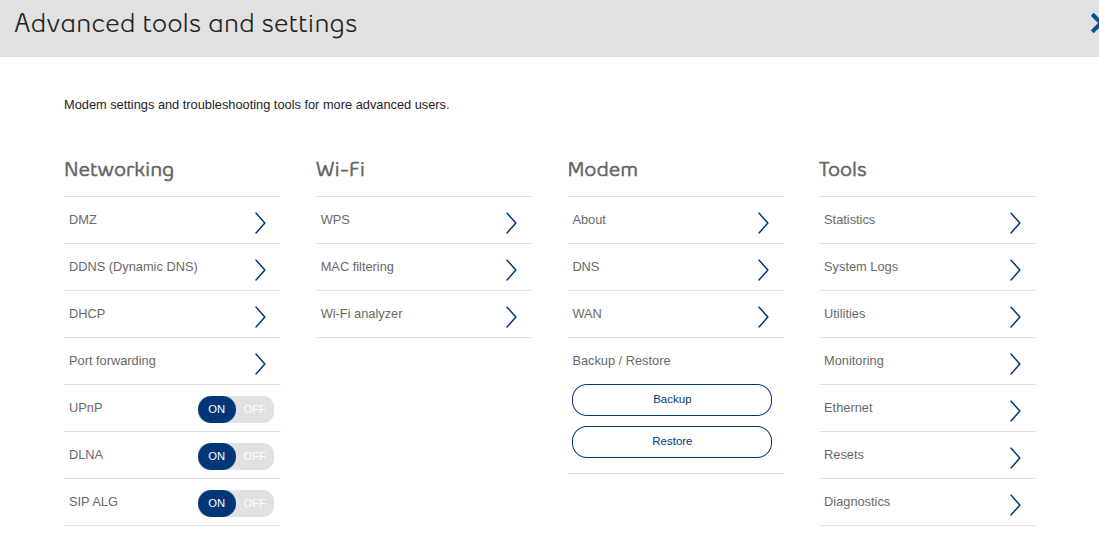
Here's my settings. DMZ: off, DDNS: off, DHCP: on (I believe this was done by the installer, and it looks like it sets up the last two numbers of the subnet and sets up the IP range). Not quite sure what else would contribute, but regardless same settings that I know of, still works on Windows.

Hmm ok. That's definitely a bit of a stumper, because all those seem to be what they should be doing. I do know that recently Zorin was having a lot of issues with connections, especially in the SMB territory, but I'm wondering if something else may have happened (or is in the same vein) that is stopping this from functioning properly as well.

This may be a very annoying thing to try to test, but could you a session of another distro (such as linux mint) and see if you're able to startup the server and connect locally from your windows machine at that point? I think to test you should be able to use a live session, rather than doing a full install (at least, from my recollection of what you need to run a server, you should be able to. But my knowledge is fairly antiquated in Minecraft Servers to be fair) My time running a Minecraft Server was probably close to version 1 lol.

Since the networking aspect looks okay, I think there might be an issue with the application itself. Try running that java command directly on the command line, not through the shell script. That would hopefully show some output that might include error messages if the application didn't start up or can't handle incoming connections properly.

For testing this, I found a tool called mcstatus that works on your local network or over the internet. This is how I've set this up on a Zorin OS 18 computer:

  1. Install openjdk-21-jre-headless.

  2. Download the server.jar file.

  3. Navigate to the folder where this file is downloaded and run the command java -Xms1G -Xmx1G -jar server.jar --nogui.

    The first time it runs it should fail and a few other files created, including the eula.txt that needs to be edited to accept it. Run it again and it produces the following output:

    Starting net.minecraft.server.Main
    [10:06:23] [ServerMain/INFO]: Environment: Environment[sessionHost=https://sessionserver.mojang.com, servicesHost=https://api.minecraftservices.com, profilesHost=https://api.mojang.com, name=PROD]
    [10:06:26] [ServerMain/INFO]: Loaded 1470 recipes
    [10:06:26] [ServerMain/INFO]: Loaded 1584 advancements
    [10:06:26] [Server thread/INFO]: Starting minecraft server version 1.21.11
    [10:06:26] [Server thread/INFO]: Loading properties
    [10:06:26] [Server thread/INFO]: Default game type: SURVIVAL
    [10:06:26] [Server thread/INFO]: Generating keypair
    [10:06:27] [Server thread/INFO]: Starting Minecraft server on *:25565
    [10:06:27] [Server thread/INFO]: Preparing level "world"
    [10:06:27] [Server thread/INFO]: Loading 0 persistent chunks...
    [10:06:27] [Server thread/INFO]: Preparing spawn area: 100%
    [10:06:27] [Server thread/INFO]: Time elapsed: 16 ms
    [10:06:27] [Server thread/INFO]: Done (0.589s)! For help, type "help"
    
  4. On a separate computer (same network), download and install mcstatus like so:

    • Install Python's venv and pip modules:

      sudo apt install python3-{venv,pip}
      
    • Create a new virtual environment, activate it, and install mcstatus:

      python3 -m venv mcstatus-venv
      source mcstatus-venv/bin/activate
      python3 -m pip install mcstatus
      
    • Check server connectivity:

      mcstatus 192.168.1.25 status
      

      Which returns:

      version: Java 1.21.11 (protocol 774)
      motd: A Minecraft Server
      players: 0/20 No players online
      ping: 16.77 ms
      

Can you follow these steps and confirm that this also works for you? Start with your local network first, no firewalls or anything, and be sure to check the terminal output of the Minecraft server to see if there are any reported problems.

@applecheeks37 I tried a live session of Zorin using the same USB I used to install a couple months ago, and was able to host the server using the exact same setup method as on my installed Zorin. So I'm convinced there's something up with this install. I'm not sure if there's any kind of repair function I can run to fix at least the core files and stuff.

@zenzen Could you elaborate a bit more on what you mean by the application itself? I've reinstalled both Java and Minecraft with no change. I've also tried a Terraria server which also did not work either. I'm very doubtful its anything but potentially a messed up setting or something.

I also tried a live environment on the Windows PC, but because I only have 16gb of RAM, I wasn't able to do much before I ran out of space. And it also seemed like the package to install openjdk was saying it couldn't be found and giving errors. Is it possible there's an option I can use for Windows?

If it's working on the live version, then definitely something has happened to your current install that's causing these connection issues. I'll have to try to find out some settings that may have caused this, but I'm not sure how much time I'm going to have to take a look into it.

Could you try running this command to see if anything else is using the port ?

sudo ss -tulnp | grep :25565

No worries, I appreciate the help from everyone. I don't mind if it takes a while (given the topic doesn't close eventually), I'm mostly just worried about getting it fixed.

First command is without the server running. Second is with it running. Doesn't seem as if something else is using the port.

I was thinking it might something about the app not founding certain key files or something. I have even less experience than @applecheeks37 on this one as I've never even played the game myself :sweat_smile:

I'm gonna try this later today see if I can make it work over the internet. Everything else being equal, it sounds like it might be the router messing things up.

But please test with that tool that I mentioned just to double chek everything is working.

I tried a live install of Zorin on my windows PC, with no luck as far as any type of package install because of an error saying the package couldn't be found. I tried installing python on windows instead, and could not figure it out.

I've already checked the windows PC and my Zorin PC with a live install, both worked fine with no issues. I've also tried multiple different game servers on the actual install on my Zorin PC, with none of them working. Zorin PC can connect locally to Windows PC, but it doesn't work the other way.

From what I've found, it's not my router, its not my port forwarding, its not the game or the server files, its not my hardware setup, and its not my firewall (since I've tested when its off). The only thing I can think of being the issue, is some kind of file or setting that happened to get messed up that isn't causing anything to be shared over the network, whether its publicly or locally.
