Cannot upgrade from 16.3 to 17.3

I booted up Zorin after not using it for awhile. Did some updates which I'm questioning if went smoothly. I seem to be missing Software Store now. Anyways I want to upgrade to Zorin 17.3. When I try I get this error:

[CHECKING] Started
[CHECKING:Validating Upgrade Attempt] Started
[CHECKING:Validating Upgrade Attempt] Completed
[CHECKING:Checking Filesystem] Started
[CHECKING:Checking Filesystem] Completed
[CHECKING:Creating Necessary Files] Started
[CHECKING:Creating Necessary Files] Completed
[CHECKING:Adding GPG Keys] Started
[CHECKING:Adding GPG Keys] Completed
[CHECKING:Restarting Apt] Started
[CHECKING:Restarting Apt] Completed
[CHECKING:Simulating Flatpak Transaction] Started
[CHECKING:Simulating Flatpak Transaction] Completed
[CHECKING:Processing Apt Repos] Started
[CHECKING:Processing Apt Repos] Completed
[CHECKING:Updating Apt Repos] Started
[CHECKING:Updating Apt Repos] Completed
[CHECKING:Calculating Upgradeable Packages] Started
[CHECKING:Calculating Upgradeable Packages] Completed
[CHECKING:Simulating Apt Transaction] Started
[CHECKING:Simulating Apt Transaction] Fatal Error: { GDBus.Error:org.debian.apt.TransactionFailed: error-dep-resolution-failed: The following packages have unmet dependencies:

zorin-os-desktop: }
[CHECKING:Simulating Apt Transaction] Failed
[CHECKING] Failed
[CHECKING:Restoring System] Started
[CHECKING:Restoring System] Completed
sudo apt install --reinstall zorin-os-desktop gives me this:

Reading package lists... Done
Building dependency tree
Reading state information... Done
Some packages could not be installed. This may mean that you have
requested an impossible situation or if you are using the unstable
distribution that some required packages have not yet been created
or been moved out of Incoming.
The following information may help resolve the situation:

The following packages have unmet dependencies:
zorin-os-desktop : Depends: gnome-software but it is not going to be installed
Recommends: gnome-software-plugin-flatpak but it is not going to be installed
Recommends: gnome-software-plugin-snap but it is not going to be installed
Recommends: zorin-windows-app-support-installation-shortcut but it is not going to be installed
E: Unable to correct problems, you have held broken packages.

This might also be of note:

The following packages have unmet dependencies:
gnome-tour : Depends: libgstreamer-plugins-bad1.0-0 (>= 1.16.3) but 1.16.2-2.1ubuntu1 is to be installed

Tried follow advice I gathered from web searches but nothing seems to work. Not sure what I should be doing. Any help appreciated.

sudo apt update gives me this:

gnome-tour/focal 3.38.0-zorin20 amd64 [upgradable from: 3.38.0-zorin19]
N: There is 1 additional version. Please use the '-a' switch to see it

Digging deeper it appears gnome-tour dependency is needed:

sudo aptitude install gnome-tour
The following packages will be upgraded:
gnome-tour{b}
1 packages upgraded, 0 newly installed, 0 to remove and 0 not upgraded.
Need to get 577 kB of archives. After unpacking 12.3 kB will be freed.
The following packages have unmet dependencies:
gnome-tour : Depends: libgstreamer-plugins-bad1.0-0 (>= 1.16.3) but 1.16.2-2.1ubuntu1 is installed
The following actions will resolve these dependencies:

 Keep the following packages at their current version:
  1. gnome-tour [3.38.0-zorin19 (now)]
    

Tried installing gstreamer and got this:

The following packages have unmet dependencies:
libgstreamer-plugins-bad1.0-dev : Depends: libgstreamer-plugins-good1.0-dev but it is not going to be installed
Depends: libopencv-dev (>= 2.3.0) but it is not going to be installed
libgstreamer-plugins-base1.0-dev : Depends: libgstreamer-plugins-base1.0-0 (= 1.16.2-4) but 1.16.2-4ubuntu0.1 is to be installed
Depends: libgstreamer-gl1.0-0 (= 1.16.2-4) but 1.16.2-4ubuntu0.1 is to be installed
Depends: libc6-dev but it is not going to be installed or
libc-dev

What is your output for

cat /etc/apt/sources.list

ls /etc/apt/sources.list.d

1 Like

Welcome to the Forum!

Did You add any Third-Party Repo's? If yes, delete them. Also: Did You have made any Changes to the Zorin Repo's?

Hi, sorry for the delay. I get this:

deb Index of /ubuntu focal main universe multiverse restricted

and this:

flexiondotorg-ubuntu-cpu-x-focal.list
flexiondotorg-ubuntu-cpu-x-focal.list.save
zorin.list
zorin.list.save
zorinos-ubuntu-apps-focal.list
zorinos-ubuntu-apps-focal.list.save
zorinos-ubuntu-drivers-focal.list
zorinos-ubuntu-drivers-focal.list.save
zorinos-ubuntu-patches-focal.list
zorinos-ubuntu-patches-focal.list.save
zorinos-ubuntu-stable-focal.list
zorinos-ubuntu-stable-focal.list.save

Hi, I deleted everything under Other Software in Software & Updates.

In Terminal I entered: ls /etc/apt/sources.list.d and got this:

zorin.list zorinos-ubuntu-drivers-focal.list.save
zorin.list.save zorinos-ubuntu-patches-focal.list
zorinos-ubuntu-apps-focal.list zorinos-ubuntu-patches-focal.list.save
zorinos-ubuntu-apps-focal.list.save zorinos-ubuntu-stable-focal.list
zorinos-ubuntu-drivers-focal.list zorinos-ubuntu-stable-focal.list.save

I deleted everything under Other Software in Software & Updates.

In Terminal I now enter: ls /etc/apt/sources.list.d and get this:

zorin.list zorinos-ubuntu-drivers-focal.list.save
zorin.list.save zorinos-ubuntu-patches-focal.list
zorinos-ubuntu-apps-focal.list zorinos-ubuntu-patches-focal.list.save
zorinos-ubuntu-apps-focal.list.save zorinos-ubuntu-stable-focal.list
zorinos-ubuntu-drivers-focal.list zorinos-ubuntu-stable-focal.list.save

Okay, then make a sudo apt update && sudo apt upgrade and then try it again with the System Upgrade.

OK, after doing some internet search and asking AI here's where I am at:

cat /etc/apt/sources.list

deb Index of /ubuntu focal main restricted universe multiverse

deb Index of /ubuntu focal-updates main restricted universe multiverse
deb-src Index of /ubuntu focal-updates main restricted universe multiverse

deb Index of /ubuntu focal-security main restricted universe multiverse
deb-src Index of /ubuntu focal-security main restricted universe multiverse

deb Index of /ubuntu focal-backports main restricted universe multiverse
deb-src Index of /ubuntu focal-backports main restricted universe multiverse

deb Index of /ubuntu focal partner
deb-src Index of /ubuntu focal partner

ls /etc/apt/sources.list.d

zorin.list zorinos-ubuntu-drivers-focal.list zorinos-ubuntu-stable-focal.list
zorin.list.save zorinos-ubuntu-drivers-focal.list.save zorinos-ubuntu-stable-focal.list.save
zorinos-ubuntu-apps-focal.list zorinos-ubuntu-patches-focal.list
zorinos-ubuntu-apps-focal.list.save zorinos-ubuntu-patches-focal.list.save

sudo apt update && sudo apt upgrade

Hit:1 Index of /ubuntu focal InRelease
Hit:2 http://archive.ubuntu.com/ubuntu focal InRelease
Hit:3 http://archive.ubuntu.com/ubuntu focal-updates InRelease
Hit:4 http://archive.ubuntu.com/ubuntu focal-security InRelease
Hit:5 http://archive.ubuntu.com/ubuntu focal-backports InRelease
Reading package lists... Done
Building dependency tree
Reading state information... Done
All packages are up to date.
Reading package lists... Done
Building dependency tree
Reading state information... Done
Calculating upgrade... Done
The following security updates require Ubuntu Pro with 'esm-infra' enabled:
libsoup-gnome2.4-1 linux-headers-generic-hwe-20.04 libopenjp2-7
bind9-dnsutils poppler-utils gstreamer1.0-alsa libcups2 intel-microcode
gnupg-utils xserver-common gir1.2-soup-2.4 gpg-wks-client
gstreamer1.0-plugins-base-apps openssl libblockdev-swap2 xserver-xorg-core
gir1.2-gdkpixbuf-2.0 libnvidia-compute-535 libnvidia-compute-535 gnupg-l10n
libgdk-pixbuf2.0-0 libssh-4 linux-modules-nvidia-510-generic-hwe-20.04
libpython3.8-minimal libctf-nobfd0 libwbclient0 libnvidia-encode-535
libnvidia-encode-535 libsystemd0 nvidia-kernel-common-535 gcc-10-base
gcc-10-base libavahi-glib1 gstreamer1.0-plugins-good libgs9
xserver-xorg-video-nvidia-535 libnvidia-gl-535 libsqlite3-0 python3-protobuf
python3-urllib3 binutils libnvidia-fbc1-535 libnvidia-fbc1-535 libsnmp-base
bind9-host libitm1 libnvidia-decode-535 libnvidia-decode-535
libavahi-common-data libavahi-common3 sudo gpg-wks-server libpython3.8
python3.8 xserver-xorg-legacy gpg libblockdev-crypto2 udev
gstreamer1.0-plugins-base cups-server-common libnvidia-cfg1-535
libblockdev-loop2 libquadmath0 libklibc libblockdev-fs2 cups-common
linux-image-generic-hwe-20.04 libblockdev-part2 nvidia-utils-535
python3-requests libgstreamer-plugins-good1.0-0 libudev1 libsoup2.4-1
gstreamer1.0-pulseaudio systemd-timesyncd dirmngr libavahi-ui-gtk3-0
linux-generic-hwe-20.04 samba-libs binutils-x86-64-linux-gnu xserver-xephyr
gstreamer1.0-gtk3 cups-filters linux-modules-nvidia-535-generic-hwe-20.04
libtiff5 udisks2 libsnmp35 libtsan0 libubsan1 cups-ppdc libcaca0
libprotobuf-lite17 avahi-daemon libgfortran5 libcupsfilters1
python3.8-minimal libgstreamer-gl1.0-0 systemd-sysv libblockdev2
nvidia-compute-utils-535 libavahi-core7 gpgv libpam-systemd
libgstreamer-plugins-base1.0-0 xwayland gstreamer1.0-x ghostscript liblsan0
systemd libgomp1 libgdk-pixbuf2.0-bin nvidia-driver-535 libfontembed1
libssh-gcrypt-4 gir1.2-gst-plugins-base-1.0 libblockdev-utils2 ghostscript-x
libgdk-pixbuf2.0-common libsmbclient libmysqlclient21 libnss-systemd
libgs9-common avahi-autoipd binutils-common libblockdev-part-err2 libgcc-s1
libgcc-s1 cups-filters-core-drivers libxml2 libbinutils libpython3.8-stdlib
libgnutls30 libudisks2-0 cups-bsd avahi-utils cups-core-drivers libatomic1
libatomic1 libpoppler-cpp0v5 cups-daemon libssl1.1 libnvidia-common-535
gnupg libcc1-0 libprotobuf17 libcupsimage2 libpoppler-glib8 libstdc++6
libstdc++6 libpoppler97 libavahi-client3 cups cups-client cups-ipp-utils
klibc-utils libnvidia-extra-535 gpg-agent bind9-libs gpgconf gstreamer1.0-gl
libctf0 cups-browsed libxslt1.1 gpgsm nvidia-kernel-source-535 libpng16-16
Learn more about Ubuntu Pro at Ubuntu Pro | Ubuntu
0 upgraded, 0 newly installed, 0 to remove and 0 not upgraded.

Initially I suspected I was missing sources so I found this on the web:

Ubuntu 20.04 LTS (Focal Fossa) -- Full sources.list

deb Index of /ubuntu focal main restricted universe multiverse
deb-src Index of /ubuntu focal main restricted universe multiverse

deb Index of /ubuntu focal-updates main restricted universe multiverse
deb-src Index of /ubuntu focal-updates main restricted universe multiverse

deb Index of /ubuntu focal-security main restricted universe multiverse
deb-src Index of /ubuntu focal-security main restricted universe multiverse

deb Index of /ubuntu focal-backports main restricted universe multiverse
deb-src Index of /ubuntu focal-backports main restricted universe multiverse

deb Index of /ubuntu focal partner
deb-src Index of /ubuntu focal partner

After doing some Terminal commands in an effort to update/install/clean/purge/etc. Which resulted in some updating. I see now that:
deb-src Index of /ubuntu focal main restricted universe multiverse is no longer listed as source. Also "The following security updates require Ubuntu Pro with 'esm-infra' enabled:" and all the text after it is new.

I still get this error:

[CHECKING] Started
[CHECKING:Validating Upgrade Attempt] Started
[CHECKING:Validating Upgrade Attempt] Completed
[CHECKING:Checking Filesystem] Started
[CHECKING:Checking Filesystem] Completed
[CHECKING:Creating Necessary Files] Started
[CHECKING:Creating Necessary Files] Completed
[CHECKING:Adding GPG Keys] Started
[CHECKING:Adding GPG Keys] Completed
[CHECKING:Restarting Apt] Started
[CHECKING:Restarting Apt] Completed
[CHECKING:Simulating Flatpak Transaction] Started
[CHECKING:Simulating Flatpak Transaction] Completed
[CHECKING:Processing Apt Repos] Started
[CHECKING:Processing Apt Repos] Completed
[CHECKING:Updating Apt Repos] Started
[CHECKING:Updating Apt Repos] Completed
[CHECKING:Calculating Upgradeable Packages] Started
[CHECKING:Calculating Upgradeable Packages] Completed
[CHECKING:Simulating Apt Transaction] Started
[CHECKING:Simulating Apt Transaction] Fatal Error: { GDBus.Error:org.debian.apt.TransactionFailed: error-no-package: Package zorin-os-16-to-17-upgrade isn't available }
[CHECKING:Simulating Apt Transaction] Failed
[CHECKING] Failed
[CHECKING:Restoring System] Started
[CHECKING:Restoring System] Completed

The issue is here.
The package is available in the Zorin OS Repository. But it will not be exposed to the end user if the Sources have deviated - in order to prevent breaking a users system during the upgrade.

The Best step forward is - a fresh install after backing up your data.
This can be done rather painlessly:

But if you really want to use the Zorin Upgrader, you can try elevating your file manager to Root Access.
Navigate to /etc/apt/sources/list/d
Remove all entries that have the .save behind the file name.
Refresh package lists:

sudo apt update

Then launch the Zorin Upgrader tool and see if it works. If it does not, the sources are just too deviated for the package to be exposed.

1 Like

Hmm .... I think @StarTreker has still Zorin 16. Maybe he can copy his sources.list File here so You can take this. Also the Files in sources.list.d with their Content.

1 Like

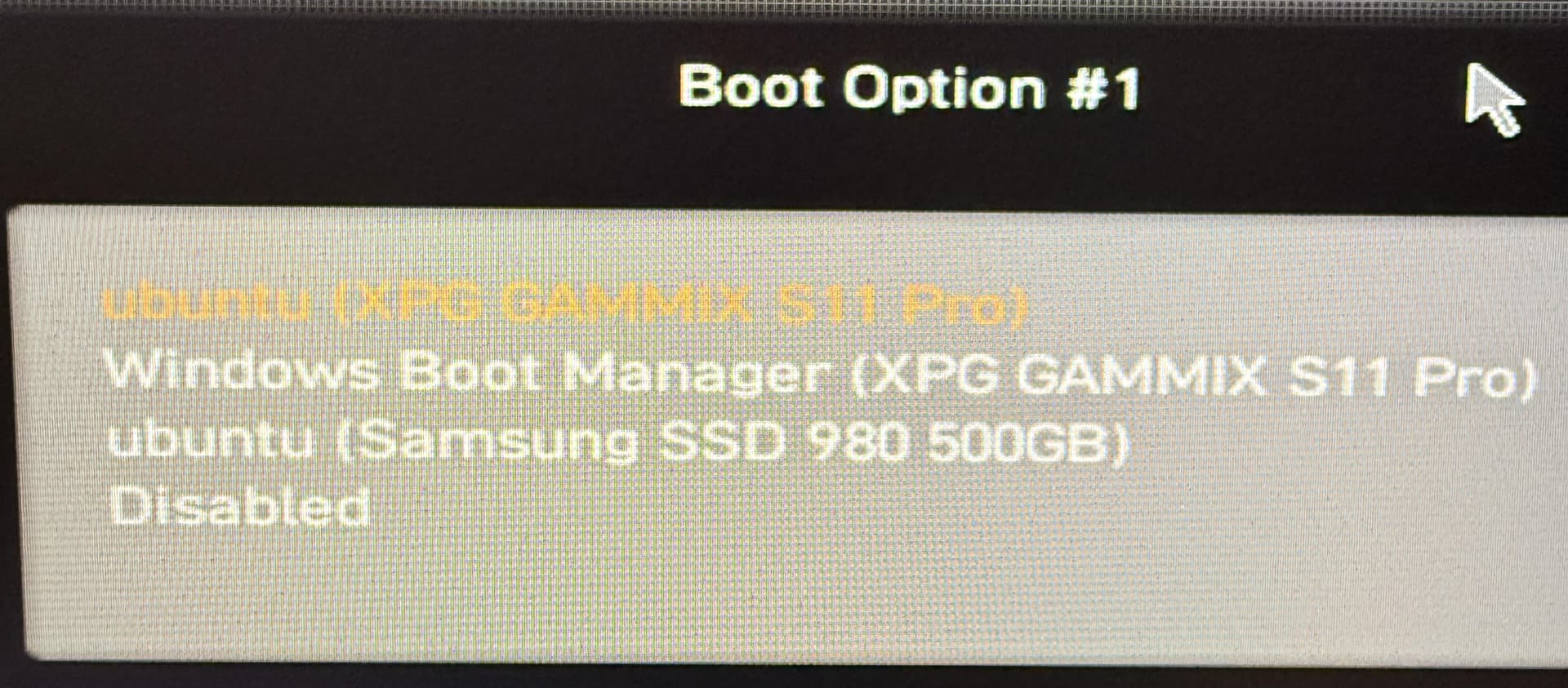
OK, thank you very much for your help. I saved the files I wanted and reinstalled 16.3 then used software updater to get to 17.3. Now I'm trying to re-establish the grub bootloader or erase it and perhaps go with EasyBCD on Windows. I may be wrong but it appears there is a Grub bootloader on my Windows drive (XPG) or something that BIOS sees as bootable and calls ubuntu. However it's currently broken. I suppose I could ignore it but I think it should be cleaned up. Not sure how anything ubuntu got on my Windows drive. Previously I would start up my computer and get the option between Zorin, Windows Boot or UEFI. I'm trying to get that set up again. Here's a pic of my BIOS boot order:

Since Zorin OS is based on Ubuntu, it's bootloader can be read as "Ubuntu."

On Zorin OS, using efibootmgr can remove orphaned bootloader files, with one command.
But be sure of the file before removing it.

1 Like

To understand that right: You want to stay on Windows and You want delete the Ubuntu Entries or You want stay on Zorin and delete the Windows Entry?

So essentially I had decided to reinstall Zorin 16.3 to the particular drive that had the Zorin OS upgrading issues. Wiped the drive, reinstalled 16.3 then upgraded 16.3 to 17.3. I lost either the original grub bootloader (which gave me the boot up option upon startup to either Zorin or Windows Bootloader) or broke it. Checking my drives in BIOS I see 3 bootable drive listings: 1) XPG Windows, Samsung ubuntu, XPG ubuntu. Not sure why there is ubuntu on the XPG drive that is my Windows Bootloader + OS. My thinking is that that is where I installed the grub bootloader originally not really knowing what I was doing.

Booting to XPG unbuntu essentially gives me a broken boot. I believe I can just recreate bootable options by either via Windows using EasyBCD or via Zorin by creating a grub bootloader. Currently Zorin boots first as my Windows drive doesn't appear in boot order unless I switch to CMS. I can however boot Windows first by setting it in a sub menu in my BIOS (forget the exact name and location in BIOS at the moment). As far as the "ubuntu" portion that appears on my XPG drive with Windows I'm thinking to either ignore it or delete it to keep things clean.

At this point I am not sure if I want to set up boot option via Windows or Zorin. I wonder if setting up a grub bootloader I can still find Windows Bootloader considering that drive doesn't readily appear as a drive in boot order on main BIOS screen. But it was all working before. Can't remember how I set up the grub bootloader originally.

You could try Boot Repair. When starting the Boot Stick with Zorin on it, choose ''try Zorin'' to get in Live Mode and there look for Boot Repair and let it run.

Another Thing would be to start in Zorin (in Your installed Zorin) and open the Terminal and type efibootmgr and post the Output here. This shows Details about Boot Entries.

1 Like

Here's the output:

BootCurrent: 0003
Timeout: 0 seconds
BootOrder: 0003,0004,0005
Boot0000* Windows Boot Manager
Boot0003* ubuntu
Boot0004* Windows Boot Manager
Boot0005* ubuntu

I went to AI with it and gave it details. It managed to help me clean up the boot "ghosts" and set up the boot screen again. Everything seems cleaned up and working now.

Thanks for your assistance. Seems all is good now.

1 Like