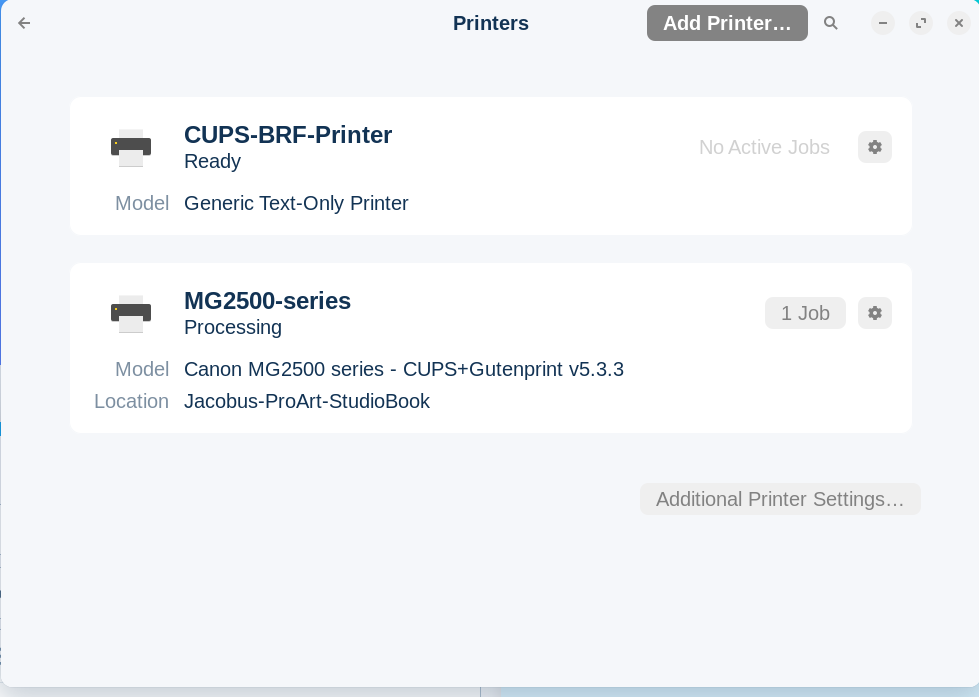
My printer worked fine until this morning. I am not sure if it had something to do with a recent update I did. but when I tried to print now (my CV, no less) the file seems to go through to the device, but no printing. This is where it hangs:
Is it connected directly or via network? Looking at your screenshot it appears to have the correct drivers (it is not showing driverless). Did you download the Linux drivers from Canon before you installed the printer?
Have you tried power cycling the printer? I've gone through this kind of issue with printers before, their brains get jammed up with yogurt(raspberry flavor). Pull the plug on that printer, let it sit unplugged for 5 minutes, then plug it back in. It might be a good idea to restart your computer as well. Load up your CV and try to print again.
I would remove the printer and follow this guide suggested by Brave A.I. (In case you are wondering why Ubuntu 22.04 is stated is because I included it in the search as Zorin 17 is a fork of Ubuntu 22.04):
Canon Printer Not Printing Ubuntu
If your Canon MG2540S printer is not printing on Ubuntu 22.04 connected to a ProArt StudioBook, there are several steps you can take to troubleshoot and resolve the issue. Based on the information from the context, here are some solutions that have been reported to work:
Install Required Dependencies : Before installing the printer drivers, ensure that you have the necessary dependencies installed. You can do this by running the following command in the terminal:
sudo apt update && sudo apt install libcups2t64
Download and Install Drivers : The Canon MG2540S may not have direct support in Ubuntu 22.04, so you may need to download the appropriate drivers. The closest drivers available are for the MG2500 series. You can download the drivers from the official Canon website or from a trusted source. Once downloaded, extract the files and navigate to the extracted directory. Run the installation script using the following commands:
cd ~/cnijfilter-mg2500series-4.00-1-deb
./install.sh
If you encounter a permission denied error, use sudo to run the script:
sudo ./install.sh
Restart the Printer and System : After installing the drivers, restart your printer and the system to ensure that all changes take effect. This can help resolve any issues related to the printer not being recognized or functioning correctly.
Check CUPS Interface : The Common Unix Printing System (CUPS) is a critical component for managing printers in Ubuntu. You can access the CUPS interface by browsing to http://localhost:631 . From there, you can add your printer and configure it if necessary.
Use the Printer Setup Tool : If the printer is still not working, you can use the printer setup tool provided by Ubuntu. Go to the Ubuntu Settings app, select "Printers" on the left panel, and click on "Additional Printer Settings..." at the bottom of the right panel. Click the "+" button to add your printer and follow the prompts to install the driver.
Check for System Updates : Ensure that your system is up to date. Sometimes, issues can be resolved by updating the operating system and installed packages. You can update your system using the following commands:
sudo apt update
sudo apt upgrade
By following these steps, you should be able to resolve the issue with your Canon MG2540S printer not printing on Ubuntu 22.04. If the problem persists, consider checking the official Canon support resources or community forums for additional guidance.
Just to add I never use Settings | Printers to launch the interface. I learned a long time ago from advice gleaned on the defunct Pear OS forum to use the following command:
Doing nothing. When You print, what Option of the 2 on the Picture of You initial comment You use?
Did You tried to remove the Printers and then turn on Your Printer so that it is added again? Did You take a Look on the Manufacturer's Website if there is maybe a Linux Driver offered?