When I installed VirtualBox and went to run the machine, this error occurred. Can't I run a virtual machine on Zorin OS 18?

This only means that other virtualization is in use.
If you have not installed any at all, which version of VirtualBox did you install and how did you install it?
Run these commands in Terminal (edit:if you have amd, use kvm_amd instead of kvm_intel)
sudo rmmod kvm_intel
sudo rmmod kvm
This is just a temporary fix, and will need to be done after every restart.
A more permanent fix is to make a .conf file with the following
options kvm enable_virt_at_load=0
Put the .conf in /ect/modprobe.d/
Did You downloaded VirtualBox from the Developers Website?
If yes, did You choose the Version for Ubuntu 24.04?
Yes, I downloaded VirtualBox from the developers' website. And I choose Ubuntu 24.04.
I follow these commands:
virtualbox installation Commands:
step 0: sudo apt update
step 1. wget -O- https://www.virtualbox.org/download/oracle_vbox_2016.asc | sudo gpg --dearmor --yes --output /usr/share/keyrings/oracle-virtualbox-2016.gpg
step 2.0 echo "deb [arch=amd64 signed-by=/usr/share/keyrings/oracle-virtualbox-2016.gpg] Index of http://download.virtualbox.org/virtualbox/debian $(. /etc/os-release && echo "$VERSION_CODENAME") contrib" | sudo tee /etc/apt/sources.list.d/virtualbox.list
step 2.1: sudo apt update
step 3.0 sudo apt install virtualbox-7.2
step 3.1 vboxmanage -v | cut -dr -f1
step 4.0 wget https://download.virtualbox.org/virtualbox/7.2.4/Oracle_VM_VirtualBox_Extension_Pack-7.2.4.vbox-extpack
step 4.1 sudo vboxmanage extpack install Oracle_VirtualBox_Extension_Pack-7.2.4.vbox-extpack
vboxmanage list extpacks
sudo usermod -aG vboxusers $USER
then reboot
groups $USER
Does it work now? Do you have tried the suggestions of kris80?
sudo modprobe -r kvm
For intel processor:
sudo modprobe -r kvm_intel
For amd processor:
sudo modprobe -r kvm_amd
You can also follow this guide and add the parameter kvm.enable_virt_at_load=0
to file /etc/default/grub
Enter in terminal
sudo nano /etc/default/grub
Change the white marked line so that it looks like here (don't change other things in the file, the screenshot is not from Zorin):
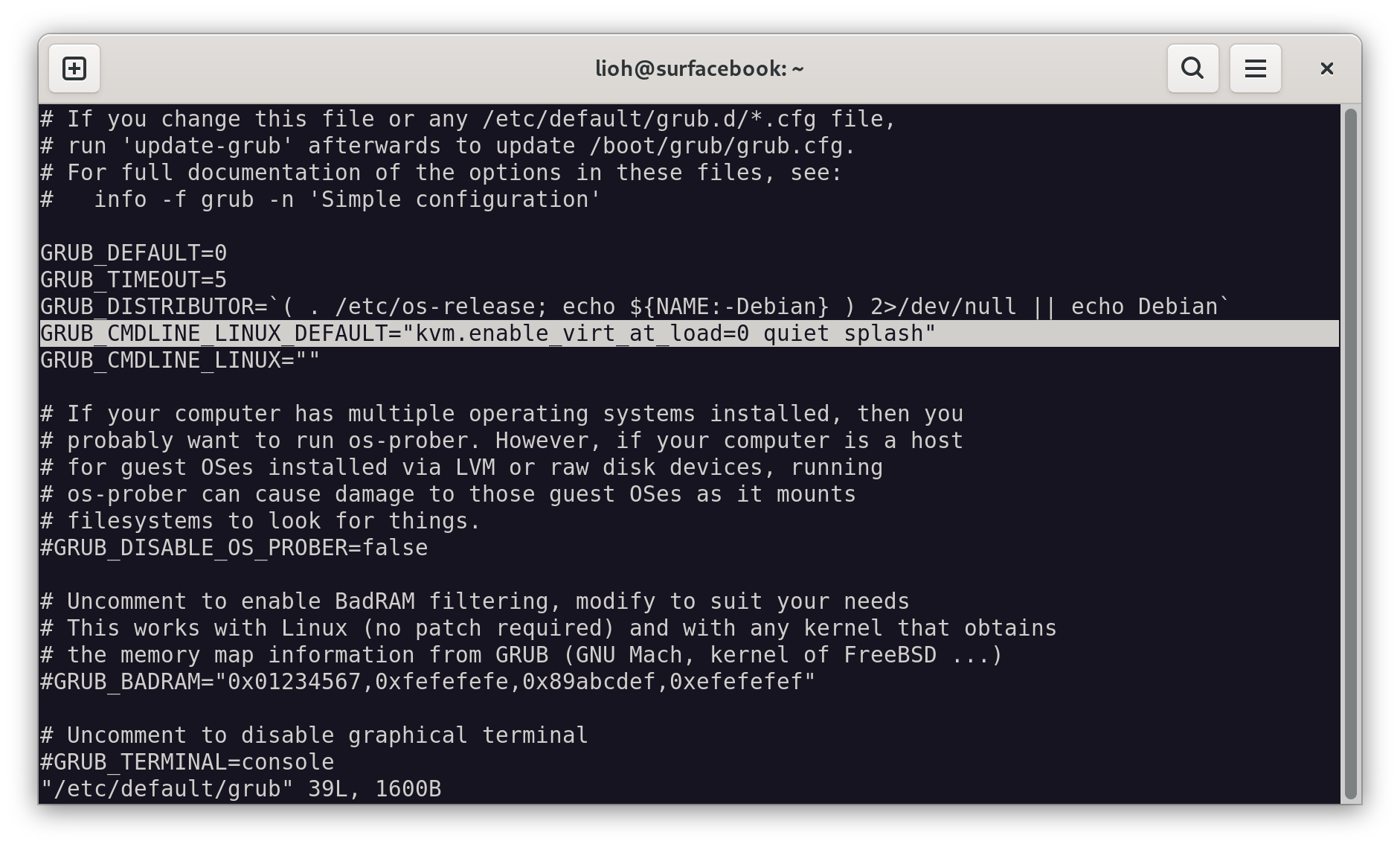
(picture from gnulinux.ch)
Then press ctrl+o, then enter, then ctrl+x
Now run
sudo update-grub
and reboot
You know, I get what is being said here, and I am using the temporary sudo rmmod command every time to open the VirtualBox, and the VirtualBox I downloaded from the Zorin OS 18 Software. What I do not like is that this should not be happening! KVM is supposed to help us with Virtual Machines, and how about that going around the rosy to start figure out how to start the CD-ROM to add a OS??
I went back to Zorin OS 16 due to this junk, and it runs better on a regular Hard Drive also!
That new VirtualBox is horrible in my opinion!
This topic was automatically closed 90 days after the last reply. New replies are no longer allowed.