I did change the standard apps in settings before, but that didn't change anything.
I now discovered a strange behaviour: I also installed Dophin (KDE) as file manager.
I tried to open a picture in Zorins standard file manager (Nemo?) and i worked!
Afterwards it also worked in Dolphin.
I have the XnView version from the standard appstore (in Mint that one is missing unfortunately, so does the Threema desktop app).
Another question: Weill .deb packages installed separately, without the appstore, also updated through the appstore?
The most .deb packages downloaded from internet aren't updated automatically with the system and you have to update them manually by installing a new version.
In the software store there are native apt packages/Zorin packages, flatpaks and snaps. At the right side of an app in the software store you can see the package format.
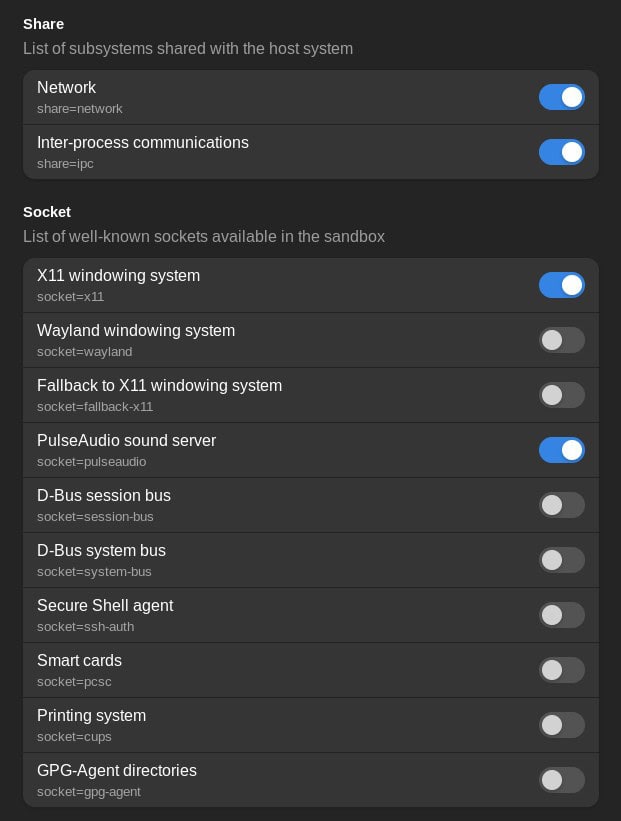
When it is installed as flatpak you should also install flatseal and in flatseal grant the app xnview access to all users/system files (at category filesystem).
You often have less problems with native .deb packages because they are better integrated into the system. Unfortunately, this app isn't offered as native Zorin package, I believe. And I also read that an user wrote about dependency problems with the downloaded .deb file on ubuntu 24.04.
There is also an Appimage to download from the homepage which you could try if the others don't work well. But it also needs to be manually updated.
So it now functions so that your images are opened with xnview? I just tried it with the flatpak version from the software store, and it functioned perfectly without requiring flatseal.
I could choose xnview in rightclick menu to open the image with it or set it as default app for pictures.
FYI: The default file manager in Zorin is called "nautilus".
I think the problem is Dolphin. In Nautilus I have the option to change standard apps, not so in Dolphin. Seems like the latter is not working flawlessly with Zorin
Unfortunately I like Dolphin much more. Nautilus in my opinion is very basic.
E.g. I want the PC to ask what to to when I drag and drop files (copy, move...). That seems not possible in Nautilus.
In Dolphin you can split the screen for two different folders with just one click and both are shown side by side much better then Nautilus shows tabs.
Also the appearance is much more customisable in Dolphin and it looks better to me (just my taste).
However it Dolphin was not made for Ubuntu/Zorin I might stick to Nautilus...
I have another problem: XnView doesn't find my printer (Gimp does, Darktable does, XnView not)????
File manager Nemo would also be an option which is better integrated into gnome and offers much more functions than nautilus. You can install it with
sudo apt install nemo
If you like you can also try Thunar for testing, which is the filemanager of Zorin lite
sudo apt install thunar
Attention: Many of the file managers are displayed as "files" after you have installed them. However, when you enter the name of the file manager (nemo, nautilus, thunar,..) it opens the correct one. You can change the name later because it is confusing.
To be able to print from xnview flatpak, enable in flatseal the "printing system" at category socket.
It sounds, as you managed it.
First go to flatseal, select on the left side xnview and then go to category "socket" and turn the slider for "printing system" on.


 Sorry.