Circles above CPU, RAM, and Disk not showing in Conky theme

I used this Conky theme (https://www.pling.com/p/2092022/), but when I applied it, the circles that should appear above the CPU, RAM, and Disk sections don’t show up.

In this theme (https://www.pling.com/p/2037136), the day of the month doesn’t display correctly.

Is this a Lua?

Can you please post the conky file contents using the no parse tags? </>

This is the content of the Conky configuration file.

conky.config = {
--==============================================================================

--  Created : 2022/Jun/05
--  This theme is for conky version 1.10.8 or newer
-- 
--  SARGAS
--  ( A part of Scorpio Conky themes pack )
--
--  author  : Closebox73
--  version : 2.9
--  variant : Playerctl & Celcius
--  license : Distributed under the terms of GPLv3

--==============================================================================

-- Size and Position settings --
  alignment = 'top_left',
  gap_x = 40,
  gap_y = 40,
  maximum_width = 300,
  minimum_height = 600,
  minimum_width = 300,
  
-- Text settings --
  use_xft = true,
  override_utf8_locale = true,
  font = 'Roboto:size=2',
  
-- Color Settings --
  default_color = 'white',
  default_outline_color = 'black',
  default_shade_color = 'black',
  color1 = 'FF7400',
  
-- Window Settings --
  background = false,
  border_width = 1,
  draw_borders = false,
  draw_graph_borders = false,
  draw_outline = false,
  draw_shades = false,
  own_window = true,
  own_window_colour = '000000',
  own_window_class = 'Conky',
  own_window_argb_visual = true,
  own_window_type = 'desktop',
  own_window_transparent = true,
  own_window_hints = 'undecorated,below,sticky,skip_taskbar,skip_pager',
  stippled_borders = 0,
  
-- Others --
  cpu_avg_samples = 2,
  net_avg_samples = 2,
  double_buffer = true,
  out_to_console = false,
  out_to_stderr = false,
  extra_newline = false,
  update_interval = 1,
  uppercase = false,
  use_spacer = 'none',
  show_graph_scale = false,
  show_graph_range = false,
  lua_load = '~/.config/conky/Sargas/lib/rings_rounded.lua',
  lua_draw_hook_pre = 'system_rings', 
}

conky.text = [[
${execi 300 ~/.config/conky/Sargas/scripts/weather-v4.0.sh -g}\
${color}${font Bebas Neue:size=55}${time %Y}${font}
${voffset 0}${color}${font Bebas Neue:size=55}${time %^A}${font}
${voffset 0}${color}${font Bebas Neue:size=55}${time %d}${font}
${voffset 0}${font Bebas Neue:size=55}${time %^B}${font}
${voffset 0}${font Bebas Neue:size=55}${time %I:}${color1}${time %M}${font}
${voffset 25}${color}${font Carlito:medium:size=10}Today weather in ${execi 600 ~/.config/conky/Sargas/scripts/weather-v4.0.sh -n}
${voffset 2}is ${execi 200 ~/.config/conky/Sargas/scripts/weather-v4.0.sh -d} with temperature ${execi 200 ~/.config/conky/Sargas/scripts/weather-v4.0.sh -t}°C
${voffset 2}it feels like ${execi 200 ~/.config/conky/Sargas/scripts/weather-v4.0.sh -f}°C, and humidity is ${execi 200 ~/.config/conky/Sargas/scripts/weather-v4.0.sh -h}%

${font Carlito:bold:size=11}${execi 2 ~/.config/conky/Sargas/scripts/playerctl-info.sh -a}
${voffset 3}${color1}${font Carlito:bold:size=14}~ ${execi 2 playerctl metadata xesam:title}
${voffset 76}${color}${font Bebas Neue:size=13}${offset 19}CPU${goto 103}RAM${goto 183}DISK
]]

ls ~/.config/conky/Sargas/lib/rings_rounded.lua

Is that where the Lua assets are?

Same question, here.
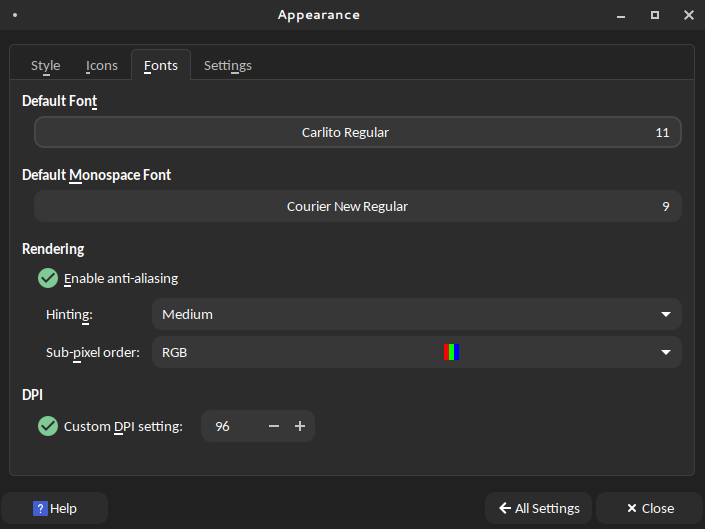
Have you checked you have the font specified in the conky file (I see Carlito as the font).

Here’s the terminal output:
/home/ali/.config/conky/Sargas/lib/rings_rounded.lua

So the Lua file is in the correct location.
I also checked for the Carlito font, but it’s not installed on my system.

You can either change that font for one that is installed, or install the Carlito font.

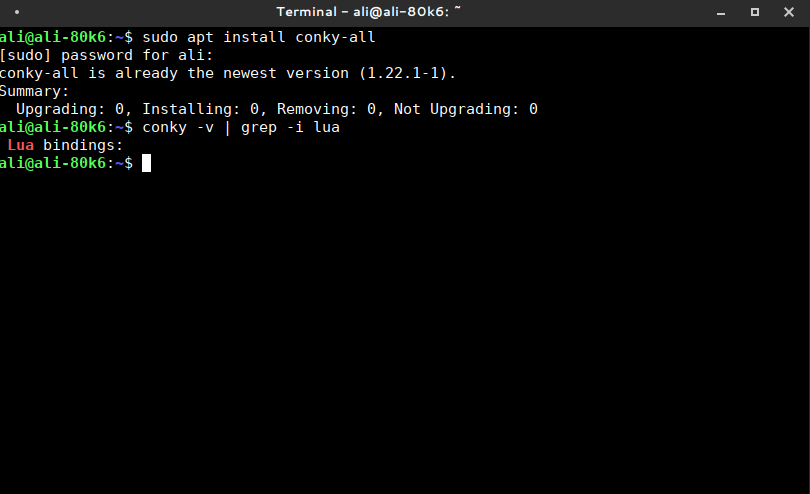
When you installed conky, did you do so with sudo apt install conky-all?
Is Lua installed?

conky -v | grep -i lua

Yes, I installed Conky using the command sudo apt install conky-all, but Lua is not installed.

And I installed the Carlito font.

I cannot remember now if you are on 17 or 18 of Zorin OS, but you can use apt search to check package versions.
I am on 18, so using those versions in this install example:

sudo apt install build-essential liblua5.3-dev libcurl4-openssl-dev libcairo2-dev libimlib2-dev libx11-dev libxft-dev libxdamage-dev libxml2-dev libncurses5-dev libpulse-dev libconfig++-dev

I’m using Peppermint OS, which is based on Debian 13 (Trixie), not Zorin OS.
So the package versions might be a bit different

Yes, please use apt search to check each - it may be a bit tedious.

I ran apt search for the packages, and they’re all available on my system (Peppermint OS based on Debian 13).
Here are the results:

liblua5.3-dev/stable,now 5.3.6-2+b4 amd64 [installed]
  Development files for the Lua language version 5.3

libcairo2-dev/stable 1.18.4-1+b1 amd64
  Development files for the Cairo 2D graphics library

libimlib2-dev/stable 1.12.4-2 amd64
  image loading, rendering, saving library (development files)

libconfig-dev/stable 1.7.3-2 amd64
  parsing/manipulation of structured config files (development)


1 Like

I downloaded this, but the problem still exists.

What graphics card are you using?

Verify the path of conky : it is
~/.config/conky/
or
~/.conky/

because I had the same problem : Conky Transparency issue - #9 by Nourpon

So your conky configaration file doesn't see the lua...

in your Sargas.conf, try this :

lua_load = '~/.conky/Sargas/lib/rings_rounded.lua',
lua_draw_hook_pre = 'system_rings',

and change every
~/.config/conky
to
~/.conky

The development libraries are not the same as the runtime. Make sure to check for that:

apt list -i | grep -i lua5.*

I don't know if this is required for Conky, though, I'm just pointing this out.

1 Like

In fact it doesn't, I don't have it installed on my computer an my conky work well

2 Likes

I was uncertain on it, so just listed them all. :stuck_out_tongue:

1 Like

I switched to Zorin OS 17 Lite, and I haven’t faced any issues with Conky.

XFCE has its own compositor that is complete, Gnome's mutter does not.