Hi. I installed ClamAV flatpack and its daemon and scanned my compie.
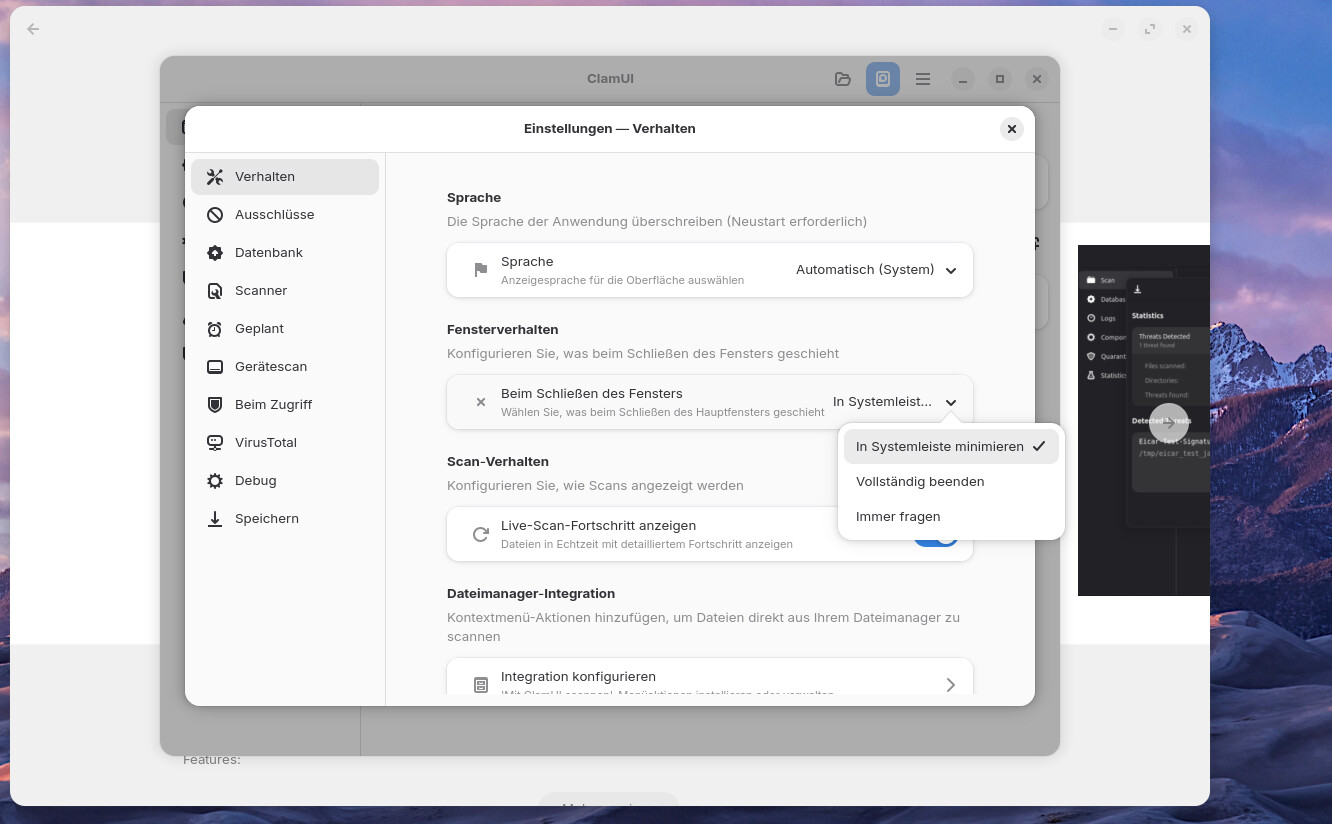
However, I dumbly chose on exit to remember my setting: to exit completely, not minimise. Now it closes completely every time I exit, instead of minimising to the taskbar. How can I set it to minimise instead? I don't find it in the settings.
In case anyone asks: I guess I'm a bit paranoid, and the Arch-breach thing of a few months ago got to me.
Are you referring to the flatpak ClamUI?
Open it and in the topbar click on the Hamburger Menu > settings. Then go to the first tab "behavior" and the second section there is the behavior of the window.
There you can configure what will happen when you close the window and you can select "minimize in panel" there.
I prefer using the .deb package as Flatpak is separate for the system. However, I am reviewing the practical use of this piece of software. It uses known signature database not new ones. It does have a practical use when you use a dedicated mailserver to check for any virus attachments. However I would recommend you use rkhunter and chkrootkit and also Lynis.
Clam UI is not fully mature yet. On newest versions when it recommends installing other packages it still states they are missing even after installing them!