Clone my Zorin Msata drive that is too small?

Hey,

I bought a super cheap thin client online and installed Zorin Os on it
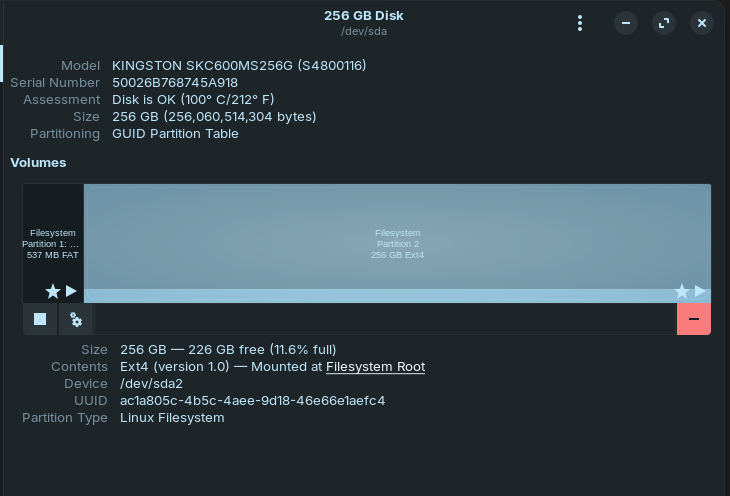
however, the device only came with a 32gb msata, which was fine at first but its now complaining its almost out of space, I have ordered an msata to usb enclosure, and a 256gb kingston msata to go with it, is there a way to clone/copy the entire 32gb zorin install onto my 256gb, and then put it back in my thin client enclosure and boot as normal, I have cloned before but that was years ago on windows 7, and I dont have a clue on zorin.

Thanks!

You could give Rescuezilla a try:

It can't expand your system to fill the new drive. You would need to use GParted for that which gets removed after installation.

sudo apt install gparted

To free up some space have you removed earlier kernels?

Thanks for the reply, however I'm brand new and would not know how to remove earlier kernels, all I know is I'm 64bit Wayland 17.3 core

That should work. An easier Solution would be to save Your Data, replace the Drive and install Zorin again.

1 Like

I have got that installed, however I am not exactly sure what I am ok to remove to be honest, the bigger msata will arrive tomorrow I expect

Thanks Rescuezilla was much more simple than I expected!

I would appreciate guidance on gparted if possible please

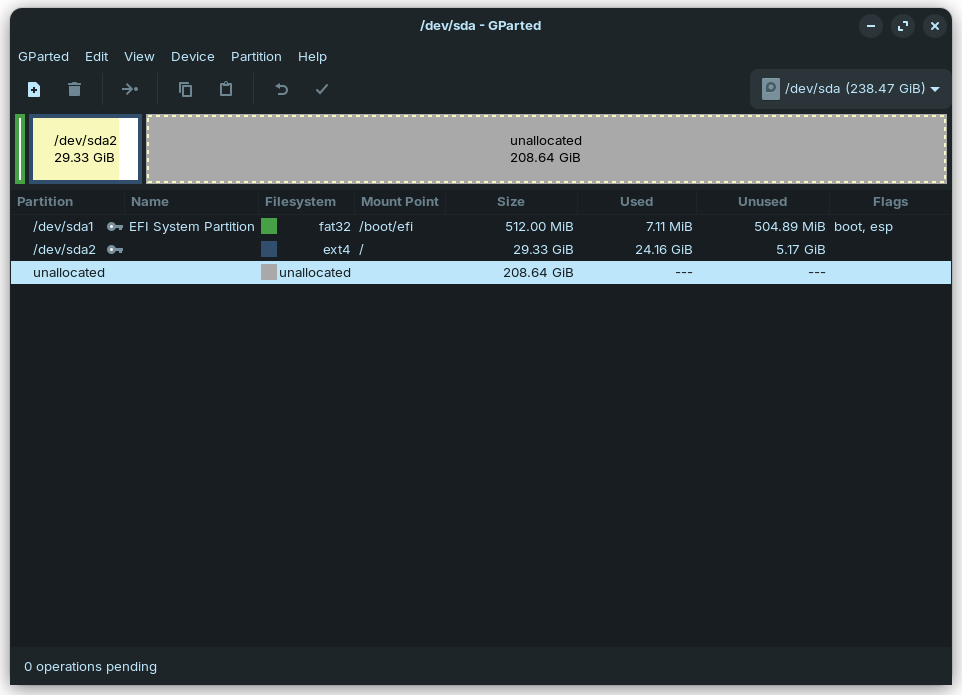
Select /dev/sda2 by left-clicking on it then select 'Resize/Move' option:

**


**

2 arrows should appear either side within the partition highlighted. Hold the left mouse button down on the right arrow and drag to end of drive, then click on the tick mark (Apply changes).
1 Like

Thanks a lot for the help :grinning_face_with_smiling_eyes:

1 Like

This topic was automatically closed 90 days after the last reply. New replies are no longer allowed.