Out of nowhere, collate button for printing is now permanently ON. In snip below, grayed out and unable to click on it to turn off collate. How do I get the collate function to allow me to turn it off?
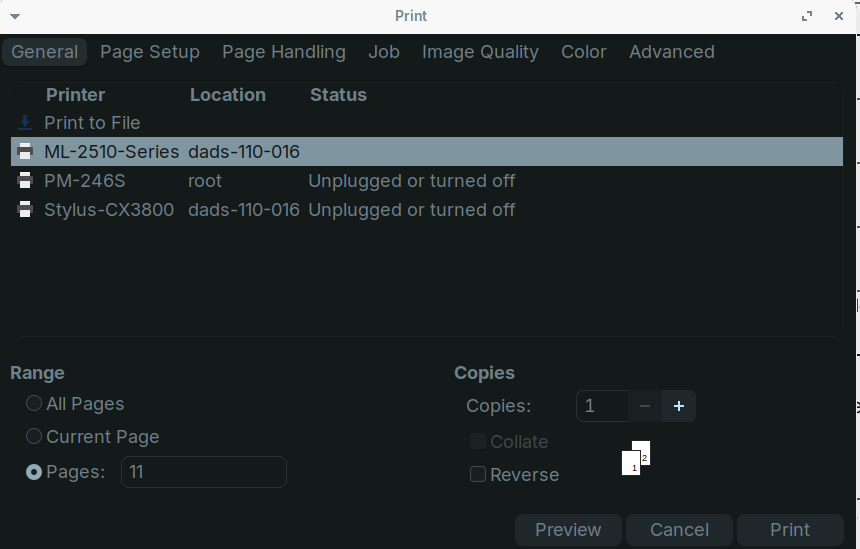
I'm not sure.
When you increase the copies to 2 and then disable collate, does it work?
I thought collate is only selectable when you print more than 1 copy, because when you only print one copy you shouldn't need to collate.
Ha! You may be on to something. Just tried that and I was able to get the collate to turn it off.  Now need to test. I'll report back later today.
Ugh! No dice, your trick did allow me to get to the collate box to turn it off or on, even with collate turned off it still wants to collate.
Additionally, the issue (so far) is only when opening a PDF from Thunar File Manager and then trying to execute the print. If the PDF presents from the software (in this case an online tax prep program) it shows the different menu from the Brave tab (snip below) that prints fine.
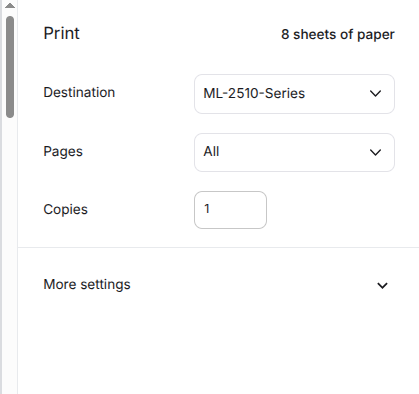
Another issue that has popped up though, is even when it prints normal from the web (Brave) tab menu (?correct terminology?...errr) it has now introduced a pause between pages of several seconds whereas before it would just fire out the pages one after the other.
And lastly, and this may be it, I just the other day added an Amazon Chinesium thermal label printer (PM-246S) for Ebay labels. Thinking we may have a driver interference issue...just a thought.
And finally, I need to do a Zorin software update -- been a minute -- maybe that will clear things up.