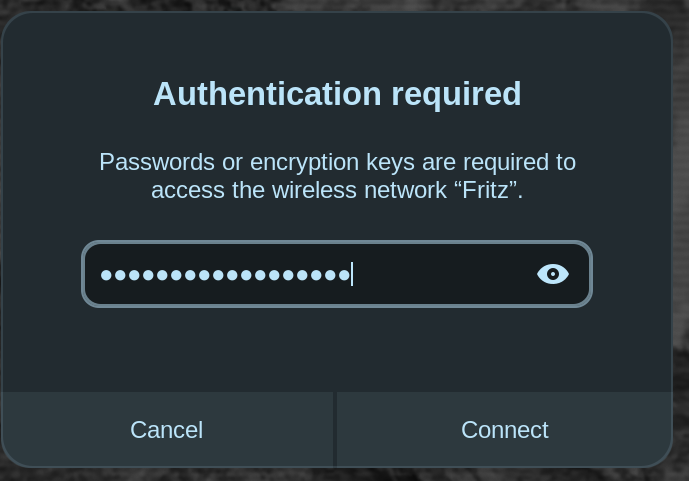
Zorin 18 Core. I keep getting a small screen-top dropdown asking for my router password, and this time I've got the same message in an on-screen dialogue box. I'm using NordVPN, but it's my router ("Fritz") password being requested. I've deleted all other saved networks. IPv4/6, DNS & Routes are all Automatic, and it's set to connect automatically. It's not a huge deal except when I miss the small dropdown, because of course my connection drops. Any ideas on what this means and how to correct it would be much appreciated.
Edit: I've disabled IPv6 to see if that fixes the problem.
Edit 2: I'm wondering if it's nothing to do with Zorin or my laptop and maybe to do with a setting on my router. Please don't spend time investigating this - it's maybe something that I'll stumble across in my router settings. Thanks for the advice already given. Much appreciated.
Do You have Automatic Login active?
Thanks for replying. I have "Connect automatically" (to this network) enabled, and it works fine when I boot my laptop, so I just don't understand why it needs re-authorisation so often. I don't know if the IPv6 disabling will make any difference - I'll keep an eye open and hope for the best.
Edit 10 minutes later: no, it's just popped up again, so it's not the IPv6 setting.
Do you login into the desktop with a password or do you use the automatic login?
I haven't used NordVPN, but does it have a function that might kill your network connection upon network loss, maybe a part of a killswitch or something like that? The killswitches I've used in the past haven't forgotten the network information, but maybe that's a feature of yours? Just an idea.
No, I log in with password or fingerprint. I removed the automatic login because it seemed to be a security risk.
I do have the kill switch enabled, but the request is for my laptop password, not my Nord password.
With Zorin 18 every time I launch Brave I have to put my password. That popup appears every time I do almost anything. It is very annoying. I checked the auto login because there is no security risk.
Following.
@Bonny Here you can find some information about the keyring. The easiest and safest way not to be prompted for password from Brave browser is to use a login with password.
If you don't like that you can set an empty password. But that is not recommended.
https://www.baeldung.com/linux/unlock-keyring-fix
Here is another solution for Brave browser:
That's very kind, thank you.
"[quote="Bonny, post:8, topic:57776"]
I checked the auto login because there is no security risk.
[/quote]
At the risk of getting off-topic, auto login seems to me to be a very high risk, and my view is supported by an article I've just read. When it was enabled, I was able to walk up to my laptop, open it, and be able to see all my emails, go to various sites and generally use the device without limit until eventually a login prompt appeared. Why do you think this is not a security risk? I'd be interested in general opinions - maybe this is a question that needs its own thread?
Because I live alone and have another computer at work. We all have different requirements.
It looks to me as if the message is coming from your "Fritz" router. Dumb question but when you go into settings/wifi and/or settings network, is the password you saved for "Fritz" the correct one? If it had a typo or was missing it might ask again.
AutoLogin is buggy, despite security opinions.
I agree with you in that I also have very low security concerns on certain computers in my own home.
If someone walked in, started reading my emails and going through my documents... they would be utterly bored.
But I do not use AutoLogin option because it conflicts with the system and causes other problems.
@DavidA Our ISP supplied us with a Fritz!Box router and whilst German users have a great experience, here in the UK it just doesn't work.
About 6 months ago maybe more, I had been using a TP-Link router for well over 6 years and then it died. Why? I had not been aware that firmware updates in 2021 ceased to be available for download, instead being fed via users' ISP. I thought the router was playing up one night, continually losing connection, so I powered off and carried out a power cycle which killed the router. Time to get the Fritz!Box out of the cupboard. It has no antenna and even though the notebook was literally inches away from the router, no joy. Even with ethernet connection from my good ladys work's notebook it would not connect! (Just to add our ISP does not support IPv6 so it always gets disabled in GNU/Linux).
So I bought an Asus modem/router. Far superior.
If you are trying to connect wirelessly, I suspect it is losing connection and then reconnecting again, hence the password pop-up window. Whilst I write this reply I suspect Zorin's power management on wifi might be the culprit so you need to change wifi power setting to 2 if memory serves.
Thanks, people. The authentication request is indeed from the router - the last time it happened I unhid the password and it's my network password, not my login. I also thought it might be happening on the switch between 2.4ghz & 5ghz bands, so I split them in the router settings and signed in only to the 5ghz band. It's too soon to say if it worked, especially as I got fed up with yet another sudden shutdown and reinstalled Zorin from scratch. Oh well, it keeps me off the streets, you know...?
Thank you. I didn't know it was buggy. I will keep reading about this.
This topic was automatically closed 90 days after the last reply. New replies are no longer allowed.