Thanks to everyone for all their help oer past couple of weeks.
I have a couple of things I have been trying to fix that just aren't working.
I need to use kernel 6.8 instead of 6.12 to get my wired connection to work. I can use the advanced options in the grub menu to pick 6.8 but was told the following edit to grub default would make this default:
unfortunately I still get bumped into 6.12 every time. What am I doing wrong?
I added an extra SSD to keep most of my data on to save space on the dual boot main drive. Unfortunately "root" has taken over ownership of the external SSD and keeps blocking me from adding files or folders or editing anything.
I've tried all types of fixes. Added mautilus -r and get the right click option to open as administrator but that usually odesn't work and apps tell me the folder doesn't exist etc.
I've tried doing sudo su and also chown but neither lets me change the ownership. I've tried opening as administrator and right clicking to change permissions but they never actually change.
BTW this is all on my home desktop computer that only I or my wife can touch so issues about someone steal;ing my computer and all it's data are not relevant.
I would appreciate any suggestions. Maybe some of my terminal syntax was wrong or something.
I made the change to the grub default. Not sure where the other came from. However, I pick 6.8 from the advanced options menu then reboot and the top option still takes me to 6.12.
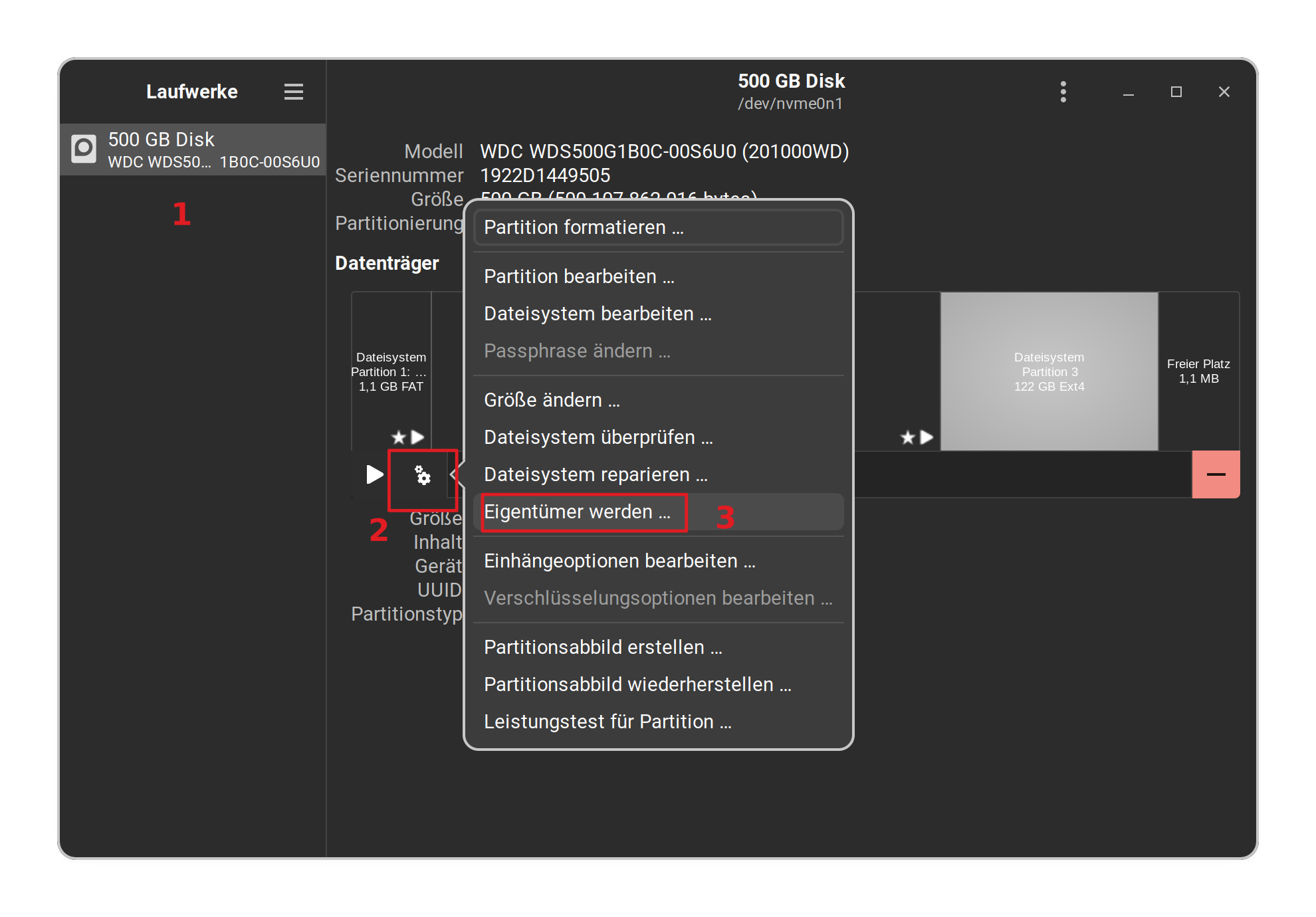
Can you explain exactly what I should do in disks. I tried editing the mount point to /media/nick/ but thatevidently wasn't the right thing. I did sudo su first to try and give me administrator priviliges
Also I noticed that the partition format is "basic data" which is a windows format. Should I use linux data or will that remove everything I have saved already?
OK ignore my question about booting. I now understand that it doesn't change what the top option does in the grub menu but automatically chooses the advanced options menu and then picks 6.8 so I just need to leave it alone and let it do what it wants to do.
My misunderstanding.
Just need to worry about the external SSD issue. My work around for now id not to use the root directory but to put everything one layer down so I have "LOcal Documents" folder and under that "Local Documents Old" which I created by making it in the home folder then copying it into "local Documents" then deleting ity from the home folder. Then I can go into "Local Documents" right click and do run as administrator which allows me to make edits in the next level down (Local Documents old) and everything downstream but not in the Local Documents folder itself. This is a pain but it works.
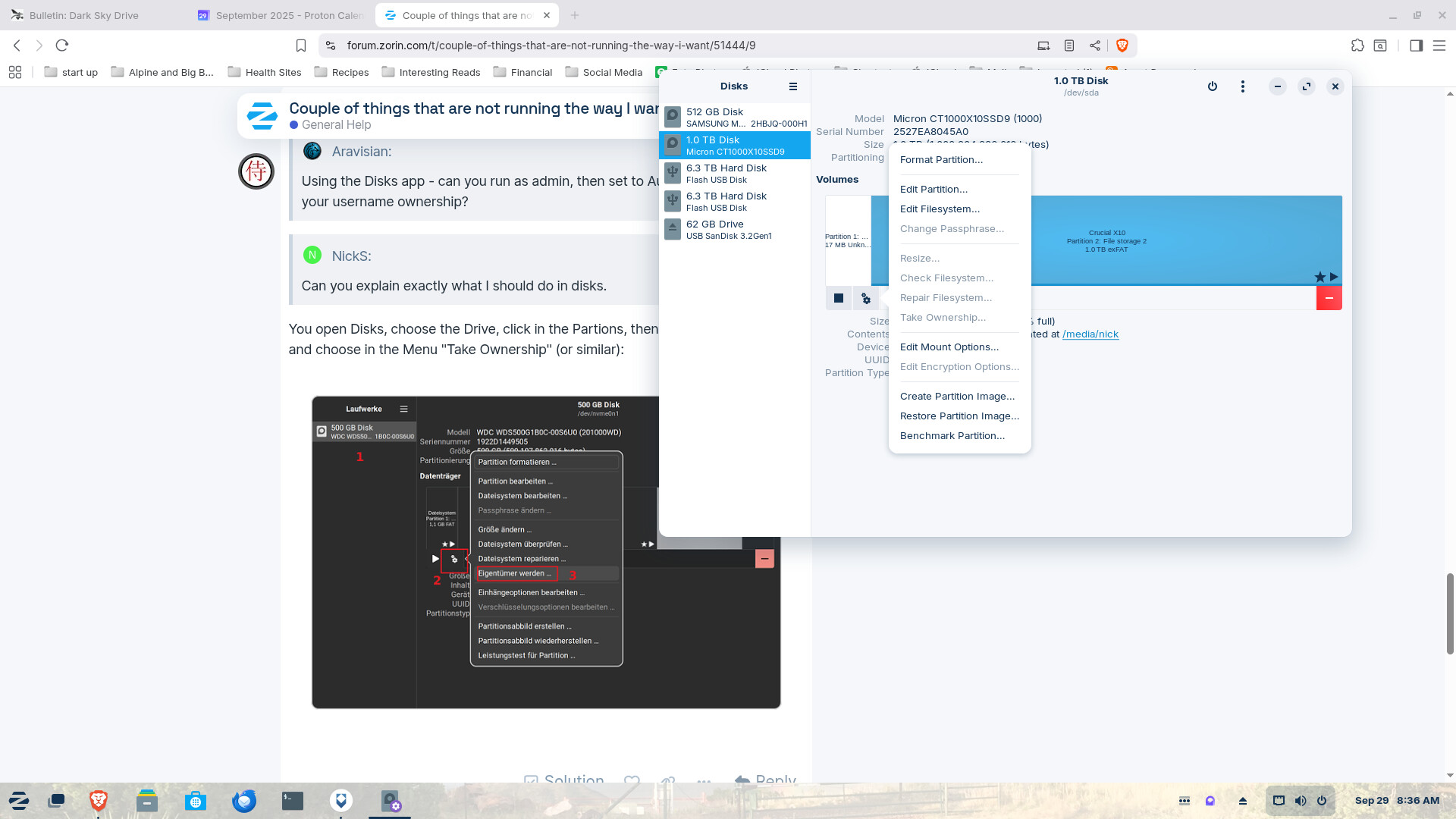
I can’t run the entire disk partition volume as administrator because right clicking on it doesn’t give that option but my work around is if I create a folder ( in my case I have a couple of them one of which is called Local Documents) in the root directory I can right click on one of those folders and get a run as administrator option which then lets me edit any folders downstream from it. However the cleaner choice would be to change ownership of the root folder in the ssd from “root” to “Nick” when I could then go in and change permissions to something other than read-only for files or access files for folders. I cannot find a way to change the ownership and without it I don’t have permission to do most anything.
I’ve tried loading nautilus-r which is how I got the run as administrator menu items. I’ve tried using sudo su to get to the root and the chown in terminal to set ownership to $Nick but that doesn’t seem to change anything, it still says in properties that the owner is root and it won’t let me change any permissions.
I wasn’t sure what I could do in discs there wasn’t anything useful in settings for the partition.
I read that "take ownership" and the permissions only work for linux filesystems as e.g. ext4. On the screenshot is shown exFAT. ExFAT doesn't support user permissions and ownership. Wait until someone can help you with this.
I found a thread to a similar problem but it is an older one:
You should be able to use your external drive with exfat in Zorin.
Here is the same/a similar solution mentioned as in the thread above
"Permission Denied Errors
Solution: Mount with proper permissions:
sudo mount -t exfat -o uid=1000,gid=1000 /dev/sdX1 /mnt/exfat
Replace 1000 with your user ID (check with id command)."
(Also replace sdX1 with your drive/partition name)
If you want to mount the external hard disk automatically, you can make an entry in the fastab file, either directly or via gnome disks. Since these operations are tricky, it is better to ask again so that someone with more experience can help you. These pages may be helpful:
I'd recommend to make a backup copy of your fstab file before. The commands need to be adapted for your user ID and UUID or drive name of your external drive partition. Don't simply copy the commands but check before, e.g. your external drive was shown as /dev/sda/.
I copied all the data to a different usb stick. Then I used gparted to unmount the partition, reformat it to ext4 and remount it. Then I looked at it in disks and the take ownership option was no longer greyed out so I did. Then I moved all the data back and, yay, all the folders have owner “me” and I can do everything I need to with them.
So I guess I should just have reformatted the drive for Linux when I first installed it. It came formatted for windows.
Everything now copacetic I hope.
BTW after the initial set up issues, which taught me a whole bunch of things I never knew, or even knew I needed to know, I really like Zorin and not sure I’ll ever need windows again. I’m really only keeping it because people have said that the software I use to do taxes (HRBlock) every spring probably won’t work with Linux. We’ll see. I don’t know why I was afraid to try making the switch for so long.