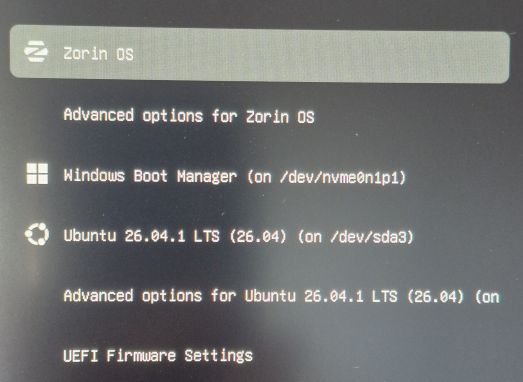
I have installed Zorin 18.1 Pro with Triple Boot (one Windows SSD; Ubuntu 26.04 and Zorin OS 18.1 Pro on another SSD - /sda).
/sda originally contained GRUB 2.14, which came with the Ubuntu 26.04 upgrade.
Installing Zorin on the same device worked, but it overwrote GRUB2 with its own proprietary boot loader.
I would be interested to learn how one can perform the equivalent of:
GRUB_DEFAULT=2 (for example)
GRUB_TIMEOUT=15
GRUB_GFXMODE=1920x1080 (as an example)
I hit 'e' when the menu was displayed but that took me to an Emacs-like screen specific only to Zorin OS. I'm asking if it is possible to customize some general options (as above), which were accessible editing /etc/default/grub
That, You do in the GRUB Config File. When You type in Terminal
sudo nano /etc/default/grub
You can work on it and set it up.
When You should hav already set up Your GRUB to Your Needs and that was with Ubuntu 26.04, You could set that as Your GRUB Menu again. Check in the BIOS the Boot Order and what Options You have there and post it here. Write it down or make a Picture of it and post it here.
yeah that e screen is still grub under the zorin theme
/etc/default/grub is the right file:
-sudo nano /etc/default/grub
-GRUB_TIMEOUT=15
-GRUB_DEFAULT=2 (or the exact menu title in quotes)
-GRUB_GFXMODE=1920x1080
-GRUB_GFXPAYLOAD_LINUX=keep
-sudo update-grub
to see what the numbers map to:
-grep menuentry /boot/grub/grub.cfg | head
if u want ubuntu grub back, boot ubuntu and sudo grub-install on the efi disk, then put that ubuntu entry first in bios / efibootmgr