DefaceGUI: Face Anonymization Tool
I am delighted to share a program I developed myself with you.
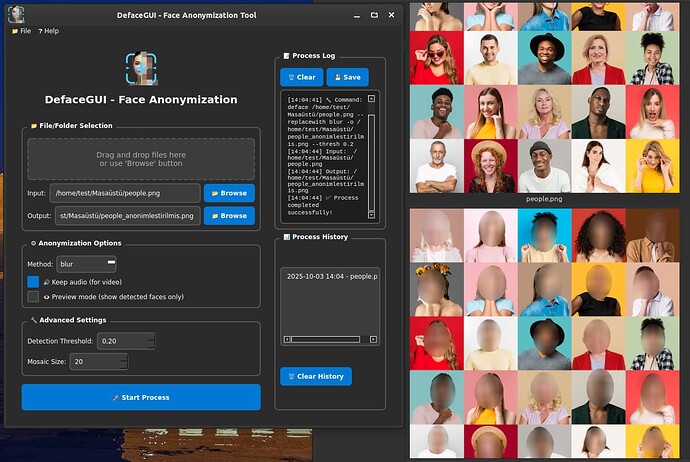
DefaceGUI is a powerful and easy-to-use graphical interface application designed to anonymize faces in video and photo files quickly and easily. In this era of increasing privacy and data protection concerns, it allows you to securely mask personal facial information in your media files before publishing or sharing them.
Whether it’s a single video or a folder full of photos, anonymization is just a few clicks away with DefaceGUI.
What Does It Do?
Using the open-source deface library, the program automatically detects human faces in your input video or image files and masks them using a method of your choice (blurring, pixelation/mosaic, or solid boxes).
- Privacy Protection: Ensures the protection of individuals' identities in videos/images shared publicly or on the internet.
- GDPR/KVKK Compliance: Helps you meet legal requirements (e.g., GDPR, KVKK) in your corporate or personal projects.
- Easy Workflow: Eliminates the need to write terminal commands, making the anonymization process accessible to everyone.
2. Core Features of the Program
DefaceGUI: User-Oriented Face Anonymization Features
DefaceGUI simplifies privacy operations by combining all the power of the "deface" command-line tool with a modern and accessible Graphical User Interface (GUI). The following key features set your program apart from competitors:
1. Ease of Use and Accessibility
- Full Graphical Interface (GUI): No more dealing with complex command-line (CLI) inputs! DefaceGUI allows you to perform all anonymization processes via a user-friendly, visual interface.
- Drag & Drop Support: You can instantly set the input path by dragging and dropping your video or photo files directly into the interface.
- Multi-Language Support: To broaden your user base, the program offers two language options: Turkish (🇹🇷) and English (
 ).
). - Modern Dark Theme: The user experience is enhanced with a stylish, eye-friendly, and modern dark mode.
2. Advanced Anonymization Control
- Multiple Anonymization Methods: You can choose from three popular methods to hide faces based on your needs:
- Blurring (
blur): Hides facial details with a soft transition. - Mosaic (
mosaic): Covers the face with distinct pixels. - Solid Box (
solid): Completely covers faces with a solid black box.
- Blurring (
- Fine-Tuning Controls: You can personalize the processing quality thanks to the advanced settings panel:
- Detection Threshold: By adjusting how sensitive the face detection is, you can ensure even shadowed or small faces are found.
- Mosaic Size: When the mosaic method is selected, you can precisely determine the pixel size of the mosaic.
- Video Audio Protection: Thanks to the keep audio (
--keep-audio) option while anonymizing videos, you won't lose audio and video synchronization.
3. Workflow and Management
- Real-Time Process Log: You can follow all outputs of the running deface command in real-time, control the process, and save the process logs to an external file.
- Process History Management: It keeps records of your previously successful operations. By double-clicking on a record in the history, you can instantly load the same input/output paths and method settings, saving time on repetitive tasks.
To install on Linux (deb) directly from the Terminal:
wget -O Setup_Linux64.deb https://github.com/cektor/DefaceGUI/releases/download/1.0.0/Setup_Linux64.deb && sudo apt install ./Setup_Linux64.deb && sudo apt-get install -f -y
