Hi,
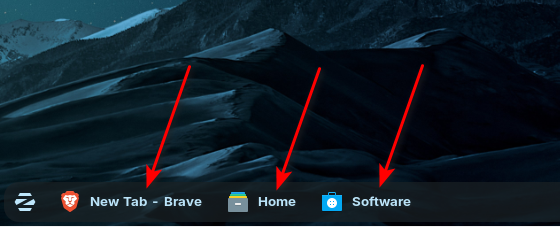
I would like to disable showing App names on the taskbar, since they take too much space.
I searched on settings, but I didn't find where to disable this feature.
Thanks!
1 Like
The easiest way is to simply select another layout through Zorin Appearance → Layouts. The one you're using right now is made to reassemble Windows XP style of taskbar with full names like that, so it's hard coded.
Please don't create multiple threads for the same problem. Then the helpers have more work.
This thread can be put together with thread
or it can be closed.
There are two Windows like layouts in Zorin Apperance. One with app icons only, Second with Icon and description. You can choose there.
2 Likes
Thank you all for your replies,
-
I used the Layout on the right because I want to have a slimmer taskbar.
The other one on the left, I just noticed that the names are not displayed.
Is there a way to remove the names on the option on the right, in order to keep this slimmer taskbar?
Or, Is it possible to adjust the taskbar height? -
Also, how to remove the taskbar radius?
It is the best to choose the left (first) layout.
Then right-click on the taskbar and select properties.
At tab style set 0 for margin and border radius.
And at tab position you can set the panel thickness / size and reduce it to a value you like.
Thanks, @Forpli
All done,
1 Like