Hello,
I updated from zorin 17 to 18, and now my display is borked.
First thing that happened, the update must have installed the newest Nvidia drivers that don't work with my ancient graphics card, and my screen would just turn off before getting to the login screen.
It took a while, but I managed to revert to an older kernel, install the right driver, and it now works.
However, my resolution is locked at 1025 X 768, and I can't change it.
If I go to "additional drivers" I don't have the option of selecting the right driver, just the "server" version. Installing the right one manually didn't result in any changes.
When I turn my pc off, message about "this card is supported by legacy driver, Nvidia drivers 535 (or whatever it is) will ignore", pops up. The legacy driver version in that message IS the correct one, so I don't understand what's going on.
Also, going into settings, system, about shows graphics as "software rendering".
I am using x11, not wayland.
Everything was working great before the update, I don't get why there's suddenly an issue.
I'm right now on kernel 6.17.0-35, the one that broke everything, but at least my screen is no longer turning off.
I can only use an older kernel if I plug in a bootable usb, otherwise the advanced settings screen just doesn't show up. The only older kernel I can choose is 6.8 something, iirc.
I was also certain that I disabled secure boot when installing zorin for the first time, but I just checked, and it's marked as enabled with no option to disable it. Don't know what to do about that, if that's a contributing issue.
I'd appreciate any suggestions on what to do here.
Welcome to the Forum!
Could You post Your Hardware Specs please? And what Nvidia Driver do You use now exactly?
Because of Secure Boot: Can You post Screenshots of the Options? Sometimes it isn't unfortunately not simply named ''disable''.
Hi, sorry for the late reply, I've just seen your response.
The screenshots will have to wait probably until Sunday evening, since I don't think I'll have the time earlier, due to my work schedule, but the only option I can change in the secure boot menu is to select which operating system I use.
The driver I'm using now is 470. My card isn't compatible with anything newer than that.
As for specs, at this point, my pc is more of an artifact then anything else. The graphics card is gtx680, processor is an old intel i5. I'll try to remember to post more details (much) later today, because I'm at work right now, and don't remember the rest.
Hi and welcome.
Can you check to see if Zorin is using the Wayland compositor protocol?
When you get to the login screen, select your username and a cog appears lower right of screen. Left click on it. If a dot appears to the left of 'Zorin desktop' it is on Wayland. Left click 'Zorin desktop on xorg' and then login. Wayland does not work well with nvidia graphics.
Until further Details, I would think with these Details at this Moment that the Kernel might be too new for Your System.
I'm definitely using xorg, not Wayland. That was one of the first things I changed after getting my screen working again.
That wouldn't surprise me. Also, the motherboard is Asus p8z77-v lx.
So would I need to reinstall zorin 17 or..? I'm pretty new to Linux in general, so not sure how to deal with that, exactly.
Oh, and also, if I go back to the older kernel, resolution is still locked.
Maybe installing an older Kernel from the Repo could be enough but before that, more Details would be good to have.
What Kernel is the older one? 6.8?
i see your using the 470 driver which is an awsome driver i have used it is it the standard driver or server one? if you want to try the server one to see if it has some options in terminal type
sudo apt install nvidia-driver-470-server
see if that one has some resilution options
So, here are the specs in one place:
Motherboard: Asus P8Z77-V LX
Memory: 24 GB
CPU: intel core i5-3570k
GPU: GTX 680
Yes, the older kernel is 6.8, but funny thing, now I don't get the advanced settings option even with a usb plugged in, I just go straight to the login screen. But it didn't look any better when I managed to get to it before, the only difference was that my screen didn't turn off.
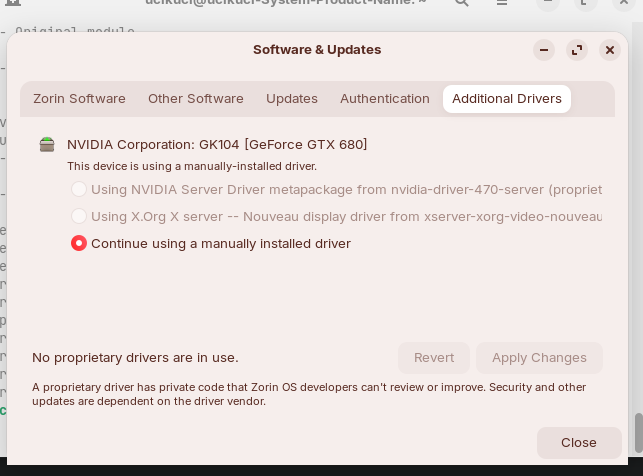
Also, I don't know if it matters, but when I go to "additional drivers" it says "no proprietary drivers in use". Does that mean it somehow doesn't recognise the driver? Or it's just because I installed the driver manually? I never had to check this before, because this is the first time I've ever had graphics problems on this OS.
Also, even though I get Nvidia server driver, as well as the nouveau driver as options, I can't choose either, I can only continue using the manually installed one.
And here's what I see in the secure boot menu ( sorry for photos, I couldn't be bothered to figure out if I can take screenshots in bios)
There's just no way of changing anything besides the OS. I've no idea why.
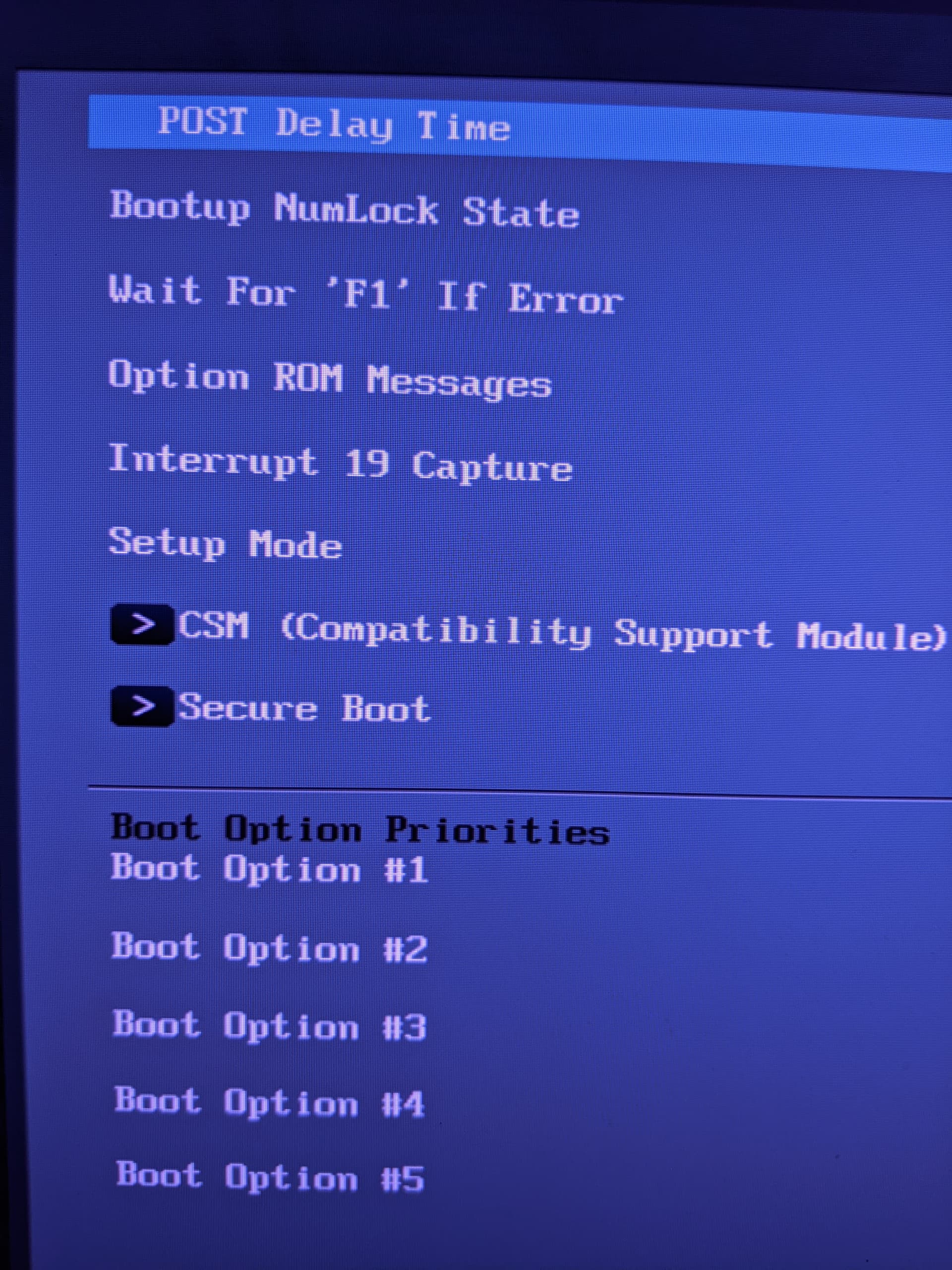
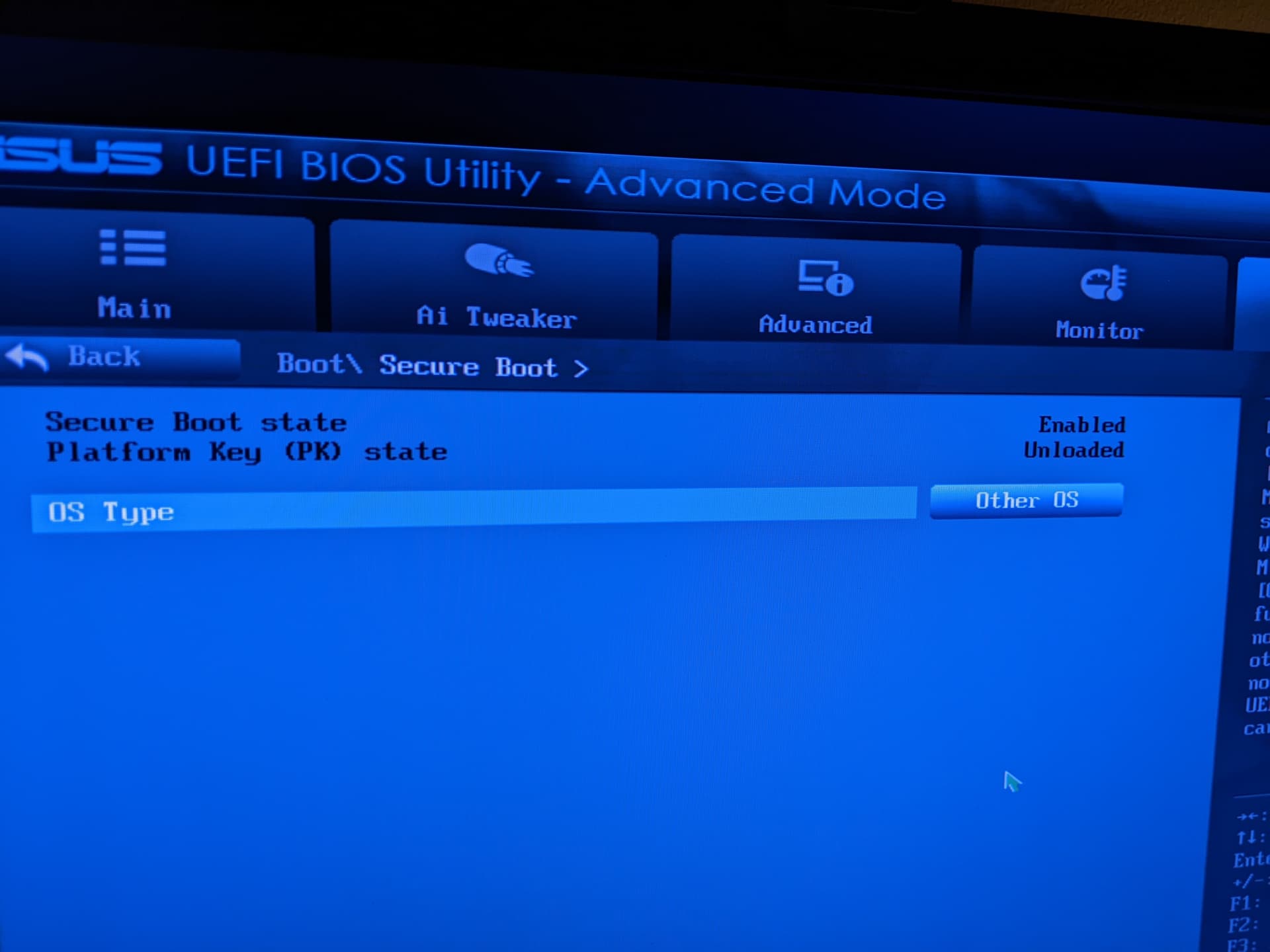
I'm using the standard version, and while I can select the server from the "additional drivers" screen, I get a message "error while installing package post-installation script subprocess returned error exit status 10 (313), and if I install manually I get error code 1, so for whatever reason I can't try this one out.
I'm also surprised that 6.8 wasn't working properly, as from I could find it seems that my driver should be supported up to 6.8.0-83 or even -84.
Okay, it is set to ''Other OS''. That should be fine.
Did You checked what the last Number of Your installed 6.8 Kernel is?
That can be when You have installed a Driver manually, yes. Can You make a Picture of the Additional Drivers Tab and post it here? Only to be sure.
Then, we could try to uninstall the Nvidia Driver to fallbacl to Nouveau and check if that works. And then install the Nvidia Driver 470. I checked on the Nvidia Website the Card and the 470 is the right one.
It's 6.8.0-124. What is really strange to me, is that for some people even 6.11.0 still works with that driver, so I'm not sure what's going on here.
I tried installing 6.8.0-83, 6.8.0-84 and 6.8.0-79, but I get a message that the package doesn't exist, or something like that. For one of those the message is the same, but also mentions that it's referenced by another package.
Is there a way of checking which kernel is compatible with my OS and my drivers?
Here's the screenshot
Okay, I would suggest the following Way now: First, You uninstall the current installed Nvidia Stuff. then look how it behaves. when you then say that all is fine and it's god how it is, okay. But when you then want install the 470 Driver again, we do that not on the Additional Drivers Tab. we would do it in Terminal. When then something doesn't work, we should have a better Output for the whole Process.
Based on the, first uninstall the Nvidia Driver Stuff with the Command
sudo apt purge nvidia* libnvidia*
When done type
sudo apt autoremove
to remove File Rests. But please take a Look at the List of the Packages that will be removed before You remove them.
When done, reboot and check Your Resolution Settings and the Additional Drivers Tab.
So, removing all the Nvidia stuff made my screen not work again lol. I reinstalled drivers in recovery mode.
Good news: I went with the server version and my resolution is back to normal and the system recognises my GPU.
Bad news; it's not working properly. For one, games that worked perfectly well before now give a "failed to initiate graphics" error.
Also, my graphics programs won't open, which for me, makes the pc an overpriced brick.
And the other thing I don't know how to describe, so I'll just show you some screenshots.
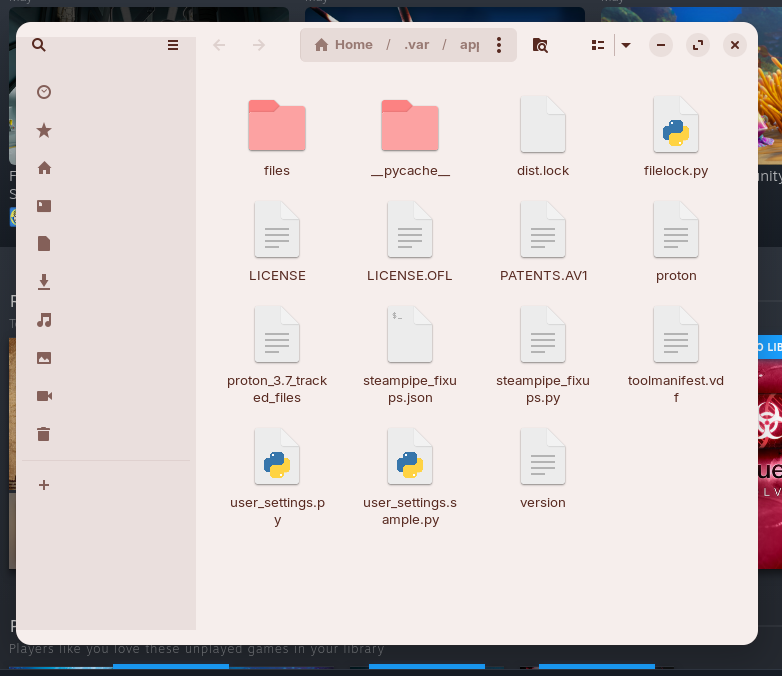
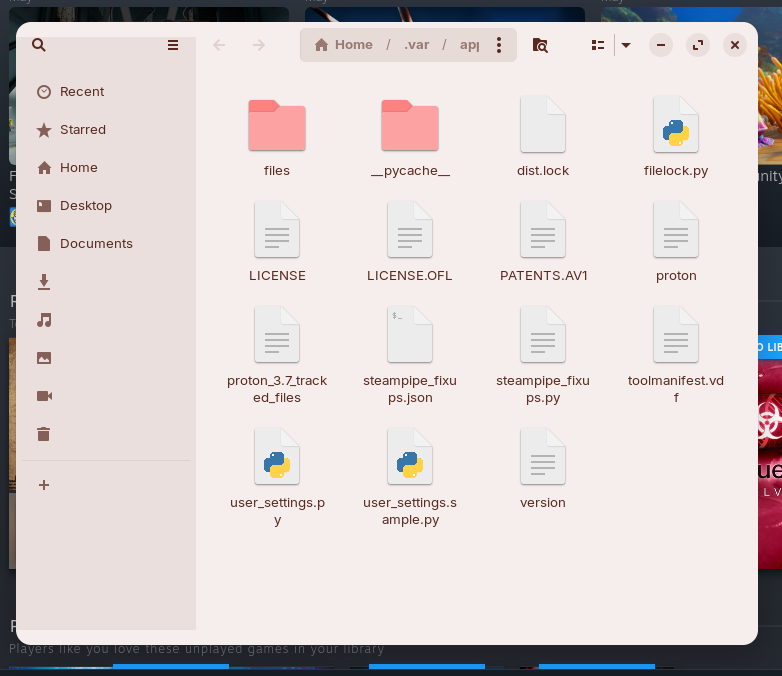
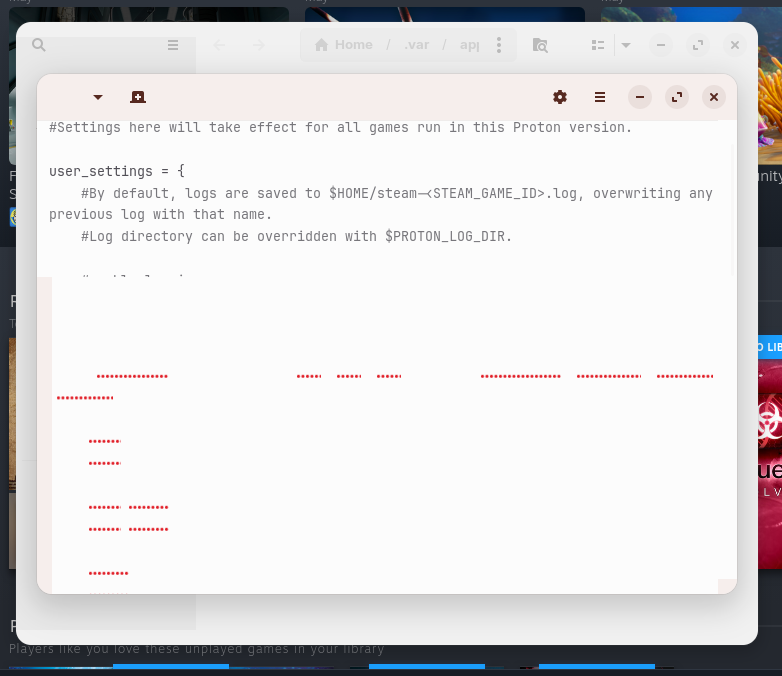
What's going on in the screenshot is this: some folders open with stuff missing that then appears after I move my cursor over it. In other cases, moving the cursor doesn't do anything. Those blank spaces in the opened file stay blank no matter what. I also discovered when moving the screenshot to my photos that the overlay you usually see when moving a file doesn't appear. I also get no thumbnails for photos.
When I installed the drivers, after installation I get a message about error code 1, same when I tried installing them before from the terminal. Installing from the additional drivers also throws an error, but a different one.
I should probably also add that I installed and removed and reinstalled both the server version and the regular one multiple times from the terminal already trying to fix this.
Installing the non server version seems to install mostly the 535 driver, not the 470 one, for whatever reason.
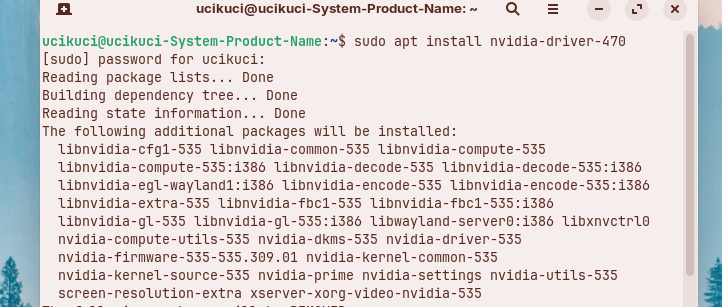
I tried to find out what to do about the error code I'm getting, but the supposed fixes I've seen don't work, and the error persists. Considering I use my pc mainly for graphics, I'd like to figure out what's going on, having my resolution back to normal is just a nice bonus, as far as I'm concerned.
Here are some informations what has happened with the 470 driver:
I'm not sure if that link can help you to show all contents in apps:
They recommend to set
GSK_RENDERER=gl
as environment variable.
@Forpli already has answered this:
With this, You have the Issue that You don't get the 470 Driver anymore. When You want use it, You have to go to Nivida and download the 470 Driver there and install it. but this isn't a deb File. It is a .run File.
Omg, thank you! That fixed everything 