No, sda3 is the Windows partition, sda5 (100 GB) is the Zorin partition and I think sda1 is the EFI partition.
1 Like
Ok, so sda5 is our target.
Now... Remember that a partition must be Unmounted to run fsck on it.
So let's make sure it is Unmounted.
sudo umount /dev/sda5
If it says it is mounted or the device is busy - stop and check in at that point.
If it is Unmounted and not busy, proceed with the fsck command:
sudo fsck -f /dev/sda5
It will offer prompts during the process that want a y tap.
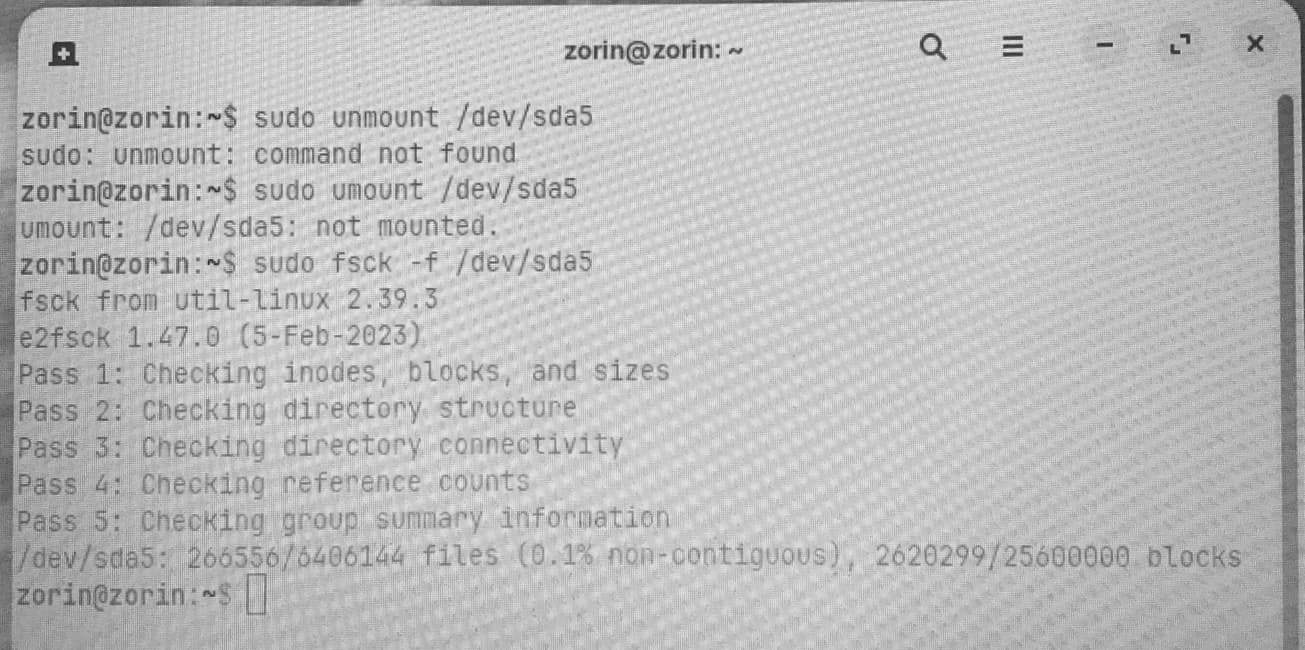
@Zack I have good news and bad news.
The good news is that your output shows a perfectly healthy drive.
The bad news is that my reply to you was because I mixed up Two Separate Threads.
In another thread, I was helping a user diagnose and then run fsck and somehow... when your reply popped up here, I stayed on that train.
Well.
At least now we know the file system is A-Ok.
Uh...
The next step is to mount the drives so you can do what you were trying to do before I went full stupid.
Create a mountpoint:
sudo mkdir -p /mnt/efi
Mount your drive:
sudo mount /dev/sda1 /mnt/efi
Check that it has a BOOT directory:
ls /mnt/efi/EFI
You are dual booting, so for safety, create a backup:
sudo mkdir -p /mnt/efi/EFI/BOOT
Copy the file to the fallback directory:
sudo cp \ /mnt/efi/EFI/ubuntu/shimx64.efi \ /mnt/efi/EFI/BOOT/BOOTX64.EFI
Synchronize the writes:
sync
Unmount before rebooting:
sudo umount /mnt/efi
(Yes, the command is umount, not unmount)
Once done, reboot and test...
I have (I think) successfully carried out the list of commands you gave me (see next image).
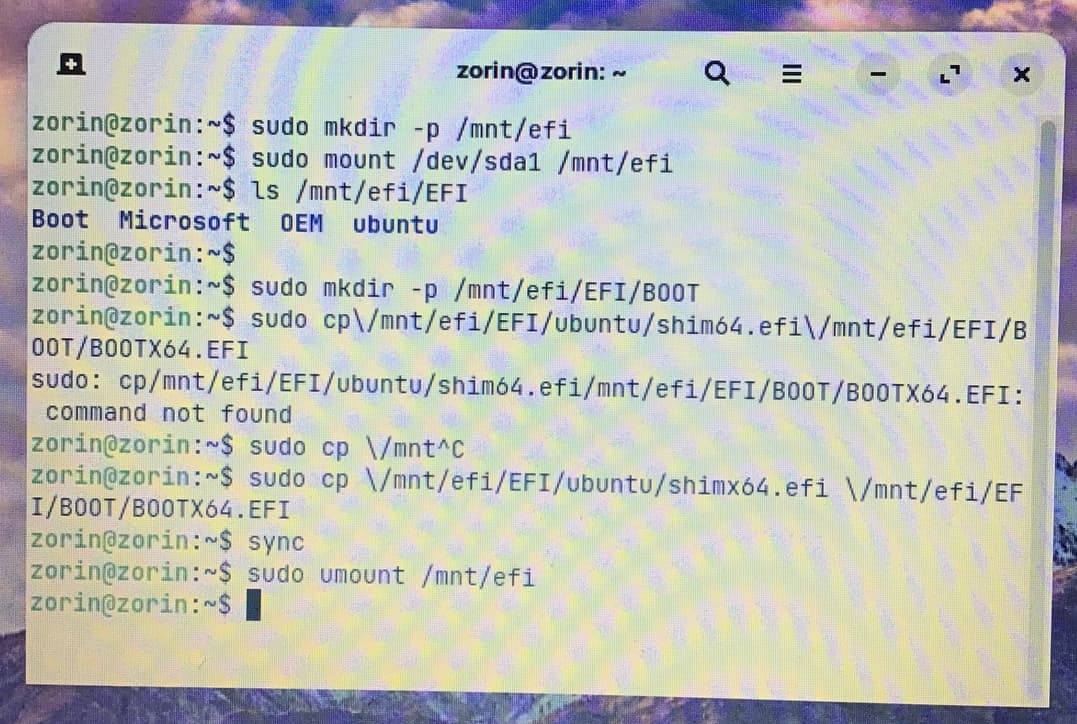
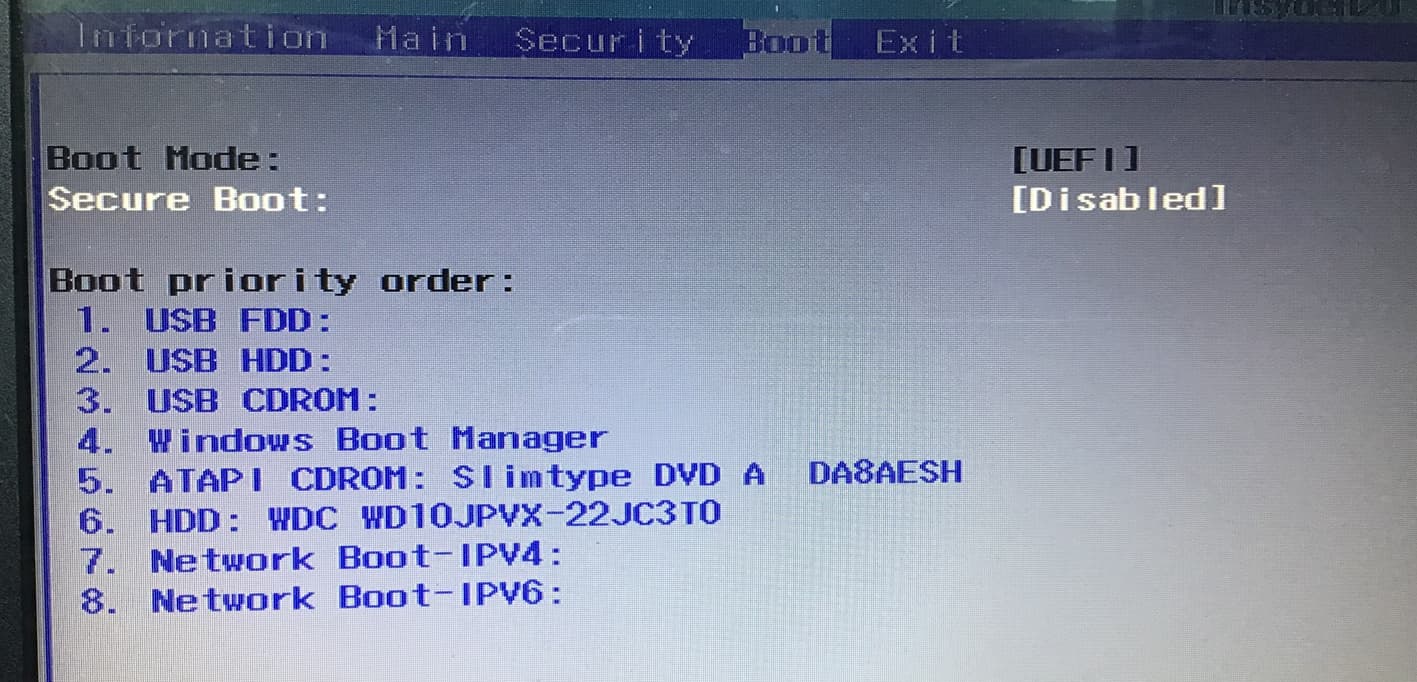
However, when I rebooted (after removing the Zorin USB) the laptop rebooted to Windows. The Windows BIOS boot order is shown in the next image.
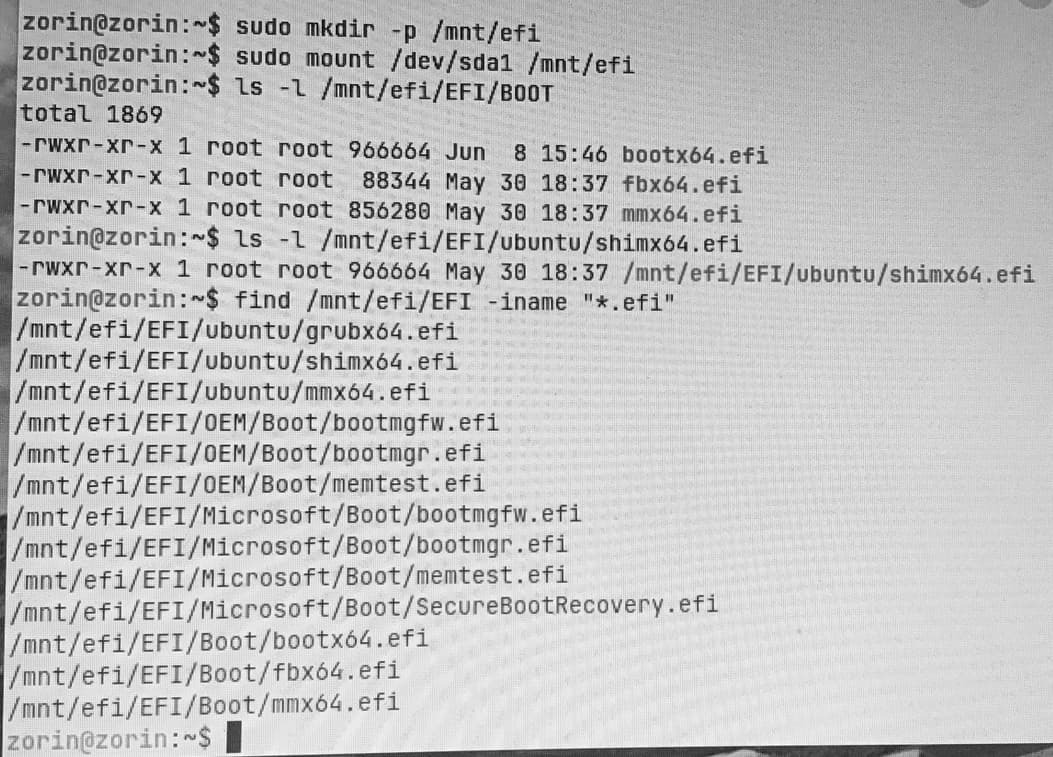
FAT file systems are not case sensitive.
So that it lists Boot
but we used BOOT, should not matter but...
If you are up for booting back into the live USB and checking that the copied file worked...
sudo mount /dev/sda1 /mnt/efi
ls -l /mnt/efi/EFI/BOOT
Note the size of BOOTX64.EFI,
then go to look at
ls -l /mnt/efi/EFI/ubuntu/shimx64.efi
and ensure that size is identical.
Then run
find /mnt/efi/EFI -iname "*.efi"
and post that output here...
This is a bang head on the desk process. All this, just to ensure Microsoft Dominance.
1 Like
I think that one of the entries might be the one I added using the efibootmgr command which I had come across.
We see that the files match - so the copied file was the correct one and that it is correctly placed.
But something else...
EFI/OEM/Boot/bootmgfw.efi
EFI/OEM/Boot/bootmgr.efi
EFI/OEM/Boot/memtest.efi
The manufacturer included their own additional boot management, alongside of Windows OS. That is unusual.
I am sad to say that we are running into a solid wall here. It may be that it will not even look at the fallback boot file as long as those other entries are present.
This machine was built to be secured to Windows OS only.
The only option to try bypassing that would be to remove Windows OS and that manufactures OEM boot file...
I did think that might be a possibility. For some reason, it is also not possible to upgrade to Windows 11 (not that I would want to!).
Thank you very much for the time you spent helping me. I really appreciate what you and your colleagues have done.
If I do go ahead to totally replace Windows with Zorin would this problem still be present?
Given the nature of our luck in this thread, I cannot make a guarantee...
But it seems highly likely that removing all boot entries except the GnuLinux supplied boot file you copied and renamed into the fallback directory will work.
Using the fallback avoids the lock placed on boot - but as long as the valid Windows Boot File is present, the machine is not looking at the fallback.
And this is a legality loophole: The manufacturer can say that technically, an end user can boot an O.S. that is not Windows OS.
And claim that this lockout is a "security feature".
Thank you once again for all your assistance.
....and your patience.
Others have managed to get that fallback to be recognized using the same steps that you have.
It is disconcerting.
I recently logged into the ACER community forum and the following suggestion was made.
" If you want Linux alongside Windows 10 on the ES1‑533, consider using the Native Boot method with a virtual VHDX file instead of a traditional dual‑boot setup. This way, Linux installs into a virtual disk that Windows can boot natively, avoiding BIOS/firmware conflicts.
Guide: Create Windows VHDX for Native Boot
This approach should work with any Linux distro, and you can test different ones without risking the main Windows installation. It’s cleaner than trying to disable Secure Boot or repartition the drive."
When I looked at the Native Boot website it appeared to only boot Windows. Do you think it might be possible to use this method, as suggested above, to boot Zorin?
If you're having trouble installing Linux as a dual-boot system, you can also create a virtual machine in Windows - for example, using VirtualBox or Virt-Manager - and install Zorin in it. That should definitely work. There are plenty of instructions available for this. I have no personal experience with Windows-VHDX.
I would not advise virt-manager for Windows, it can be done but not without issues from what I have read.
I successfully installed LMDE 7 last year on an Acer notebook that had Windows 10 on it. I used Ventoy which includes a MOKUTIL to enroll chosen .iso onto an EFI secure machine.
1 Like
Thanks, I hadn't looked into it further and just wrote down what's always recommended here on the forum.
Vmware workstation pro could be an alternative option for Windows then.
1 Like